
You’ve ordered a shiny new Nvidia GPU, waited for the delivery, and now something’s off. Maybe it doesn’t fit your case. Maybe the performance isn’t what you expected.
Or maybe the card arrived with a cosmetic scratch that bothers you anyway.
The Nvidia return policy looks simple on paper. The real story depends on where you bought it and whether you broke the seal. Nvidia offers a 30-day return window from the delivery date for direct purchases.
That window only covers items bought from their own store. Everyone else deals with Best Buy, Amazon, Newegg, or Micro Center policies. One wrong step can cost you a restocking fee, shipping charges, or the ability to return at all.
The Real Problem: It’s Not One Policy
The biggest mistake people make is assuming Nvidia has a single return policy. They don’t. You’re dealing with two separate systems.
Nvidia Direct Store covers products bought at store.nvidia.com. That includes Founders Edition cards, Shield TV, Jetson kits, and some laptops. Third-party retailers includes everyone else: Best Buy, Amazon, Newegg, Micro Center, B&H, and partner brands like ASUS, MSI, and Gigabyte.
Each retailer writes its own return rules. The 30-day window on Nvidia’s site does not apply to the card you bought at Best Buy. Best Buy gives you 14 days for most electronics.
Micro Center gives you 15 days. The clock starts ticking from delivery, not purchase. If you waited a week to open the box, you might already be past the deadline.
Before you do anything else, find your purchase receipt. Identify the seller. Write down the order date, the delivery date, and the retailer’s name.
That single step prevents 90 percent of return headaches.
Quick Answer: Nvidia Direct vs. Retailers
Here is the nutshell version.
If you bought from Nvidia Direct:
- Return window: 30 days from delivery
- Restocking fee: $0 for unopened items, up to 15 percent for opened items
- Return shipping: Free for defective items, you pay for non-defective returns
- Refund time: 3 to 5 business days after warehouse inspection, plus bank processing
If you bought from a retailer:
- Return window: Varies from 14 to 30 days
- Restocking fee: Often 10 to 15 percent on opened GPUs, sometimes waived for store credit
- Return shipping: Usually free if defective, you may pay for non-defective returns
- Refund time: 5 to 10 business days total
The rest of this guide walks through each branch so you know exactly what to do.
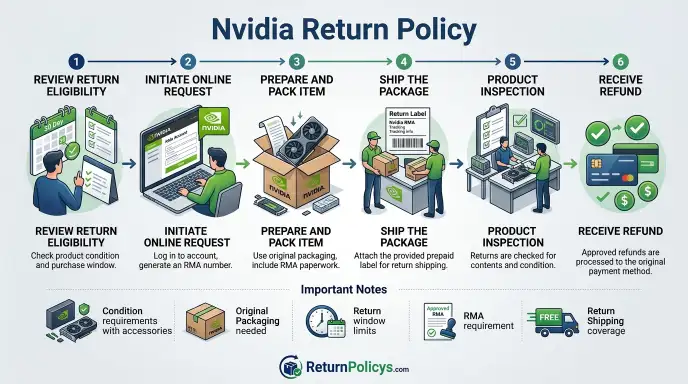
Decision Tree: Did You Buy from Nvidia Direct or a Retailer?
This is the most important question. Your answer dictates everything that follows.
Branch A: Nvidia Direct Store
If your order number starts with “NV” or you can log into your Nvidia account and see the purchase under Order History, you are dealing with Nvidia’s own return process.
Go to store.nvidia.com/en-us/returns and follow the prompts. You will need your order number and the email address used at checkout. Select a reason for return: defective, wrong item, no longer needed, or damaged in shipping.
If the product is defective, Nvidia provides a prepaid return label and covers shipping. If the product is non-defective, you pay for return shipping. Nvidia deducts the shipping cost from your refund unless you use your own label.
Expect a restocking fee only if the item is opened and not defective. The fee is typically 10 to 15 percent.
Nvidia direct does not accept returns on certain items like software downloads or clearance items. Always check the product page before buying.
Branch B: Best Buy, Amazon, Newegg, Micro Center, and Other Partners
For every other retailer, you must follow their return policy. Not Nvidia’s.
- Best Buy: 14-day return window for most GPUs. Restocking fee of 15 percent on opened items without a Totaltech membership.
- Amazon: 30-day return window. No restocking fee on most items. Amazon may deduct if original packaging is missing or damaged.
- Newegg: 30-day return window. 15 percent restocking fee on opened GPUs. Free return shipping for defective items.
- Micro Center: 15-day return window. 10 percent restocking fee on opened items. In-store returns only. No shipping.
You cannot return a product bought at a retailer to Nvidia directly. Even if the card has a “Nvidia” sticker, the transaction is between you and the retailer. Nvidia’s warranty still applies for defects, but returns and exchanges go through the seller.
Is Your Product Opened or Unopened?
Once you know the seller, the next question is whether you have opened the box. This determines whether you pay a restocking fee.
Condition 1: Sealed Box
If the shrink wrap or factory seal is intact, most retailers treat it as new. You get a full refund minus shipping costs. No restocking fee from Nvidia direct, Amazon, or Best Buy with membership.
Micro Center may still charge a small fee for some categories, but GPUs are typically exempt.
Keep the original packaging. You need the box, foam inserts, static bag, and all accessories. Do not open the anti-static bag.
Even a small tear can be considered opened. Ship back in the same box if possible. Remove old labels and tape securely.
Condition 2: Opened but Functional
You opened the box, installed the card, ran a few benchmarks, and now you want to return it. Most retailers allow this, but you will pay a restocking fee. Nvidia direct charges up to 15 percent.
Newegg charges 15 percent. Best Buy charges 15 percent unless you have Totaltech.
The fee is calculated on the purchase price before tax. On a $1,599 RTX 4090, that is about $240. Retailers may waive the fee if you accept store credit instead of a refund.
Amazon rarely charges a restocking fee unless the item shows signs of use or missing parts.
Condition 3: Defective or Damaged
If the card is genuinely defective, you get different treatment. Nvidia direct provides a prepaid return label and fast replacement. Retailers also cover return shipping for defects, but they may require you to contact the manufacturer first before processing a return.
Keep proof of the defect. Photos, video, or benchmark logs help. Some retailers ask for a description.
Refunds for defects are typically full and include original shipping charges. A restocking fee does not apply to defective returns. Do not let a customer service rep confuse the two.
The Dead Pixel Gray Area: What Counts as a Defect?
Dead pixels are one of the most contentious return issues. If your new Nvidia GPU produces a stuck or dead pixel on your monitor, you might think it is a defect. Nvidia’s policy does not cover monitor dead pixels.
That issue is between you and the monitor manufacturer.
This section focuses on the GPU hardware. A true GPU defect shows as:
- Green, pink, or white flickering dots that appear across multiple monitors
- Screen tearing or horizontal lines that do not go away with driver updates
- Artifacts under load that are consistent and repeatable
A single dead pixel on a monitor is not a GPU defect. You will need to contact the monitor brand for replacement. Nvidia’s return policy only covers the graphics card itself, not peripherals.
If you suspect a GPU defect, run a stress test with a tool like FurMark or OCCT. Document the issue with a screen recording and photos. Contact Nvidia support or your retailer.
Most will expedite the return or exchange.
One more nuance: coil whine is considered a normal operating characteristic by Nvidia. It is not a defect. Many returns for coil whine are denied.
If that noise bothers you, you might try returning under the opened-but-functional policy, but expect the restocking fee.
Step-by-Step: How to Start a Return
Whether you bought from Nvidia direct or a retailer, the return process follows a similar sequence.
1. Find Your Order Information
You need your order number, the email address you used at checkout, and the delivery date. For Nvidia direct purchases, log into your account at store.nvidia.com and go to Order History. For retailer purchases, check your confirmation email or the retailer’s order portal.
2. Initiate the Return Request
For Nvidia direct, go to the official returns page. Select the item you want to return and choose a reason from the dropdown. Options include defective, wrong item shipped, no longer needed, and damaged in transit.
For retailers, visit their returns center. Best Buy, Amazon, and Newegg all have dedicated return portals within your account. Micro Center requires you to bring the item and receipt to a physical store.
Select defective only if the product actually has a problem. Lying about defects can flag your account for fraud.
3. Receive Your RMA Number and Label
After submitting, you will get an email with a Return Merchandise Authorization number and a return shipping label. For defective items, the label is prepaid. For non-defective items, you may need to pay for shipping.
Print the label and the RMA form. Write the RMA number on the outside of the box if the label does not include it.
4. Pack the Product Correctly
Use the original box, foam inserts, and anti-static bag. If you lost the original packaging, use a sturdy box with plenty of cushioning. Wrap the card in anti-static bubble wrap.
Include all accessories: cables, adapters, manuals, stickers.
Tape the box securely. Remove old shipping labels. Attach the new label on top.
5. Ship It Back
Drop the package at the carrier specified on the label. For Nvidia direct, that is usually FedEx or UPS. For retailers, it varies.
Keep the tracking number. Save the receipt from the drop-off.
Monitor the tracking until the package is delivered to the warehouse.
Timeline and Fees: What to Expect
| Stage | Nvidia Direct | Best Buy | Amazon | Newegg | Micro Center |
|---|---|---|---|---|---|
| Return window | 30 days | 14 days | 30 days | 30 days | 15 days |
| Restocking fee (opened) | 10-15% | 15% | Usually $0 | 15% | 10% |
| Return shipping (defective) | Free | Free | Free | Free | In-store only |
| Return shipping (non-defective) | You pay | You pay | Usually free | You pay | In-store only |
| Warehouse inspection | 3-5 days | 3-7 days | 2-3 days | 3-5 days | Instant |
| Refund processing | 3-5 days | 5-7 days | 3-5 days | 5-7 days | Same day |
| Total refund time (est.) | 6-10 days | 8-14 days | 5-8 days | 8-12 days | Same day |
Refund timing depends on your bank. Credit cards typically post refunds within 3 to 5 business days after the merchant releases the funds. PayPal and other digital wallets may be faster.
Debit cards can take 7 to 10 business days.
Restocking Fee Details
The restocking fee is calculated on the product price before tax and shipping. If you paid $1,599 for an RTX 4090 and the fee is 15 percent, you lose about $240.
Some retailers waive the fee if you accept store credit instead of a refund. Store credit often comes with a bonus of 5 percent extra. If you plan to buy another product from the same store, store credit can be worth it.
Refund Amount Breakdown
For a defective return, you get back the full purchase price including tax and shipping. For a non-defective return, you get back the purchase price minus the restocking fee and any return shipping charges.
Example: $1,599 GPU plus $100 tax plus $15 shipping equals $1,714 total. If you return it opened and non-defective with a 15 percent restocking fee and $15 return shipping, your refund is $1,714 minus $240 restocking fee minus $15 shipping. That equals $1,459.
You lose $255.
Common Mistakes That Kill Your Return
Mistake 1: Missing the Return Window
The 30-day window starts from delivery, not purchase. If you bought the card on November 1 but it arrived November 5, the return deadline is December 5. Missing it by even one day means the return is denied.
Set a calendar reminder as soon as the package arrives.
Mistake 2: Throwing Away the Original Box
Retailers require original packaging. Without the box, foam, and static bag, most will reject the return or charge extra fees. Keep the box for at least 60 days after purchase.
Mistake 3: Returning an Opened Card as Defective When It Isn’t
Lying about defects to avoid restocking fees is fraud. Retailers track serial numbers and return reasons. If you claim a defect but the card tests fine, they can ban your account or refuse future returns.
Mistake 4: Not Including All Accessories
Missing cables, adapters, or the anti-static bag can lead to deductions. The retailer may charge for missing parts or deduct from your refund. Before shipping, double-check that everything from the box is inside.
Mistake 5: Using the Wrong Shipping Label
If you bought from a retailer but use Nvidia’s label, your package will go to the wrong place. Always use the label provided by the seller you bought from.
Mistake 6: Shipping Without Tracking
Even if the label is prepaid, always get tracking and keep the receipt. If the package gets lost, you need proof of shipment.
Mistake 7: Ignoring Serial Number Requirements
Nvidia tracks serial numbers. If you return a different card than the one you bought, the return will be rejected. Always return the exact card that came in the box.
Real Scenarios: Three Different Outcomes
Scenario 1: Sarah Buys an RTX 4070 from Nvidia Direct
Sarah orders a Founders Edition RTX 4070 from store.nvidia.com. The card arrives, but after installing it, she realizes it is too large for her case. She decides to return it.
She starts the return within 24 hours of delivery. The card is opened but functional. Nvidia charges a 10 percent restocking fee, which is $55 on a $550 card.
She pays $12 for return shipping. The refund arrives 8 business days later.
Total loss: $67. That is the cost of changing her mind.
Scenario 2: Marcus Buys an RTX 4090 from Best Buy
Marcus picks up an RTX 4090 at Best Buy. He opens it, installs it, and notices a flickering issue. After testing with another monitor, he confirms the card has a display defect.
He initiates the return on day 4, which is within the 14-day window. He selects defective and includes a video of the artifacts. Best Buy provides a prepaid shipping label.
The warehouse tests the card and confirms the defect. Full refund is issued, including tax. No restocking fee.
The refund posts to his credit card 6 business days after drop-off.
Marcus gets every dollar back. The key was documenting the defect honestly.
Scenario 3: Jenna Buys a Refurbished RTX 3060 from Newegg
Jenna orders an open-box RTX 3060 from Newegg. The card arrives with a missing display adapter and a scratch on the backplate. She wants to return it.
She starts the return on day 10, which is within the 30-day window. Newegg requires her to pay return shipping because it is not defective. She is charged a 15 percent restocking fee on the refurbished price. $300 times 15 percent equals $45.
Missing accessories cost an additional $10 deduction. She receives $245 back out of $300.
Jenna’s mistake was not checking the condition before buying open-box. She could have avoided the fee by buying new.
Frequently Asked Questions
Can I return a GPU without the original box?
Most retailers require the original box. Without it, returns are often denied. Some retailers may accept it with a deduction for the missing packaging, but that is rare.
Keep the box for at least 60 days.
What happens if I use the wrong shipping label?
The package will go to the wrong return center. It may be lost, delayed, or returned to you. Always verify the return address matches the retailer you bought from.
If you accidentally use the wrong label, contact the carrier immediately.
Does the return window extend during the holidays?
Some retailers extend return windows for holiday purchases. Best Buy typically extends to January 14 for purchases made in November and December. Amazon often extends through January 31.
Nvidia direct does not officially extend, but they may make exceptions on a case-by-case basis.
Can I return to Nvidia US if I bought from Canada?
No. Nvidia operates separate stores for each country. A purchase from the Canadian store must be returned to the Canadian return center.
Shipping across borders adds customs fees and delays. Always return within your own country.
Are refurbished or open-box items different?
Yes. Refurbished and open-box items often have shorter return windows, typically 14 days instead of 30. Restocking fees may be higher, up to 20 percent.
Some retailers treat them as final sale. Always check the product listing for return details before buying.
Can I exchange instead of return?
Some retailers offer exchanges for the same item if defective. Nvidia direct does not offer cross-product exchanges, like swapping an RTX 4070 for an RTX 4080. You would need to return and place a new order.
Best Buy and Amazon allow exchanges within the return window for the same product or store credit for different products.
Your Decision Guide: A Quick Checklist
Before you pack that box and print the label, run through this checklist.
Confirmed the Seller
Look at your receipt. Did the money go to Nvidia direct or to a retailer? Check the order confirmation email.
The sender and the “sold by” line tell you everything.
Only Nvidia direct purchases follow the policy on store.nvidia.com. Everything else follows the retailer’s rules.
Counted the Calendar
The return window runs from delivery, not purchase. If you got the card on December 10 and today is January 9, that is 30 days. One day more and you are out of luck.
Mark the deadline on your phone the moment you unbox it.
If you are one day past, call customer service anyway. Some retailers grant a grace period of one to three days.
Identified the Condition
Is the factory seal intact? If yes, no restocking fee. Full refund minus original shipping.
If you opened it, is it defective? Faulty cards get free return shipping and no restocking fee. If it works fine but you changed your mind, expect a 10 to 15 percent restocking fee.
Be honest with yourself. Lying about a defect can flag your account.
Located the Original Box and Accessories
Find the box, foam inserts, anti-static bag, cables, adapters, manuals, and stickers. Everything that came in the box must go back. Missing any piece can mean a deduction or a rejected return.
If you lost the box, contact the retailer before shipping. Some will accept a generic box with proper padding. Others will not.
Chosen the Right Return Reason
Select the reason that matches your situation. Defective means the card does not work properly. Wrong item means you received something different from what you ordered.
No longer needed means you changed your mind.
Do not pick defective if the card is fine. Do not pick wrong item if you just want a different model. The wrong reason can slow down processing or trigger an inspection.
Generated the RMA and Printed the Label
Start the return through the correct portal. For Nvidia direct, use store.nvidia.com/en-us/returns. For retailers, use their return center.
You will get an RMA number and a shipping label by email.
Print the label immediately. Save the PDF to your computer. Write the RMA number on the box if the label does not include it.
Packed It Properly
Put the card in the anti-static bag. Place it in the foam insert. Put the foam inside the original box.
Add any cables and accessories. Close the box and tape it securely.
Remove old shipping labels from the outer box. Attach the new label on top.
Shipped with Tracking
Drop the package at the carrier specified on the label. Get a receipt with the tracking number. Keep that receipt until you see the refund hit your account.
Monitor the tracking until it shows delivered. If it stalls, contact the carrier.
Waited for Inspection and Refund
After the warehouse receives your package, they inspect it. This takes 3 to 5 business days for Nvidia direct. Retailers vary.
After inspection, the refund processes in another 3 to 5 business days.
Check your account or the retailer’s portal for status updates. If you have not seen a refund after the estimated time, call customer service with your RMA number.
Returns are a normal part of buying hardware. Follow the decision tree. Use this checklist.
You will get your money back. The only thing that kills a return is rushing. Take five minutes to verify the seller, the window, and the condition.
Pack carefully. Ship with tracking. That is all it takes.