
You are staring at a speaker you might want to return. Maybe it does not fit your room. Maybe you got it as a gift.
Or maybe you just changed your mind. The Sonos Return Policy sounds simple on paper: 45 days, free shipping, no questions asked.
The reality depends on three things. Where you bought it. When you bought it.
And whether you still have the box. As of 2026, Sonos offers a 45-day return window for purchases made directly from sonos.com. Bought from Best Buy or Amazon?
Their policies apply. Those can be as short as 15 days. The holiday extension pushes the deadline to January 15 for eligible purchases.
Here is exactly how to figure out your situation.
Quick Answer
You can return a Sonos product bought directly from Sonos.com within 45 days of delivery. The product must include all original packaging. The return is free.
There is no restocking fee for standard products.
That covers most people who buy from the official store. Bought elsewhere? The rules change.
Third-party retailers set their own windows: 15 days, 30 days, or 90 days.
Bought from an unauthorized reseller, like eBay or a random Amazon marketplace seller? Sonos will not accept that return. Those sellers handle their own policies.
The most important rule: the product must be 100 percent complete. Original box. All cables.
All manuals. All plastic wraps and inserts. Throw the box away and your return could be rejected or hit with a fee.
Why This Gets Confusing: The Three Pain Points That Trip Up Most Buyers
Three things cause confusion. Get these right and the rest is easy. Get them wrong and you lose your refund.
Where You Bought It
This is the biggest trap. People assume the Sonos return policy applies to every purchase. It does not.
Sonos only processes returns for items bought from Sonos.com or the Sonos app.
Bought from a third-party retailer? You must return to that retailer. Best Buy will not honor the 45-day Sonos policy.
Neither will Amazon. Neither will Target.
Each store has its own window, restocking fee rules, and condition requirements. Some charge restocking fees on opened electronics. Sonos does not.
Best Buy might.
When You Bought It (The Holiday Window)
The 45-day window is straightforward. But Sonos changes the rules during the holiday season. Purchases made between mid-October and December 31 have an extended return window.
That extension typically runs through January 15.
People who bought in November think they have until January 15. That is correct. People who bought in September think the same.
That is wrong. The extension only applies to purchases within that specific date range.
The exact start date changes slightly each year. Sonos usually announces it in October. Check the official policy before assuming you qualify.
The Packaging Rule
Here is the rule nobody reads: the product must be returned in original packaging. The box. The inserts.
The plastic bags. The foam. The cable ties.
Everything.
Threw away the box? You have two options. Try to return it anyway and risk rejection.
Or contact customer service and ask about exceptions. They sometimes make them. Do not count on it.
This rule applies to both direct and third-party returns. Some retailers are more lenient about missing boxes. Most are not.
Your Starting Point: Where You Bought It Changes Everything
Before you do anything else, find your receipt. Or your order confirmation email. Or your bank statement.
You need to know exactly where you bought the product.
Your starting point determines every other step. It determines your return window. It determines the fees.
It determines whether you need the box. It determines who you call for help.
If You Bought from Sonos.com
You are in the best position. Full 45-day window. Free return shipping.
No restocking fee. Start a return online through your Sonos account.
Bought as a guest without an account? Use the guest return portal on the Sonos support page. You will need your order number and the email address you used.
If You Bought from a Third-Party Retailer
You must go to that retailer. Sonos will not take the product back. Even if it is unopened.
Even if it is still sealed. The retailer is your only option.
Each retailer has different rules. Best Buy gives you 15 days. Amazon gives you 30 days.
Target gives you 90 days for unopened products. Costco gives you 90 days. The rules for opened products vary.
Check the retailer’s return policy online before you go to the store. Some require a receipt. Some accept a digital order confirmation.
Some require the original credit card.
If You Bought from an Unauthorized Reseller
You have the hardest path. Unauthorized resellers on eBay, Facebook Marketplace, Craigslist, and random Amazon third-party sellers do not follow the official Sonos policy.
You must work with that seller directly. Some offer returns. Most do not.
If the seller does not accept returns, you have no recourse through Sonos. You cannot file a chargeback if the item was accurately described.
Best to check who you are buying from before you click purchase.
Branch 1: You Bought Directly from Sonos.com
This is the straightforward path. Sonos makes returns easy for direct purchases. But there are still rules you need to follow.
The 45-Day Standard Window
Your return window starts the day your order is delivered. Not the day you placed the order. Not the day it shipped.
The day it arrives at your door.
You have 45 calendar days. That includes weekends and holidays. Ordered on January 1 and it arrived on January 5?
You have until February 19. Mark your calendar.
Missed the 45-day window? Sonos may still accept the return as an exception. Contact customer service.
Explain why you missed it. They sometimes grant extensions. They are not guaranteed to do so.
The Holiday Extension
Bought between mid-October and December 31? You likely have until January 15 to return. This extension applies to all standard products.
It covers gifts and personal purchases alike.
The extension does not apply to purchases made before the start date. Bought on October 1 and the extension started on October 15? You still have the standard 45 days.
Not the extension.
Check the Sonos website for the exact start and end dates each year.
Condition Requirements
The product must be in like-new condition. No scratches. No dents.
No signs of use. Sonos inspects products when they arrive at the warehouse.
All accessories must be included. Power cable. Ethernet cable.
Optical adapter if applicable. Manuals. Warranty cards.
Any other inserts.
The original box is required. Not a generic box. Not a shipping box.
The actual Sonos branded product box. Kept the box? You are good.
Threw it away? Find it or call customer service.
Refurbished and Trade-Up Returns
Refurbished products bought directly from Sonos have a different return policy. The window is shorter. The restocking fee may apply.
Check your order confirmation for the exact terms.
Trade-Up program returns also have special rules. Sent in your old product as part of a trade-in? You cannot return the new product without also returning the trade-in credit.
That can get complicated.
Used the Trade-Up program and want to return? Contact customer service. They will walk you through the process.
Branch 2: You Bought from a Third-Party Retailer
This is where things get complicated. You cannot return the product to Sonos. You must go back to the store you bought it from.
Each retailer has its own set of rules.
| Retailer | Return Window | Restocking Fee | Notes |
|---|---|---|---|
| Best Buy | 15 days (60 for Totaltech members) | 15% on some opened items | Need receipt or account history |
| Amazon | 30 days | Rarely charged | Third-party sellers have own rules |
| Target | 90 days unopened, 30 days opened | None for Sonos | Need receipt or credit card |
| Costco | 90 days | None | Must have original packaging |
| Crutchfield | 60 days | None | Good customer service |
| Walmart | 30 days | Possible on opened items | Check store policy |
| B&H Photo | 30 days | Yes on opened items | Check website for terms |
Best Buy
Best Buy gives you 15 days to return most electronics. That includes Sonos products. Best Buy Totaltech members get 60 days.
Opened products are accepted. But you may face a restocking fee. Best Buy charges a restocking fee on some opened electronics.
It is typically 15 percent of the purchase price.
You need the receipt or your purchase history in your Best Buy account. Return to any Best Buy store. Or ship it back if you bought online.
Amazon
Amazon gives you 30 days from delivery. For Sonos products sold directly by Amazon or fulfilled by Amazon, start a return online. Print a label.
Drop it off.
Bought from a third-party seller on Amazon? You must return to that seller. Amazon does not handle third-party returns for electronics in all cases.
Check your order details.
Amazon rarely charges restocking fees for Sonos products. But they may deduct return shipping from your refund if the reason is not a defect.
Target
Target gives you 90 days to return unopened electronics. Opened Sonos products have a 30-day return window. Target is more generous than most retailers.
You need the receipt or the credit card you used. Target can look up purchases by credit card or by the Target Circle account.
No restocking fee at Target for Sonos products. But they reserve the right to charge one for items not in original condition.
Costco
Costco has one of the best return policies. 90 days for electronics. Full refund. No restocking fee.
But the product must be in original condition.
Costco is stricter about the box than most. They want the original packaging. Threw it away?
They may still accept the return. It depends on the store manager.
You need your membership number and the receipt. Costco can look up purchases by your membership card.
Other Retailers
Crutchfield gives you 60 days. No restocking fee. Good customer service.
Walmart gives you 30 days. They may charge a restocking fee for opened electronics. Check the store policy.
B&H Photo gives you 30 days. Restocking fee on opened items. Check their website for exact terms.
What If the Retailer Refuses?
Sometimes a retailer refuses a return. You missed the window. You lost the receipt.
The product is damaged.
Your next step is to contact Sonos customer service directly. Explain the situation. They can sometimes help even if you bought from a retailer.
They cannot force the retailer to accept a return. But they may offer a replacement or a discount.
Paid with a credit card? You have another option. Call your credit card company.
File a chargeback if the product is defective or not as described. This is a last resort. It can damage your relationship with the retailer.
But it is an option.
Paid with a debit card? Chargebacks are harder. You have fewer consumer protections.
Best to use a credit card for electronics purchases.
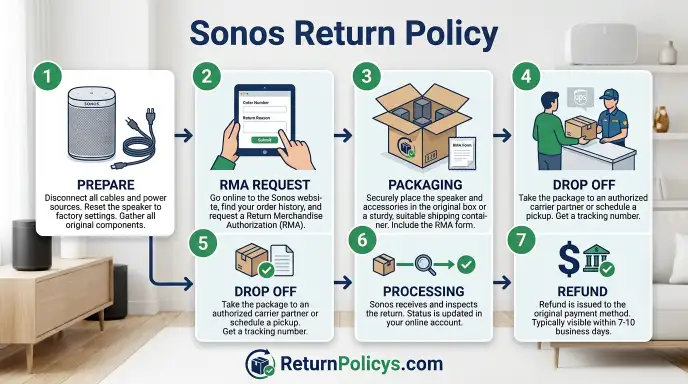
How to Start a Return (Step by Step)
For Sonos.com Purchases
Step 1: Log into your account. Go to the Sonos website. Sign in. Find the order you want to return.
Click the return button.
Step 2: Get your return label. Sonos emails you a prepaid shipping label. Print it. Cut out any old labels on the box.
Attach the new one.
Step 3: Pack the product. Use the original box. Include all accessories. Put everything in the exact way it came.
Include the RMA number inside the box.
Step 4: Drop it off. Take the package to any UPS location. You can schedule a pickup if you prefer. Return shipping is free.
You will not be charged.
Step 5: Track the return. Sonos sends you a tracking number. Watch for the delivery confirmation. Refund typically arrives 7 to 14 business days after the warehouse receives the product.
For Third-Party Purchases
Step 1: Check the retailer’s return portal. Log into your account on the retailer’s website. Find your order. Click return.
Step 2: Print the label. Most retailers provide a return label. Some let you return to a physical store instead. Choose whichever is faster.
Step 3: Pack and ship. Same rules apply. Original box. All accessories.
Good condition.
Step 4: Wait for processing. Retailers vary. Best Buy processes returns within 3 to 5 business days. Amazon processes within 2 to 3 weeks.
Target processes within 7 to 10 business days.
Step 5: Check your refund. Money goes back to your original payment method. No store credit unless the retailer specifically says so.
What If You Lost the Box?
Contact the retailer immediately. Some accept returns without the box. Most do not.
For Sonos.com purchases, call customer service. They can make exceptions. They may charge a fee or deduct from your refund.
For third-party purchases, ask the store manager. In-store returns sometimes bypass the box requirement. Online returns usually do not.
What If You Lost Your Receipt?
For Sonos.com purchases, your order confirmation email is your receipt. Lost that too? Log into your account.
Print the order details.
For third-party purchases, the retailer can look up your purchase by credit card or membership number. This works at Target, Costco, and Best Buy.
Amazon keeps your order history indefinitely. Log into your account. Find the order.
Print the invoice.
The Trade Up Program: A Smarter Alternative to Returning
The Trade Up program lets you send in an old Sonos product for credit toward a new one. It is not a return. But if you are unhappy with your purchase, it might save you money.
Here is how it works. You buy the new product at full price. Sonos sends you a prepaid shipping kit.
You send back the old product. Sonos credits you the trade-in value within 10 to 14 business days.
When Trade Up Beats a Return
You want a different Sonos model. You bought a Sonos Era 100 but want the Era 300. Trade Up gives you credit for the Era 100.
That credit offsets the cost of the upgrade.
You have an older Sonos product sitting unused. The Play:1, the original One, the older Play:5. Trade Up gives those products value.
You cannot return them. You can trade them.
When Trade Up Does Not Work
You want a full refund. Trade Up is not a refund program. It is a credit program.
You get store credit. You do not get your money back.
You bought from a third-party retailer. Trade Up only works for products purchased from Sonos.com. Bought from Best Buy?
You cannot trade up through Sonos. You must work with Best Buy.
You want to return the new product after trading in the old one. This is the tricky part. If you trade in a product and then return the new one, Sonos reverses the trade-in credit.
You get your money back for the new product. But you do not get the old product back. You lose both.
How to Use Trade Up
Go to the Sonos Trade Up page. Enter the serial number of your old product. Sonos tells you the trade-in value.
If you accept, they send you a prepaid shipping kit.
You have 30 days to send back the old product. If you miss the window, the trade-in offer expires. You do not get the credit.
The trade-in credit lands in your bank account within 10 to 14 business days after Sonos receives and inspects the old product.
The Holiday Window Explained (Don’t Miss It)
The holiday return window is the most misunderstood part of the Sonos return policy. Let us clear it up.
When It Starts
The holiday window typically starts in mid-October. The exact date varies by year. Sonos announces it on their website and in their marketing emails.
Purchases made on or after the start date qualify. Purchases made before the start date use the standard 45-day window.
When It Ends
The holiday window ends on January 15. Not January 31. Not the end of the month.
January 15.
If you bought on November 1 and the holiday window applies, you have until January 15. That is about 75 days. That is generous.
But mark your calendar. January 15 comes quickly after the holidays.
Who Qualifies
Anyone who buys a standard Sonos product from Sonos.com during the holiday window qualifies. Gifts count. Personal purchases count.
Refurbished products may have different terms. Check your order confirmation.
Bought from a third-party retailer? The holiday window does not apply to them. Best Buy has its own holiday return policy.
Amazon has its own. Check those separately.
Common Mistake
People assume the holiday window covers all purchases made in December. It does if you bought on or after the start date. But if the start date is October 15 and you bought on December 1, you qualify.
If you bought on October 1, you do not.
Know the start date. Know the end date. Do not assume.
Common Mistakes That Get Returns Rejected
Missing Accessories or Packaging
This is the number one reason returns get rejected. You cannot return a Sonos speaker without the original box. You cannot return it without the power cable.
You cannot return it without the inserts.
Sonos inspects every return. If something is missing, they email you. They give you a choice.
Accept a reduced refund. Or pay to have the product shipped back to you.
Keep the box. Keep everything that came in the box. Put it all in a safe place until the return window closes.
Buying from Unauthorized Resellers
This mistake costs people the most money. They see a good deal on eBay or Facebook Marketplace. They buy it.
It does not work out. They try to return it to Sonos.
Sonos will not help. They do not accept returns for products sold by unauthorized resellers. They do not honor warranties for those products either.
Check the authorized retailer list on the Sonos website before you buy. If the seller is not on that list, you have no return protection.
Assuming All Retailers Have the Same Policy
This is another expensive mistake. People buy from Best Buy. They read the Sonos return policy online.
They think they have 45 days. Best Buy gives them 15 days. They miss the window.
Every retailer has its own policy. Read the policy at the store where you buy. Do not rely on the Sonos policy for third-party purchases.
Waiting Too Long
Even with the holiday extension, people miss deadlines. They assume they have more time than they do. They do not.
If you think you might return a product, start the process early. Do not wait until day 44. Start on day 30.
That gives you a buffer for shipping delays and inspection time.
What About Defective Products? Return vs. Warranty Claim
Two situations here. Return for a refund. Or warranty claim for a replacement.
When to Use a Return
The product is defective within the return window. You do not want a replacement. You want your money back.
Use the return process.
Start the return through the normal channels. Sonos will not charge a restocking fee for defective products. The response time is faster than a warranty claim.
When to Use a Warranty Claim
The product is defective after the return window. You have up to one year from purchase for the standard warranty. Use the warranty claim process.
Contact Sonos customer service. They will help you set up a replacement. You may need to provide proof of purchase.
They may ask for photos of the defect.
Some retailers offer extended warranties. Costco gives you two years on electronics. Check your retailer’s warranty policy.
Differences
| Factor | Return | Warranty Claim |
|---|---|---|
| Time window | 45 days standard | 1 year standard |
| What you get | Money back | Replacement or repair |
| Who handles it | Sonos or retailer | Sonos typically |
| Cost to you | Free (direct from Sonos) | Free (if defect is covered) |
| Condition | Must be complete | Defective product only |
What Counts as a Defect
Dead pixels on the display. Speaker buzzes or crackles. Product does not power on.
Wi-Fi connection fails repeatedly. Software problems that persist after troubleshooting.
What does not count? You do not like the sound. You changed your mind.
The color does not match your room. Those are return reasons, not warranty reasons.
Refund Timeline and Fees
How Long the Refund Takes
For Sonos.com purchases, refunds process within 7 to 14 business days after the warehouse receives the product. That is calendar days for the shipping time plus business days for the processing.
The refund goes back to your original payment method. Credit cards take 3 to 5 business days to show the refund. PayPal is faster, often within 24 hours.
Debit cards vary by bank.
If you have not seen the refund after 14 business days, contact Sonos customer service. Have your RMA number ready.
Restocking Fees
Sonos does not charge restocking fees for standard product returns bought directly from sonos.com. That is one of the best parts of their policy.
Third-party retailers may charge restocking fees. Best Buy charges up to 15 percent for opened items. B&H Photo charges for opened items.
Check before you buy.
Refurbished products from Sonos may have restocking fees. Check your order confirmation for the exact terms.
Who Pays for Return Shipping
Sonos pays for return shipping on direct purchases. You get a prepaid label. You do not pay anything.
Third-party retailers vary. Amazon deducts return shipping from your refund if the reason is not a defect. Best Buy does not charge shipping for in-store returns.
Target does not charge for returns made within 30 days.
Walmart charges a return shipping fee for online returns. Costco does not charge for returns.
Frequently Asked Questions
Can I return a Sonos gift?
Yes. If the gift was bought from Sonos.com, you can return it using the guest return portal. You need the order number.
If you do not have it, ask the gift giver. Sonos will refund the original payment method. You cannot get store credit instead.
What if I lost the receipt for my Sonos purchase?
For Sonos.com purchases, log into your account. Print your order history. That serves as proof of purchase.
For third-party purchases, check your credit card statement. The retailer can look up the purchase by card number.
Can I return a Sonos Move or Roam because of the battery?
Yes. But there are shipping restrictions. Sonos products with lithium-ion batteries like the Move, Move 2, and Roam must be shipped with specific labeling.
Sonos provides the correct label. Do not use a generic shipping label. The carrier may reject the package.
Does the 45-day return window apply to refurbished products?
No. Refurbished products have different terms. Check your order confirmation.
The window is typically shorter. Restocking fees may apply.
Can I return a Sonos product to Sonos if I bought it from Best Buy?
No. Sonos will not accept the return. You must return it to Best Buy.
Sonos only processes returns for products bought directly from sonos.com or the Sonos app.
How do I return a Sonos product if I bought it as a guest?
Use the guest return portal on the Sonos support page. You will need your order number and the email address you used at checkout. The portal walks you through the same process as a logged-in return.
The Final Decision Flow: Your Specific Situation, One Clear Answer
Here is your decision tree. Answer each question honestly.
Where did you buy it?
- Sonos.com → Go to Branch A
- Third-party retailer → Go to Branch B
- Unauthorized reseller → Go to Branch C
Branch A: You bought from Sonos.com
Is it within 45 days of delivery? Yes → Start a return online. Package everything.
Use the prepaid label. Get a full refund within 14 business days.
Is it within the holiday window (mid-October to December 31)? Yes → You have until January 15. Same process.
Full refund.
Is it past 45 days? Contact customer service. Ask for an exception.
No guarantee.
Is the product defective? Start a return. Mark it as defective.
No restocking fee. Faster than a warranty claim.
Is the product past the return window but still under warranty? File a warranty claim. Get a replacement.
Branch B: You bought from a third-party retailer
Check the retailer’s return window. Best Buy: 15 days. Amazon: 30 days.
Target: 30 days for opened, 90 for unopened. Costco: 90 days. Crutchfield: 60 days.
Is it within the window? Yes → Return to the retailer. Bring the receipt or credit card.
Bring the original box. Expect a refund within 7 to 14 business days.
Is it past the window? Contact the retailer. Ask for an exception.
Some stores are flexible. If they refuse, contact Sonos customer service. They cannot force the retailer to accept a return.
They may offer a discount or replacement.
Is the product defective? Return it to the retailer. Most retailers accept defective returns even past the normal window.
Check their policy.
Branch C: You bought from an unauthorized reseller
You have no return protection from Sonos. Contact the seller directly. Check their return policy.
If they do not accept returns, your only option is a credit card chargeback.
Is the product defective? Same situation. Contact the seller.
If they refuse, file a chargeback. Provide evidence of the defect.
Did you pay with PayPal? Open a dispute. PayPal buyer protection covers some cases.
Not all.
Did you pay with a credit card? Call your card issuer. Ask about chargeback options.
You have 60 to 120 days depending on the card.
The bottom line: Buy from Sonos.com for the best return experience. Buy from a trusted retailer with a clear return policy. Avoid unauthorized resellers.
Keep your box and accessories. Know your window. Start early.