
You just unboxed a new Logitech mouse, plugged it in, and the scroll wheel stutters. Or maybe you ordered the wrong version of their flagship keyboard by accident. Now you’re staring at the return page on Logitech’s website, wondering what happens next.
The Logitech return policy looks straightforward at first glance, but the fine print depends heavily on where you bought the item and how much time has passed.
As of 2026, Logitech’s direct return window sits at 30 calendar days from delivery. The refund amount can vary by up to 15 percent depending on the product’s condition and category. Knowing exactly what triggers a restocking fee or which retailer handles your return can save you time and money.
Let’s walk through the decision tree so you don’t lose money or get stuck with a product you don’t want.
Quick Answer
Logitech accepts returns within 30 days of delivery for items bought on Logitech.com. Unopened items get a full refund with free return shipping. Opened items may face a 15 percent restocking fee on certain products like racing wheels.
Defective items are replaced at no cost. Purchases from third-party retailers must go through that retailer’s policy.
Where You Bought It Changes Everything (Direct vs. Retailer)
The single most important question you need to answer is: did you buy directly from Logitech’s website, or from a third-party store? That answer determines which return process you follow, who pays for shipping, and what fees apply.
If you purchased on Logitech.com, you’re dealing directly with Logitech’s centralized returns team. They control the timeline, provide prepaid labels, and handle refunds or replacements under their own policy. This is the simplest path.
If you bought from Amazon, Best Buy, Walmart, Target, Micro Center, or B&H Photo, Logitech will not take that item back. You must return it to the original seller. Their policies differ wildly, Best Buy has a 15-day window for most electronics, Walmart often allows 30 days with no restocking fee, and Amazon’s policy can extend to 90 days for certain items.
Here’s a quick way to check your purchase type. Find your order confirmation email. If the “From” address ends with @logitech.com and the shipping confirmation came from Logitech, you’re on the direct path.
If it came from an order@amazon.com or similar, you’re with a third party.
The 30-Day Clock: When Your Return Window Actually Starts
Logitech counts the 30-day return period from the date the package is marked delivered by the carrier. Not from the date you ordered. Not from the date you opened the box.
For example, if FedEx delivers your Logitech G Pro X Superlight on June 10th but you’re out of town and don’t open it until June 20th, your return window still ends on July 10th. Not July 20th. That’s a common and frustrating surprise that shows up in aggregate reviews.
What about weekends and holidays? Logitech’s system runs on calendar days. Day 30 is day 30, even if it falls on a Sunday. The label will still be valid, but ship it a day or two early to avoid carrier delays.
If you purchased during the holiday season (typically November through December), Logitech often extends the window to January 15th or 31st. Check Logitech’s support page for the current year’s extension.
Pro tip: Set a reminder for day 25. That gives you a five-day buffer to pack and ship. Missing the deadline by one day means you lose the return option entirely.
Step 1: Are You Returning Directly to Logitech?
You’ve confirmed you bought from Logitech.com. Now the decision tree branches based on whether the product is opened or unopened.
Logitech.com Purchase Flow
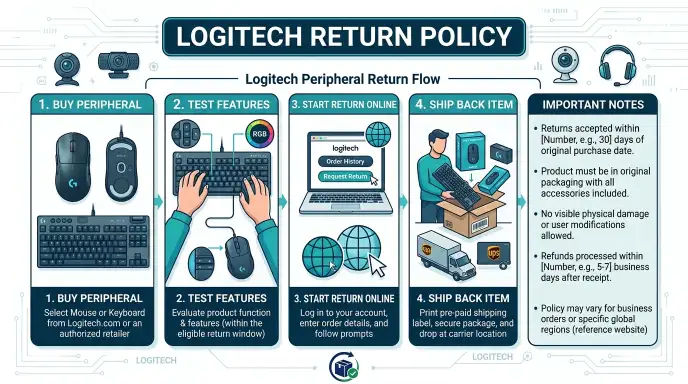
To start a return, go to Logitech’s Returns & Exchanges page. Sign in with your account email and order number. You’ll choose the item from your order list and pick a reason: defective, changed mind, wrong item, or arrived damaged.
For defective items, you’ll upload a photo or a short video. Logitech staff review these within one business day, then issue a Return Merchandise Authorization (RMA) number and a prepaid shipping label.
Important: Never ship the item back before receiving an RMA. Logitech’s system will reject unlabeled packages. If you send a package without a label, it may be refused at the warehouse or held at the carrier depot.
You’ll waste weeks.
What Counts as “Opened” or “Unopened”
Logitech defines “unopened” as the product still sealed in its factory plastic or box with all breakaway tabs intact. “Opened” means you’ve broken that seal, used the product, or removed accessories from their packaging.
This distinction directly affects your refund amount:
- Unopened, full refund to original payment method, no fees, free return shipping.
- Opened, full refund possible on most items, but high-value products or those with high return rates may face a 15 percent restocking fee.
- Damaged or defective, full refund plus free return shipping, no restocking fee, even if opened.
Be honest about condition. Logitech inspects returns. If they find the product used beyond normal testing or missing parts, they will deduct from your refund accordingly.
The Restocking Fee Trap (15% on Certain Items)
Not all opened products get hit with a fee. But some do. Per Logitech’s published terms as of 2026, the following categories are most likely to incur a 15 percent restocking fee:
- Racing wheels (G923, G Pro Wheel)
- Flight sim controllers (yoke system, throttle quadrant)
- Gaming chairs (any Logitech-branded seat)
- High-end audio (G933, G Pro X Wireless headsets over a certain price threshold)
Why these items? They have high return rates or require significant inspection. The fee covers repackaging, testing, and refurbishing labor.
Check your order total before returning. A $500 Logitech G Pro Wheel will cost you $75 as a restocking fee on an opened return. If that’s a dealbreaker, consider reselling it privately instead.
Step 2: Did You Buy from a Third-Party Retailer?
If you didn’t buy directly from Logitech, stop here. Logitech will not process a return for you. You must handle the return through the retailer where you made the purchase.
Amazon, Best Buy, Walmart, Target – Their Policies Differ
Each major retailer has its own return window, condition requirements, and refund method. Here’s a quick cheat sheet:
| Retailer | Standard Return Window | Restocking Fee | Notes |
|---|---|---|---|
| Amazon | 30 days (often extended during holidays) | None for most electronics | Prepaid label; may offer instant refund upon carrier scan |
| Best Buy | 15 days (30 days for paid My Best Buy members) | None for most items; 15% on opened drones and some high-end peripherals | In-store drop-off available; requires original packaging |
| Walmart | 30 days (90 days for some electronics) | None | In-store or mail; serial number may be checked |
| Target | 30 days (90 days for Target Circle members) | None | Original packaging required; in-store drop-off |
| Micro Center | 15 days (30 days for some items) | None for unopened; 15% on opened | In-store only; must have receipt |
| B&H Photo | 30 days | None for unopened; 10% on opened PCs and monitors | Must call for RMA; no prepaid label on opened items |
If you’re outside the retailer’s return window, Logitech’s limited warranty may still cover defects for up to two years (depending on product). But you cannot return a functional product that you simply changed your mind on after the retailer’s deadline.
Key Retailer Policy Cheat Sheet
- Amazon: Easiest process. Print label, drop off, refund within days. No restocking fee on Logitech items. Prime members may get an instant refund before the item arrives back.
- Best Buy: Tight window at 15 days. If you buy a high-end Logitech mouse and return it opened after 20 days, you’ll be denied or reduced to store credit. Know your exact purchase date.
- Walmart: Best for impulse returns in-store. They accept returns without a box in many cases. Product must be clean and fully functional.
- Target: Similar to Walmart. Original box preferred but not always required. No restocking fee for most electronics.
Action step: Save your receipt and note the purchase date. Set a calendar reminder for 5 days before the retailer’s deadline.
Step 3: Is the Product Defective or Just Unwanted?
The distinction between a defective product and a simple change of mind matters for what you get back and how fast.
Defective Items: Exchange vs. Refund
If your Logitech product doesn’t work as intended, a webcam with flickering video, a keyboard with sticking keys, a mouse that won’t pair, you are entitled to a replacement or a full refund. Even if you opened it and used it for a week. Logitech’s limited warranty covers defects in materials and workmanship for one to two years.
Check the specific product warranty sheet.
For direct purchases: When you file a return and select “defective,” Logitech offers an advanced exchange option for select products. They ship a replacement immediately, and you have 15 days to return the original unit. If you don’t, they charge your card for the full price of the replacement.
For retailer purchases: If your product is defective within the first 30 days, the retailer will replace or refund it. After 30 days, you must go through Logitech’s warranty process directly. Logitech will ask for proof of purchase and a description of the issue, then send a replacement or prepaid repair label.
Warning: Do not disassemble or attempt to repair a defective Logitech product. Opening the case voids the warranty, and Logitech may refuse the return.
Changed Your Mind: Standard Return Rules
You bought a wireless mouse but decided you prefer wired after all. That’s a “changed mind” return. The rules:
- Must be within 30 days (direct) or the retailer’s window (if third party).
- Must include all original accessories, cables, dongles, and manuals.
- Must be in like-new condition, no scratches, no spilled liquid, no missing feet.
- If opened, you may face a restocking fee on certain products (see Step 1).
- Refund will be to the original payment method, not store credit, except for gifts.
Gift returns work differently. If someone bought you a Logitech product and included a gift receipt, you can return it for store credit or a refund to the gift giver. Without a receipt, Logitech may ask for the order number.
If neither is available, you may be offered an exchange only.
Real world example: You order two different Logitech keyboards to test them side by side. One is perfect, the other you open and type on for 10 minutes. That opened one qualifies for return.
But if it’s a popular model like the Logitech MX Mechanical, the restocking fee likely won’t apply because it’s not in the high-risk category. Check the product’s return policy page at checkout, it’s listed clearly there.
Common Mistakes That Delay or Deny Your Refund
Even if you follow the basics, a few small errors can push your refund weeks into the future or kill it entirely. Here are the most common ones.
Missing the dongle or receiver. Logitech wireless devices use tiny USB receivers to connect. Lose that receiver, and the product is essentially incomplete. Logitech will either deny the return or deduct the cost of a replacement receiver from your refund.
Keep the dongle taped to the mouse or keyboard until you’re sure you’re keeping the product.
Throwing away the original box too early. Logitech doesn’t require the original box for returns, but it helps. In our research, returns without original packaging are more likely to be flagged for condition checks. If you use a generic box, make sure the product is well protected.
Damage during return shipping is your responsibility.
Forgetting the power adapter or charging cable. Some Logitech products like the G533 headset or Litra Beam light come with proprietary cables. If you send the item back without that cable, Logitech may charge you for it or deny the return.
Using the wrong shipping label. If you bought from a retailer but use Logitech’s return label by mistake, the package will be rejected. The return address must match the seller. Double check the label before dropping it off.
Shipping too close to the deadline. If you drop the package at FedEx on day 29 but the carrier picks it up on day 30, you might still be fine. But if the label expires at midnight on day 30 and the carrier picks it up on day 31, your return may be denied. Ship at least two to three days before the deadline to be safe.
Ignoring the restocking fee disclosure. Some buyers only notice the fee after seeing the partial refund. Read the “Return Policy” link at checkout before you buy, especially for high-value racing or flight sim gear.
Still Outside the 30-Day Window? Your Warranty Options
If your return window has closed, you’re not necessarily stuck with a broken product. Logitech provides a limited warranty that covers defects. The warranty length varies by product:
- Keyboards and mice: Two years from date of purchase.
- Headsets and webcams: Two years.
- Gaming peripherals (G series): Two years.
- Racing wheels and flight controllers: One year.
- Harmony remotes: One year.
- Chairs and furniture: One year.
The warranty covers defects in materials and workmanship. It does not cover accidental damage, drops, spills, or normal wear and tear. To file a warranty claim, visit Logitech’s support page and select “Warranty and Repair.” You’ll need your proof of purchase and a description of the defect.
Logitech may offer a replacement unit (refurbished) or a repair. Shipping is covered for defective items. Processing time is typically five to seven business days after they receive your item.
If your product is outside the warranty period, Logitech offers out-of-warranty repair services for some items at a flat fee. Check with support for current pricing.
How to Initiate a Return (Step-by-Step)
Here’s the exact process for a direct Logitech purchase.
- Gather your order number and email. You’ll need both to access your order on Logitech’s returns page.
- Go to Logitech’s Returns & Exchanges portal at logitech.com/en-us/support/returns.
- Sign in with your Logitech account or use the guest return option if you checked out as a guest.
- Select the item you want to return and choose a reason from the dropdown.
- Upload any required photos if the item is defective. Show the defect clearly.
- Receive your RMA number and prepaid label via email within one business day.
- Pack the item carefully with all accessories, original packaging if possible, and the RMA number written on the outside of the box.
- Attach the prepaid label and drop off at the specified carrier (usually FedEx or UPS).
- Track the return using the tracking number provided. Logitech will send updates.
- Wait for inspection and refund. Expect 7 to 14 business days from the time Logitech’s warehouse receives the package.
For third-party purchases, the process is similar but through the retailer’s returns portal. Logitech does not provide labels or RMA numbers for non-direct purchases.
Real-World Scenarios: Quick Decision Table
| Your Situation | You Bought From | What Do You Do? | Expected Outcome |
|---|---|---|---|
| Mouse double-clicks on first day | Logitech.com | File return as defective, get RMA, use prepaid label | Free replacement or full refund |
| Changed mind about keyboard after opening | Logitech.com | File return as changed mind, return within 30 days | Full refund, possibly minus restocking fee if applicable |
| Unopened webcam still in shrink wrap | Best Buy | Return to Best Buy with receipt within 15 days | Full refund, no fees |
| Headset broken after 4 months | Amazon | Use Logitech warranty, not Amazon return | Replacement sent directly by Logitech |
| Racing wheel arrived damaged in shipping | Walmart | Return to Walmart store or online within 30 days | Full refund or exchange |
| Gift mouse without receipt | Logitech.com (gift order) | Return to Logitech with order number from gift giver | Store credit or refund to gift giver |
| Keyboard bought secondhand on eBay | N/A – not original buyer | No warranty or return; contact seller directly | No coverage from Logitech |
Frequently Asked Questions
How long does a Logitech return take to process?
Once Logitech’s warehouse receives your item, inspection takes 7 to 14 business days. Refunds are then issued to the original payment method within 3 to 5 business days. Total time from drop-off to money in your account is usually 10 to 21 business days.
Can I return a Logitech product without the original box?
Yes, but it’s not recommended. Logitech prefers the original packaging. If you use another box, make sure the product is well padded.
Any damage that occurs during return shipping because of poor packing will be deducted from your refund.
Does Logitech charge a restocking fee on all opened items?
No. The 15 percent restocking fee applies only to specific high-value categories like racing wheels, flight controllers, gaming chairs, and some premium audio gear. Most standard mice, keyboards, and webcams are not subject to restocking fees.
Can I return a Logitech product bought on Amazon to Logitech directly?
No. Amazon purchases must be returned to Amazon. Logitech will not accept returns for items bought through third-party retailers.
The warranty still applies, but the return process does not.
What if my Logitech product is defective after 30 days?
You’re outside the return window but still within the limited warranty period (typically one to two years). File a warranty claim on Logitech’s support page. They will offer a replacement or repair at no cost if the defect is covered.
Does Logitech offer free return shipping?
Yes, for direct purchases on Logitech.com. They provide a prepaid shipping label. For third-party purchases, return shipping policies vary by retailer.
Some offer free labels, others deduct shipping from your refund.