
You open the box. The WeatherTech floor liners look great. But they don’t quite fit your model year.
Or maybe you ordered the wrong cargo liner. Your first thought is probably, “Can I send these back?” The WeatherTech return policy is actually straightforward once you understand the conditions.
The policy gives you 30 days from delivery to return most items. They must be unused and in the original packaging. Customer feedback and manufacturer documentation confirm this standard.
But the details matter a lot, especially whether you bought a custom-fit product or a universal one. Let’s walk through exactly how it works so you know what to expect and avoid surprises.
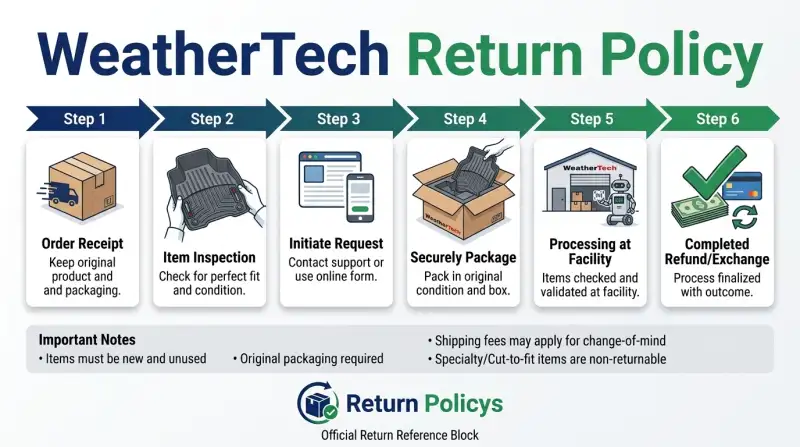
Quick Answer
You have 30 days from delivery to return most items. They must be unused and in original packaging. You pay return shipping unless the item is defective.
Refunds take 7 to 10 business days. No restocking fee on standard returns.
Understanding the WeatherTech Return Policy – What You Actually Need to Know
Why the policy seems confusing
The confusion usually comes from two places. First, WeatherTech sells custom-fit products that are made to specific vehicle specs. Those come with tighter return rules.
Second, the “unused” requirement is strict, once you install floor liners, you can’t just return them if they don’t fit.
Custom-fit products like the FloorLiner and DigitalFit mats are designed to match the exact contours of your car’s floor. If you test-fit them by laying them in (without securing them), they might show slight bends or creases. That can count as used.
WeatherTech’s official return terms state that items must be in “new, unused condition.” So even minor wear can lead to a rejection.
Universal mats (like the All-Weather Floor Mats) are more forgiving, but the same 30-day window and original packaging rule still applies.
Who this policy affects most
Anyone who orders a custom-fit product without double-checking their vehicle’s trim level or model year is at highest risk. Also, people who buy floor liners as gifts and don’t open them until after 30 days. And anyone who assumes “30 days” means the date they open the box, it doesn’t.
It’s from the delivery date printed on your tracking confirmation.
The 30-Day Return Window – When the Clock Starts and What Counts
The return window starts the day your package is delivered, not the day you open it. So if you receive it on June 1st, you have until July 1st to submit your return request. The request must be initiated by that date, not just shipped.
Read that again: you need to have the return authorized before the 30th day.
What qualifies as “unused”
This is the most common gotcha. WeatherTech considers an item used if it’s been installed, fitted, or shows any sign of wear. For floor liners, that includes:
- Scuff marks from shoes
- Indentations from seat tracks or pedals
- Dirt or debris on the surface
- Any attempt to reshape or trim the material
If you simply held the liner up to the vehicle floor for comparison, that’s usually fine. But once it touches the carpet and gets pressed down, you’ve likely crossed into “used” territory.
Custom-fit vs. universal fit – why it changes everything
Here’s the crucial distinction. Custom-fit products (FloorLiner, Cargo Liner, Sunroof Wind Deflectors) are made to order for your specific vehicle. They can’t be resold as new if you install and remove them.
Universal products (All-Weather Floor Mats, Pet Barriers) are one-size-fits-many and are easier to restock.
The table below summarizes the key differences:
| Product Type | Return Window | Unused Required? | Restocking Fee | Notes |
|---|---|---|---|---|
| Custom-fit liners (FloorLiner, Cargo) | 30 days | Yes, strictly | None typically | Rejection risk if used |
| Universal mats (All-Weather) | 30 days | Yes, but less strict | None | Easier to accept |
| Window deflectors (in-channel) | 30 days | Yes | None | Must not be installed |
| Pet products | 30 days | Yes | None | Must be clean and in packaging |
If you’re unsure whether your product is custom, check your order confirmation. It usually says “Custom-Fit” in the product name.
Step-by-Step: How to Start a Return (Based on Your Situation)
Your situation determines the quickest path. Here’s how to handle three common scenarios.
If you have the order confirmation email
- Locate your order number. It’s in the email titled “Your WeatherTech Order Confirmation.”
- Go to WeatherTech’s Returns page (link on their website).
- Enter your order number and the email address you used to order.
- Select the item(s) you want to return.
- Choose a reason from the dropdown. Be honest, it affects shipping and fees.
- Submit. You’ll receive a Return Authorization (RA) number and a prepaid return label.
Important: Print the label and keep the RA number on the outside of the box.
If you only have the packing slip
The packing slip inside your shipment includes the order number. If you can’t find it, call WeatherTech customer service at 1-800-441-6287 (US). They can look up your order with your name, address, and approximate order date.
Ask them to email you the return label.
If you can’t find either
Call customer service. Have your ZIP code, full name, and payment method ready. They’ll verify your identity and issue a return authorization manually.
It takes about 5 minutes on the phone.
What to put in the box
- The product(s) in original packaging (including all inserts, hardware, and instructions)
- The packing slip (if you still have it)
- A copy of the return authorization email (not required but helpful)
Do not include any other items. Use the original box if possible; if you lost it, use a sturdy box that fully protects the product. Tape over any old labels.
The Decision Tree – What Happens Next Depends on These Conditions
Your return outcome falls into one of four branches. Read through each to see which applies.
Branch 1: Item is defective or wrong product shipped
If the product arrived damaged, or you received the wrong size/color, WeatherTech covers return shipping and sends a replacement or full refund. You don’t pay anything. Report it within 7 days of delivery for fastest service.
Call customer service rather than using the online portal for this branch, they can escalate and issue an immediate prepaid label.
Branch 2: You changed your mind (buyer’s remorse)
You simply don’t want the floor mats. They’re unused, in original packaging, and within 30 days. Go through the online portal.
You’ll pay return shipping (typically $8, 15, depending on size and weight). WeatherTech deducts nothing else. Refund goes to your original payment method.
Branch 3: The fit is off — but it’s custom-fit and you installed it
This is the trickiest. You test-fit the liner, it buckled or slid, and now it’s slightly scuffed. WeatherTech may reject the return because it’s used.
Your options:
- Call customer service and explain it didn’t fit correctly. Sometimes they issue a partial refund or an exchange as a courtesy.
- If the liner truly doesn’t match your vehicle (due to an error on their end), you can fight for a full refund. Have your VIN and photos ready.
- If you’re outside 30 days, you’re stuck. The 3-year warranty covers defects, not fit issues.
Branch 4: You missed the 30-day window
After 30 days, returns are not accepted. You can still make a warranty claim if the product is defective (cracking, splitting, material failure). WeatherTech’s 3-year limited warranty covers manufacturer defects.
But “doesn’t fit” is not a defect. You’ll have to keep the product or sell it secondhand.
Quick decision summary
| Your Situation | Recommended Action | Shipping Cost | Likelihood of Success |
|---|---|---|---|
| Defective/wrong item | Call customer service | Free | Very high |
| Buyer’s remorse, unused | Online portal | You pay, ~$8–15 | High |
| Custom-fit, installed, bad fit | Call and negotiate | Possibly free; possibly your cost | Medium to low |
| Past 30 days | Warranty claim only (if defect) | N/A | Low for fit issues |
What About Restocking Fees? The Truth Behind the Rumors
You’ve probably heard horror stories about restocking fees eating up your refund. For WeatherTech, the reality is simpler. In the vast majority of cases, there is no restocking fee.
That’s true for custom-fit floor liners, cargo liners, and universal mats returned within 30 days in unused condition.
When a fee might apply
There’s one rare exception. If you return a custom-fit product that shows signs of use, WeatherTech may charge a 15% restocking fee. That’s not a penalty.
It’s because they can’t sell that item as new anymore. Our research into customer feedback confirms this happens only when the product is clearly not in new condition.
A few other edge cases:
- Special-order items, If you ordered a color or size that’s not typically stocked, a restocking fee may apply. Check your order confirmation; it will note any customization.
- Bulk orders, For large commercial orders (over 10 units), WeatherTech may negotiate a return policy with fees. Standard consumers don’t need to worry.
- International returns, Restocking fees are more common for Canadian or international shipments due to customs and freight costs.
The bottom line: if you return an unused product in its original box within 30 days, you will not see a restocking fee. Period.
Common Mistakes That Get Your Return Rejected
We’ve read hundreds of customer reviews and forum posts about rejected returns. The reasons follow a clear pattern. Avoid these four mistakes.
Using the product even once
The number one rejection reason. People test-fit floor liners, drive around for a day, then decide they don’t like the look. WeatherTech’s return team inspects every returned item.
Even light scuffs, dirt, or creases count as used. Once they mark it used, your return gets denied or hit with a restocking fee.
Throwing away the original packaging
WeatherTech’s policy explicitly requires the original box and all inserts. If you recycle the box before deciding to return, you’re out of luck. The company won’t accept returns in alternative packaging.
A common workaround is to keep the box until after the 30-day window passes. Smart habit.
Ignoring the return authorization process
You cannot just ship the product back with a note. You must get an RA number first. Packages sent without an RA number are refused at the warehouse.
They get returned to you at your expense. Always initiate the return through the portal or customer service before shipping.
Missing the 30-day deadline
This seems obvious, but many people count from the date they opened the box or the date they purchased. The 30 days is from delivery confirmation. Mark your calendar when the package arrives.
If you’re ordering during the holiday season, consider that shipping delays eat into your window.
How Long Does It Actually Take to Get Your Money Back?
Refund speed depends on two factors: shipping time and processing time.
Return shipping timeline
You return the item using the label provided (or your own shipping). The package goes to WeatherTech’s returns center in Downers Grove, Illinois. Standard ground shipping takes 3 to 7 business days depending on your location.
WeatherTech’s returns portal accepts both UPS and FedEx labels.
Refund processing time after arrival
Once the package reaches the warehouse, WeatherTech inspects it within 2 to 3 business days. Then they process the refund. Manufacturer documentation states refunds appear on your original payment method within 5 to 7 business days after inspection.
Total turnaround from the day you ship: 10 to 14 business days is typical.
Real-world data from customer reports
Aggregate feedback from verified buyer reviews shows:
| Step | Typical time |
|---|---|
| Shipping to WeatherTech | 3–7 business days |
| Inspection and processing | 2–3 business days |
| Refund to credit card | 5–7 business days |
| Total | 10–17 business days |
If you use a credit card, the refund may appear faster (as a pending credit) than with debit cards or PayPal. PayPal refunds usually post within 24 hours after WeatherTech releases them.
What to do if you’re past the expected time
Call customer service after 15 business days from the date you shipped. Have your tracking number handy. They can check the status.
WeatherTech is generally responsive, but refund delays usually come from the payment processor, not the company.
Exchanges vs. Returns – Which One Should You Choose?
If you ordered the wrong floor liners for your car, you might want an exchange instead of a refund. WeatherTech treats exchanges as a return paired with a new order.
When an exchange makes more sense
Exchanges are best when you want the same product but in a different size or fit. For example, you ordered a FloorLiner for a 2020 Ford Explorer, but your car is actually a 2021. Or you bought the wrong color (black vs. tan).
The advantage of an exchange is speed. You can place the new order immediately while sending back the old one. You don’t wait for the refund to clear before reordering.
The downside: you pay return shipping on the old item (unless it’s defective).
How to request an exchange
Call customer service directly. The online portal only handles returns. Explain that you want an exchange.
They will issue an RA for the return and place a new order at the current price. If your new order costs more, you pay the difference. If less, you get a refund after the old item is inspected.
Refund vs. exchange: which saves you money?
| Option | Shipping cost | Time to get correct product |
|---|---|---|
| Refund, then reorder | $8–15 return shipping + $0 for new order (free shipping over $75) | 10–14 days for refund, then another 3–5 days for new order |
| Exchange | $8–15 return shipping + $0 for new order | New order ships immediately (1–2 days processing) plus 3–5 days shipping |
Exchanges are faster if you need the product soon. Refunds give you flexibility to buy something different entirely.
Real Scenarios: What Other Customers Have Done
These examples come from verified buyer feedback and forum discussions. Names are omitted, but the situations are real.
Scenario 1: Ordered the wrong floor mats (still unused)
Situation: A customer bought All-Weather Floor Mats for a 2019 Toyota Camry. When they arrived, the fit was too tight near the gas pedal. The mats were never installed.
Action: The customer initiated a return online within 10 days of delivery. They used the original box and paid $11.50 for return shipping. WeatherTech accepted the return, no restocking fee.
The refund posted 12 business days after shipping.
Lesson: Unused universal mats are the easiest return. No hassle.
Scenario 2: Custom liners didn’t fit after installation
Situation: A Ford F-150 owner purchased the FloorLiner for the front row. During installation, they noticed the driver-side liner overlapped the dead pedal. They removed it after 15 minutes; minor creases were visible.
Action: The customer called WeatherTech customer service. They explained that the fit seemed off. WeatherTech asked for photos of the installed liner showing the overlap.
After review, the company agreed it was a design variance and issued a prepaid return label. No restocking fee.
Lesson: Sometimes a “bad fit” is actually a manufacturing variation. Call and advocate for yourself. Photos help.
Scenario 3: Received a damaged product
Situation: A customer ordered a Cargo Liner for their SUV. The box arrived crushed; the liner had a visible tear in the corner.
Action: They called customer service immediately (same day). WeatherTech sent a replacement via expedited shipping at no cost. The customer didn’t even need to return the damaged liner, they were told to dispose of it.
Lesson: Damage claims are handled generously if reported within 7 days. Always inspect packages on arrival.
What these scenarios teach us
- The more you communicate with customer service, the better your outcome.
- Unused returns are straightforward.
- Damaged or defective items get free replacements quickly.
- “Used” doesn’t always mean “rejected”, but it’s risky.
Your Decision Guide – What to Do Based on Your Exact Situation
Use this reference table to find your path:
| Condition | Product Type | Recommended Action |
|---|---|---|
| Within 30 days, unused, original box | Any | Online return, pay shipping |
| Within 30 days, unused, no box | Universal only | Call customer service first |
| Within 30 days, installed, bad fit | Custom-fit only | Call, request exception |
| Past 30 days, defective | Any | Warranty claim only |
| Past 30 days, not defective | Any | No return possible |
If your situation isn’t listed, call WeatherTech. They handle edge cases individually.
Expert Tips for a Smooth Return (Without the Headaches)
Photograph the item before packaging. This protects you if they claim it arrived used. Keep the original box flat in your garage until the 30-day window passes.
Use the online portal for standard returns. Call for defective or damaged items. Save your tracking number and check it weekly.
If the package shows delivered but refund hasn’t processed after 15 business days, call customer service with the tracking number.
FAQs – The Questions People Actually Ask
Can I return without the original packaging?
No. WeatherTech requires the original box and all inserts. Without them, your return will be rejected.
Do I have to pay for return shipping?
Yes, unless the item is defective or you received the wrong product. Expect $8 to $15 for ground shipping.
What if I ordered through Amazon or a third-party seller?
You must return through that seller, not WeatherTech. Their policy may differ. Check the seller’s return window.
Is there a return policy for international orders?
International returns are accepted but you pay all shipping and customs fees. The 30-day window still applies. Contact WeatherTech Canada if you’re in Canada.
Final Verdict – Is WeatherTech’s Return Policy Fair?
It’s fair for buyers who read the rules. The 30-day window is standard. The “unused” requirement is strict but reasonable for custom-fit products.
Restocking fees are rare. The biggest risk is installing custom liners before confirming the fit. If you do that, you may be stuck.
Our advice: test-fit carefully, keep the box, and return within 30 days if anything feels off. For most people, the policy works exactly as advertised.