
Why the UniFi Return Policy Trips Up So Many Buyers
Most people treat Ubiquiti returns like any consumer electronics policy, send it back within 30 days, get your money back. That assumption is the first mistake.
The policy is built around two distinct tracks, and mixing them up is the number‑one reason returns get rejected or delayed. One track is for “change of mind” returns on fully functional gear. The other is for hardware that arrived broken, dead on arrival (DOA), or fails within the warranty period.
Each track has different rules on shipping, fees, and packaging.
A second common trap: the 15% restocking fee. Many buyers discover it only after they’ve opened the box and decided the device doesn’t fit their rack or their budget. That fee applies even if the hardware is pristine and unused, once the seal is broken, Ubiquiti charges it.
Third, the serial number. If you lose the original box or remove the serial label, Ubiquiti’s return system may reject the unit entirely. Serial numbers are linked to purchase records, and returns without a matching serial are turned away.
Quick Answer
UniFi gear has a 30‑day return window. Unopened items get a full refund. Opened items get a 15% restocking fee.
Defective units go through a separate RMA process.
Return shipping is free only for RMA cases. For change‑of‑mind returns, you pay shipping. Software licenses and subscriptions are non‑returnable.
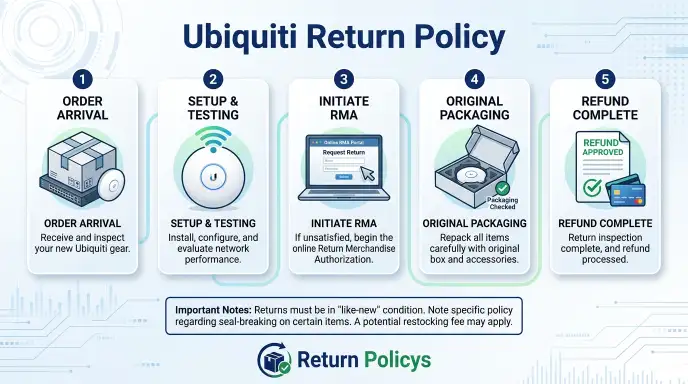
Core Breakdown: Two Very Different Return Paths
Ubiquiti splits returns into two completely separate workflows. Knowing which one you’re in saves time, money, and frustration.
Standard Returns (Change of Mind)
This path covers any non‑defective item you simply don’t want anymore.
- Condition matters: Sealed (factory shrink‑wrap intact) = full refund. Opened (even just to look) = refund minus 15%.
- Shipping: You pay to ship it back. Ubiquiti does not provide a prepaid label for standard returns.
- Time limit: 30 days from the delivery date on your tracking.
- Packaging: Original box, all accessories, manuals, and any included mounting brackets must be returned. Missing items can delay or reduce the refund.
- Refund method: Returns to the original payment method. Store credit is also offered as an alternative.
This path does not cover defects. If the device arrives with a dent, a non‑working port, or fails within the first week, do NOT use the standard return portal, you’ll be charged the restocking fee for a unit that should never have been shipped to you.
RMA Returns (Defective or Damaged)
The RMA (Return Merchandise Authorization) process is for hardware that is faulty, damaged in shipping, or fails during the warranty period.
- No restocking fee: Full refund or replacement.
- Free return shipping: Ubiquiti provides a prepaid shipping label.
- Proof of defect required: You may need to provide photos, a diagnostic log, or a video showing the issue.
- RMA number mandatory: Every defective return must have an RMA number issued by Ubiquiti support before you ship anything. Sending a broken device without an RMA number will cause it to be returned to you unprocessed.
- Warranty coverage: Standard one‑year limited warranty applies. Extended coverage (UBNT Care) is available for an additional fee.
The RMA path is not a “no‑questions‑asked” return. Ubiquiti inspects the unit, and if they find no defect, they can refuse the return or convert it to a standard return with the 15% restocking fee.
The Decision Tree: What Applies to Your Situation?
Let’s run through your specific scenario. Answer these questions in order.
Branch 1: Is the item still sealed in the original factory packaging?
If yes, you’re in luck. Unopened items qualify for a full refund with no restocking fee. You still have to pay return shipping, but you get every dollar back.
Ship the sealed box to Ubiquiti’s returns center (address provided when you initiate the return). Expect the refund within 5 to 10 business days after they receive it.
Branch 2: Is the item opened but fully functional?
This is the most common scenario. You opened the box, maybe tested the device for an hour, and decided it’s not what you needed.
You go through the standard return process. You pay return shipping. Ubiquiti deducts 15% as a restocking fee.
The remaining amount is refunded to your payment method. Total timeline: about two weeks from drop‑off to refund.
Branch 3: Is the item defective, damaged on arrival, or failing within the warranty period?
Do not use the standard return portal. Instead, contact Ubiquiti support to start an RMA request. You’ll need your order number, serial number, and a clear description of the defect.
Ubiquiti will issue an RMA number and a prepaid shipping label. Ship the unit back. They inspect it, and if the defect is confirmed, they either send a replacement or issue a full refund (including your original shipping costs).
No restocking fee.
Branch 4: Are you trying to return a software license, a subscription like UniFi Protect Plus or UniFi Network Premium, or a custom‑configured product?
Stop. These items are non‑returnable. Software licenses and subscriptions are final sale.
If you purchased a license by mistake, you may need to contact support to see if an exception can be made, but there is no guarantee. Custom‑configured hardware (like a pre‑programmed UniFi Console) also cannot be returned unless defective.
Step‑by‑Step: How to Start a Return or RMA
The exact steps depend on where you bought the gear. We’ll cover the two most common channels: the official Ubiquiti Store and third‑party resellers like Amazon or B&H Photo.
For Direct Ubiquiti Store Purchases
- Log into your Ubiquiti Store account. Go to the orders page and find the item you want to return.
- Click “Return” or “Request RMA.” The portal automatically detects whether you’re inside the 30‑day window and whether the item is defective (based on what you select).
- Choose your return reason. If it’s a defect, upload a photo or short video showing the issue.
- Get your return authorization. For standard returns, you’ll receive a return number and a shipping address. For RMA, you’ll get an RMA number and a prepaid shipping label.
- Pack the item correctly. Use the original box. Include all accessories. Write the RMA number clearly on the outside of the box if it’s a defective return. For standard returns, include the return number inside the box.
- Ship it. For standard returns, use a carrier with tracking (UPS, FedEx, USPS). For RMA, use the prepaid label provided.
- Wait for inspection. Ubiquiti inspects within 3 to 5 business days of receipt. Refunds or replacements are processed after inspection.
For Third‑Party Reseller Purchases
If you bought from Amazon, B&H, CDW, or another authorized distributor, do not return the item to Ubiquiti directly. The reseller handles its own return policy. Those policies can differ, Amazon often has a 30‑day return window with no restocking fee, while B&H may charge a 15% fee on opened networking gear.
Always check the reseller’s return policy before opening the box.
If the item is defective, you still go through the reseller first. Most resellers will issue an RMA on your behalf or provide a replacement directly. Only if the reseller refuses or the item is out of their return window would you contact Ubiquiti for warranty support (still via Ubiquiti’s RMA process).
The Restocking Fee Trap: When You’ll Pay 15% (and When You Won’t)
The 15% restocking fee is the most misunderstood part of the UniFi return policy. Here’s exactly when it applies and when it doesn’t.
| Condition | Restocking Fee? |
|---|---|
| Unopened, factory sealed | No (full refund) |
| Opened but fully functional | Yes – 15% deducted |
| Defective (confirmed by Ubiquiti) | No (standard or RMA path) |
| Damaged in shipping | No (RMA path, free return) |
| Opened and missing accessories | Yes – 15% plus possible deduction for missing parts |
The fee applies per item, not per order. If you return three opened switches, each one takes a 15% hit. The fee is calculated on the purchase price before tax and shipping.
So on a $200 switch, you lose $30.
Important: Ubiquiti does not charge a restocking fee on unopened items. If you’re on the fence about a device, leave it sealed. Once the shrink‑wrap comes off, the fee kicks in.
Common Mistakes That Get Your Return Rejected or Delayed
Using the wrong return portal. Filing a standard return for a defective unit triggers the restocking fee. Filing an RMA for a change‑of‑mind return may get your request rejected. Use the right channel from the start.
Shipping without an RMA number. Sending a defective device without authorization means Ubiquiti’s warehouse has no record of it. The package may sit unopened or get returned to you at your expense.
Missing original packaging. Ubiquiti requires the original box, inserts, and accessories. Third‑party boxes or missing cables can delay processing or reduce the refund. Keep the box until you’re sure you’re keeping the device.
Removing the serial number sticker. The serial number is required for any return. If you peeled it off and stuck it somewhere else, Ubiquiti may reject the unit. Leave the sticker in place.
Waiting past 30 days. The return window starts the day the carrier delivers the package, not the day you ordered. Check your tracking date. Even one day over can mean a full denial.
Returning to the wrong address. The Ubiquiti Store returns address is different from their corporate office and different from their RMA center. Only use the address provided in your return authorization.
Returns vs. Warranty Claims: Which One Are You Actually Filing?
Many buyers confuse a return with a warranty claim. They’re not the same thing.
| Factor | Return | Warranty Claim |
|---|---|---|
| Time limit | 30 days from delivery | 1 year from purchase (standard) |
| Condition | Any (with restrictions) | Defect or failure only |
| Fees | 15% restocking if opened | No fee |
| Shipping | You pay for standard; free for RMA | Free (prepaid label) |
| Outcome | Refund or exchange | Repair, replacement, or refund |
Warranty claims are handled through the same RMA portal but require proof of purchase and a description of the failure. The warranty covers manufacturing defects and hardware failures under normal use. It does not cover physical damage, water damage, power surges, or modifications.
If your device fails after 30 days but within the first year, you file a warranty claim, not a return. The process is the same as a defective return: contact support, get an RMA number, ship it back on Ubiquiti’s dime.
Regional Differences: EU, UK, Canada, and Australia
Ubiquiti’s published return policy applies to the US store. International buyers face different rules.
European Union: Consumer protection law gives you a 14-day cooling-off period for online purchases. This overrides Ubiquiti’s 30-day policy for EU buyers in some cases. You can return any item within 14 days for a full refund with no restocking fee.
After 14 days, Ubiquiti’s standard policy applies. Check the EU Consumer Rights Directive for details.
United Kingdom: Post-Brexit, UK buyers have a 14-day right to cancel under the Consumer Contracts Regulations. Ubiquiti’s UK warehouse follows similar rules to the EU policy. Restocking fees are prohibited during the cooling-off period.
Canada and Australia: Ubiquiti sells through authorized distributors in these regions. Return policies vary by distributor. In Australia, consumer law guarantees a refund for major defects regardless of the seller’s policy.
Check your local distributor’s terms.
International returns: If you buy from the US store and ship to a non-US address, the return window still applies, but you pay international return shipping. Ubiquiti does not cover customs fees for returns.
Expert Tips for a Smooth, No-Hassle Return
Photograph everything before opening. Take a picture of the box, the seal, and the serial number. If the device is damaged, you have proof.
Test devices within the first week. Don’t wait until day 29 to find out something doesn’t work. Set up the device within a few days of delivery. If it fails, you have plenty of time to file an RMA.
Keep the box and accessories. Store the original packaging in a closet until the return window closes. It’s the only packaging Ubiquiti accepts.
Use the correct shipping method for standard returns. Ship with tracking and insurance. If the package is lost, you need proof of shipment. UPS and FedEx are reliable choices.
Contact support before shipping anything defective. Ubiquiti support can sometimes resolve firmware issues over the phone. A quick firmware update might save you the hassle of a return.
Check the reseller’s policy before buying. If you purchase from a third party, read their return page. Some resellers offer better terms than Ubiquiti direct. Amazon, for example, often waives restocking fees during the holiday season.
Final Decision Guide: What Should You Do Right Now?
Here’s a quick summary based on your situation.
Item still sealed? Initiate a standard return. You get a full refund minus your shipping cost.
Item opened and working? Decide now. If you’re within 30 days, start the standard return. You’ll lose 15% but recover the rest.
If you’re past 30 days, you’re stuck with the device.
Item defective or damaged? Stop everything. Contact Ubiquiti support via the RMA portal. Do not ship anything without an RMA number.
Once approved, use the prepaid label. You’ll get a replacement or full refund.
Software license or subscription? You likely cannot return it. Verify with support, but expect a final sale.
Bought from a third party? Go back to the reseller. Do not contact Ubiquiti until the reseller’s process is exhausted.
Frequently Asked Questions
How long does it take to get a refund from Ubiquiti?
Once Ubiquiti receives your return, they inspect it within 3 to 5 business days. The refund posts to your payment method within 5 to 10 business days after inspection. Total time from drop‑off to money back is roughly two weeks.
Can I return a UniFi device without the original box?
No. Ubiquiti requires the original packaging for all returns. If you’ve lost the box, you may not be able to return the item.
Some resellers have different rules, but Ubiquiti direct will reject a boxless return.
Is the restocking fee waived for any reason?
The only time the 15% restocking fee does not apply is on unopened items or defective units confirmed through the RMA process. Change‑of‑mind returns on opened gear always incur the fee. No exceptions per Ubiquiti’s published policy.
What happens if I return a defective item without an RMA number?
Ubiquiti’s warehouse will refuse the package or return it to you at your cost. You lose the shipping fee and the item. Always obtain an RMA number before shipping a defective unit.
Do I have to pay return shipping on an RMA?
No. Ubiquiti provides a prepaid shipping label for RMA returns. You only pay shipping on standard change‑of‑mind returns.
If you’re told otherwise, ask for a prepaid label.
Can I return a UniFi device if I bought it from Amazon?
You must return it to Amazon, not Ubiquiti. Amazon’s return policy applies. If you need a warranty replacement after Amazon’s return window, contact Ubiquiti support directly.
Does the 30-day return window start from order date or delivery date?
From the delivery date. Ubiquiti uses the carrier’s proof of delivery timestamp. If you ordered on January 1 and it arrived January 10, the 30 days start January 10.