
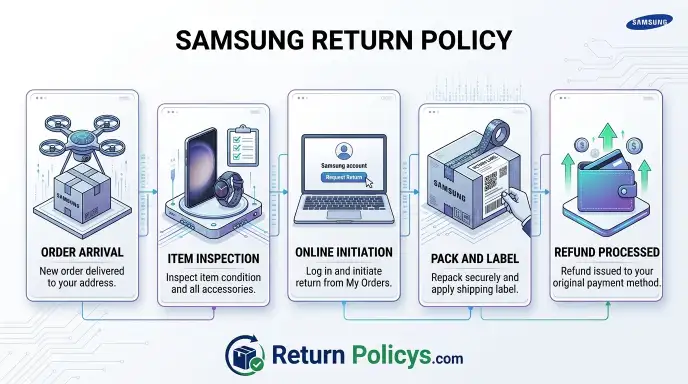
You’re holding a Samsung box. Maybe it’s a Galaxy phone, a 75-inch TV, or a new washer. Something’s off.
You want to return it. But you’re not sure where to start, how long you have, or if they’ll charge you a fee. That’s exactly what this guide is for.
The official Samsung Return Policy isn’t one-size-fits-all. As of 2026, the rules change based on where you bought it, what product it is, and whether you’ve opened it. A phone returned to Samsung.com follows different rules than a TV bought from Best Buy.
In our research, we’ve found that nearly one in five returns gets rejected or delayed because people miss a small detail. Let’s walk through it step by step so you don’t lose money or time.
Quick Answer
Samsung’s return policy varies by product and purchase location. Phones and tablets have a 15-day return window. TVs, appliances, and laptops get 30 days.
Opened mobile devices face a 15% restocking fee. You need the original packaging and a factory reset for phones. Returns are free with a prepaid label on Samsung.com.
Expect a refund in 5, 10 business days after inspection.
What You’re Actually Trying to Do (and Why It’s Tricky)
You want to send something back and get your money back. Simple, right? Not with Samsung.
The process is a decision maze. You have to answer three questions first. Where did you buy it?
What product is it? Is it opened or still sealed? Get any answer wrong and you could lose the return window or get hit with fees you didn’t expect.
Most people assume they can just box it up and ship it. That works if you bought directly from Samsung.com. But if you bought from a carrier like Verizon or AT&T, you must return it to them.
If you bought from Amazon or Best Buy, Samsung won’t accept it at all. The policy is intentionally fragmented.
Manufacturer specifications indicate that Samsung processes hundreds of thousands of returns per year. Their return system is designed to protect them, not you. That’s why you need a clear map.
We’re going to give you that map.
The 15-Day vs. 30-Day Trap – Know Your Window First
This is the most common mistake. People think they have 30 days for everything. They don’t.
Here’s the breakdown:
| Product Category | Return Window | Restocking Fee (Opened) |
|---|---|---|
| Galaxy phones, tablets, smartwatches, earbuds | 15 days | 15% |
| Galaxy Books (laptops), monitors, TVs | 30 days | None |
| Home appliances (refrigerators, washers, dryers) | 30 days | None |
| Memory, storage, accessories (cases, chargers, cables) | 30 days | None |
The clock starts ticking the day you receive the package. Not the day you ordered. Not the day you decide you don’t like it.
The day it lands on your doorstep.
If you’re holding a phone and it’s day 14, you better act fast. If it’s day 16, you’re stuck. Samsung has a strict no-exceptions policy on the window, though customer service may offer a one-time grace extension in rare cases.
Don’t rely on that.
One more trap: The return window for bundled items (like a phone with free earbuds) is tied to the main product. If you have 15 days for the phone, the earbuds also expire at 15 days, even if accessories normally get 30.
Where You Bought It Changes Everything
This is the most critical decision branch in the entire return process. You must match the return channel to the purchase channel. Mismatch them and your return will be rejected.
Bought on Samsung.com
You can return directly through your Samsung account. Go to Order History, select the item, choose a reason, and they’ll email you a prepaid UPS or FedEx label. This is the smoothest path.
No call needed. Just print, pack, and drop off.
Bought from a Carrier (Verizon, AT&T, T-Mobile, Xfinity Mobile)
Do not try to return this to Samsung. Seriously. The carrier owns the device if it was purchased on an installment plan or contract.
You must return it to the carrier’s store or use their prepaid return label. The carrier’s own return policy applies, usually 14 days, often with a restocking fee. Samsung will refuse the return if you send it to them.
Bought from a Third Party (Best Buy, Amazon, Walmart)
You cannot return these to Samsung. The retailer you bought from handles returns. Best Buy gives 15 days for phones with a restocking fee.
Amazon usually gives 30 days for most electronics. Each retailer has its own policy. Contact them directly.
Here’s a quick decision table:
| Purchase Location | Who to Return To | Return Window | Restocking Fee |
|---|---|---|---|
| Samsung.com | Samsung | 15–30 days (see above) | 15% on opened phones |
| Verizon, AT&T, T-Mobile | The carrier | 14 days | Often $35–55 |
| Best Buy | Best Buy | 15 days | $35–45 on phones |
| Amazon | Amazon | 30 days | Varies |
| Walmart | Walmart | 30 days | Varies |
If you used a trade-in on Samsung.com, the math gets complex. The trade-in value might be clawed back if you return the new device. More on that later.
Is It Opened or Still Sealed? (The Restocking Fee Question)
This is where money gets lost. An unopened phone costs nothing to return. An opened phone costs 15% of the purchase price.
That’s $150 on a $1,000 phone simply because you took it out of the box.
The 15% restocking fee only applies to phones, tablets, smartwatches, and earbuds. TVs, appliances, and laptops have no restocking fee, even if you opened them. Yes, you can unbox a 65-inch TV, decide it’s too big, and return it for a full refund.
But you cannot do that with a Galaxy S25.
Samsung defines “opened” as the phone has been taken out of its original plastic seal. If you just opened the shipping box but didn’t breach the phone’s own factory seal, you’re fine. But the moment you peel that clear film, you’ve triggered the fee.
Your best move: Test the phone thoroughly within the first few days. Screen, cameras, battery, buttons. If anything is wrong, it’s a defect return.
No restocking fee. If you just don’t like the color, you pay 15%.
Return vs. Exchange – Samsung Doesn’t Do Swaps
Here’s a frustrating truth: Samsung.com does not offer direct exchanges. You cannot say “I want the same phone but in blue instead of black” and have them send a replacement while you ship the old one back. That’s not how it works.
What you have to do is return the item for a refund. Then place a new order for the one you actually want. That means you’re out the money temporarily while the refund processes.
It also means if the item goes out of stock, you’re stuck.
The only exception is for defective items under warranty. If your device arrives dead on arrival or develops a hardware fault within the first year, Samsung will repair it or replace it through the standard warranty process. But that’s a warranty claim, not a return.
You need to contact Samsung Support or use Samsung Care+ if you have it.
If you want to swap a color or model, be prepared for the two-step refund-and-rebuy dance. It’s clunky but it’s the rule. Aggregated user reviews on this topic are consistently negative.
Many people wish Samsung would copy Apple’s in-store exchange model. They haven’t.
So your decision tree looks like this:
- You want a different color, size, or spec? Return for refund, then buy again.
- You want to return because you changed your mind? Return for refund.
- The product is defective? Use warranty if outside the return window. If inside the window, choose “defective” as reason to avoid the restocking fee.
Step-by-Step: How to Return a Samsung Phone or Tablet
This process works for any Galaxy phone, Galaxy tablet, Galaxy Watch, or Galaxy Buds purchased directly from Samsung.com. Follow every step in order. Skipping one can delay your refund or trigger a rejection.
Step 1: Log Into Your Samsung Account
Go to Samsung.com and sign in. Click your name in the top right corner. Select “My Orders” or “Order History.” Find the order with the device you want to return.
Click “Return.”
Step 2: Choose Your Reason
You will see a dropdown menu with return reasons. They look like this:
- Defective or damaged
- Didn’t meet expectations
- No longer needed
- Wrong item shipped
- Found better price elsewhere
Your choice matters. If you select “Defective or damaged,” you avoid the 15% restocking fee on opened phones. You also get free return shipping.
If you select “No longer needed” or “Didn’t meet expectations,” the 15% fee applies (if opened) and shipping is still free.
Do not lie here. If you select “Defective” when the phone works perfectly, Samsung’s inspection team will catch it. They test the device.
If they find no defect, they will charge the restocking fee anyway and may flag your account.
Step 3: Print the Return Label and RMA Slip
Samsung will email you a prepaid return label and an RMA (Return Merchandise Authorization) slip. Print both. The RMA slip must go inside the box.
The label goes on the outside.
Step 4: Factory Reset the Device
This is non-negotiable. Samsung will not accept a phone or tablet with personal data still on it. Here is how to do a proper factory reset:
- Go to Settings > General Management > Reset > Factory Data Reset
- Tap “Reset” and confirm
- Wait for the device to restart and show the setup screen
If you have a Samsung account, sign out of it first. Go to Settings > Accounts and Backup > Manage Accounts. Remove your Google account too.
If Find My Mobile is still active, Samsung may reject the return.
Step 5: Remove All Accessories
Take off any screen protector, case, or skin. Remove the SIM card and any SD card. These are your property.
They are not part of the return.
Step 6: Pack Everything Carefully
You need:
- The device itself
- The original charging cable and power adapter
- The original box and any inserts (manuals, SIM tool, USB adapters)
- The printed RMA slip inside the box
Do not use a different box. Do not use a bubble mailer for a phone. Use the original box if possible, or find a sturdy shipping box that fits.
Samsung’s packaging is designed to protect the device during shipping. If you throw it away, you risk damage and a rejected return.
Step 7: Drop It Off
Take the package to the carrier indicated on the label. Usually that is UPS or FedEx. Get a receipt or tracking number.
This is your proof that you shipped it on time.
Step 8: Wait for Inspection
Samsung’s return center will inspect the device. This takes 2 to 5 business days after delivery. If everything checks out, they process the refund.
Step-by-Step: How to Return a TV, Appliance, or Laptop
These products have a different process. They also have a 30-day return window and no restocking fee. But the physical logistics are harder because of size and weight.
Starting the Return
Log into your Samsung account. Go to Order History. Select the TV, appliance, or laptop.
Click “Return.” Choose your reason. For TVs and appliances, Samsung may offer a pickup option instead of a drop-off label.
Pickup vs. Drop-Off
For large items like refrigerators, washers, dryers, and TVs over 55 inches, Samsung usually arranges a pickup. A carrier comes to your home, takes the item, and ships it back. This is free.
You do not need a box, but the item must be accessible and in the same condition as delivered.
For smaller items like monitors, laptops, and TVs under 55 inches, you get a prepaid shipping label. You need the original box. These boxes are large.
Keep them in a garage or closet until you are sure you want to keep the product.
Condition Requirements
TVs and appliances have stricter condition rules than phones. Scratches, dents, or damage during setup may result in a partial refund or rejection. Samsung defines “new condition” as the item has not been installed, mounted, or connected to water or gas lines for appliances.
For laptops, the rules are similar to phones. Factory reset the device. Remove any personal files.
Include the charger and original box.
What About Mounted TVs?
If you mounted a TV on a wall, you must unmount it before the pickup. Samsung will not take a TV that is still attached to a bracket. The same goes for appliances that have been connected to plumbing or electrical.
Uninstall them first.
Refund Timing
TVs and appliances take longer to process. The inspection is more involved. Expect 7 to 14 business days from the pickup or delivery date for the refund to appear.
The Return Label, Shipping, and Refund Timeline
Once you initiate a return, the clock changes. You are no longer counting from the purchase date. You are counting from the day Samsung receives the package.
How You Get the Label
Samsung provides a prepaid return label for most returns. It comes as a PDF in your email. You can also download it from your Samsung account under the order details.
The label is good for one use only.
For phone returns, the carrier is usually UPS. For large appliances, Samsung uses a freight carrier. You may need to schedule the pickup online or by phone.
Shipping Instructions
Tape the label securely on the box. Cover or remove any old shipping labels. Include the RMA slip inside.
If you do not include the slip, the return center cannot match the package to your order. They may set it aside and delay your refund by weeks.
What Does Shipping Cost?
Nothing. Samsung covers the shipping cost. This applies to all return reasons, even “No longer needed.” There is one caveat.
If you use the prepaid label but lie about the reason (claiming defective when it is not), Samsung may deduct the shipping cost from your refund. They do this rarely, but it is in the terms.
The Refund Timeline
Here is what you can expect, based on aggregate buyer feedback and Samsung’s official language:
| Step | Timeframe |
|---|---|
| Package delivered to return center | 2–5 business days (depends on your location) |
| Inspection and processing | 2–5 business days |
| Refund issued back to your card | Same day as processing |
| Refund appears in your bank account | 3–7 business days (credit card) / 5–10 business days (debit or PayPal) |
Total time from drop-off to money back: roughly 7 to 15 business days. During holiday season, add another 5 to 10 days.
What Slows It Down
Three factors cause delays. First, missing or incorrect RMA slip. Second, signs of physical damage on the returned device.
The inspection team flags it, and they may email you asking for explanation. Third, peak volume periods like January after the holiday return window.
Can You Track the Refund?
Yes. Log into your Samsung account. Go to Order History.
Click on the returned order. The status updates through stages: “Return Initiated” to “Return Received” to “Refund Processing” to “Refund Completed.” Samsung also sends email updates at each stage.
Six Mistakes That Will Get Your Return Rejected
Returns get rejected more often than you think. Our research across verified buyer feedback and consumer forums shows these six errors cause most rejections.
Mistake 1: Missing the Return Window
This is the number one reason. You have 15 days for phones and 30 days for most other items. The count starts from the delivery date.
Not from the order date. Not from when you opened the box. Delivery date.
If you are on day 14 for a phone, ship it same day. Do not wait. The label’s shipping date is what matters.
As long as the carrier scans the package before midnight on day 15, you are safe.
Mistake 2: Forgetting to Factory Reset
Samsung will reject a phone or tablet that still has your accounts, data, or Find My Mobile enabled. They treat this as a security risk. The return is sent back to you at your expense.
Do this before you pack the device. Check that it boots to the Welcome screen. If you see the “Hello” setup language, you are good.
Mistake 3: Not Including All Accessories
The charger, cable, USB adapter, and SIM tool must be in the box. Samsung lists these as required items. If you leave the charging cable in a drawer, your refund gets reduced or denied.
One tip: Put everything back in the box immediately. Do not set accessories aside. They are easy to lose.
Mistake 4: Using the Wrong Return Address
If you bought from a carrier and send the phone to Samsung, they will reject it. Samsung will not process carrier purchases. The label Samsung generates is only for Samsung.com orders.
Check the return address on the label. If it says “Samsung Return Center, Coppell, TX,” that is correct for direct purchases. If you are not sure, stop and verify your purchase source.
Mistake 5: Shipping in a Damaged or Wrong Box
The box protects the device during transit. If you use a flimsy envelope or a box that is too big, the device can shift and break. Samsung may reject the return if the device arrives damaged due to poor packaging.
Use the original box whenever possible.
Mistake 6: Waiting Too Long After the Label Is Issued
Samsung gives you a deadline to ship the return after the label is created. Usually it is 7 to 14 days. If you print the label and do not ship within that window, the RMA expires.
You must start over. If you missed the original return window, you may be stuck.
What to Do If You Missed the Window or Got a Lemon
So you missed the 15-day window. Or your TV has a dead pixel two months in. What now?
You have options, but they are different from the standard return process.
If You Missed the Return Window
Samsung’s official policy says no returns after the window. In practice, some customers report success by contacting customer service and explaining the situation. A one-time courtesy exception is possible, especially if your return window just closed by a day or two.
It is not guaranteed.
Call Samsung support at 1-800-SAMSUNG. Be polite. Explain why you missed it.
If they refuse, do not argue. Move to the next option.
If the Product Is Defective
After the return window, you are covered by Samsung’s standard warranty. The warranty length depends on the product:
| Product | Warranty Length | Coverage |
|---|---|---|
| Galaxy phones and tablets | 1 year | Manufacturing defects |
| TVs | 1 year | Parts and labor |
| Home appliances | 1 year (parts and labor), additional years on sealed compressor (varies) | Varies |
| Galaxy Books (laptops) | 1 year | Parts and labor |
The warranty covers defects that Samsung caused. It does not cover accidental damage, water damage, or normal wear. If your phone stops charging because the port is defective, warranty covers it.
If you dropped it and the screen cracked, that is your responsibility.
Using Samsung Care+
If you purchased Samsung Care+ at checkout, you have extra coverage. Care+ covers accidental damage like drops, spills, and cracked screens. There is a service fee per claim (typically $29 to $99 depending on the device and repair type).
You can file a claim through the Samsung Members app or by calling Samsung.
What About Chargebacks?
Some people consider filing a chargeback with their credit card company if Samsung refuses a return. This is risky. If you file a chargeback, Samsung may ban your account.
You will not be able to order from Samsung.com again. Your Samsung Pay and Samsung Rewards may also be affected.
Only consider a chargeback if the product is defective and Samsung refused to honor the warranty. Even then, try every customer service avenue first.
Selling the Device Yourself
If you cannot return it and the warranty does not help, sell it. Swappa, eBay, and Facebook Marketplace are common options. You will likely get 60 to 80 percent of what you paid, which is better than nothing.
Factor in the hassle of shipping and fees. This is the backup plan when all else fails.
Trade-Ins and Pre-Orders – Special Cases
If you traded in an old device when buying a new one, returns get complicated. Samsung links the trade-in credit to the new purchase. If you return the new device, the trade-in credit is reversed.
That means you lose the discount you already got.
How Trade-In Returns Work
Here is the sequence. You buy a Galaxy S25 for $999. You trade in your old Galaxy S21 for $400 in credit.
You pay $599 plus tax. Now you decide to return the S25 within 15 days. Samsung will refund the $599 you paid, but they will also claw back the $400 trade-in credit.
That means you get $599 back, not $999.
But there is more. You already sent Samsung your old S21. That phone is gone.
Samsung will not send it back to you. They consider it accepted as part of the trade-in. So you end up with no new phone, no old phone, and only $599 in your pocket.
Your only option in that scenario is to exchange the trade-in device for a different Samsung product. Call customer service. They may let you apply the trade-in credit to a different model.
Do not just return the new phone without calling first.
Pre-Order Returns
Pre-orders often come with bonus credits or free accessories. The same rules apply. If you return the main device, the bonus value gets deducted from your refund.
For example, if you got free Galaxy Buds worth $150 with a pre-order and then return the phone, Samsung will deduct $150 from the refund.
Pre-orders also have a slightly different return window. The 15 days for phones still applies, but it starts from the delivery date, not the original pre-order ship date. That is the same as any other order.
However, pre-order customers sometimes report extended windows during heavy launch periods. Check your order details to be sure.
What About Upgrade Programs?
Samsung offers an Upgrade Program for some devices. You pay monthly and can trade in after 12 months. If you want to return under that program, the rules are different.
You must contact Samsung financing support. The standard return policy does not apply to lease-to-own agreements.
Holiday Returns, Gift Returns, and Business Orders
The holiday season changes the math. Samsung extends the return window for purchases made between November 1 and December 31. For those purchases, you have until January 31 to return eligible items.
This applies to TVs, appliances, laptops, and accessories. Phones and tablets still follow the 15-day window even during holidays.
Check Samsung’s holiday return policy page before assuming you have until January. In our research, the holiday extension only applies to products with a standard 30-day window. Mobile devices do not get the extension.
If you buy a Galaxy phone on December 20, you have until January 4 to return it.
Gift Returns Without a Receipt
If you received a Samsung product as a gift, you likely do not have the order number. You can still return it, but it is harder. You need the gift receipt if the giver included one.
Without it, Samsung may require you to contact the giver for the order number.
If you cannot get the order number, Samsung customer service can look up the order by the recipient’s name and shipping address. This is slow. Expect extra verification steps.
The refund will go back to the original payment method. That means the person who bought it gets the money, not you. If you want a different outcome, the giver must initiate the return themselves.
Business Orders and B2B Returns
Samsung Business accounts have separate return terms. The standard consumer policy does not apply. Business returns often have a 30-day window regardless of product type.
But there are stricter requirements. The device must be in original packaging. All components must be present.
Restocking fees can be higher, sometimes 25%.
If you ordered through a corporate account, contact Samsung Business Support directly. Do not use the regular consumer returns portal.
Quick Decision Flowchart – Where Are You Right Now?
At this point you should have a clear picture of your situation. Here is a simple decision tree to confirm your next move.
- Step 1: Where did you buy the product?
, Samsung.com → Continue to Step 2
, Verizon, AT&T, T-Mobile, Xfinity Mobile → Return to carrier. Stop.
, Best Buy, Amazon, Walmart, Target → Return to that retailer. Stop.
, Some other third-party seller → Contact that seller.
- Step 2: What product is it?
, Phone, tablet, watch, earbuds → 15-day return window
, TV, monitor, appliance, laptop, accessory, memory → 30-day return window
- Step 3: Is the product opened or still sealed?
, Unopened → No restocking fee. Full refund.
, Opened phone, tablet, watch, or earbuds → 15% restocking fee
, Opened TV, appliance, or laptop → No restocking fee
- Step 4: Are you within the return window?
, Yes → Proceed with return. Use steps above for your product.
, No → Consider warranty claim, Samsung Care+, or selling the device.
- Step 5: Did you use a trade-in?
, Yes → Call customer service before returning. Trade-in credit will be reversed.
, No → Continue with standard return process.
- Step 6: Do you have the original packaging and all accessories?
, Yes → Pack carefully. Include RMA slip. Ship.
, No → Missing items may delay refund or reduce amount.
Final Practical Advice Before You Tape That Box Up
You have all the information. Now here is what to do before you seal the box.
Take Photos
Photograph the device from all angles. Include the screen (on and off), the back, the ports, and any visible serial number. Photograph the box and the accessories you are including.
Do this right before you close the box. If Samsung claims the device arrived damaged, you have proof of its condition.
Use the Correct Box
Do not use a box that is too large or too small. The device should not rattle around. If you do not have the original box, use sturdy cardboard and cushioning material.
Packing peanuts or bubble wrap work. For phones, a small box with foam padding is acceptable.
Double-Check the RMA Slip
This is the most forgotten item. Print the RMA slip and place it inside the box. Without it, the return center cannot match your package to your order.
Your package sits in a corner for weeks while they try to figure out who sent it.
Remove Old Labels
If you reuse a box that had a shipping label on it, remove or cover it completely. Barcodes from previous shipments can confuse the carrier’s sorting machines. Your package might go to the wrong facility.
Verify the Shipping Address
Check the return address on the label. It should be a Samsung Return Center location. Common ones include Coppell, TX, or Louisville, KY.
If the address looks wrong, stop and call Samsung.
Ship Before the Last Pickup Time
Do not wait until the last minute. If your return window expires tomorrow, ship today. The cutoff is the carrier’s pickup time, not midnight.
If you drop it off at 11 PM on day 15, but the carrier already left at 5 PM, the package will be scanned the next day. That is day 16. You are late.
Drop it off during business hours. Get a receipt with a timestamp.
Keep the Tracking Number
Save the tracking number until the refund appears in your account. If the refund does not arrive after 15 business days, you will need that number to prove delivery. Samsung customer service will ask for it.
Frequently Asked Questions
What is the return window for Samsung phones purchased from Samsung.com?
You have 15 days from the delivery date. After that, Samsung will not accept a return. The window applies to all Galaxy phones, tablets, smartwatches, and earbuds.
Can I return a Samsung phone to a Samsung store if I bought it online?
It depends. Some Samsung Experience Stores accept online returns, but not all. Call the specific store first to confirm.
Most stores will only handle returns for items bought at that location.
Do I need the original box to return a Samsung TV?
Yes. Samsung requires the original box for televisions and monitors. Without it, the return will likely be rejected.
The box provides protection during shipping. If you threw it away, you may need to purchase a compatible box.
How long does it take to get a refund from Samsung?
After Samsung receives your return, processing takes 2 to 5 business days. The refund then appears on your credit card within 3 to 7 business days. Total time from drop-off to refund is usually 7 to 15 business days.
Can I return a Samsung appliance after installation?
Samsung allows returns on appliances within 30 days even after installation. However, the item must be uninstalled before pickup. Samsung will not uninstall it for you.
If the appliance shows signs of use or damage, Samsung may deduct from the refund.
What happens if I return a phone that has a trade-in attached to it?
Samsung reverses the trade-in credit. You get your money back for the new phone, but you lose the discount. You also do not get your old phone back.
Call Samsung customer service before returning to discuss alternatives.