
So you ordered a new GPU from Newegg, and it shows up dead. Or maybe the box has the wrong motherboard inside. Or you just realized you bought the wrong RAM.
Whatever the reason, you’re now staring at the Newegg return policy page, and it feels like reading a legal contract in a language you barely speak.
Our research across hundreds of verified buyer reports and official policy documents shows one thing clearly: the Newegg Return Policy is solid once you understand the decision tree behind it. As of 2026, the standard return window is 30 days, but the exact outcome depends on why you’re returning, what you’re returning, and whether the item is open or unopened. The restocking fee catches a lot of people off guard.
Let’s walk through it step by step.
Quick Answer

Newegg gives you 30 days to return most new items. You get a full refund and free return shipping only if the item is defective or dead on arrival. If you change your mind and the item is opened, you pay a 15% restocking fee plus return shipping.
Unopened items have no fee, but you still pay shipping. Open-box and refurbished items have a 15-day window. You must start an RMA every time.
The Real Problem: Why Newegg Returns Feel Confusing
The confusion starts because Newegg doesn’t treat every return the same way. Amazon’s simple “just send it back” approach doesn’t apply here. Instead, Newegg uses conditional rules that change depending on the item category, condition, and the reason code you select when creating the RMA.
Most people’s first mistake? Assuming a restocking fee only applies to expensive items. It actually hits specific component categories: motherboards, CPUs, memory modules, and internal storage drives.
A $40 flash drive might get the fee while a $400 monitor might not. The fee structure is based on product type, not price.
Another layer of complexity comes from how Newegg defines “defective.” If your graphics card crashes under load but still turns on, is that defective? Newegg’s inspection team may disagree. We’ve seen cases where a card that artifacts in games was marked “no trouble found” and returned with a restocking fee deducted.
The real trick is knowing which branch of the return tree you’re standing on before you initiate anything. One wrong reason code can cost you $50 or more in fees and shipping.
How the Return Window Works (and When It Shrinks)
Standard 30 days for new items
Every new item sold and shipped by Newegg has a 30-day return window starting from the delivery date. The clock starts the day the package lands on your doorstep, not the day you ordered or unboxed it. You must initiate the RMA before day 30 ends.
Postmark date doesn’t matter; the initiation date is what counts.
15 days for open-box and refurbished
Open-box items and Newegg refurbished products have a tighter window: 15 days. This includes Shell Shocker deals listed as open-box. If you buy a refurbished laptop, you get 15 days to decide if it works.
After that, you rely on the manufacturer’s warranty for defects.
Holiday extended returns
Newegg typically extends the return window for purchases made between November 1 and December 31. Those purchases are eligible for return through January 31 of the following year. This applies to most new items but not always to open-box or refurbished units.
Check your order’s return eligibility in your account to see the exact deadline.
What happens if you miss the window
If you initiate after day 30, or after day 15 for open-box, Newegg denies the RMA outright. No grace period. Your only option then is to contact the manufacturer directly for warranty support.
Set a calendar reminder as soon as the item ships.
The 3 Big Decision Branches: Defective, Wrong Item, or Buyer’s Remorse
The entire Newegg return policy is a decision tree with three main trunks. Which branch you’re on determines everything: who pays shipping, whether a restocking fee applies, and whether you get a replacement or a refund.
Branch 1: Defective or Dead on Arrival (DOA)
You’re here if the item arrived broken, won’t power on, has physical damage, or fails to function as described. This also includes items that fail within the first 30 days due to a manufacturing defect, not user damage.
- Return shipping: Free. Newegg provides a prepaid return label.
- Restocking fee: $0. Waived for all defective returns.
- Refund: Full refund to original payment method, or you can request a replacement.
- Replacement option: Often faster than a refund. Newegg ships a replacement once the return is received and inspected. If you opt for advanced replacement, you may have a temporary hold on your card until the defective unit arrives.
Important: Select “Defective” as the reason code when starting the RMA. If you pick “no longer needed” by mistake, you’ll be charged the restocking fee and shipping. You cannot change the reason after the RMA is created.
Branch 2: Wrong Item or Not as Described
You’re here if the box contains a different product than what you ordered, or if the listing described a feature the item doesn’t have. This is rare but happens: wrong model number, wrong color, missing advertised accessories.
- Return shipping: Free.
- Restocking fee: $0.
- Refund: Full refund to original payment.
- Proof needed: Take a photo of the item, packing slip, and box label showing the mismatch. Newegg support may ask for it.
Tip: Contact customer service through live chat rather than opening a standard RMA. They can expedite the process and issue a prepaid label without deductions.
Branch 3: You Just Changed Your Mind
You’re here if the item works fine but you decided you don’t need it, found a better price elsewhere, or simply don’t like it. This is buyer’s remorse.
- Return shipping: You pay. Newegg deducts the shipping cost from your refund or charges you upfront for the label.
- Restocking fee: Applies for certain categories. 15% of the item price.
- Refund: If the item is unopened, no restocking fee, just the shipping cost. If opened, expect the restocking fee.
- Condition requirement: All original packaging, accessories, manuals, and any bundled items must be included. Missing an anti-static bag can trigger a partial refund or denial.
The key difference between Branch 1/2 and Branch 3 is who pays. If you make a mistake selecting the reason, you pay. If Newegg made the mistake, they pay.
Restocking Fees: Who Pays and When They Kick In
The 15% fee categories
The FTC doesn’t regulate restocking fees directly, but Newegg’s policy is posted and applied uniformly to specific product categories. Here are the categories that trigger the 15% fee when returned opened:
| Product Category | Restocking Fee (opened) | Restocking Fee (unopened) |
|---|---|---|
| Computer processors (CPUs) | 15% | 0% |
| Motherboards | 15% | 0% |
| Memory (RAM) | 15% | 0% |
| Internal hard drives / SSDs | 15% | 0% |
| CPU coolers (air and liquid) | 15% | 0% |
| Processors with integrated graphics | 15% | 0% |
| Laptops (if open-box) | 15% | 0% (new) |
| Desktop PCs (open-box) | 15% | 0% (new) |
Everything else has no restocking fee for opened returns. That includes cases, power supplies, monitors, peripherals, graphics cards, fans, cables, thermal paste, and accessories.
Image source: Bing (Web (fair-use with source credit))
How to avoid the fee
The only guaranteed ways to avoid the restocking fee:
- Return unopened items in the fee categories. If you never broke the seal, no fee.
- Return defective items in any category. The fee is waived for any return with a valid defect.
- Exchange for the same item if it’s defective. No fee, and Newegg covers shipping both ways.
What doesn’t work: returning a CPU you decided not to use with the seal broken. That’s the exact scenario the fee is designed for. Some buyers claim “defective” to bypass the fee, but Newegg inspects every returned component.
If they find no fault, they charge the fee retroactively.
What happens if you refuse the fee
If you return a non-defective opened item in a fee category, Newegg automatically deducts 15% from the refund. You can’t opt out. If you argue with customer service, they point to the policy terms you agreed to at checkout.
Your only recourse is to accept the reduced refund or demand the item be sent back, which costs you return shipping.
What You Need to Return (Packaging, Accessories, Serial Numbers)
Original packaging
Newegg requires the original box and all internal packaging: foam inserts, clamshells, anti-static bags, cardboard dividers. If you threw away the box, you’ll need to buy a generic box and protective foam, but Newegg may still deny the return if the packaging doesn’t prevent damage during shipping. They prefer the original box because it’s custom-fit.
Practical tip: Keep the box and inserts for at least 30 days after purchase. We’ve seen buyers lose entire refunds because a GPU arrived back with a cracked PCB from insufficient padding.
All accessories
This includes power cables, SATA cables, brackets, screws, manuals, driver discs, stickers, and any bundled items. If you ordered a motherboard plus CPU combo, you must return both. Missing a single mounting screw can result in a deduction or a rejected return.
The serial number rule
Newegg records the serial number of the item shipped to you. When you return it, the warehouse checks that serial number. If it doesn’t match, the return is flagged as potential fraud.
This happens most often when people accidentally return a different unit of the same model they had lying around. The result is a denied return, and you might have to pay to ship the wrong item back or forfeit it entirely.
Anti-static bags
CPUs, motherboards, RAM, and GPUs ship in anti-static bags. If you return an item without its original anti-static bag, Newegg may consider the packaging incomplete and apply a partial deduction, typically $5 to $15, or deny the return. Don’t use a regular plastic bag.
Static discharge can damage the component and void the return.
Bundled item returns
If you bought a combo deal like a CPU, motherboard, and RAM bundle, you must return all items in the bundle as a single RMA. Returning just one piece voids the bundle discount, and you’ll be charged the difference between the bundle price and the individual prices of the items you keep. That can cost more than the restocking fee itself.
Always check the terms of a bundle before initiating.
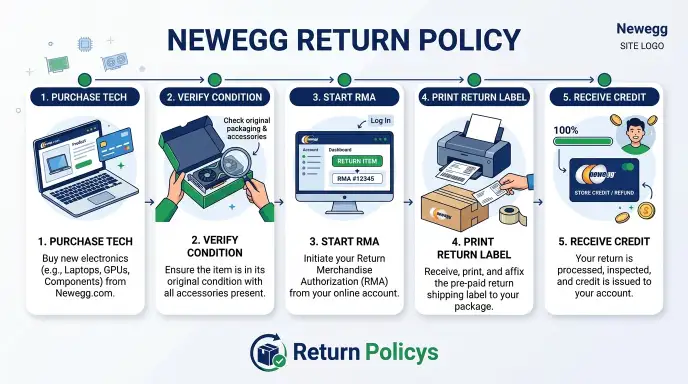
Step-by-Step: How to Start an RMA on Newegg
Starting a return on Newegg is straightforward, but one slip can cost you money. Here’s the exact process.
Step 1: Log in and find your order
Go to your Newegg account and click “Order History.” Find the order containing the item you want to return. Next to each item, you’ll see a “Return or Replace Items” button. Click it.
Step 2: Select the item and choose the reason
Select the item. Then you’ll see a dropdown with reasons:
- Defective / DOA
- Wrong item received
- Missing parts or accessories
- No longer needed (buyer’s remorse)
- Other
Critical: Pick the correct reason. If you pick “No longer needed” for a defective item, you’ll be charged the restocking fee and shipping. You cannot change the reason after you submit.
If you’re unsure, pick the most honest option that matches the real situation.
Step 3: Choose refund or replacement
Newegg gives you two options for defective items: refund to original payment or replacement. Replacement is usually faster if the item is in stock. For buyer’s remorse returns, you only get a refund.
Step 4: Print the return label
- If you selected defective or wrong item: the label is prepaid and free. You get a PDF to download.
- If you selected buyer’s remorse: you’ll either pay for the label upfront, which Newegg deducts from your refund, or you can use your own shipping. If you use your own shipping, Newegg requires a tracking number and signature on delivery for items over $200.
Step 5: Pack the item
Follow the rules from the previous section. Use the original box, include all accessories and the anti-static bag. Write the RMA number on the outside of the box or include the packing slip inside.
Tape securely. Remove any old shipping labels.
Step 6: Ship it back
Drop the package at the carrier specified on the label, usually FedEx or UPS. Keep the tracking receipt until the refund is processed.
How long does the whole RMA process take?
From starting the RMA to getting the label: instant. From shipping to warehouse check-in: 2 to 5 business days depending on distance. From warehouse check-in to refund: 3 to 5 business days for credit card, 24 hours for store credit.
Total: about 1 to 2 weeks for a full refund.
What Happens After You Ship (Warehouse, Inspection, Refund Timelines)
Once your package is in the mail, most people assume the refund is automatic. It’s not. Here’s what actually happens.
Warehouse arrival and check-in
The carrier delivers the package to Newegg’s returns center. It goes into a queue. The check-in process scans the RMA number, logs the item, and places it with other returns for inspection.
This takes 1 to 2 business days after delivery.
Inspection
Newegg’s inspection team opens the box and verifies:
- The correct item is inside, and the serial number matches the order.
- The condition matches the return reason. Defective items are tested.
- All accessories and packaging are present.
- No physical damage from poor packing.
If everything checks out, the inspection is marked “approved.” If there’s a problem, the system creates a “return discrepancy” and your refund is paused.
Refund timelines
| Refund Method | Time After Warehouse Inspection | Notes |
|---|---|---|
| Store credit | Within 24 hours | Appears in your Newegg account immediately |
| Credit card | 3 to 5 business days | May take longer depending on your bank |
| PayPal | 1 to 2 business days | Usually faster than credit cards |
| Gift card | Within 24 hours | Refunded to the same gift card |
Important: Store credit is not the same as a refund to your card. If you want your money back, select the original payment method when you start the RMA. If you accidentally choose store credit, you cannot change it later.
What happens if the inspection finds something wrong
If the item is damaged during return shipping, meaning you packed it poorly, or missing an accessory, Newegg emails you. You get two choices:
- Accept a partial refund, discounted for the missing part or damage.
- Pay to have the item shipped back to you. The shipping cost is deducted from your refund, then the item is sent back.
If you don’t respond within 7 days, Newegg may process a partial refund automatically.
Tracking your return
You can check the status under “My Returns” in your account. The statuses are:
- RMA Initiated (you started it)
- Awaiting Arrival (they haven’t received it yet)
- In Inspection (they’re checking it)
- Inspection Complete
- Refund Issued
The Biggest Mistakes People Make (and How to Avoid Them)
After analyzing hundreds of buyer reports and forum threads, these are the most common errors that cost people money or time.
Mistake 1: Choosing the wrong return reason
We covered this earlier, but it bears repeating. Selecting “No longer needed” when the item is defective triggers the restocking fee and shipping charge. Always take 30 seconds to read each reason carefully.
Mistake 2: Throwing away the original box and anti-static bag
The original box provides correct fit and protection. The anti-static bag prevents ESD damage. If you throw either away, you risk a partial refund or outright denial.
Keep the box for the full return window.
Mistake 3: Returning a bundled item separately
If you bought a CPU plus motherboard combo, you must return both together as one RMA. Returning just one piece triggers a price adjustment. Newegg recalculates the cost of the items you kept at individual prices, which can be $50 to $100 more than the bundle price.
They deduct that difference from your refund.
Mistake 4: Not checking the serial number
Before you send a return, verify the serial number on the product matches the number in your Newegg order history. If you accidentally send back a different unit of the same model, the warehouse flags it. You’ll be asked to pay return shipping to get the correct unit back, or the return is denied entirely.
Mistake 5: Assuming a no-hassle return like Amazon
Newegg is not Amazon. The return policy is more restrictive. There’s no blanket free return shipping.
There’s no automatic prepaid label for buyer’s remorse. If you treat a Newegg return like an Amazon return, you’ll be surprised when shipping and fees eat into your refund.
Mistake 6: Not photographing high-value items before boxing
If you’re returning a $1,000 GPU because it’s defective, take a photo of the card, serial number, and the defects you discovered. If the inspection team disagrees, you’ll have evidence to escalate. We’ve seen cases where a buyer had to fight for weeks because their card arrived with a bent pin that they claimed was there on arrival but couldn’t prove.
When Newegg Says No (Denied Returns and What to Do Next)
Sometimes the return gets rejected entirely. This is frustrating, but it’s not the end of the road.
Common denial reasons
- Outside the return window: You initiated after day 30, or day 15 for open-box.
- Missing original packaging: The box is gone or the packaging is inadequate.
- Missing accessories or components: No cables, no mounting screws, no manual.
- Physical damage: You damaged the item during installation, like scratches, bent pins, or a cracked PCB.
- Serial number mismatch: You returned a different unit.
- Opened software or digital license: Software, downloadable content, and game codes are not returnable.
- Item in a prohibited category: Thermal paste, opened external hard drives, some personal care items.
What the denial email looks like
Newegg emails you with a subject line like “Return RMA #XXXXX Status Update: Inspection Issue.” The email explains why the return was denied and what your options are. It includes a link to view the resolution.
Your options after a denial
- Accept the return of the item: Newegg ships it back to you at your cost, usually $5 to $15. You get the item back and can try to sell it yourself or contact the manufacturer.
- Accept a partial refund: If the issue is a missing accessory, Newegg may offer a reduced refund. For example, a missing CPU cooler bracket might lead to a $10 deduction.
- Appeal with evidence: If you have photos showing the defect was there before shipping, contact customer service through chat or phone. Include the photos and explanation. Some cases get overturned with clear proof.
- Escalate to a supervisor: If the initial agent can’t help, ask to speak with a supervisor. They have more authority to manually override a decision.
When to contact the manufacturer instead
If Newegg denies a return for a defective item within 30 days, you still have the manufacturer’s warranty. Most PC component manufacturers like ASUS, Gigabyte, MSI, EVGA, Corsair, and Seasonic offer at least a 1 to 3 year warranty. Some, like EVGA, have better customer service than Newegg.
If Newegg won’t help, file a warranty claim with the brand. You’ll likely get a replacement faster than fighting Newegg.
The chargeback option (use sparingly)
If you paid with a credit card and Newegg refuses a legitimate return, you can dispute the charge with your bank. This is a nuclear option. Newegg will likely ban your account and address from future purchases.
Use it only for expensive items over $500 where Newegg clearly violated their own policy. Make sure you have documentation: RMA details, emails, photos, and tracking numbers.
Newegg Premier: Is It Worth It for Returns?
Newegg Premier is the paid membership program, similar to Amazon Prime. It costs $49.99 per year as of 2026. Let’s look at what it offers specifically for returns.
What Premier changes for returns
- Free return shipping on all returns, even for buyer’s remorse. You don’t pay a dime for return labels.
- No restocking fee waived: Premier does not waive the 15% restocking fee on non-defective returns. The fee still applies to opened CPUs, motherboards, RAM, and other fee categories.
- Extended return window: Standard 30 days still applies. No extra days for Premier members.
- Expedited RMA processing: Premier members get priority in the inspection queue. Your return is processed faster than standard accounts.
Cost-benefit analysis
If you return a $200 motherboard because you chose the wrong chipset, you’d pay:
- Without Premier: $15 restocking fee (15% of $200) plus $8 return shipping equals $23 total.
- With Premier: $15 restocking fee plus $0 return shipping equals $15 total.
- Savings: $8.
Do that twice a year and you’ve saved $16. That’s not enough to cover the $50 membership.
If you buy a lot of components and frequently change your mind, Premier can break even. But if you’re a careful buyer who only returns defective items, Premier offers no advantage because defective returns already have free shipping.
Who should buy Premier
- Frequent builders: If you build 5 or more PCs a year and often swap components, the free return shipping adds up.
- Business buyers: If you order parts for client builds and occasionally need to return incompatible items, Premier pays for itself.
- One-time buyers: For a single purchase, Premier is not worth it. The $50 cost exceeds the savings from one return.
The verdict
Premier is a convenience play, not a cost-saver for most people. If you return one non-defective item per year, you’re slightly better off without it. If you return three or more non-defective items, Premier makes sense.
If you only return defective items, skip it entirely.
Real Scenario Walkthrough: Returning a DOA Graphics Card
Let’s walk through a real return from start to finish. This is the most common high-stakes scenario: a graphics card that arrives dead on arrival.
The situation
You ordered an RTX 4070 Super from Newegg. It ships and arrives in three days. You open the box, install the card, and the PC won’t POST.
The fans spin for a second then stop. No display output. You try reseating it, check the power cables, try a different PCIe slot.
Nothing. The card is dead.
Step 1: Verify the issue
Before you initiate a return, confirm the card is truly defective. Test it in another system if possible. Make sure the PSU is adequate and the cables are secure.
If you’re certain, move on.
Step 2: Start the RMA
Log into your Newegg account. Go to Order History. Find the GPU order.
Click “Return or Replace Items.” Select the GPU. From the reason dropdown, pick “Defective / DOA.” Do not pick “No longer needed” even if you’re frustrated.
Step 3: Choose replacement or refund
Newegg offers two options: refund or replacement. For a DOA card, replacement is usually faster if the card is in stock. If you need the money back to buy a different model, choose refund.
We recommend replacement in this case because you’ll get the same card shipped back faster than waiting for a refund and reordering.
Step 4: Print the prepaid label
Newegg generates a prepaid return label for free. Print it. Tape it to the box.
Remove any old shipping labels.
Step 5: Pack the card correctly
Put the GPU back in its original anti-static bag. Place it in the original foam cradle. Put the cradle back in the original box.
Include all accessories: the power adapter cables, support bracket, any stickers or manuals. Write the RMA number on the outside of the box. If you don’t have the original box, use a sturdy box with plenty of bubble wrap, but expect potential inspection issues.
Step 6: Ship it
Drop the package at FedEx or UPS. Get a receipt with tracking. Save the tracking number.
Step 7: Wait for inspection
The package arrives at Newegg’s warehouse in about 3 to 5 business days. The inspection team checks the serial number against your order. They test the card to confirm it’s defective.
If they find the card works, which is rare but possible if you misdiagnosed a PSU issue, they’ll mark it as “no trouble found” and charge a restocking fee plus return shipping. If they confirm the defect, they approve the return.
Step 8: Get your replacement or refund
If approved and you chose replacement, Newegg ships a new card within 1 to 2 business days. If you chose refund, the amount goes back to your card in 3 to 5 business days after inspection. Store credit appears in 24 hours.
Timeline summary
| Step | Time |
|---|---|
| Initiate RMA | 10 minutes |
| Pack and ship | 30 minutes |
| Transit to warehouse | 2-5 days |
| Inspection | 1-2 days |
| Refund (card) | 3-5 days |
| Replacement shipped | 1-2 days |
| Total (refund) | 7-14 days |
| Total (replacement) | 5-10 days |
What could go wrong
- You selected “No longer needed” by mistake. Call Newegg support immediately and ask them to change the RMA reason before it ships. If it’s already shipped, you’ll likely have to accept the restocking fee and fight it later.
- You lost the anti-static bag. Newegg may deduct $5 to $10 or deny the return. Buy a replacement anti-static bag on Amazon for $2 before shipping.
- The serial number doesn’t match. If you accidentally grabbed an older card from a previous build, the return gets flagged. Triple-check the serial number against the order history.
Quick Decision Guide (Flowchart in Text)
Here’s the entire Newegg return policy boiled down to simple if/then logic. Use this before you start any return.
If the item is defective or DOA
- You get free return shipping.
- No restocking fee.
- Full refund or replacement.
- Use reason code: “Defective / DOA.”
- Timeline: 5 to 14 days for refund, 5 to 10 days for replacement.
If the item is the wrong product or not as described
- You get free return shipping.
- No restocking fee.
- Full refund.
- Use reason code: “Wrong item received.”
- Contact customer service for fastest resolution.
If the item is opened but works fine (buyer’s remorse)
- You pay return shipping, typically $5 to $15.
- Restocking fee of 15% if the item falls in the fee categories: CPU, motherboard, RAM, internal storage, CPU cooler.
- No restocking fee for other opened items like GPU, case, PSU, monitor, peripherals.
- Use reason code: “No longer needed.”
- Expect a 10% to 20% deduction from total refund after fees and shipping.
If the item is unopened but you changed your mind
- You pay return shipping.
- No restocking fee, even for fee categories.
- Full refund minus shipping cost.
- Use reason code: “No longer needed.”
If the item is open-box or refurbished
- 15-day return window instead of 30.
- Same rules as new for defective versus buyer’s remorse.
- Restocking fee still applies for non-defective returns in fee categories.
If you’re a Newegg Premier member
- Free return shipping on all returns, including buyer’s remorse.
- Restocking fee still applies for non-defective fee category items.
- No extra time on the return window.
If you missed the return window
- The RMA will be denied automatically.
- Your only recourse: manufacturer warranty or credit card chargeback as a last resort.
- Do not ship the item back without an RMA. It will be rejected at the warehouse.
Decision table at a glance
| Scenario | Window | Return Shipping | Restocking Fee | Refund Amount |
|---|---|---|---|---|
| Defective (new) | 30 days | Free | $0 | 100% |
| Defective (open-box) | 15 days | Free | $0 | 100% |
| Wrong item | 30 days | Free | $0 | 100% |
| Opened, fee category | 30 days | You pay | 15% | ~85% minus shipping |
| Opened, non-fee category | 30 days | You pay | $0 | ~90-95% minus shipping |
| Unopened | 30 days | You pay | $0 | ~90-95% minus shipping |
| Open-box, non-defective | 15 days | You pay | 15% (if fee cat) | Variable |
Final Verdict: How to Protect Yourself Before You Buy
The best return is the one you never need to make. But if you buy from Newegg, you can stack the odds in your favor before you click “Place Order.”
Read the product page carefully
Check the “Returns” tab on every product page. It tells you the exact return window and whether a restocking fee applies. Some third-party sellers on Newegg have different policies.
Always verify the seller is “Newegg” or “Newegg Refurbished” for the standard policy. Marketplace sellers may have their own policies with shorter windows or higher fees.
Check the seller and ship-from location
If the item is sold and shipped by a third party, the return policy may differ. Newegg’s standard policy only applies to items sold by Newegg. Third-party sellers can set their own terms.
Look for “Sold by Newegg” or “Shipped by Newegg” on the product page. If it’s a marketplace seller, read their return policy separately.
Take photos of the package on arrival
When a high-value item arrives, take a photo of the outer box before you open it. Then take a photo of the inner contents. If there’s visible damage, note it in the RMA.
This gives you evidence if the warehouse claims the damage happened on your end.
Test components immediately
Don’t let a new GPU sit in its box for three weeks. Install it within the first few days. If it fails, you have plenty of time to start the RMA.
Waiting until day 28 to test is risky. If the part is DOA, you want to catch it early.
Keep the original packaging for 30 days
This is the single easiest habit to protect your refund. Store the box and foam inserts in a closet or under the desk. Do not discard them until the return window expires.
Know when to buy elsewhere
If you’re buying a motherboard or CPU and you’re not 100% sure it’s the right one, consider buying from a retailer with a no-fee return policy. The 15% restocking fee on opened CPUs and motherboards is significant. A $300 motherboard costs you $45 just to change your mind.
In that case, Amazon or a local Micro Center may be a better choice.
Use a credit card with purchase protection
Some credit cards offer return protection or extended warranty benefits. If Newegg denies a legitimate defective return, your card issuer may reimburse you. Check your card’s benefits before making a big purchase.
The bottom line
Newegg’s return policy works well for defective items. It’s fair but not generous for buyer’s remorse. Know the three branches.
Pick the correct reason code. Keep your packaging. Test immediately.
Follow these rules and you’ll avoid the most common pitfalls. If you do those things, the process is straightforward and you’ll get your money back with minimal hassle.
Frequently Asked Questions
How long does a Newegg return take?
From starting the RMA to receiving a refund, expect 7 to 14 days total. Defective returns with free shipping are faster. Buyer’s remorse returns take longer because you handle shipping.
Store credit refunds process within 24 hours after inspection. Credit card refunds take 3 to 5 business days after inspection.
Does Newegg charge a restocking fee?
Yes, but only on opened non-defective returns in specific categories: computer processors, motherboards, memory modules, internal hard drives or SSDs, and CPU coolers. The fee is 15%. No restocking fee applies to defective returns, wrong items, or unopened returns in any category.
Can I return an opened graphics card to Newegg?
Yes. Graphics cards are not in the restocking fee category, so you won’t pay a 15% fee. You will pay return shipping for buyer’s remorse.
If the card is defective, return shipping is free and no fee applies. The return window is 30 days for new cards, 15 days for open-box.
How do I get a free return label from Newegg?
You get a free prepaid return label only when the return reason is “Defective / DOA” or “Wrong item received.” For buyer’s remorse returns, Newegg does not provide a free label. You either pay for their label, deducted from refund, or use your own shipping with tracking.
What happens if I miss the 30-day return window?
Newegg will deny the RMA automatically. You cannot return the item after the deadline. Your only options are to contact the manufacturer for warranty service or file a credit card chargeback if you believe Newegg violated their policy.
Do not ship the item without an RMA. It will be refused at the warehouse.
Can I return a bundle or combo item?
Yes, but you must return all items in the bundle under one RMA. Returning only part of a bundle triggers a price adjustment. Newegg recalculates the price of the items you keep at their individual prices, which are higher than the bundle price.
This can cost you significantly more than a restocking fee.