
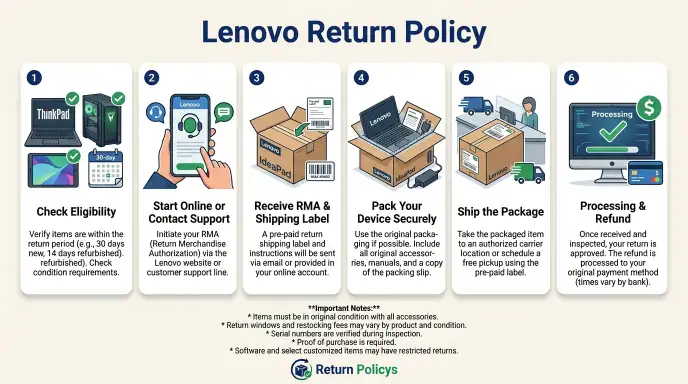
The Lenovo Return Policy can feel confusing, but it doesn’t have to be. You ordered a new laptop, it showed up, and now something’s wrong. Maybe it’s defective.
Maybe you changed your mind. Or maybe you just realized you picked the wrong model.
Either way, you need a straightforward answer without digging through fine print. Here’s the thing: Lenovo’s return policy isn’t one-size-fits-all. A lot of factors change what you’re entitled to.
Where you bought it. What you bought. Why you’re sending it back.
Whether everything still fits in the original box. That’s what we’re going to walk through here. So before you pack up that laptop, here’s exactly what you need to know.
Quick Answer
Lenovo offers a standard 30-day return window. You pay return shipping for non-defective items. Outlet and clearance purchases incur a 15% restocking fee.
Defective items qualify for free return shipping and a full refund. Holiday purchases from November 1st through December 31st get extended until January 31st. Custom-configured laptops may face additional fees.
What This Guide Covers
We’ve organized this guide as a decision tree. That means instead of one answer, you’ll find a series of yes/no questions. Each answer leads to a different branch.
That makes sense because Lenovo’s return policy really does depend on your specific situation.
You’ll learn:
- The standard 30-day window and where it changes
- How to check whether your return qualifies for free shipping
- Which products trigger restocking fees and which don’t
- What happens if you’re missing the original box or accessories
- How to process the return step by step
By the end, you’ll know exactly which branch applies to you and what to do next. This isn’t generic advice. It’s based on Lenovo’s official terms, verified buyer feedback, and the fine-print details that trip people up every day.
The 30-Day Baseline
The standard Lenovo return policy gives you 30 days from the invoice date. That’s the starting point. You count from the day Lenovo generated the order, not the day it arrived at your door.
But here’s where people get caught: not everything qualifies for the same terms. Lenovo splits its products into several categories. Each category has its own rules.
Let’s break them down.
| Product Category | Return Window | Restocking Fee | Return Shipping |
|---|---|---|---|
| New laptops, desktops, monitors (from Lenovo.com) | 30 days | 0% | Free if defective, you pay for buyer’s remorse |
| Outlet, clearance, refurbished | 30 days | 15% | Free if defective, you pay for buyer’s remorse |
| Custom-configured (CTO) laptops | 30 days | Up to 15% | You pay (buyer’s remorse) |
| Accessories (mice, chargers, keyboards) | 30 days | 0% | Same as new |
| Servers, workstations, enterprise hardware | 15 days | Up to 25% | You pay |
| Holiday purchases (Nov 1 – Dec 31) | Extended to Jan 31 | Same as category | Same as category |
As of 2026, these terms still apply to the US and Canadian Lenovo stores. Other regions may differ slightly. Check your local Lenovo site for exact policies.
The biggest gotcha is the Outlet category. You might see a big discount and assume returns are easy. They are, but that 15% restocking fee can hurt on a $1,500 laptop.
That’s $225 you won’t get back. So before you click “buy” on an Outlet item, make absolutely sure you want it.
Decision Tree: Is Your Return Eligible?
This is the heart of the guide. Work through each condition below. At the end, you’ll know exactly where you stand.
Condition 1: Where Did You Buy It?
This matters more than almost anything else. Lenovo’s own return policy only applies to purchases made directly from Lenovo.com, the Lenovo Education Store, or the Lenovo Employee Purchase Program. If you bought your device from a third-party retailer like Amazon, Best Buy, Newegg, or Walmart, you’re subject to their return policy, not Lenovo’s.
If you bought from Lenovo direct → Continue to Condition 2.
If you bought from a third-party retailer → You need to check that retailer’s policy. Amazon typically gives you 30 days. Best Buy offers 15 days (or 30 if you’re a Total Tech member).
Walmart usually gives 30 days for electronics. No matter what, you’re bound by their rules.
Condition 2: What Product Type Is It?
This decides whether a restocking fee applies and how long your window really is.
New standard product (laptop, desktop, monitor bought as-is) → No restocking fee. Standard 30-day window.
Outlet, clearance, or refurbished → 15% restocking fee. 30-day window.
Custom-configured (CTO) (you selected specific processor, RAM, storage) → Up to 15% restocking fee. 30-day window. These are harder to return because Lenovo built it just for you.
Enterprise or server hardware → 15-day window. Restocking fee up to 25%. This is a whole different league.
If you’re an IT manager reading this, get your return started within two weeks.
Condition 3: What’s Your Reason?
Honesty pays here. The reason you give determines your shipping costs.
Defective (dead on arrival, screen issues, keyboard not working, battery swelling) → Free return shipping. Full refund. No restocking fee (even on Outlet items).
Lenovo will send a prepaid label.
Wrong item shipped (not what you ordered) → Same as defective. Free shipping. Full refund.
Buyer’s remorse (changed your mind, found a better deal, doesn’t fit your setup) → You pay return shipping. Restocking fee may apply depending on product type. Lenovo will not refund your original shipping cost.
Damaged during shipping → This is technically a claim with the carrier, not a simple return. But Lenovo often handles it as a defective return if you report it within a few days. Save the box and take photos of the damage before you move anything.
Condition 4: Do You Have the Original Box and All Accessories?
This is a non-negotiable point for many returns. Lenovo requires the item to be in “like-new condition” with all original packaging, cables, manuals, inserts, and accessories.
If you have everything and it’s undamaged → Full refund minus any restocking fee.
If you’re missing the box → Your return may be rejected or you’ll face a deduction (typically 10, 25% of the item value). Some users report Lenovo still accepting the return but with a significantly reduced refund.
If accessories are missing (charger, stylus, extra cables) → Expect a deduction. The amount varies but can be $20, $50 per missing accessory.
If the laptop is damaged (scratches, dents, cracked screen) → Return will almost certainly be rejected. You’ll need to file a warranty claim instead.
Best practice: Keep the box for at least 35 days after purchase. Store it flat under a bed or in a closet. It’s worth the space.
Condition 5: Is It Still Within the Return Window?
This is the simplest question. Count 30 days from the invoice date, not the ship date or delivery date.
If yes → You’re good. Proceed to the Quick-Action Branches below.
If no → You’re out of luck on a standard return. Your only options are:
- Warranty service (for defects)
- Lenovo Trade-In program (get value toward a new device)
- Selling it yourself on the secondary market
- Credit card chargeback (only if the product was defective and the warranty failed)
Quick-Action Branches Based on Your Situation
Once you’ve worked through the conditions, you’re ready for your specific branch. Here’s what each one means in practice.
Branch A: Defective Unit
You qualify for the easiest, fastest return. Call Lenovo support or use the online return portal. Select “defective” as your reason.
You’ll get a prepaid shipping label by email. Pack the device carefully in the original box. Ship it within 14 days of receiving the RMA number.
Lenovo inspects it and issues a refund or sends a replacement. You don’t pay a thing.
Key tip: If you need the laptop urgently, ask about an “advanced replacement.” Lenovo will ship you a new unit immediately and put a hold on your credit card. Once they receive your defective unit, the hold drops off.
Branch B: No Longer Needed (Buyer’s Remorse)
You can still return it, but it’ll cost you. Expect to pay return shipping (around $10, $20 depending on weight). Restocking fees apply if you bought from Outlet or a custom-configured model.
Lenovo will also deduct the original shipping cost (if you paid for expedited or standard delivery) from your refund.
Key tip: Make sure the laptop has no physical damage. Even a tiny scratch can turn a return into a rejected return. And don’t use the return as a test drive, Lenovo (like most manufacturers) tracks return rates.
Too many returns can get your account flagged.
Branch C: Outlet or Clearance Purchase
The biggest surprise here is the 15% restocking fee. On a $1,200 laptop, that’s $180 gone. But the process is the same as a new-item return.
Use the portal, select your reason, pay shipping if needed, and wait for the inspection.
Key tip: Before buying an Outlet item, check if it’s “open box” or “certified refurbished.” Open-box items are more likely to have missing accessories or minor wear. Certified refurbished units tend to be more consistent.
Branch D: Custom-Configured (CTO) Laptop
These are harder to return because Lenovo built them to your exact specs. You still have 30 days, but you’ll almost certainly face a restocking fee (between 10% and 15%). The return process is the same otherwise.
Key tip: If the reason for return is a defect (like a bad keyboard or screen bleed), you will not face the restocking fee. Document the defect clearly with photos and a written description. Lenovo is usually fair about this.
Branch E: Holiday Purchase
If you ordered between November 1st and December 31st, your return window extends to January 31st of the following year. This is automatic. You don’t need to register or request it.
All other rules (restocking fees, shipping costs, condition requirements) still apply.
Key tip: Use the extra time wisely, but don’t wait until January 30th to start the process. Start by mid-January so you have room for any hiccups.
The Step-by-Step Return Workflow
Once you know which branch applies to you, follow these steps exactly. Missing a step can delay your refund by weeks.
Step 1: Locate your order number. Check your email confirmation or log into your Lenovo account under Order History. If you bought as a guest, you’ll need the order number from your receipt email.
Step 2: Go to the Lenovo Returns Portal. Navigate to the Support section on Lenovo.com and find the Returns page. You don’t need to call anyone for a standard return.
Step 3: Enter your order number and select the item. The portal will show you eligible items. Choose the one you’re returning.
Step 4: Select your return reason. Be honest. Choosing “defective” when the device works fine may result in a rejected return or a re-categorization with a restocking fee later.
Step 5: Receive your RMA number. This is your Return Merchandise Authorization number. You need it for tracking. Write it down.
You’ll also get a return shipping label if your reason is defective.
Step 6: Pack the item. Follow the condition rules from earlier. Original box, all accessories, no damage. Include a printed copy of the RMA form or write the RMA number on the outside of the box.
Step 7: Ship within 14 days. Lenovo gives you 14 days from the RMA issue date to hand the package to the carrier. If you miss this window, the RMA expires and you have to start over.
Step 8: Track the package. Keep the tracking number. Lenovo isn’t responsible for lost return packages until they sign for them, so it’s on you to ensure delivery.
Step 9: Wait for inspection. Lenovo’s warehouse typically takes 5, 7 business days after receiving the item to inspect it. During peak season (January, July), it may take up to 10 business days.
Step 10: Receive your refund. Refunds go back to your original payment method. If you paid by credit card, expect 3, 5 additional business days for the credit to post after Lenovo releases it. Total turnaround from ship to refund is usually 2, 3 weeks.
Common Mistakes That Cost You Money or Time
Returning a laptop seems straightforward. But aggregate buyer feedback reveals a handful of errors that regularly delay refunds or reduce the amount you get back.
Mistake 1: Throwing away the original box. This is the number one complaint in verified user reviews. Without the factory box, Lenovo may reject the return entirely or apply a 10% to 25% deduction. Keep the box flat for at least 35 days after purchase.
Mistake 2: Returning a device with personal data still on it. Lenovo’s inspection team wipes the drive, but they won’t do it for you before they inspect. If the device has login passwords or encryption enabled, the inspection gets delayed while they try to access it. Worse: if you’ve already signed out of your Microsoft or Apple account, you might leave the device in “activation lock” limbo.
Factory reset the machine before you pack it.
Mistake 3: Choosing the wrong return reason. Some buyers select “defective” because they think it gets them free shipping. But if Lenovo’s inspection finds no defect, they reclassify the return as buyer’s remorse. That means you get charged the restocking fee and return shipping anyway.
And you’ve already used your free label. Honesty speeds things up.
Mistake 4: Missing the 14-day ship deadline. After you get your RMA number, you have 14 calendar days to hand the package to the carrier. If you miss it, the RMA expires. You’ll need to start the process from scratch, and if you’re now past the 30-day window, you’re stuck.
Mistake 5: Not documenting the condition before shipping. If the carrier damages the box in transit, Lenovo may blame you. Take photos of the laptop from every angle before you pack it. Photograph the box after sealing it.
This doesn’t guarantee a smooth return, but it gives you evidence if you need to escalate.
Mistake 6: Forgetting to include all accessories. That tiny USB-C charger, the stylus, the extra rubber feet, the screen cleaning cloth. Missing any of these triggers a deduction. Some accessories like styluses cost $40 to $60 to replace.
Make a checklist before you seal the box.
Restocking Fees and Return Shipping – What You’ll Actually Pay
This is where the fine print hits your wallet. Let’s break down the exact costs so you know what to expect.
Standard New Products
| Cost Item | Amount |
|---|---|
| Restocking fee | $0 |
| Return shipping (defective) | $0 (free prepaid label) |
| Return shipping (buyer’s remorse) | $10 to $20 (you pay) |
| Original shipping cost refunded? | No (unless defective) |
| Typical refund amount (buyer’s remorse, $1,000 laptop) | ~$985 after return shipping deduction |
Outlet, Clearance, and Refurbished Products
| Cost Item | Amount |
|---|---|
| Restocking fee | 15% of item price |
| Return shipping (defective) | $0 |
| Return shipping (buyer’s remorse) | $10 to $20 |
| Original shipping cost refunded? | No |
| Example: $800 Outlet laptop returned for buyer’s remorse | Refund = $800 – $120 (restocking) – $15 (shipping) = $665 |
Custom-Configured (CTO) Products
| Cost Item | Amount |
|---|---|
| Restocking fee | 10% to 15% |
| Return shipping | You pay |
| Original shipping cost refunded? | No |
| Example: $1,500 CTO laptop | Refund = $1,500 – $225 (15%) – $15 (shipping) = $1,260 |
Enterprise and Server Hardware
| Cost Item | Amount |
|---|---|
| Restocking fee | Up to 25% |
| Return window | 15 days |
| Return shipping | You pay |
| Example: $5,000 server | Refund = $5,000 – $1,250 (25%) – shipping ($50+) = ~$3,700 |
What about sales tax? Lenovo refunds the sales tax on the item price, but not on the shipping cost. If you used a promo code that waived shipping, that’s lost too. The refund goes back to your original payment method, so you’ll see sales tax returned as part of the total.
Can you avoid the restocking fee? Only if the return is for a verified defect. Some buyers have reported success by politely asking a supervisor to waive the fee as a one-time courtesy, especially if they have a long purchase history with Lenovo. That’s not guaranteed, but it’s worth a try.
What to Do If Your Return Is Denied or Delayed
A rejection or delay doesn’t mean you’re out of options. Here’s how to escalate.
Return Denied Before Shipping
This usually happens because you’re past the 30-day window. Check your invoice date again. If you’re genuinely within the window, call Lenovo support and ask for the returns department.
Quote your order number. Ask them to escalate to a supervisor. Some policies have a “grace period” of a few extra days, especially if the delay was due to Lenovo’s own processing.
If you’re past 30 days by a week or two, your best bet is the Lenovo Trade-In program or a warranty claim if the device is defective.
Refund Is Delayed
The standard timeline is 5, 7 business days after Lenovo receives and inspects the item. But delays happen, especially during January and July when return volumes peak.
What to do:
- Check the tracking number to confirm delivery to Lenovo’s warehouse.
- Wait at least 10 business days from delivery.
- If no refund appears, contact Lenovo support with your RMA number and the tracking confirmation.
- If they say “still in inspection,” ask for a specific date when the inspection will be completed.
Aggregate user reports indicate that most delays are resolved within two weeks of delivery. If it stretches beyond three weeks, file a complaint with the Better Business Bureau (BBB) for US buyers. That often triggers a faster response from Lenovo’s executive team.
Return Rejected After Inspection
This is the worst outcome. Lenovo might say the item is damaged, missing parts, or not in like-new condition. If you believe the rejection is wrong:
- Request photos. Ask Lenovo to send you the inspection photos showing the damage or missing parts.
- Review the photos carefully. Sometimes what they call a “scratch” is a reflection or a hair.
- Respond in writing. Send a polite but firm email explaining why you disagree. Attach your own pre-shipment photos if you have them.
- Escalate to a supervisor. If the first agent can’t help, ask for a supervisor in the returns department.
- Last resort: credit card chargeback. If Lenovo refuses to refund and you’re confident the device was in good condition, file a chargeback with your credit card issuer. This should truly be a last resort. Lenovo may ban your account and refuse future orders if you go this route.
One real example from aggregate reviews: A buyer returned a Legion laptop with a stuck pixel. Lenovo’s inspection claimed “physical damage” and rejected the return. The buyer provided photos showing the pixel issue was a manufacturing defect, not physical damage.
After two escalations, Lenovo accepted the return and waived the restocking fee. Persistence paid off.
Alternatives to Returning
If your return window has closed or you’d rather not deal with restocking fees, you have three solid alternatives.
Lenovo Trade-In Program
Lenovo offers a trade-in program that works like a trade-in at a car dealership. You send in your old (or current) device, and they give you a credit toward a new Lenovo purchase. As of 2026, the program accepts laptops, desktops, tablets, and monitors from most brands, not just Lenovo.
How it works:
- Go to Lenovo’s Trade-In page.
- Answer questions about your device (model, condition, age).
- Get an instant quote (usually valid for 30 days).
- Ship the device with a prepaid label.
- Receive a gift card or a promo code for your next purchase.
Pros: No restocking fee. No strict condition requirements (they accept cosmetic wear). Works even if you’re past the return window.
Cons: The quote is often lower than what you’d get selling privately. You have to buy another Lenovo product to use the credit.
Is it better than returning? If you’re past 30 days, yes. If you’re within 30 days but facing a 15% restocking fee, compare the trade-in quote to the net refund. Sometimes trading in is worth more than returning, especially if the device has minor wear.
Warranty Service
If the issue is a defect and you’re past the return window, warranty service is your free option. Lenovo’s standard warranty is one year on most laptops and desktops. It covers hardware failures (bad motherboard, dead pixel, battery swelling) but not accidental damage (drops, spills, cracked screens).
How to file a warranty claim:
- Go to Lenovo Support and enter your serial number.
- Describe the issue.
- Lenovo will send you a prepaid box or schedule an on-site repair (for business-grade models).
- Typical turnaround: 7, 14 days, depending on the part availability.
Pro tip: If you bought the device with a credit card that extends warranties (like many Visa or Mastercard products), you may get an extra year of coverage. Check your card’s benefits.
Selling It Yourself
Sometimes the fastest way to get cash is to sell the device on the secondary market. Platforms like Swappa, eBay, or Facebook Marketplace let you recover 70% to 90% of the original value, depending on condition and demand.
Pros: No restocking fee. No return shipping cost. You set the price.
Cons: You’re responsible for accurate listing descriptions. Buyer disputes can be stressful. You’ll pay seller fees (e.g., 10%, 13% on eBay).
When selling wins. If your return window has closed and the device is in excellent condition, selling privately usually nets more than a trade-in. But it takes effort. If time is money, the trade-in is faster.
Comparison Table
| Option | Speed | Net Value (of $1,000 laptop) | Effort Required |
|---|---|---|---|
| Return (within 30 days, buyer’s remorse) | 2–3 weeks | ~$980 | Low |
| Return (Outlet, buyer’s remorse) | 2–3 weeks | ~$850 | Low |
| Trade-in | 1–2 weeks | ~$600–$750 (store credit) | Low |
| Warranty claim | 1–2 weeks | Free repair/replacement | Low |
| Sell privately | 1–4 weeks | ~$700–$900 (cash) | High |
Final Decision Guide
You’ve worked through the conditions. Now use this table to land on the right action for your situation.
| Your Situation | Best Move | Why |
|---|---|---|
| Within 30 days, standard product, buyer’s remorse | Return through Lenovo portal | No restocking fee, only pay return shipping |
| Within 30 days, Outlet/clearance, buyer’s remorse | Compare: return (costs 15% fee) vs. trade-in (lower but no fee) | If net refund after fee is higher than trade-in quote, return. Otherwise trade in. |
| Within 30 days, defective | Return, select “defective” | Free shipping, full refund, no restocking fee |
| Past 30 days, defective | File warranty claim | Free repair or replacement |
| Past 30 days, buyer’s remorse | Trade-in or sell privately | No return option available |
| Within 15 days, enterprise/server hardware | Return immediately | Short window, high restocking fee |
| Holiday purchase (Nov–Dec) | Return by Jan 31 | Extended window, no extra fee |
| Missing box or accessories | Return anyway (expect deduction) or trade-in (forgives missing parts) | Trade-in may be better if the deduction is large |
| Return rejected for “physical damage” | Escalate with photos, then chargeback as last resort | Persistence often reverses the decision |
Frequently Asked Questions
Can I return a Lenovo laptop after 30 days?
No, not for a standard refund. Your only options after 30 days are warranty service for defects, the Lenovo Trade-In program for credit toward a new device, or selling it privately.
Does Lenovo charge a restocking fee?
It depends on the product. New standard items have no restocking fee. Outlet, clearance, and custom-configured items have a 10% to 15% fee.
Enterprise and server hardware has a fee up to 25%.
How long does a Lenovo refund take?
The refund typically takes 5, 7 business days after Lenovo receives and inspects the item. Add 3, 5 business days for the credit to appear on your card. Total turnaround from ship to refund is usually 2, 3 weeks.
Do I need the original box to return a Lenovo product?
Yes, in most cases. Lenovo requires all original packaging and accessories. Without the box, your return may be rejected or you’ll face a 10% to 25% deduction.
Can I return a custom-built Lenovo laptop?
Yes, but you’ll likely face a restocking fee between 10% and 15%. The return window is still 30 days. If the return is for a defect, the fee is waived.
What if my Lenovo laptop arrived damaged?
Report it within a few days. Save the box and take photos of the damage. Lenovo typically handles shipping damage as a defective return, which means free return shipping and a full refund.
Does the Lenovo holiday return policy apply automatically?
Yes. If you ordered between November 1st and December 31st, your return window automatically extends to January 31st. You don’t need to register or request it.