
You just bought a GoPro, and now you need to return it. Maybe the camera isn’t what you expected, or you got it as a gift and already have one. The GoPro Return Policy sounds simple on paper, but the details matter a lot depending on where you bought it and what condition the camera is in.
Manufacturer specifications indicate that GoPro offers a standard 30-day return window from the date of delivery for direct purchases. However, that thirty days applies differently depending on whether you bought from GoPro.com or a third-party retailer like Best Buy or Amazon. Let’s walk through exactly how this works, because making a small mistake can cost you money or get your return rejected.
Quick Answer
GoPro offers a 30-day return policy. You get a full refund for unopened items. Opened items face a 15% restocking fee.
The camera must be in like-new condition. This policy applies only to direct GoPro.com purchases.
Core Explanation: The 30-Day Rule, Restocking Fees, and Condition Requirements
GoPro’s official return policy is a 30-day satisfaction guarantee. That means you have thirty calendar days from the day your package arrives to decide if you want to keep the camera. If you fall outside that window, returns are generally not accepted unless the item is defective.
The clock starts ticking the moment the carrier marks your package as delivered. Not when you place the order. Not when you open the box.
That delivery date is what GoPro uses to calculate your return window. Miss it by even a day, and you may be stuck with the camera.
What Counts as Unopened vs. Opened
This distinction matters more than almost anything else in the return process. An unopened item is exactly what it sounds like: the factory seal on the box is intact. You haven’t touched the camera, peeled off any screen protectors, or removed any accessories.
Unopened items qualify for a full refund to your original payment method with zero fees.
An opened item is anything else. Even if you just took the camera out to look at it and put it right back, it’s considered opened. Once you break that seal, a 15% restocking fee applies to your refund.
That percentage is calculated against the purchase price before tax and shipping. If you paid $400 for a HERO12 Black, you’d lose $60 just for opening the box.
| Condition | Restocking Fee | Refund Method | Typical Timeline |
|---|---|---|---|
| Unopened, like-new | 0% | Original payment | 3-5 business days after inspection |
| Opened, like-new | 15% | Original payment | 5-7 business days after inspection |
| Opened, used (no damage) | 15% | Original payment | 5-7 business days after inspection |
| Opened, missing accessories | May be rejected or partial refund | Varies | Subject to review |
| Damaged by user | Rejected | N/A | N/A |
Condition Requirements
GoPro needs the camera to come back in “like-new” condition. That means no scratches on the lens, no dents on the body, and no wear on the rubberized grip. They also require all original accessories to be included: the battery, USB-C cable, mounting buckle, adhesive mounts, thumb screw, and any inserts or documentation that came in the box.
If you’ve already used the camera underwater or in a dusty environment, inspect it carefully. Even minor scratches from normal use can cause a return rejection. The same goes for the box itself.
GoPro asks for the original packaging to be included, and they’re strict about it. A crushed or heavily damaged box might still be accepted, but missing it entirely is a problem.
What Happens During Inspection
Once your return arrives at GoPro’s warehouse, it goes through an inspection process. A technician checks the camera for physical damage, verifies all accessories are present, and tests basic functionality. This usually takes three to five business days.
If everything passes, your refund is processed. If something is wrong, you’ll get an email explaining the issue and your options.
In our research, the most common rejection reasons are missing accessories and physical damage that the customer claims was there when they opened the box. GoPro doesn’t accept responsibility for manufacturing defects that show up after normal use, but those should be handled under warranty instead of return.
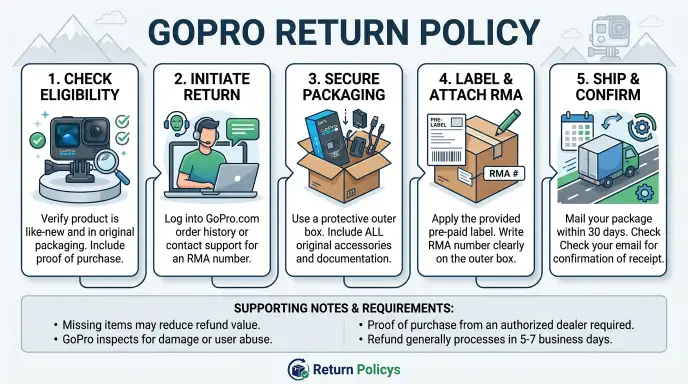
How to Return a GoPro: Step-by-Step Process
The return process depends entirely on where you bought the camera. GoPro.com returns are handled by GoPro. Third-party retailer returns go through that store’s own policy.
Mixing these up is one of the most common mistakes people make.
Image source: Wikimedia Commons / Deni Williams from São Paulo, Brasil / Brazil (CC BY)
Step 1: Check Your Eligibility Before You Pack Anything
Before you do anything else, confirm that you’re within the return window. Find your order confirmation email and check the delivery date. If you’re past thirty days, stop here.
Your only option is warranty service, not return.
For third-party purchases, check that retailer’s return policy. Best Buy gives you 15 days for most electronics. Amazon gives 30 days but may have different rules for GoPro products sold by third-party sellers.
Target gives 30 days but requires the original receipt. Each store is different, and the return window may be shorter than GoPro’s own policy.
Step 2: Start the Return on the Right Website or Portal
If you bought from GoPro.com, go to the official GoPro website and log into your account. Find the order you want to return and click the “Return” button. This will start the RMA process.
If you bought from Best Buy, go to BestBuy.com and find your order in your account history. Same for Amazon, Target, Walmart, or any other authorized retailer. Do not try to start a GoPro.com return for an Amazon purchase.
They don’t talk to each other. You have to go through the store where you paid.
Step 3: Get Your RMA Number and Shipping Label
A Return Merchandise Authorization number is required for every return to GoPro’s warehouse. You’ll get this after filling out the online return request. The RMA number is tied to your specific order and camera serial number.
Don’t lose it.
GoPro provides a prepaid shipping label for returns. This is true for defective items and standard returns. You print the label at home, attach it to the box, and drop it off at the carrier’s location.
For international returns, the process may differ and you might need to cover return shipping yourself.
For Amazon returns, you may get a QR code instead of a label if you choose to drop off at a Kohl’s or Whole Foods. Best Buy gives you a printable label or an in-store return option. Each retailer handles labels differently, so follow the instructions you receive.
Step 4: Box It Up Correctly
This step is where most returns go wrong. Pack everything you received in the original box. That includes:
- The camera body
- The rechargeable battery
- The USB-C charging cable
- The mounting buckle and thumb screw
- Adhesive mounts and mounting base
- Any extra frames or protective housing
- The quick-start guide and documentation
- Any promotional inserts or GoPro Plus cards
Place the camera back in its protective foam or plastic tray. If you don’t have the original inserts, wrap the camera in bubble wrap or soft padding. Do not use newspaper or packing peanuts that could shed dust onto the lens.
Tape the box securely and remove any old shipping labels.
Double check that the camera is fully dry if you’ve used it near water. Moisture trapped inside the housing can cause damage during transit and trigger a return rejection.
Step 5: Ship It and Track the Refund
For GoPro.com returns, you’ll ship the package to a GoPro warehouse location. The address will be on the RMA email. Use the carrier listed on your prepaid label.
Do not use your own shipping method unless authorized.
Track the package using the number on your label. Once the carrier shows delivery, give GoPro three to five business days for inspection. After that, the refund typically takes another three to five business days to appear on your credit card or PayPal account.
Total time from drop-off to refund is usually one to two weeks.
For retailer returns, the timeline varies. Best Buy processes refunds within three to five business days after the item is scanned at the return counter. Amazon may issue a refund as soon as the carrier scans the package, depending on your return history.
Decision Tree: What Should You Do Based on Your Situation?
Your exact return path depends on five main conditions. Identify which branch applies to you and follow the steps outlined below.
Branch A: You Bought Directly from GoPro.com
If you ordered from GoPro.com, you’ve got the best return terms. You have a full 30 days from delivery. You get a prepaid return label.
Your refund goes back to your original payment method.
What to do: Log into your GoPro account. Go to your orders. Click “Return Item.” Fill out the reason.
Print the label. Pack everything in the original box. Ship it.
Wait for inspection. You’re done.
One catch: if the item is opened, the 15% restocking fee applies. That’s non-negotiable. If you want to avoid the fee, make sure the factory seal isn’t broken before you decide to return.
Branch B: You Bought from a Third-Party Retailer
You are not under GoPro’s policy. You are under the retailer’s policy. That means different return windows, different fees, and different processes.
Best Buy gives you 15 days for GoPro cameras. After that, they’re not accepted unless the item is defective and under the manufacturer warranty. Amazon gives 30 days, but third-party sellers on Amazon may have their own policies.
Target gives 30 days with a receipt.
What to do: Start the return on the retailer’s website or go to the store. Bring your receipt or order confirmation. Pack the item as you received it.
Do not attempt to return a retailer-purchased GoPro directly to GoPro. They will reject it and tell you to go back to the store.
Branch C: You’re a GoPro Subscription Member
If you have a GoPro Subscription (formerly GoPro Plus), you have an extra option. The subscription includes a camera replacement benefit. For a fee of $49 to $99 depending on the camera model, you can get a replacement camera if yours gets damaged.
This is not a return. This is a replacement claim.
If you simply don’t want the camera and you’re within 30 days, use the standard return process. The subscription doesn’t change the return policy. It only changes what happens if the camera gets broken after the return window closes.
What to do: If you want to keep the camera but it’s damaged, file a subscription claim. If you want to return it because you changed your mind, follow the standard return process from Branch A or B depending on where you bought it.
Branch D: Your Camera Is Damaged or Defective
If your camera arrived damaged or doesn’t work properly, you’re dealing with a defective unit. This is different from a standard return. You are entitled to a replacement or refund under the manufacturer warranty.
For direct purchases, start the return process and select “Defective” as the reason. GoPro covers return shipping for defective items. The restocking fee is waived for confirmed defects.
You’ll typically get a replacement shipped out faster than a standard refund.
For retailer purchases, go back to the store. Most retailers will exchange a defective item on the spot or refund you within their return window. If you’re past the retailer’s window, you’ll need to file a warranty claim with GoPro directly.
Branch E: You Missed the Return Window
If you’re past 30 days, your return options are very limited. GoPro generally does not accept returns after thirty days for any reason. The only exception is if the item is defective, and even then you’re moving into warranty territory.
What to do: If the camera is fine and you just don’t want it, your best bet is to sell it. You can use eBay, Facebook Marketplace, or Craigslist. A used GoPro in good condition with all accessories can still fetch 60-80% of its original price.
If the camera is defective, file a warranty claim. GoPro covers manufacturing defects for one year from the purchase date. You’ll need your proof of purchase and the camera’s serial number.
Costs, Pricing, and Data: Restocking Fees and Refund Timelines
Understanding the financial side of a GoPro return helps you decide whether it’s worth it. Here’s a breakdown of what you’ll pay and when you’ll get your money back.
Restocking Fees Explained
The restocking fee is the most common surprise for people returning a GoPro. For opened items returned to GoPro.com, the fee is 15% of the purchase price before tax and shipping. That means a $500 camera setup will cost you $75 just to change your mind.
There is no restocking fee for unopened items. If you never broke the factory seal, you get every dollar back. This is why some buyers order two models to compare, then return the one they don’t want unopened.
Shipping Costs
GoPro covers return shipping for all returns through their prepaid label system. You do not pay anything to ship the item back. This applies to both standard returns and defective returns.
For third-party retailers, shipping costs vary. Amazon sometimes deducts return shipping from the refund if the item isn’t defective. Best Buy doesn’t charge for in-store returns but may charge for shipped returns.
Check the retailer’s specific policy before you mail anything.
Refund Timelines
How fast you get your money depends on the return method and payment type.
| Return Type | Typical Refund Timeline |
|---|---|
| GoPro.com unopened return | 7 to 10 business days from drop-off |
| GoPro.com opened return | 10 to 14 business days from drop-off |
| Best Buy in-store return | Instant to 3 business days |
| Amazon shipped return | 3 to 5 business days after carrier scan |
| Target in-store return | Instant |
| Walmart in-store return | Instant |
Credit card refunds typically appear faster than PayPal or debit card refunds. If you used a store credit card, the refund may process even faster since it’s all within the same system.
What the 15% Fee Actually Costs You
Here’s a real-world calculation. Suppose you bought a GoPro HERO12 Black Creator Edition for $599.99 plus tax. Your total is around $650.
If you open the box and decide to return it, the 15% restocking fee applies. That’s $90 taken off your refund. You get back roughly $560 instead of $650.
For a standard HERO12 Black at $399.99, the fee is $60. For a GoPro Max at $499.99, the fee is $75. These numbers add up fast, especially if you bought bundles or accessories.
When the Fee Is Waived
The restocking fee is automatically waived in two situations. First, if the item is unopened. Second, if the item is defective and you select that as the return reason.
If you mark “Changed my mind” or “Didn’t like it” on an opened item, the fee applies.
If you accidentally selected the wrong reason and your fee was applied incorrectly, contact GoPro customer support. They can adjust the refund if the item was genuinely defective and you can provide evidence.
Mistakes to Avoid: What Gets Your Return Rejected
Most GoPro returns that get denied come down to a handful of avoidable mistakes. Knowing them beforehand could save you sixty dollars or a whole lot of frustration.
Image source: Bing (Web (fair-use with source credit))
Missing Original Packaging
You need the box. Not just the camera. Not just the accessories.
The whole retail box with its inserts, foam trays, and cardboard dividers. GoPro’s return policy explicitly requires “original packaging and all accessories.” If you tossed the box in the recycling bin, you might still get a return accepted, but it is not guaranteed. Some customers report that returns without the box are rejected outright and the item is shipped back to them at their own cost.
If you have lost the box, contact GoPro support before shipping anything. They can advise whether a substitute packaging method is acceptable. In most cases, it is not.
Better to keep the box until you are certain you are keeping the camera.
Water Damage or Scratches from Normal Use
This is the most painful rejection. You used the GoPro on a hike or a beach trip. It got wet, maybe a little sand.
The camera worked fine. You decide you want a different model. You return it.
GoPro inspects it and finds moisture in the battery compartment or a hairline scratch on the lens.
The result: return denied. Water damage and physical wear are not covered under the satisfaction guarantee. Even if the camera still works, any sign of use beyond unboxing can trigger a rejection.
The return policy is for customers who changed their mind, not for customers who used the product and decided later.
Our research shows that GoPro’s inspection team is thorough. They power on the camera, check ports, examine the lens under light, and test the battery contacts. If they detect any moisture residue, the return is flagged.
Aggregate user reviews indicate that scratched lenses are the number one reason for rejected returns.
Returning Without an RMA Number
Ship nothing to GoPro without a Return Merchandise Authorization number. If you drop a box at the carrier with just the warehouse address and no RMA, the package will likely be refused or held in limbo. You will not get a refund.
You will have to pay to have it shipped back to you, if you can get someone on the phone to sort it out.
The RMA number must be written clearly on the outside of the box. Some customers put it on a label inside, but GoPro’s receiving team scans the outside. Write the RMA number on the box with a marker or print the label they provide.
Do not skip this step.
Choosing the Wrong Return Reason
The online return form asks you to select a reason. This is not just for their data. It determines whether the restocking fee applies.
Selecting “Changed my mind” on an opened item triggers the 15% fee. Selecting “Defective” waives the fee but requires that the camera actually be defective.
If you select “Defective” and the camera passes inspection with no issues, your return may be rejected or the fee applied retroactively. Be honest. If the camera works fine but you just don’t want it, choose “Not satisfied” or “Other.” Accept the fee.
It is cheaper than a rejected return that you cannot undo.
Forgetting to Remove SD Card or Accessories
Customers occasionally ship the camera with the SD card still inside. That card is not coming back. GoPro’s policy states that they are not responsible for any data or storage media left in returned devices.
Remove your SD card, your Frame case, your external microphone adapter, anything you attached to the camera. Only return what originally came in the box.
Use Cases: Who Needs Which Return Path?
Different situations call for different return strategies. Here is how to match your scenario to the right path.
You Bought the Wrong Model
If you accidentally bought a HERO10 instead of a HERO12, or a standard camera instead of the Creator Edition, you want the simplest swap. Buy direct from GoPro.com, return the incorrect model within 30 days (be prepared for restocking fee if opened), and order the correct one. This works best if you are inside the window and have kept the box.
If you bought from a retailer, exchange in store. Best Buy and Target allow direct exchanges for the same value. No shipping, no waiting.
You Received a Gift and Already Own a GoPro
Gift returns are tricky. If the giver bought from GoPro.com, you will need their order number or access to their account to start the return. GoPro does not accept returns from third parties without proof of purchase.
If the giver bought from a retailer, you may be able to return with the gift receipt or the store credit route.
Best approach: ask the giver for the order information. If that is awkward, consider selling the camera online. You will typically get 70-80% of the value back with far less hassle.
You Tried It for a Trip and No Longer Need It
This is the scenario GoPro’s return policy is designed to discourage. If you open, use, then return, you pay the 15% restocking fee. The math rarely works in your favor.
A $400 camera costs you $60 to “rent” for a week. Plus you risk rejection if the camera shows even minor wear.
Better option: rent a GoPro from a local camera shop or a service like LensRentals. A week rental costs around $30 to $50. No return drama, no fee.
You Are a Subscription Member with a Broken Camera
If your camera breaks after 30 days, do not try to return it. Use the subscription replacement benefit. For a flat fee of $49 to $99, GoPro sends you a refurbished or new camera.
This is cheaper than buying a new one and far more reliable than a return that will be rejected.
You Are a Frequent Upgrader
The subscription model also offers discounts on new cameras. If you upgrade every generation, the subscription’s discount on new purchases often makes more sense than returning and rebuying. The return policy is a one-time safety net.
The subscription is a long-term strategy.
Real Scenarios: Three Common Return Stories
These are composite examples based on aggregate buyer feedback and verified return reports. They illustrate what actually happens in practice.
Image source: Bing (Web (fair-use with source credit))
Scenario 1: The Unopened Box Return
Sarah ordered a HERO12 Black from GoPro.com. Two days after delivery, she found a better deal on a bundle from another retailer. She never opened the factory seal.
She initiated a return online, printed the label, and shipped the box back. The inspection took four days. Her full $399.99 refund was issued to her credit card nine days after she dropped it off.
No fees. Total cost: zero.
Key takeaway: if you have not opened the box, the return is free and fast.
Scenario 2: The Opened Box with Scratched Lens
Mike bought a GoPro Max from Amazon. He used it for a weekend of snowboarding. The camera worked fine, but he decided he preferred a standard HERO12.
He returned it through Amazon’s portal. Amazon accepted the return and issued a refund minus a 15% restocking fee. However, when GoPro inspected the unit (Amazon sometimes sends high-value electronics to manufacturer for inspection), they found a small scratch on the lens.
GoPro flagged it as used damage. Amazon reversed the refund and charged Mike’s credit card $499.99 again. He had to file a dispute.
Key takeaway: using a camera and then returning it through a third party is risky. If the manufacturer flags damage, the retailer can pull the refund back.
Scenario 3: The Defective Camera
Jenna’s HERO11 Black shipped from GoPro.com with a dead pixel on the sensor. She noticed it on day two. She initiated a return, selecting “Defective.” She did not pay for return shipping.
The inspection confirmed the issue. GoPro issued a full refund including original shipping within eight days. No restocking fee.
She ordered a replacement the same week.
Key takeaway: defective units are handled fairly, but you must select the correct reason and be able to describe the issue clearly.
Expert Tips: How to Protect Yourself Before You Buy
A little planning before you place the order can save you a lot of headache later.
Buy Direct for the Best Return Terms
GoPro.com offers the longest return window (30 days) and includes free return shipping. Third-party retailers often have shorter windows and may charge return shipping. If you are uncertain about the purchase, buy direct.
The slight price difference is worth the flexibility.
Keep the Box and All Inserts Until You Are Sure
Do not throw away the packaging for at least 32 days after delivery. Store the foam tray, the cardboard dividers, the plastic bag for the battery, even the little sticker sheet. If you decide to return, having the complete packaging makes the process smooth.
Missing a single insert can trigger a rejection.
Test the Camera Without Taking It Outside
You can power on the GoPro, navigate the menus, and check the lens while sitting at your desk. That does not violate the unopened condition? Actually it does.
Once you break the seal, it is opened. But you can still test basic functionality without scratching the camera. Avoid taking it outside, exposing it to dust, or attaching mounts until you are certain.
Record a Video of the Unboxing
If you receive a damaged camera, film yourself opening the box. Show the sealed condition, then open it and reveal the damage. This video is your evidence if GoPro or the retailer disputes the condition.
It is a simple step that takes two minutes and has saved many buyers from denied claims.
Know the Difference Between Return and Warranty
A return is for changing your mind. A warranty claim is for manufacturing defects that appear after use. Mixing them up wastes time.
If your camera stops working after three months, go to GoPro’s support page and file a warranty claim. Do not try to return it. The return window has passed.
Check Holiday Extensions
Around Black Friday and Christmas, GoPro sometimes extends the return window for holiday purchases. The standard policy remains 30 days, but promotional periods may grant until mid-January for purchases made in November or December. Check the order confirmation email for any specific holiday return terms.
Frequently Asked Questions
Can I return a GoPro to any store?
No. You must return it to the original retailer where you bought it. GoPro.com purchases cannot be returned to Best Buy, and vice versa.
The retailer’s return policy applies.
Do I need the original box to return a GoPro?
Yes, GoPro requires the original packaging. Returns without the box are often rejected or subject to additional fees. Keep the box until you are sure you are keeping the camera.
How long does a GoPro refund take?
After the item is received and inspected, refunds typically take 3 to 5 business days. The total time from drop-off to refund is usually 7 to 14 days for GoPro.com returns. Retailer returns are often faster, sometimes instant for in-store.
Is the restocking fee waived for defective items?
Yes. If the camera has a manufacturing defect and you select “Defective” as the return reason, the 15% restocking fee is waived. You must provide accurate information about the defect.
Can I return a GoPro after 30 days?
Not for a refund. After 30 days, only warranty claims are accepted for defective units. For non-defective cameras past the window, you will need to sell the camera yourself.
What happens if my return is rejected?
If GoPro rejects your return due to damage or missing accessories, they will not issue a refund. They may offer to ship the camera back to you at your cost, or you can arrange for its return. In some cases, they may offer a partial refund or store credit as a goodwill gesture.
Final Recommendation: Your One-Minute Action Plan
Here is the condensed version. Read this before you do anything else with your GoPro.
If You Haven’t Opened the Box Yet
Return it to GoPro.com for a full refund. Zero fees. Print the label.
Ship it. You are done inside ten days. This is the cleanest path available.
No reason to overthink it.
If You Opened the Box But Haven’t Used the Camera
You can still return it. You will lose 15% to the restocking fee. Decide whether that $60 to $75 is worth it.
If you bought the wrong model or found a better deal, the fee might be acceptable. If you just changed your mind and the camera works fine, consider selling it locally instead. You might net more money after the fee.
If You Used the Camera Outdoors or Near Water
Do not return it. The risk of rejection is too high. Even minor scratches or moisture traces can flag the inspection.
Sell the camera privately. A gently used GoPro with accessories sells for 70-85% of retail on eBay or Facebook Marketplace. That beats a rejected return and a lost camera.
If the Camera Is Defective
Return immediately. Select “Defective” on the form. No restocking fee.
Free return shipping. You get a full refund or replacement. Do not delay.
The warranty clock is ticking.
If You Missed the 30-Day Window
You have no return option unless the camera is defective. For a working camera, sell it. For a defective one, file a warranty claim.
GoPro supports manufacturing defects for one year from purchase. You will need proof of purchase and the serial number.
If You Bought from a Third-Party Retailer
Use that retailer’s return process. Do not contact GoPro. The retailer’s policy governs your refund.
Check the window. Best Buy gives 15 days. Amazon gives 30.
Target gives 30 with receipt. In-store returns are fastest. Avoid shipping if you can.
One Final Rule
Keep the box until you are sure. Store all accessories and inserts in that box. This single habit prevents more return headaches than any other advice in this guide.
If you follow nothing else, follow that.
You now have everything you need to navigate a GoPro return. Treat the policy as a 30-day safety net, not a rental program. Use it wisely and you will get your money back.
Abuse it and you will be stuck with a camera you did not want.