
Figuring out the Cuyana return policy doesn’t have to be a hassle. We’ve researched the official rules so you know exactly what to expect before you ship anything back. Whether you’ve bought a leather tote, a silk blouse, or a gift for a friend, the process is simpler than most people think.
Per the policy as of 2026, Cuyana offers a 30-day return window and free returns within the United States. There are a few important conditions around tags, packaging, and final sale items. Getting them right is the difference between a smooth refund and a rejected return.
Let’s walk through every detail so you can handle your return with confidence.
Quick Answer: Cuyana Return Policy at a Glance
Cuyana accepts returns within 30 days of delivery.
Items must be unworn with tags attached.
Returns are free in the continental United States.
Refunds process in 5 to 10 business days after the return is received.
Exchanges ship faster than refunds.
Final sale items cannot be returned or exchanged.
What Is Cuyana’s Return Policy? (The Core Rules)
Cuyana’s return policy is straightforward but has a few non‑negotiable requirements. If you understand these upfront, you’ll avoid most of the headaches shoppers run into.
Return window. You have 30 calendar days from the delivery date to start a return. That means the day your package hits your doorstep, not the day you order it. Mark your calendar or set a phone reminder.
Condition requirement. Every item must be unworn, unused, and in its original condition. That includes all tags still attached. If the tag is missing or cut off, Cuyana will likely reject the return.
For leather goods, the protective dust bag and box should be included.
Proof of purchase. You need either your original order confirmation email or the packing slip that came in the box. If you don’t have either, the return becomes trickier (we cover that in the decision tree below).
Free returns in the U.S. Cuyana provides a prepaid return label for shipments within the 50 states. There’s no restocking fee. That’s a nice touch compared to many premium brands that charge $7 to $15 for return shipping.
Customer responsibility. You’re responsible for packing the item securely and dropping it off at the carrier’s location. Cuyana recommends using the original packaging or a sturdy box. Shoes should be in their original box inside another shipping box to avoid damage.
In our research, the most common reason for a rejected return is missing tags. The second is starting the return after day 30. Both are easy to avoid with a little planning.
For the full official wording, you can always check Cuyana’s official return policy page.
Return authorization. You must initiate the return through Cuyana’s online portal or via customer service. Simply shipping the item back without a return number can delay processing or result in the package being refused.
How Long Do You Have to Return Cuyana Items?
The standard return window is 30 calendar days from the delivery date. Cuyana counts days the way most brands do: delivery day plus 30. If day 30 falls on a weekend or holiday, it’s safest to ship before that day.
What counts as the delivery date? The date shown in your tracking information from the carrier. If you selected standard shipping and the package sat at your doorstep for two days before you opened it, the clock already started ticking. That’s a common trap.
Exceptions to the 30‑day rule.
- Final sale items. Anything marked “final sale” cannot be returned or exchanged under any circumstance. This includes seasonal markdowns and clearance merchandise. The final sale status is clearly shown on the product page during checkout.
- Holiday purchases. Cuyana sometimes extends the return window for orders placed between November and December. When available, items purchased after a specific date (often mid‑November) have until mid‑January to be returned. This is a courtesy, not a guarantee, so double‑check your order confirmation.
- Damaged or wrong items. If your item arrived damaged or Cuyana sent the wrong size or color, you still have 30 days. But you should contact customer service immediately to start a claim. They may expedite the process and cover return shipping without using the prepaid label.
What happens after day 30? Cuyana’s system generally auto‑rejects returns submitted after the window closes. There is no 30‑day grace period. If you’re past the window, you can still contact customer service, but there’s no guarantee they’ll accept the return.
Some shoppers have reported exceptions when they contacted support within a day or two of the deadline and had a valid reason (like an illness or delay). That’s not guaranteed, so don’t rely on it.
Our advice. As soon as you decide you don’t want an item, start the return. Don’t put it off. The 30 days pass faster than you think, especially during busy seasons.
Decision Tree: Which Return Path Is Right for You?
Every return situation is a little different. The right path depends on whether you have your receipt, whether the item is damaged, whether it’s a gift, and whether you want a refund or an exchange. Use the branches below to find your fastest route.
You Have a Receipt and Order Number
This is the easiest path. Log into your Cuyana account, go to “Orders,” and click “Return Items.” Follow the prompts to select the item and reason. You’ll get a prepaid label within minutes.
If it’s a guest purchase (you checked out without creating an account), use the order number from your email confirmation. That email also contains a direct link to the return portal.
Result: Label issued immediately, return scanned within 24 hours, refund processed 5, 10 business days after arrival.
You Don’t Have a Receipt
This is where things get harder. Without an order number or email, Cuyana can’t look up your purchase by name or address. Your only option is to contact customer service and provide:
- The email address used at checkout.
- The shipping zip code and date of delivery.
- The credit card used (last four digits).
If you have any of these, customer service can often locate the order and still issue a return. If you have none of these, Cuyana will likely decline the return.
No receipt, no luck. This is the most common frustration we see in aggregate reviews. Keep your order confirmation email or take a screenshot of the tracking page.
You Received a Damaged or Wrong Item
Cuyana is generally responsive about this. Contact customer service as soon as you notice the problem. They will request photos of the damage or the incorrect item.
Once they confirm, they’ll issue a prepaid return label and prioritize processing.
Don’t ship it back without contacting support. If you send it back without a claim, it may be treated as a regular return and you won’t get a faster refund. Always open a case first.
Refund vs. replacement. You can choose a replacement (same item, correct version) or a full refund. Replacement shipping is usually overnight once the return is scanned.
You Want to Exchange Instead of Refund
Exchanges are often faster than refunds. When you start a return through your account, look for the “Exchange” option. You can swap for a different size or color of the same item.
Cuyana does not currently support exchanging for a completely different product.
How exchanges work.
- You ship your item back using the prepaid label.
- Once the return is scanned by the carrier, Cuyana immediately ships the replacement.
- The new item typically arrives in 3 to 5 business days.
Exchange window. Same 30‑day limit as returns. If you want a refund instead, you have to complete the return first and then place a new order.
The Item Is Final Sale
If your receipt says “final sale” or the product page showed that label, there is no return or exchange option. Cuyana is strict on this. The only exception is if the item is defective or Cuyana sent the wrong product.
In that case, contact customer service.
What if you change your mind? You can try re‑selling the item on a secondhand marketplace. Many minimalist wardrobe groups buy and sell Cuyana items.
You’re Returning a Gift
Gift returns work slightly differently. If the original order was marked as a gift, the packing slip inside the box usually includes a gift receipt. That receipt has all the information needed to initiate a return without the giver knowing the price.
- If you have the gift receipt: Use the link on the receipt or contact customer service with the order number. The refund goes to the person who made the purchase.
- If you don’t have the gift receipt: The giver will need to initiate the return from their account.
- Store credit option. Some gift returns can be processed as store credit if the giver’s credit card has expired or they prefer not to get the money back. Ask customer service about this.
No‑receipt gift returns are the hardest. Without any order information, the recipient cannot return the item. The giver will have to help.
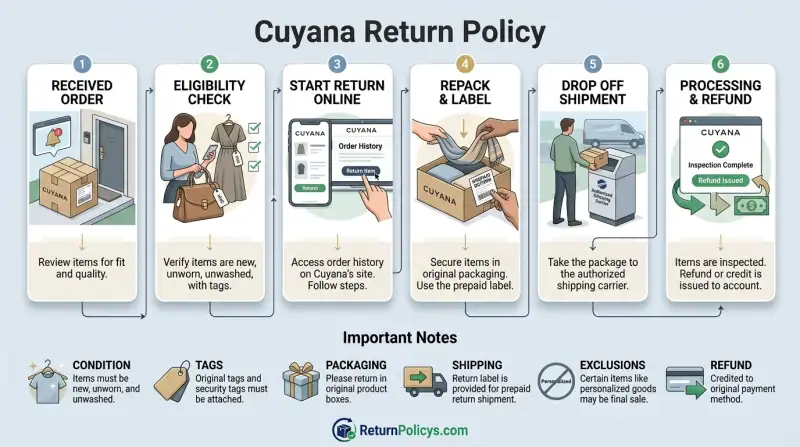
How to Start a Return: Step‑by‑Step Workflow
Wherever you are in the decision tree, the actual process of starting a return follows the same basic workflow. Here’s what to do from start to finish.
Online (Most Common Path)
Step 1: Log into your Cuyana account. Go to “My Account” → “Orders.” Find the order containing the item you want to return. Click “Return Items.”
Step 2: Select the item and reason. Check the box next to each item you’re returning. Choose a return reason from the dropdown (e.g., “too small,” “changed my mind,” “quality issue”). If it’s a damaged item, select “defective.”
Step 3: Choose refund or exchange. If you want an exchange, confirm the size or color. If you want a refund, select “Refund.”
Step 4: Download the prepaid return label. Cuyana will email you a PDF return label. Print it. If you don’t have a printer, many UPS and FedEx locations can print labels for a small fee (or you can write the return authorization number on the box if customer service provides one).
Step 5: Pack the item securely.
- Include all original packaging: dust bag, box, tags.
- Shoes go in their original shoe box inside another shipping box.
- Leather items should be wrapped in tissue or a soft cloth to prevent scratches.
- Tape the label to the outside of the box. Remove or cover old barcodes.
Step 6: Drop off at the carrier. The label typically uses UPS or USPS. Take it to a drop‑off location (schedule a pickup if available). Keep the tracking receipt or take a photo of the label for your records.
Step 7: Wait for processing. Once the carrier scans the package, Cuyana’s system updates. It can take 1 to 3 business days from when the package arrives at the warehouse for them to inspect it. Then the refund or exchange is triggered.
In‑Store (If a Location Is Near You)
Cuyana has a small number of physical stores in select U.S. cities (Los Angeles, New York, San Francisco). If you live near one, in‑store returns can be faster.
What to bring:
- The item(s) in original condition with tags.
- Your packing slip or order confirmation (paper or on your phone).
- A valid photo ID.
What happens: The store associate inspects the item on the spot. If everything checks out, you get a refund to your original payment method immediately. For exchanges, they check stock in real time and can hand you the replacement right then.
Online orders returned in‑store. Yes, you can do this. The store processes the return just like an online return. The refund goes back to the card you used online.
No need to bring your laptop or printer.
Returns without a receipt at the store. The store can look up your order using the email or phone number associated with your account. This is much easier than doing it online without a receipt. If you have an account but forgot to log in at checkout, provide the email you used.
They can usually find it.
Store credit vs. card refund. The store always refunds to the original payment method unless you request store credit. Store credit may be immediate (gift card) while card refunds take 3, 5 business days to appear.
What Happens After You Ship It Back? (Processing & Refund Timeline)
Once you drop that package at the carrier, the clock starts on your refund. But the timeline has several stages. Knowing them helps you set the right expectations.
Carrier scan. The moment the carrier scans your return label, Cuyana’s system knows the package is in transit. This triggers an automated email confirming receipt. If you don’t see that email within 24 hours of drop‑off, check the tracking number you kept.
Inbound transit. Most return shipments take 2 to 5 business days to reach Cuyana’s warehouse. This depends on where you are and which carrier you used. A Monday drop‑off from the East Coast might arrive by Wednesday.
A Friday drop‑off from the West Coast might not arrive until the following Thursday.
Warehouse inspection. Once the package arrives, it goes to the returns department. A team member inspects the item for tags, condition, and packaging. This step usually takes 1 to 3 business days.
If the item passes inspection, the refund is initiated. If something is wrong (missing tag, visible wear), they may flag it and hold the refund.
Refund issuance. After inspection passes, Cuyana issues the refund to your original payment method. For credit cards and debit cards, the money leaves Cuyana’s account immediately but takes time to appear on your statement.
Refund timing by payment method.
| Payment Method | Time to Appear on Your Statement |
|---|---|
| Credit card | 5 to 10 business days |
| Debit card | 5 to 10 business days (some banks faster) |
| PayPal | 3 to 5 business days |
| Gift card / store credit | Instant (within 1 hour of approval) |
| Cuyana merchandise credit | 24 hours |
Why does it take so long? The 5 to 10 business day window is driven by your bank’s processing speed, not Cuyana. Once Cuyana sends the refund, your card issuer decides when to post it. Some banks clear it in 3 days.
Others hold it for the full 10.
What if the refund doesn’t appear after 10 business days? First, check your spam folder for any return confirmation emails. If you have the return tracking number and it shows delivered, contact Cuyana customer service. In our research, most delays are caused by the bank, not the merchant.
But if there’s a problem on Cuyana’s side, they can escalate it.
A note on partial refunds. If you returned multiple items from one order, Cuyana processes the refund as a single transaction. The amount equals the price of the returned items minus any discounts that applied to those items. You won’t see separate refunds for each blouse or bag.
Refund for orders paid with a gift card. If you used a Cuyana gift card for part of the purchase, the refund goes back to the same gift card first. Any leftover amount beyond the gift card’s balance goes to the credit card. This is standard across most retailers.
Common Mistakes That Slow Down or Block Your Return
You can follow every step perfectly and still hit a snag. The most common problems come down to a handful of preventable errors. Here’s what we see most often in aggregate reviews and community forums.
Mistake 1: Cutting off or losing the tags. This is the number one reason Cuyana rejects returns. The tags are small and easy to snip when you’re trying on an item. If you think you might return something, leave the tag attached.
Tuck it inside the garment or keep it in the pocket.
Mistake 2: Starting the return after day 30. The system tracks the delivery date automatically. If you try to start a return on day 31, the portal will show an error message. There is no grace period.
Set a reminder on your phone for day 28 so you have a two‑day buffer.
Mistake 3: Using the wrong packaging. Cuyana’s leather bags and accessories come in a dust bag and a rigid box. If you ship a handbag back without the dust bag, the return may be accepted but the refund could be reduced. The policy states “original packaging” is required for leather goods.
For clothing, the original poly bag isn’t mandatory, but a sturdy box or envelope is.
Mistake 4: Returning without an authorization number. Dropping the item in the mail without initiating a return through the portal or customer service is a common error. The warehouse receives unidentified packages and holds them. You then have to contact support and prove ownership.
This can delay your refund by weeks.
Mistake 5: Mixing up final sale items. If an item is marked final sale, no return is possible. Some shoppers realize this too late and get frustrated when the return is rejected. Always check the product page before buying if you’re unsure about keeping a piece.
Mistake 6: Forgetting to remove old shipping labels. If you reuse a box that previously held a different delivery, peel off the old barcode. Otherwise the carrier may send the package to the wrong warehouse. Print a fresh label and cover any old tracking numbers.
Mistake 7: Not keeping proof of drop‑off. The tracking number is your only evidence that you shipped the item on time. Take a photo of the label and the receipt from the carrier counter. If the package gets lost in transit, this proof is essential for Cuyana to issue a refund anyway.
What to do if you already made one of these mistakes. Contact customer service as soon as possible. Be honest about the situation. If it’s a missing tag, they may still accept a return with a reduced refund (usually a 20% restocking fee, though not officially stated).
If it’s past 30 days, they may offer a one‑time courtesy if you have a strong reason.
Items That Cuyana Won’t Accept for Return
Not everything you buy can be sent back. Cuyana has a short but strict list of non‑returnable categories. Knowing them before you order saves disappointment.
Final sale items. This is the biggest category. Any product marked “final sale” at checkout cannot be returned or exchanged. This includes sale sections, seasonal clearance, and occasional limited‑edition releases.
The word “final sale” appears on the product page, in the cart, and on your order confirmation. If you see it, consider your purchase permanent.
Customized or personalized items. If you ordered a monogrammed bag or an item with a custom engraving, Cuyana will not accept a return. These are made to your specifications and cannot be resold.
Intimate apparel and swimwear. For hygiene reasons, Cuyana does not accept returns on underwear, bras, or swimwear once the hygienic seal is broken. If the item is unworn and the seal is intact, you can return it within 30 days. But as soon as you break the liner or remove the sticker, the item is yours.
Gift cards. Cuyana gift cards are non‑returnable and non‑refundable. This is standard in the retail world. Buy them carefully.
Items purchased from third‑party retailers. If you bought a Cuyana product from a department store or a resale site, you must follow that retailer’s return policy. Cuyana only handles returns for items purchased directly through their website or physical stores.
Free gifts or promotional items. Sometimes Cuyana includes a free accessory with a purchase (a pouch, a keychain, etc.). These cannot be returned for credit. If you return the qualifying item, you must include the free gift too.
But you won’t get money back for the gift itself.
What about items with minor wear? Cuyana generally expects items to be unworn. A pair of trousers you tried on once is fine. A handbag you carried for a week?
That’s considered used. The policy says “unworn, unused condition.” If the item shows any sign of use (scuffed leather, makeup stains, stretched fabric), the return will be rejected or you’ll get a reduced refund.
Damaged items are different. If the damage happened before you received it, that’s a defect claim. Those are accepted even if the item would normally be final sale. Just report it within 30 days.
Exchange Policy: Faster Path to the Right Size or Color
Exchanges are Cuyana’s express lane. Instead of waiting for a refund and then placing a new order, you can send back the unwanted item and get the correct one shipped out sooner. Here’s how it works.
Eligibility. Exchanges are only available for the same product in a different size or color. You cannot exchange a pair of trousers for a blouse. You cannot exchange a leather tote for a backpack.
It has to be the exact same style, just a different variant.
How to start an exchange. When you’re in your account and click “Return Items,” look for the “Exchange” button. Select the new size or color. The system checks real‑time inventory.
If it’s in stock, the exchange is approved instantly.
Shipping speed for exchanges. Cuyana ships the replacement as soon as the return label is scanned by the carrier. They don’t wait for the original item to arrive at the warehouse. This is the key advantage.
In practice, you could drop the package on Monday and have the replacement on Wednesday.
What if the new size or color is out of stock? The exchange request will be held until restock. You can choose to receive store credit instead, or you can cancel and get a refund. Customer service can help you with this.
Return window for exchanges. You still have to start the exchange within the 30‑day window. The new item doesn’t reset your return clock. If you exchange for a larger size and it still doesn’t fit, you have the remaining days from your original delivery date to return that one too.
Exchange fees. There are no fees for exchanging within the U.S. Cuyana provides the prepaid label for the original return and covers shipping for the replacement. If you are outside the continental U.S., shipping costs for the replacement may apply.
Exchanges on gifts. If you received a Cuyana item as a gift and want a different size, you can start an exchange using the gift receipt. The new item ships to you. The giver is not notified about the size change.
When exchanges make more sense than refunds. If you like the item but need a different fit, an exchange saves you several days. The total wait is roughly 3 to 5 business days for the replacement. A refund plus a new order takes 7 to 14 business days because you have to wait for the money to clear before placing a new order.
What about color exchanges? Same rules. If you bought the black tote but want the tan one, start an exchange. The system will check stock.
If tan is available, you’re good to go.
Cuyana Customer Support: When and How to Contact Them
Sometimes the online portal isn’t enough. You get an error message. Your tracking shows delivered but no refund processed.
You’re past 30 days and need a courtesy exception. In those moments, Cuyana’s customer support team is your next step.
How to reach them.
| Contact Method | Details |
|---|---|
| Via the contact form on the Cuyana website (under Support) | |
| Live chat | Available on the website during business hours |
| Phone | Not publicly listed for general returns (check website) |
| Social media | Direct message on Instagram or Facebook |
Email response time. In our research, most customers receive a reply within 24 to 48 hours during the business week. Weekends and holidays can push that to 72 hours. If you need a faster answer, live chat is the better option.
What information to have ready. Before contacting support, gather your order number (or the email address used), the tracking number from the return label, and a brief description of the issue. For damaged items, have photos ready. The faster you provide these details, the quicker they can resolve your case.
When to use email vs. chat. Use live chat for simple questions: “Is my exchange in stock?” or “When will my refund show up?” Use email for complex cases: past‑due refunds, damaged item claims, or requests for a one‑time return exception. Email allows attachments and a paper trail.
What if you don’t get a response after 72 hours? Follow up. Sometimes messages get buried. Send a polite reply to the same thread.
If that fails, try contacting them via social media. Many brands respond faster on Instagram or Facebook than through their own website.
Refund escalations. If you have a legitimate refund delay (10+ business days after the return was delivered) and customer service isn’t resolving it, you can contact your credit card issuer and initiate a chargeback. This should be a last resort. A chargeback can result in your account being blacklisted from future Cuyana purchases.
Holiday support volume. During November and December, response times can double. Plan ahead. If you need a return processed before the holidays, start the process at least two weeks before the deadline.
Cuyana’s philosophy on returns. Based on our research, Cuyana aims to be a “responsible” brand with a generous policy. Their support team is generally rated positively by verified buyers. Issues arise mostly when customers miss the 30‑day window or fail to meet the condition requirements.
A calm, polite explanation of your situation goes a long way.
Important Tips Before You Pack Up Your Return
A few small actions make the difference between a five day refund and a five week headache. These tips come from patterns we see in verified buyer feedback and common customer service inquiries.
Photograph everything before sealing the box. Take a picture of the item with the tag visible. Photograph the label on the outside of the box. If the carrier damages the package or the item goes missing, you have proof of condition and timing.
Use the original box when possible. Cuyana’s packaging is designed to protect its products during transit. The dust bag for leather goods prevents scratches. The shoe box prevents crushing.
If you lost the original packaging, use a sturdy new box and plenty of packing paper.
Remove old labels and barcodes. A reused box with a previous shipping label can confuse the carrier. Your package might end up in the wrong sorting facility. Cover every old barcode with a black marker or peel it off.
Write your return authorization number inside the box. This is optional but helpful. If the outer label gets damaged, the warehouse can still match your package to your return request. Write it on a piece of paper and tuck it inside.
Ship early in the week. Monday through Wednesday drop offs avoid weekend holds. A Thursday drop off might sit at the carrier’s facility until Monday. A Friday drop off could sit until Tuesday.
That adds unnecessary days to your refund timeline.
Use the carrier listed on the label. Cuyana’s prepaid labels are specific to one carrier (usually UPS). Dropping it at a different carrier’s location will not work. The package will be rejected or delay significantly.
Check the label for your address. The label prints with your shipping address as the return address. If you’ve moved since ordering, update your address in the return portal before printing. Otherwise the refund confirmation may go to the wrong place.
Keep your tracking number handy. Save the email with the label or write down the tracking number. You will need it if the refund doesn’t appear within the expected window. Without it, customer service has a much harder time locating your return.
Don’t mix items from different orders in one box. Each return label is tied to a specific order. If you put a blouse from order one and a bag from order two in the same box, the warehouse can’t process them together. You need separate labels and separate packages.
Consider insurance for high value items. The prepaid label includes basic coverage. For items worth several hundred dollars, adding a small amount of extra insurance (offered by the carrier at drop off) protects you if the package is lost or stolen in transit.
Warranty Information
Cuyana offers a limited warranty on its products. This is separate from the return policy and applies to manufacturing defects that appear after the 30 day return window closes.
What the warranty covers. Structural defects in leather goods, broken zippers, loose stitching that was not caused by normal wear, and hardware failures. These are covered for a reasonable period after purchase. Cuyana evaluates each claim individually.
What the warranty does not cover. Normal wear and tear, scratches on leather, discoloration from water or sun, damage from improper storage, and damage from overstuffing a bag. These are considered part of the product’s natural life.
How to file a warranty claim. Contact customer service with photos of the defect and your order number. Describe the issue clearly. They may ask you to ship the item for inspection.
If the claim is approved, they typically offer repair or replacement at no cost to you.
Time limit on warranty claims. Cuyana does not publish a fixed warranty period. In our research, claims submitted within the first year are most likely to be accepted. Claims beyond 12 to 18 months are evaluated on a case by case basis.
Warranty vs. return for defective items. If you notice a defect within the first 30 days, use the return process instead of the warranty. Returns are faster and more straightforward. The warranty is for issues that appear later.
International customers. If you purchased from outside the US, warranty shipping costs are your responsibility. Cuyana covers the repair or replacement but not the shipping to their facility. This is uncommon in the luxury market but clearly stated.
Frequently Asked Questions
Can I return Cuyana items after the return window?
Cuyana does not automatically accept returns after 30 days. You can contact customer service and explain your situation. Some shoppers report one time courtesy exceptions within a few days of the deadline.
There are no guarantees.
How long does Cuyana take to refund my money?
Refunds process 5 to 10 business days after the return is received at the warehouse. Credit cards and debit cards typically take the full window. PayPal refunds usually appear in 3 to 5 business days.
Gift card refunds are instant.
Can I return opened products to Cuyana?
It depends on the product. Clothing must be unworn with tags attached. If you opened a box to inspect a leather bag and repacked it properly, that is fine.
If you used a scarf or wore shoes outside, the return will be rejected.
Can online orders be returned in Cuyana stores?
Yes. You can return online purchases at any Cuyana retail location. Bring the packing slip or your order confirmation on your phone.
The store refunds to the original payment method immediately. This is often faster than shipping the item back.
Does Cuyana offer free returns in the United States?
Yes. Cuyana provides a prepaid return label for returns shipped from within the 50 states. There is no deduction from your refund for shipping.
Alaska and Hawaii are included in the free return offer.
Can I exchange a Cuyana item for a different product?
No. Exchanges are limited to the same item in a different size or color. You cannot exchange a handbag for a jacket or a pair of earrings for a wallet.
If you want a different product, return the item for a refund and place a new order.
What happens if my return gets lost in transit?
Contact Cuyana customer service immediately. Provide the tracking number and proof of drop off. If the tracking shows the package was delivered to Cuyana’s warehouse but never scanned in, they will investigate.
If the carrier lost it, Cuyana typically issues a refund after a short investigation period.
Are final sale items ever returnable?
Only if the item is defective or Cuyana sent the wrong product. Otherwise, final sale items cannot be returned, exchanged, or refunded for any reason. Check the product page carefully before purchasing clearance or sale items.
How do I return a gift if I don’t have the order number?
Contact customer service with your name, the giver’s name, and the approximate purchase date. If the giver used your email or account, they can locate the order. Without any identifying information, the return is not possible.
Does Cuyana charge a restocking fee for returns?
No. Cuyana does not charge restocking fees on standard returns processed within the 30 day window. The only fees you pay are if you miss the window or fail to include tags, which may result in a reduced refund rather than a fee.
About This Guide
ReturnPolicys.com independently researches publicly available policy information to help consumers understand return, refund, and exchange processes. We are not affiliated with Cuyana or any of the companies mentioned unless clearly stated. Policies may change at any time.
Always verify current rules on the official Cuyana website before initiating a return.
Final Decision Guide: Keep It, Return It, or Exchange It?
You have three paths. Which one is right depends on your specific situation. Here is a simple framework to decide.
Keep the item if. You like the fit, color, and material. You would wear or use it within the next month. The price feels fair for the value.
Returning it would mean paying for something similar elsewhere at a higher cost. Sometimes keeping a near perfect piece saves time and effort.
Return the item if. The fit is wrong and the same item in another size won’t work. You changed your mind about the style. The color looks different in person than it did on screen.
The item has a defect that cannot be fixed. Returns are free and easy, so there is no penalty for sending it back.
Exchange the item if. You love the piece but need a different size. You want the same style in another color. The exchange process is faster than a refund plus a new order.
You want to keep the purchase within the same transaction for simplicity.
A quick decision matrix.
| Your Situation | Best Action |
|---|---|
| Fit is off, same item in another size exists | Exchange |
| You dislike the fabric or feel | Return |
| You love it but want a different color | Exchange |
| You found a better price elsewhere | Return |
| The item is final sale | Keep (unless defective) |
| The item has a small flaw you can live with | Keep or contact support for partial refund |
| You haven’t worn it yet and the window is closing | Return immediately |
When to just keep it. If you are on the fence and the item is good quality, keeping it often wins. The hassle of packing, shipping, and waiting for a refund is real. Only return if you are sure you will not wear it.
Cuyana’s pieces are meant to last. If it sparks joy, hold onto it.
When to act fast. If you are within the last five days of the return window, do not wait. Start the return now. You can always change your mind later and cancel the return request before it ships.
But once the window closes, your options narrow sharply.
Trust your instincts. The policy is designed to be fair. Use it when you need it, and you will come out ahead.