
You’ve ordered a server, a few laptops, and some software licenses. Everything arrives. Then two weeks later you realize the laptops are the wrong model, and one of the software licenses doesn’t work with your existing setup.
You call CDW to start a return and suddenly hit a wall of rules, restocking fees, and fine print. The CDW Return Policy is straightforward in broad strokes, but the details shift depending on what you’re sending back, whether it’s been opened, and how it was ordered. And those details are exactly what trip people up.
In our research, the 30-day return window is the standard, but restocking fees can range from zero to 30 percent depending on product category and condition. Software that’s been opened is generally non-returnable. Custom-configured equipment often can’t be returned at all.
Knowing these distinctions before you buy saves time, frustration, and money. Let’s walk through how the policy actually works, decision branch by decision branch.
The 30-Day Rule and Restocking Fee Basics
The general return window is 30 calendar days from the invoice date. That’s the default for most hardware items. Some categories, like monitors and certain enterprise networking gear, may have a shorter window, often 15 days.
Check your invoice terms for exceptions.
Restocking fees follow this pattern:
| Condition | Typical Restocking Fee |
|---|---|
| Unopened, like-new hardware | 0% |
| Opened hardware (standard) | 15% |
| Opened enterprise / network gear | 25% – 30% |
| Software (opened) | Non-returnable |
| Defective on arrival | 0% (and free return shipping) |
| Custom-configured orders | Often non-returnable |
These fees are calculated on the purchase price before taxes. If your invoice total was $1,200 but the item price was $1,000, the restocking fee applies to $1,000. You also lose the original outbound shipping cost.
CDW does not refund shipping on change-of-mind returns.
One important nuance: if you have a government or education contract with CDW, your account may have negotiated different terms. Larger enterprise accounts sometimes get restocking fees waived or windows extended. Vendor-specific programs, like CDW’s partnership with Dell or HP, can also override the default.
Always check your sales order confirmation or ask your account manager before initiating a return.
What Your Return Actually Depends On
The policy isn’t a single flowchart. It’s multiple decision trees that depend on the following variables.
Product Category. Hardware, software, digital downloads, and services each have separate rules. Software that hasn’t been opened can be returned, but once the shrink wrap or license key is revealed, the return is denied. Digital downloads are final sale in most cases.
Seal Status. “Sealed” means the original packaging is intact with no evidence of opening. For hardware, that includes all foam inserts, plastic wraps, and cable ties. For software, it means the shrink wrap or tamper-evident sticker is unbroken.
Configuration Level. Standard off-the-shelf gear is returnable with conditions. Anything that CDW configured, such as a server with specific RAID settings, a pre-imaged laptop, or a rack assembly built to your specs, is generally considered a custom order and non-returnable.
Defect Presence. If the item arrived broken, DOA (dead on arrival), or with a manufacturing defect, the return process changes. You do not pay a restocking fee and CDW covers return shipping. You’ll need to document the issue with photos or a manufacturer diagnostic.
The item must still be in new condition otherwise.
Account Type. Business, government, education, and individual buyers all fall under the same base policy, but contractual agreements can modify it. If you have a master service agreement (MSA) with CDW, check the terms. Some MSAs extend the window to 45 or 60 days.
Decision Branch #1: Hardware vs. Software
This is the most common source of surprise. Hardware and software live under entirely separate return policies within CDW.
Hardware (laptops, monitors, servers, networking equipment, peripherals)
- Returns accepted within 30 days (or shorter for select categories).
- Restocking fee applies if opened, as shown in the table above.
- Must include all original accessories, manuals, and packaging.
- Serial numbers must match the invoice.
- Cannot be returned if it shows signs of use beyond minimal inspection. Powering on or booting up is usually allowed. Installing software or loading data is not.
Software (licensed applications, operating systems, security suites)
- Unopened software: returnable within 30 days, no restocking fee.
- Opened software: not returnable. Once the seal is broken or the license key is revealed, CDW treats it as used.
- Digital downloads: final sale. No returns.
- Volume licensing (Microsoft, Adobe, VMware): returns are handled through the publisher, not CDW, and are extremely rare.
This distinction catches people who buy a software license on a disc, open it to install, and then find it’s incompatible. That disc is now yours permanently. Similarly, if you buy a laptop that includes a software bundle, opening the laptop does not trigger software returnability.
You can still return the laptop with a fee, but if the software license was separate and opened, it’s non-returnable.
A quick real-world example. A business purchases five Adobe Creative Cloud annual subscriptions as boxed licenses. They open one to install, then realize they need a different plan. That opened license is non-returnable.
The remaining four sealed boxes can be returned within 30 days with zero restocking fee. The lesson: never open software until you’re sure.
Decision Branch #2: Opened or Unopened
Whether you’ve opened the box is the second most important variable. CDW defines “opened” as any evidence of handling beyond the exterior of the shipping carton. That includes breaking a retail box seal, removing foam inserts, or peeling back plastic wrap.
Unopened items are the easiest to return:
- Full refund to original payment method.
- No restocking fee.
- You still pay return shipping unless it’s a defective item.
- The original packaging must be pristine. No crushed corners, no tape residue.
Opened items trigger a restocking fee:
- Standard hardware: 15% of item price.
- Enterprise/network gear: 25-30%.
- Monitors and displays: often 15%, but some models are non-returnable if opened.
- Laptops and tablets: 15% typical, but if the display is cracked or casing scratched, the return may be rejected entirely.
What counts as “opened” for a server or network switch? CDW considers a server “opened” if you unbox it and remove the chassis from the antistatic bag. Even if the server never turned on, the fact that the bag seal is broken constitutes opened. That matters because a $5,000 server with a 30% restocking fee costs you $1,500 just to return it.
Always inspect the outer box for damage before opening inner packaging. If you’re uncertain about compatibility, contact your account manager for a compatibility check first.
Pro tip from account manager feedback. If you need to verify specifications like port layouts or bezel design, ask for a product sheet or a sample image. Do not unbox unless you’re committed to keeping the item. That single action can cost hundreds in fees.
Decision Branch #3: Custom-Configured Orders
This is the single most expensive mistake people make with CDW. A custom-configured order (CCO) is any product that CDW modified or assembled to your specifications. That includes servers built with specific RAID arrays, laptops pre-imaged with your corporate software load, network switches configured with VLAN settings, and rack assemblies built to your exact component list.
Here’s the rule that matters: custom-configured orders are almost never returnable. CDW treats them as final sale.
The reasoning is straightforward. Once CDW dedicates labor to assemble, configure, test, and image a system, that system cannot be resold as new. It’s functionally used.
Even if you never turned it on, the configuration work is done. CDW would have to wipe, restore, and rebox it, and they won’t absorb that cost.
What specifically counts as custom?
- Servers with custom RAID or BIOS settings
- Laptops with company images, asset tags, or BIOS passwords
- Desktops with pre-installed software loads
- Network switches with custom firmware or configs
- Bundled systems where components were pulled from stock and assembled
- Custom cable assemblies or pre-terminated runs
What does NOT count as custom?
- Standard off-the-shelf hardware from the CDW warehouse
- Items where the only custom element is the shipping configuration (single box vs pallet)
- Software that was not pre-installed or activated by CDW
How to protect yourself. If you think you might need to return a custom-configured system, stop and talk to your account manager before the order is placed. Some scenarios allow a restocking fee in place of a total non-return policy. For example, a custom-imaged laptop might be returnable with a 25 percent restocking fee if you arrange it before the order ships.
You lose that option once the configuration work begins.
A real example from aggregate buyer reports. A company ordered twenty custom-configured Dell servers with specific RAID arrays and firmware versions. After delivery, they realized the firmware version didn’t match their existing stack. CDW refused the return entirely.
The company had to sell the servers on the secondary market at a loss of roughly 40 percent of retail. That loss could have been avoided by ordering a single test unit first, verifying compatibility, then ordering the remaining nineteen.
The safe play. For any configuration order, request a pre-configuration sample or a compatibility check from your account manager. If CDW offers a “test unit” program, use it. Order one unit as a standard SKU to validate fit, then order the custom batch.
That test unit is returnable under standard policy if it doesn’t work out.
Decision Branch #4: Defective on Arrival vs. Change of Mind
The return process changes completely depending on whether the item is defective or you simply changed your mind. Mixing these two up is the fastest way to pay a restocking fee you didn’t owe.
Defective on arrival (DOA). The item arrived damaged, doesn’t power on, has a dead pixel, or fails to function as specified. In this case:
- No restocking fee. Ever.
- CDW pays for return shipping. They typically issue a prepaid label.
- You can request a replacement (advance exchange) or a full refund.
- The window is still 30 days, but most manufacturers honor a longer DOA period (often 30 to 45 days from invoice).
Change of mind. The item works fine, you just don’t want it anymore. Wrong model, didn’t fit your rack, decided on a different brand. In this case:
- Restocking fee applies if opened.
- You pay return shipping.
- Refund is to original payment method minus fees and outbound shipping.
- The window is 30 days, and it’s strictly enforced.
The gray zone: “I opened it to check but it’s still new.” CDW does not have a “didn’t use it” exception. If you opened the inner packaging, it’s opened. The restocking fee applies regardless of how many minutes the item was out of the box.
This is where we see the most frustrated customers. The policy is clear, but your account manager can sometimes override it if you have an established relationship.
How to document a DOA claim properly. If you suspect a defect, follow these steps before contacting CDW.
- Take clear photos of the damage or failure. Include the serial number in at least one photo.
- Run the manufacturer’s diagnostic tool if one exists. Save the error report.
- Do not attempt repairs or modifications. That voids the DOA claim.
- Contact CDW within 48 hours for critical items (servers, network gear). The standard window is 30 days, but faster reporting improves your odds of an advance replacement.
Advance exchange vs. refund. For DOA items, CDW offers an advance exchange. They ship a replacement unit immediately, and you return the defective one within a set timeframe (usually 10 to 15 business days). If you don’t return the defective unit by the deadline, you get charged for the replacement.
For non-critical items, a standard refund is faster since there’s no cross-ship involvement.
The key takeaway. Know which branch you’re on before you call. If you tell support “I want to return it” when it’s actually DOA, you may be quoted the change-of-mind policy with restocking fees. Correct that conversation at the start.
Say “I have a defective item and need a DOA return.” That triggers a different workflow entirely.
The Step-by-Step Return Workflow
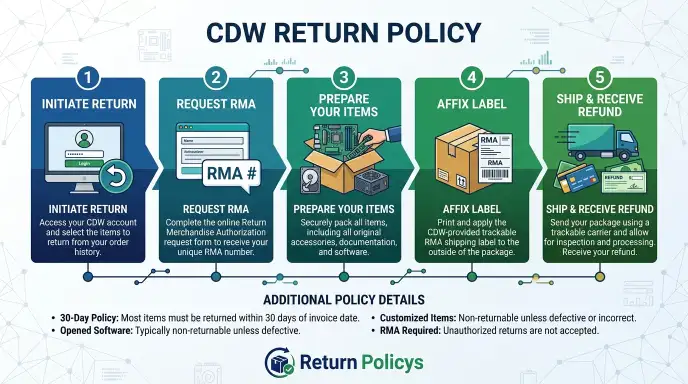
The return process at CDW is straightforward once you know which branch you’re on. Here’s the exact sequence, regardless of product type.
Step 1: Log into your CDW account. Go to cdw.com and sign in. If you don’t have a web account, call your account manager or customer service at 800.800.4239. For government and education customers, your account manager is the fastest route.
Step 2: Locate the order. Navigate to “Order History” in your account dashboard. Find the invoice for the item you’re returning. You’ll need the invoice number and the item line number.
Step 3: Initiate the return request. Click the “Return” or “Request RMA” button next to the line item. The system asks you to select a reason. Choose from:
- Defective / DOA
- Changed mind
- Wrong item shipped
- Incompatible with existing equipment
- Other
Your choice determines which policy branch applies. Be honest. Selecting “changed mind” when it’s defective could cost you a restocking fee.
Step 4: Receive your RMA number and instructions. CDW issues an RMA (Return Merchandise Authorization) number. You get instructions via email. This includes the return address, required documentation, and whether a prepaid label is included.
For DOA returns, the label is prepaid. For change-of-mind returns, you pay for shipping.
Step 5: Package the item correctly. This is where most mistakes happen. Use the original outer box and all interior packaging. Include all accessories: cables, manuals, power adapters, mounting brackets, software discs, and foam inserts.
Place the RMA number and a copy of the packing slip inside the box. Write the RMA number clearly on the outside of the box.
Step 6: Ship the return. Use the carrier specified by CDW. Most returns go via UPS or FedEx. For change-of-mind returns, you choose the carrier, but we recommend using a trackable service with insurance.
CDW is not responsible for lost return shipments.
Step 7: Track the return. CDW’s receiving department inspects the item upon arrival. They check for damage, completeness, and serial number matches. This process takes 2 to 5 business days.
Step 8: Receive your refund. After inspection, CDW processes the refund. It posts to your original payment method within 7 to 14 business days. If you had a store credit or used a purchase order, the credit goes back to that account.
For credit card payments, expect 5 to 10 business days for the bank to reflect the transaction.
Total timeline summary.
| Step | Duration |
|---|---|
| Return request | Same day |
| RMA issuance | Instant to 1 business day |
| Shipping to CDW | 2 to 7 days (depending on location) |
| CDW inspection | 2 to 5 business days |
| Refund processing | 7 to 14 business days |
| Total | 11 to 27 business days |
5 Common Return Mistakes That Cost You Time and Money
Our research across verified buyer feedback and account manager insights reveals five consistent errors. Avoid these and you’ll save hours of frustration and potentially hundreds of dollars.
Mistake 1: Throwing away the outer box. CDW accepts returns only in the original outer box with all interior packaging. A laptop box alone isn’t enough. You need the shipping carton from CDW.
If you tossed it, you’re buying a replacement box and voiding your full refund. We’ve seen returns rejected because the box had a different manufacturer logo on it.
Mistake 2: Missing the 30-day window by even one day. CDW uses the invoice date, not the delivery date, for the clock. If your invoice is dated December 1 and the package arrives December 5, your 30-day window closes December 31, not January 4. Mark your calendar as soon as the invoice arrives.
The system is automated. There is no grace for late returns.
Mistake 3: Opening software to “check compatibility.” Once the shrink wrap breaks or the license key is revealed, the software is non-returnable. This applies to discs, digital downloads, and volume licensing keys. Verify compatibility on the manufacturer’s website or by calling CDW before you open anything.
Mistake 4: Returning a DOA item as a change of mind. If the item is defective, say so on the return form. Choosing “changed mind” triggers the standard return with restocking fees and you paying shipping. CDW does not automatically reclassify returns.
If you paid a restocking fee on a defective return, contact your account manager. They can reverse it in most cases, but it’s a hassle.
Mistake 5: Not keeping serial numbers matched. CDW records the serial number of every item shipped. If you return a different unit (even the same model but a different serial), the return is rejected. This happens most often with laptops and tablets in organizations where devices get shuffled.
Always return the exact unit that was shipped.
Pro Tips: How to Reduce or Avoid Restocking Fees
You don’t have to accept the restocking fee as a given. There are legitimate pathways to reduce or eliminate it.
Tip 1: Use your account relationship. If you have a CDW account manager and a history of orders, ask for a restocking fee waiver before you initiate the return. Enterprise and government customers with master agreements often have fee waivers built into their contracts. For small businesses, a polite conversation about a return within 15 days of delivery sometimes gets a one-time courtesy waiver.
Tip 2: Return unopened only. The easiest way to avoid a restocking fee is to not open anything until you’re committed. If you need to verify specifications, use the product page, a datasheet, or a call to your account manager. Open only after you’re sure.
Tip 3: Order a single test unit first. For large or expensive configurations, order one SKU as a standard configuration. Test it for compatibility. If it works, order the rest.
That single test unit is fully returnable under standard policy. This strategy has saved organizations thousands in non-returnable losses.
Tip 4: Request an advance exchange for DOA items. If the item is defective, insist on the DOA workflow. That zeroes out the restocking fee and covers return shipping. Some customers accept a replacement (advance exchange) without realizing they could have requested a refund instead.
Both options carry no fee.
Tip 5: Check for manufacturer return programs. Some manufacturers offer direct return programs that override CDW’s policy. For example, Dell’s direct return program for enterprise hardware sometimes allows returns beyond the 30-day window. CDW can process these returns under the manufacturer’s terms.
Ask your account manager if a manufacturer-specific program applies to your item.
Three Real Scenarios
Abstract rules are one thing. Seeing how they play out in real orders makes the policy click. Here are three common situations, each with a different outcome based on the variables we’ve covered.
Scenario 1: The business laptop that didn’t fit. A mid-size company orders ten Dell Latitude laptops. Standard SKU, no custom imaging. They arrive, and the IT team opens one to test.
The screen size is smaller than expected, and the keyboard lacks a backlight they assumed was standard. They want to return all ten.
What happens. The nine unopened laptops are fully refundable with no restocking fee. Return shipping is the buyer’s cost, roughly $15 to $25 per unit. The one opened laptop triggers a 15 percent restocking fee.
On a $1,200 laptop, that’s $180. The total cost of the mistake is $180 plus return shipping on the opened unit. Total timeline: 11 to 27 business days for the refund.
Lesson for this buyer. Order one test unit first. Open it. Confirm fit.
Then order the remaining nine. That approach costs zero in restocking fees.
Scenario 2: The government server that was custom configured. A county government office orders a single Dell PowerEdge server. They request custom RAID configuration, an asset tag, and a specific firmware load. The server arrives and works.
Two weeks later, a new policy changes their storage requirements. The server is now the wrong spec. They call to return it.
What happens. The server is a custom-configured order. CDW treats it as final sale. No return is accepted.
The county owns the server and must either use it, repurpose it, or sell it on the secondary market. The loss is the full purchase price: roughly $8,000.
Alternative outcome. If the county had ordered a standard configuration server (no customization) as a test unit, it could have been returned within the 30-day window with a 15 percent restocking fee. That’s $1,200 instead of $8,000. The county could then order the correct spec as a new system.
Lesson for this buyer. Never custom-configure an order until you’ve validated the base configuration in your environment. Standard SKUs are returnable. Custom ones are not.
Scenario 3: The opened software that cost a license. A school district buys 50 Adobe Creative Cloud subscriptions as boxed licenses. The IT director opens one to test the deployment process. It works fine.
But a week later, the district’s budget is cut. They need to cancel 20 of the 50 licenses.
What happens. The one opened license is non-returnable. The remaining 49 sealed boxes are returnable within 30 days with no restocking fee. The loss is the cost of one license: roughly $600 per year.
The district keeps that license active or absorbs the cost.
Lesson for this buyer. Open one license to test, not five. Better yet, test with a digital trial from the manufacturer. Only open a boxed license when you’re certain the purchase is final.
For volume licensing, ask CDW about a temporary evaluation license that doesn’t count against your order.
The Decision Guide
Use this guide to determine your exact return path. Start at the top and follow the conditions that match your situation.
Step 1: What are you returning?
If it’s hardware:
Is it a standard off-the-shelf item, or a custom-configured order?
- Custom: Stop. It is almost certainly non-returnable. Contact your account manager for any possible exceptions, but expect a final sale.
- Standard: Continue to Step 2.
If it’s software:
Is the package sealed or opened?
- Sealed: Continue to Step 2. You can return it within 30 days with no fee.
- Opened: Stop. It is non-returnable. There is no pathway to return opened software.
If it’s a digital download:
Stop. It is final sale. No returns are accepted.
Step 2: Is the item defective or DOA?
If yes:
You are on the DOA workflow. No restocking fee. CDW pays return shipping.
You can choose an advance exchange or a full refund. Document the defect with photos and diagnostics. Contact CDW immediately.
If no (change of mind or compatibility issue):
Continue to Step 3.
Step 3: Is the item opened or unopened?
If unopened:
Full refund to original payment. No restocking fee. You pay return shipping.
The 30-day window applies. Keep the original outer box and all interior packaging.
If opened:
Restocking fee applies. The rate depends on the product category.
- Standard hardware (laptops, desktops, monitors, printers): 15 percent.
- Enterprise and network gear (servers, switches, routers, firewalls): 25 to 30 percent.
- Consumables (toner, cables, batteries): varies, often 15 percent but check your invoice.
This is your decision path. No branch leads to a full refund on opened hardware. Your only choice is whether the restocking fee is acceptable or whether you keep the item.
Step 4: Do you have an account manager or a master agreement?
If yes:
Call your account manager before initiating the return. Some agreements include restocking fee waivers or extended windows. Even without a written clause, a polite request sometimes results in a first-time courtesy waiver.
If no:
You are on the standard policy. Follow the return workflow exactly. Pay attention to the packaging and serial number requirements.
Ship with tracking and insurance.
Quick reference table.
| Your Situation | Returnable? | Restocking Fee? | Who Pays Shipping? |
|---|---|---|---|
| Unopened hardware | Yes | None | Buyer |
| Opened standard hardware | Yes | 15% | Buyer |
| Opened enterprise/network gear | Yes | 25-30% | Buyer |
| Custom-configured hardware | Usually not | N/A | N/A |
| Sealed software | Yes | None | Buyer |
| Opened software | No | N/A | N/A |
| Digital download | No | N/A | N/A |
| Defective hardware | Yes | None | CDW |
Frequently Asked Questions
How do I find my RMA number for a CDW return?
Your RMA number is sent in the confirmation email after you submit the return request online. It also appears in your CDW account under Order History. If you didn’t receive it, contact your account manager or CDW customer service at 800.800.4239.
Can I return a laptop to CDW if I already set it up?
Yes, but a restocking fee applies. Setting up the laptop (installing software, loading data, or creating user accounts) constitutes use. CDW treats it as opened.
The standard 15 percent restocking fee applies. You must also factory reset the device before returning it.
What happens if I send a return without an RMA number?
CDW will reject the shipment. The package sits in their receiving department unprocessed. You will be contacted to provide an RMA number.
If you don’t provide one within a reasonable timeframe, the package may be returned to you at your cost. Always include the RMA number on the outside of the box and on the packing slip inside.
Does CDW charge a restocking fee for monitors?
Yes, in most cases. Standard monitors trigger a 15 percent restocking fee if opened. Some high-end professional displays or large format monitors may have a 25 percent fee or be non-returnable if opened.
Check the product page or your invoice for specific terms before opening the box.
Can I return a custom-configured server if it arrived damaged?
Yes. Damage or defects override the custom-order non-returnable rule. You are on the DOA workflow.
No restocking fee. CDW pays for return shipping. The server must not show signs of physical damage caused by your installation or handling.
Document all damage with photos before contacting CDW.
How long does CDW take to issue a refund after they receive my return?
CDW inspects the returned item within 2 to 5 business days of receiving it. After inspection, the refund is processed. It posts to your original payment method within 7 to 14 business days.
Credit card refunds typically appear in 5 to 10 business days after CDW releases the funds.