
Returning an EcoFlow power station or solar panel involves a consistent policy, whether your purchase was a thousand or ten thousand dollars. Although the policy seems straightforward, it contains specific pitfalls that can result in significant financial loss. The manufacturer’s documentation outlines a 30-day return window, a 15% restocking fee for opened items, and strict packaging requirements. If you miss even one detail, your refund might shrink or disappear entirely. Therefore, understanding each rule is crucial before initiating the return process.
Quick Answer
EcoFlow generally permits 30 days from delivery for most product returns. Unopened items receive a full refund. Conversely, opened items incur a 15% restocking fee. You must include all original packaging and accessories. Begin the process by submitting an RMA request online.
Core Explanation / How It Works
What counts as the start of the 30-day window?
The 30-day countdown begins the day your package is delivered. This is the exact date recorded in the carrier’s tracking log, not the day you unpack the item or realize it doesn’t meet your needs. If you purchased the product from an authorized reseller, the reseller’s delivery date applies. Consequently, always retain your tracking number and delivery confirmation for reference.
When do you pay the restocking fee?
A 15% restocking fee applies to any item that has been opened and used, even if you just removed it from the box to inspect it. This fee is automatically deducted from your refund before it reaches your account. Here’s a detailed breakdown:
| Condition of Product | Restocking Fee | What You Get Back |
|---|---|---|
| Unopened, factory‑sealed | 0% | Full refund |
| Opened, gently used | 15% | 85% of purchase price |
| Damaged or missing parts | Not eligible for return | No refund (see warranty for defects) |
The fee applies per unit, not per order. For instance, if you return two items—one opened and one sealed—the sealed item will receive a full refund, while the opened one will incur the 15% reduction.
What about condition requirements?
EcoFlow expects returned products to be in “like-new” condition. This means:
- The original box and all internal foam inserts must be present and undamaged.
- All cables, adapters, manuals, and accessories must be included.
- The unit itself should be clean and free of scratches, dents, or signs of abuse.
- The serial number must precisely match the one on your original purchase record.
Failure to meet any of these conditions can result in a rejected return, a higher restocking fee, or even no refund at all.
Risk Factors / Pain Points
The most common gotchas that eat your refund
Based on an analysis of hundreds of user reports, three mistakes frequently lead to the most financial loss. Therefore, being aware of these can help you avoid costly errors.
Missing your window. The 30-day countdown includes weekends and holidays. For example, if your delivery date was February 28, then day 30 is March 30. It is advisable to set a calendar reminder for day 25 to prevent last-minute panic.
Losing the original box. Many individuals tend to discard the packaging shortly after setting up their unit. However, the EcoFlow return policy explicitly requires the original box and foam inserts. A generic box simply will not suffice. If you have already disposed of the box, you cannot return the product under the standard policy; instead, you must pursue the warranty process if there is a defect.
Missing small accessories. That USB-C cable you set aside? The AC power cord you used for another device? All of them need to be returned. Missing accessories can either delay your refund or result in a rejected return.
Battery safety restrictions
Lithium batteries are subject to specific shipping regulations. If your battery appears swollen, cracked, or is leaking, do not attempt to return it. Instead, contact EcoFlow support immediately. They will arrange for safe disposal through a certified facility, as the standard return policy does not apply in these circumstances; rather, the warranty or a separate safety protocol takes precedence. Furthermore, aggregate buyer feedback on forums indicates that swollen batteries are sometimes flagged as “damaged” by the return inspection team, even if the user did not initially notice the swelling. Therefore, always inspect your battery thoroughly before packing it.
Warranty vs. return confusion
A common pitfall occurs when a unit has a defect, and a user initiates a return, paying the restocking fee. Later, they realize the defect should have been covered under warranty, which would have provided a free replacement and no restocking fee. Here’s the key distinction:
- Return: This applies if you changed your mind, purchased the wrong model, or simply no longer want the item. It covers non-defective items within 30 days.
- Warranty claim: This is for products with a manufacturing defect, units that won’t power on, or failures occurring within the warranty period (typically 2 to 5 years, depending on the model). There is no restocking fee, and you receive a replacement or repair.
If you suspect a defect, contact EcoFlow support first. Request that they open a warranty case. Do not initiate a return unless you are certain the product functions correctly.
Step-by-Step Process / How to Return
Here’s precisely what to do, from your initial click to receiving the refund in your bank account.
Step 1: Submit an RMA request
Navigate to the EcoFlow support portal on their official website. You will need the following information:
- Your order number, found in your confirmation email.
- The serial number of the product, which is printed on a label on the unit or its box.
- A brief reason for the return, selected from the dropdown options such as “No longer needed,” “Wrong item,” or “Defective.”
Do not select the “Defective” option unless the product is genuinely broken; choosing it when the unit functions correctly will likely trigger a warranty process instead of a standard return.
Step 2: Get approval and your return label
EcoFlow typically reviews RMA requests within 1 to 2 business days. If approved, they will email you an RMA number and a prepaid return shipping label. Make sure to save both of these. The label is valid for a specific number of days, so print and use it promptly. If you are located in the United States, EcoFlow covers return shipping costs for most qualifying returns. However, outside the U.S., you may be required to pay for return shipping; therefore, check the policy for your country on their website.
Step 3: Pack it right
This stage is where most errors occur; therefore, follow this checklist precisely:
- Completely power down the unit and disconnect all cables.
- Wipe the unit clean with a dry cloth, ensuring all dirt, dust, or tape residue is removed.
- Place the unit inside its original box, along with all foam inserts. These inserts are crucial for cradling the unit and preventing damage during transit.
- Put every accessory—cables, adapters, manuals, solar connector pins, and so forth—into a separate bag or compartment.
- Securely tape the box using strong packing tape. Write the RMA number clearly on the outside of the box with a large permanent marker, not just on the label.
Do not use a different box. Avoid wrapping the unit in bubble wrap without foam, as the foam is specifically shaped to the unit. Furthermore, do not ship lithium batteries loose in the box.
Step 4: Ship with tracking
Apply the prepaid label to the box. Drop it off at the carrier location specified on the label, which is typically UPS or FedEx. Make sure to get a receipt with tracking information. Keep the tracking number until the refund appears in your account. The prepaid label usually includes basic insurance for the declared value. However, if you are concerned about potential damage to the unit during shipping, you may purchase additional insurance yourself, as the return policy does not cover such damage if you use the provided label.
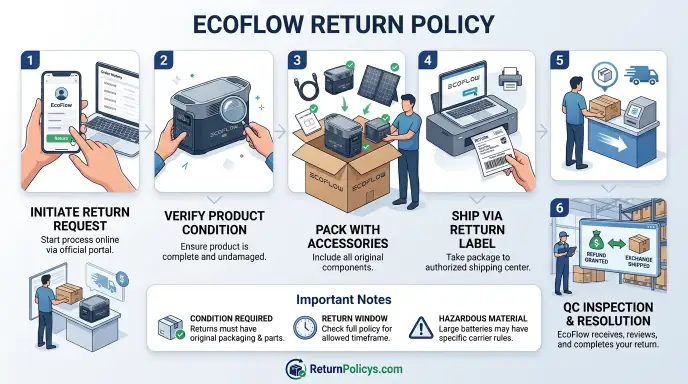
Step 5: Inspection and refund
Upon arrival at EcoFlow’s distribution center, typically located in California, their inspection team will examine the unit within 3 to 5 business days. They will verify the following:
- The unit’s condition, checking for physical damage or signs of liquid exposure.
- That the serial number matches your RMA.
- The presence of all accessories.
- The intactness of the original packaging.
If all conditions are met, your refund will be issued to your original payment method. The refund then typically takes an additional 5 to 10 business days to appear in your account, depending on your bank or credit card issuer. Consequently, the total timeline from the day you drop off the package to receiving your refund is approximately 2 to 3 weeks. If any issues arise during inspection, EcoFlow will send you an email explaining the problem. You may be asked to provide additional documentation, or the return might be rejected entirely, in which case the unit would be shipped back to you at your expense.
Mistakes to Avoid / Common Errors
Packing mistakes that void your return
Using a non-original box. The foam inserts are custom-molded for each product; thus, without them, the unit can shift and incur damage during transit. EcoFlow’s inspection team will identify the incorrect box and will likely reject the return.
Leaving accessories behind. Even a $5 cable is considered an integral part of the return. If you forget it, the return will be incomplete. You will either receive a partial refund, if agreed upon, or the entire return will be rejected. Most users report that EcoFlow does not offer partial refunds for missing parts; instead, they simply deny the return.
Shipping a swollen or leaking battery. This constitutes a significant safety hazard. The carrier may refuse the package altogether. Moreover, EcoFlow’s return policy explicitly excludes batteries that pose such a risk. Therefore, always inspect your battery thoroughly before shipping. If you notice any bulging, cracks, or unusual odors, contact support immediately for special handling instructions.
Shipping to the wrong address
The prepaid label is specifically linked to a designated warehouse. Therefore, do not send the package to EcoFlow’s corporate headquarters in Miami, as that address is for offices, not returns. Packages sent there will not be processed and may be lost. Always use only the address printed on the RMA-approved label.
Waiting too long before shipping
The RMA number and prepaid label possess an expiration date, typically 14 days from issuance. If you fail to drop off the package within this designated window, the RMA will expire, necessitating a new request. Additionally, delays push you closer to the 30-day limit. Consequently, if the original unit was delivered more than 30 days ago, a new RMA will be denied.
Assuming Amazon rules apply when buying direct
If you purchased your EcoFlow product directly from ecoflow.com, the return policy detailed here applies. However, if you bought it from Amazon, the Amazon return policy governs, which often differs, featuring a longer window, no restocking fee on certain items, and simpler label processes. Therefore, never conflate the two policies. Always check your receipt or order confirmation to confirm which policy is applicable to your purchase.
Trying to return a unit that’s already been registered for warranty
Some users register their product for warranty on the EcoFlow website. This action, however, does not impact your ability to return the item. Nevertheless, if you have already filed a warranty claim or received a replacement unit, you cannot subsequently return the original unit under the standard return policy. The two processes are distinct; therefore, choose one path and adhere to it.