
You bought a Ubiquiti switch, access point, or router. Maybe it arrived dead. Maybe you ordered the wrong model.
Maybe you just changed your mind. Now you need to figure out the Ubiquiti return policy. And that is where most people hit a wall.
The answer depends entirely on where you bought it, what condition it is in, and why you are sending it back.
In our research, the official policy grants a 30-day return window from the shipment date. Opened non-defective items face a 15% restocking fee. Dead-on-arrival units get a free replacement with no fee.
But those are just the headline numbers. The real story is in the details, which seller you used, whether you still have the original box, and how fast you act.
Quick Answer
Ubiquiti offers a 30-day return window from shipment. Opened products incur a 15% restocking fee. Unopened products get a full refund.
Dead-on-arrival units qualify for a free replacement with no fee. You must obtain an RMA number before shipping. Returns only apply to purchases from the official Ubiquiti Store.
Where You Actually Need to Return It – Store vs. Reseller vs. eBay
This is the single most common mistake. People buy a Ubiquiti device from Amazon, assume they can return it to Ubiquiti, and end up stuck. The rule is simple: you return it to the seller you bought it from.
If you ordered from the official Ubiquiti Store (store.ui.com), you follow their RMA process. If you bought from an authorized reseller, Amazon (sold by Amazon or a listed reseller), B&H Photo, CDW, Micro Center, or an approved distributor, you return it to that reseller under their policy. Ubiquiti will not process a return for a product purchased from a third party.
What about eBay, Facebook Marketplace, or an unlisted seller on Amazon? Those are unauthorized channels. The warranty may still apply, but the return policy does not.
You are at the mercy of the seller’s own return rules. In our research, many of those transactions are final sale. You have no recourse through Ubiquiti.
Check your invoice. If it says “Ubiquiti Inc.” and the payment went to Ubiquiti, you are in the direct channel. If it lists a reseller name, you go to them.
| Purchase Source | Return To | Restocking Fee (if opened) | Notes |
|---|---|---|---|
| Ubiquiti Store (store.ui.com) | Ubiquiti directly | 15% | RMA required |
| Amazon (sold by Amazon or authorized reseller) | Amazon or that reseller | Varies (typically 0–15%) | Follow Amazon’s 30-day policy |
| B&H Photo, CDW, Micro Center | The reseller | Varies by store | Check store’s policy |
| eBay or unauthorized third-party | The seller | Seller’s discretion | No Ubiquiti support |
Our take: if you care about easy returns, buy from Ubiquiti direct or from a major reseller with a clear policy. Avoid sellers who do not list their return terms upfront.
First, Decide “Why Am I Returning It?” – The Three Branches
Once you confirm you purchased from Ubiquiti direct, your next move depends on the reason. Ubiquiti splits returns into three distinct paths. Choosing the wrong one can cost you a restocking fee or delay your replacement.
Branch A: Dead on Arrival (DOA) – The No-Fee, Fast-Track Path
A DOA unit means it arrived damaged, will not power on, or fails POST (power-on self-test). Ubiquiti treats these differently. You pay no restocking fee.
You get free return shipping. And they prioritize your replacement.
How to confirm DOA: plug it in, connect via Ethernet, check for lights. If nothing happens, it is likely DOA. Do not attempt to repair it yourself, that voids the warranty.
What to do: contact Ubiquiti support within 30 days of delivery. They will issue an RMA with a prepaid return label. Ship it back in the original packaging.
They will send a new unit (not refurbished) once the warehouse receives yours.
Branch B: Opened but Working – The 15% Restocking Fee Branch
This is the most common path. You opened the box, mounted the device, realized it is the wrong model, or just do not need it. The hardware works fine.
What you pay: a 15% restocking fee on the original purchase price. You also pay return shipping (unless you are within the first few days, some users report exceptions, but the policy states customer pays).
What you get: a refund to your original payment method, minus the fee. Or store credit, which can be faster.
Branch C: Unopened / Sealed – The Full Refund Branch
If the box is still factory-sealed, you are in luck. No restocking fee. Full refund.
You still need an RMA, and you still pay return shipping (unless Ubiquiti issues a prepaid label, rare but possible for sealed items).
Important: “unopened” means the product has not been removed from its packaging. If the seal is broken, even if you never powered it on, it is an opened item. That 15% fee applies.
Step-by-Step: How to Get an RMA Number (and What Happens If You Skip It)
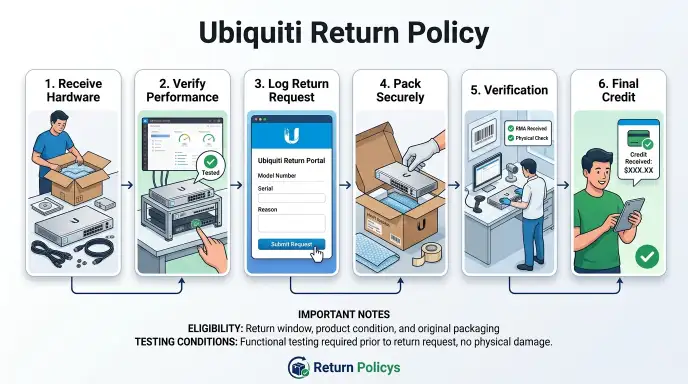
You cannot just ship a Ubiquiti device back without authorization. The RMA number is the key. Without it, the warehouse will reject your package, and you may not get a refund.
Here is the process, condensed:
- Go to the Ubiquiti RMA portal (rma.ui.com). Log in with your Ubiquiti Store account email.
- Find your order. Select the product you want to return.
- Choose the reason (DOA, opened, unopened). Be honest. If you select “unopened” but the seal is broken, they will adjust it to opened and apply the fee.
- Upload proof of purchase. A screenshot of the order confirmation email works. They may also ask for the serial number.
- Submit. You will get an RMA number and a return authorization letter within 1, 2 business days. Save the RMA number, write it on the outside of the box.
If you skip the RMA process and just ship it back, the warehouse logs it as an undeliverable package. You will have to contact support to get it processed, which adds weeks to your refund timeline. In some cases, they may refuse the package and send it back to you.
Timeline: from submission to RMA approval, plan 24, 48 hours. From when the warehouse receives your box, 7, 10 business days for refund processing.
The 30-Day Clock – When It Starts and Whether There Is Any Grace
Ubiquiti’s return window is strict. It starts on the shipment date, not the delivery date. That means if the shipment took five days to arrive, you actually have 25 days from when it lands on your doorstep.
Example: you order a UniFi switch on March 1. It ships March 2. It arrives March 7.
Your 30-day window ends March 31 (30 days from March 2). You have 24 days in your hands.
The policy says 30 calendar days. In our research, Ubiquiti occasionally grants a small grace period of 2, 3 days if you contact support before the window closes. Do not count on it.
The official stance is “no exceptions.”
What counts as the shipment date? The date your carrier (UPS, FedEx, USPS) scanned the package. You can find it in your order confirmation email or Ubiquiti account.
What about weekends and holidays? They do not extend the window. If day 30 falls on a Sunday, you still need to have the RMA submitted by Saturday.
Submit early.
After 30 days: your only option is a warranty claim, which covers defects but not change of mind. Warranty RMAs have their own process, no restocking fee, but you may have to cover shipping both ways.
Packing, Labels, and Shipping – Who Pays for What
This is where hidden costs catch people off guard. Here is the breakdown.
For DOA returns (Branch A)
- Ubiquiti provides a prepaid return label via email.
- You pack the device in the original box with all accessories.
- You drop it off at the carrier’s location.
- You pay nothing for shipping.
For opened non-defective returns (Branch B)
- You pay return shipping. Ubiquiti does not reimburse it.
- Costs vary by weight and distance. A small access point might cost $8, $12. A heavy switch can cost $20, $35.
- You can use any carrier you like. Ubiquiti’s label is sometimes available for a flat fee (about $15). Compare rates.
For unopened returns (Branch C)
- Same as Branch B: you pay shipping. No prepaid label.
- Exception: if Ubiquiti issues a prepaid label for a sealed item, you are covered. This happens rarely.
What to use for packing: the original box is strongly preferred. If you do not have it, use a sturdy corrugated box with at least 2 inches of cushioning (bubble wrap, foam, or crumpled kraft paper). Include all accessories, power adapter, mounting hardware, cable, manual.
Missing items can delay your refund or incur a deduction.
Shipping insurance: Ubiquiti does not insure the package for non-DOA returns. If the box gets lost or damaged in transit, you are responsible. We recommend adding insurance for any item over $100.
It typically costs $2, $5.
Label placement: put the RMA number clearly on the outside of the box. Write it in marker on two opposite sides. The warehouse scans it to match your return.
Without it, the package goes into limbo.
Drop-off timing: once you have the label, you have 30 days to ship it back. The RMA itself expires after 30 days. If you miss that deadline, you have to start over.
The Inspection Process – What the Warehouse Checks (and Why Your Serial Number Matters)
When your box lands at the warehouse, it does not go straight to a refund. Every return gets inspected. The process takes 3 to 5 business days before your refund or replacement even starts moving.
Here is exactly what the inspection team looks for:
- Serial number match. They scan the barcode on the device. It must match the serial number you submitted in your RMA request. If it does not, your return gets flagged. That can mean a delay or a denial.
- Physical condition. They check for cracks, bent ports, water damage, or signs of tampering. Scratches from normal use are usually fine. A dent from dropping it is not.
- Accessories present. Power adapter, mounting kit, Ethernet cable, quick-start guide, every item that came in the box must be inside. Missing parts can trigger a deduction from your refund.
- Original packaging. They prefer the original box. If you used a different box, it must be sturdy and protective. Flimsy packaging can cause damage during shipping, and that damage gets blamed on you.
Why does the serial number matter so much? Because Ubiquiti ties every RMA to a specific unit. If you send back a different device, even the same model, the warehouse system rejects it.
You have to contact support, explain the mix-up, and get a new RMA. That adds days or weeks.
A common mistake: people submit the RMA for one switch but accidentally grab a different one from their stack. Always check the serial number on the unit before you pack it.
Common Mistakes That Kill Your Return (Missing Accessories, Wrong Box, Physical Damage)
Most return denials are not about the policy. They are about avoidable errors. Here are the top three reasons Ubiquiti rejects a return or docks your refund.
Mistake 1, Missing accessories. You think, “Who needs the little plastic mounting bracket?” Ubiquiti does. Every item in the box is part of the SKU.
If the warehouse finds the box is missing the power cord or the rubber feet, they note it. You may lose $10 to $30 from your refund. In some cases, they refuse the return entirely and ship it back.
Mistake 2, Wrong box. The original box has a label with the model number. If you put a UniFi 6 Lite access point into a UniFi 6 Pro box, the warehouse gets confused.
The serial number on the device will not match the expected model for that box. The return gets flagged. Use the correct box for the correct device.
Mistake 3, Physical damage you caused. Ubiquiti accepts returns for DOA units only if the damage happened during shipping. If you dropped the device, stepped on it, or plugged it into the wrong voltage, that is user damage.
The policy does not cover it. The warehouse will reject the return and you get nothing back.
Other common errors:
- Writing the RMA number on a sticky note instead of directly on the box. The label falls off. Your package becomes orphaned.
- Shipping without insurance for a $500 switch. It gets lost. You have no recourse.
- Not cleaning the device of any stickers or labels you added. Remove them. The warehouse does not care about your rack labeling system.
What to do: before you tape the box shut, lay everything out. Photograph the contents. Compare against the original packing list.
That five-minute check can save you a headache.
What Happens After the Warehouse Receives Your Box – Refund vs. Replacement Timelines
Once the warehouse scans your package, the clock starts. The timeline depends on which branch you used.
For opened or unopened returns (Branches B and C):
- Warehouse inspection: 3, 5 business days.
- Refund processing: another 2, 4 business days after inspection passes.
- Money back in your account: depends on your bank. PayPal is usually fastest (1, 2 days). Credit cards take 3, 7 business days. Store credit is available instantly after inspection.
For DOA replacements (Branch A):
- Warehouse inspection: 1, 2 business days (priority handling).
- Replacement unit ships: within 2 business days after inspection passes.
- Shipping method: ground (UPS or FedEx). No expedited option unless you pay.
- Typical total time from when you drop the return at the carrier: 10, 14 days door-to-door for a replacement.
What slows things down:
- Holiday periods. November through January can double inspection times.
- Missing RMA number on the box. The package goes to a “pending” area until someone tries to match it to an open RMA. That can take a week.
- Wrong serial number. The warehouse has to contact support. That adds 3, 5 days.
Real example from aggregate reviews: one user returned a UniFi Dream Machine Pro. They forgot to include the power cord. The warehouse flagged it as incomplete.
Ubiquiti offered to ship the cord back to them and process a partial refund, or return the whole package. The user chose the partial refund and lost $25. Total time from drop-off to final refund: 18 days.
Ubiquiti Store Credit vs. Original Payment Method – Which Is Faster
When your RMA is approved, Ubiquiti gives you two choices: refund to the original payment method or store credit. They are not equal in speed or convenience.
Store credit:
- Processed almost immediately after inspection.
- No restocking fee for opened items? Actually, store credit does not waive the fee. The 15% still applies.
- You can use it on anything from the Ubiquiti Store.
- No expiration date, it stays in your account.
- Best for: people who plan to buy another Ubiquiti product soon.
Original payment method:
- Takes 3, 10 business days after inspection to hit your account.
- The full refund minus the restocking fee (if applicable).
- No strings attached. Money goes back to your card or PayPal.
- Best for: people who want the money back for other uses or who are done with Ubiquiti.
Which is faster? Store credit wins by a week or more. If you need cash back to your bank account, you wait.
If you want to reorder a different model immediately, take store credit. It is available the same day inspection clears.
One catch: store credit is non-transferable. You cannot sell it or give it to someone else. It stays tied to your Ubiquiti account.
Our recommendation: unless you are swearing off Ubiquiti forever, take store credit. It avoids the bank processing lag and gets you back to buying faster. But keep in mind the restocking fee still applies.
What If You Bought from Amazon, B&H, or Micro Center? – Reseller Return Policies vs. Ubiquiti’s
If you did not buy from the Ubiquiti Store, the above policy does not apply. You have to follow the retailer you used. Here is how the major ones compare.
Amazon (sold by Amazon or authorized reseller):
- 30-day return window from delivery.
- Most items: no restocking fee if unopened. Opened items: sometimes 15%, varies by seller.
- Amazon often issues a prepaid return label. No shipping cost to you (for defective or damaged items).
- If sold by a third-party marketplace seller, return to that seller. Check their policy before buying.
B&H Photo Video:
- 30-day return from invoice date.
- 15% restocking fee for opened networking gear. No fee for sealed items.
- Customer pays return shipping unless defective.
- B&H is known for being strict about accessories, missing a cable or manual can trigger a full denial.
Micro Center:
- 15-day return window for networking equipment (shorter than Ubiquiti’s).
- No restocking fee for unopened. 15% for opened.
- In-store returns only for online orders shipped to a nearby store. If you ordered online and had it delivered, you can return to any Micro Center location with the packing slip.
CDW:
- 30-day return for most hardware.
- 15% restocking fee on opened items.
- They may require an RMA number as well.
- Business accounts sometimes get extended windows (60 days). Check your account terms.
Key difference: Ubiquiti direct does not accept returns from these resellers. If you buy from Amazon and the device is dead, do not contact Ubiquiti. Contact Amazon.
Amazon will handle the DOA replacement or refund.
Which is better for returns? Ubiquiti direct gives you the most consistent process and the clearest terms. But resellers like Amazon often offer free return shipping on defective items, which Ubiquiti does not for non-DOA returns. Micro Center’s 15-day window is tight.
B&H matches Ubiquiti’s 30-day window but with similar restocking fees.
Our advice: if you live near a Micro Center, you can walk in and get an instant refund or exchange. That speed is hard to beat. If you order online and want the longest window, Ubiquiti direct or B&H are your best bets.
Just know the restocking fee exists everywhere.
International Returns – The Extra Hoops for Canada, EU, and Asia-Pacific Buyers
If you live outside the United States, the Ubiquiti return policy changes. Not dramatically, but in ways that cost you time and money. The most important factor is whether you bought from the official Ubiquiti Store for your region or from an international reseller.
Canada: Ubiquiti runs a separate Canadian store (ca.store.ui.com). The same 30-day window and 15% restocking fee apply. You pay return shipping to their Canadian warehouse.
Shipment to the US is not allowed. If you bought from the US store by mistake, you may be stuck paying cross-border duties and a more expensive return shipping cost. In our research, Canadian buyers report typical return shipping fees of $20 to $40 CAD.
European Union: EU law gives you a 14-day cooling-off period for online purchases. Ubiquiti’s 30-day policy already covers that. But the key difference is that under EU consumer law, you do not have to pay a restocking fee for opened items.
Ubiquiti’s policy still states 15% for opened items, which could conflict with local regulations. In practice, Ubiquiti applies the policy as written. EU buyers have reported getting the fee waived after citing their local consumer rights, but it is not automatic.
You may need to contact support and ask.
Asia-Pacific, Australia, and New Zealand: Ubiquiti does not have a direct store in most of these regions. You buy through authorized distributors. Returns go to those distributors, not to Ubiquiti.
Their policies vary. In Australia, the Australian Consumer Law gives you a right to a refund or replacement for major failures, but change-of-mind returns depend on the seller. Expect 15% restocking fees and shorter windows (14 to 30 days).
Shipping costs for international returns can be steep. A 5-pound UniFi switch returning from Germany to a US warehouse can cost $60 to $80. For DOA units, Ubiquiti covers return shipping, but only if you bought from the official store in your region.
If you bought from the US store and live abroad, you pay.
Our advice: always check the store domain. Buy from the store that ships to your country. If you are in the EU, consider buying from an authorized local reseller with a clear return policy.
The few extra dollars upfront can save you expensive return logistics.
Verdict: A Short Decision Guide for Your Specific Situation
You now have all the pieces. Here is how to choose your path based on your exact situation.
If your device is dead on arrival:
- Contact Ubiquiti support immediately. Do not try to repair it.
- Get a prepaid return label. Ship it back in original packaging.
- You get a new unit in 10 to 14 days total. No fees.
If your device is opened and working but you changed your mind:
- Accept the 15% restocking fee. It is the cheapest way out.
- Pay return shipping yourself. Insure the package.
- Take store credit if you plan to buy again. It is faster.
If your device is still sealed:
- Full refund. No restocking fee.
- You still pay shipping. Still get an RMA first.
- Do not open the box just to “check it.” Once opened, the fee applies.
If you bought from a reseller like Amazon or B&H:
- Return to the reseller, not Ubiquiti.
- Follow their window and fee schedule. Amazon often has free return shipping for defects.
If you are outside the US:
- Buy from your regional official store if one exists.
- Factor in higher shipping costs for returns.
- Know your local consumer rights. They may override Ubiquiti’s policy on restocking fees.
Proactive tip: keep the original box and all accessories for at least 35 days after purchase. That covers the full return window and any shipping delays. Do not throw away the box until you are sure the device is stable and working.
Frequently Asked Questions
Can I return a Ubiquiti product after 30 days?
No. The 30-day window is firm from the shipment date. After that, you only have the warranty.
Warranty claims cover defects but not change of mind. You can file a warranty RMA through the same portal, but you may pay shipping.
Does Ubiquiti charge a restocking fee for DOA units?
No. Dead on arrival units get a zero percent restocking fee and free return shipping. You still need an RMA number.
The replacement unit ships once the warehouse receives the defective one.
What happens if I return a Ubiquiti product without the original box?
The warehouse may accept it if the packaging is sturdy and protective. But missing the original box increases the risk of damage during transit. If damage occurs, the return can be denied.
You also risk triggering a deduction. Use the original box if possible.
How long does a Ubiquiti refund take?
After the warehouse inspects the return (3 to 5 business days), the refund processes in 2 to 4 more business days. Total: 5 to 9 business days from delivery. Store credit is faster, usually available immediately after inspection.
Can I return a Ubiquiti product bought from Amazon to Ubiquiti directly?
No. Ubiquiti only accepts returns for products purchased from the official Ubiquiti Store (store.ui.com). If you bought from Amazon, you must return it to Amazon or the seller on Amazon.
Ubiquiti will not issue an RMA for that purchase.
Does Ubiquiti offer free return shipping for opened items?
Only for DOA units. For opened non-defective or unopened returns, you pay return shipping. You can use your own carrier or buy a label through Ubiquiti for a flat fee (around $15 for small items).
Always get a tracking number and insurance.