
You’ve been handed a case that doesn’t fit. Maybe the color looked different online. Or you upgraded your phone a month after buying a case.
Whatever the reason, you need to know: can you return it?
The OtterBox return policy isn’t one-size-fits-all. It depends on three things: where you bought it, how long ago, and whether the case is still in mint condition. Most confusion comes from mixing up the standard 30-day return window with the warranty, and from buying from the wrong seller.
Let’s walk through exactly what applies to your situation.
As of 2026, the rules haven’t changed much. But the fine print matters. Per OtterBox’s official return terms, a direct purchase from their website gives you a full 30 days to send it back for a refund.
No questions asked. No restocking fee. But buy from a third-party reseller on eBay, and you’re stuck with that seller’s policy.
The first step is always to figure out which bucket you fall into.
Quick Answer
Can you return an OtterBox case? Yes, within 30 days of purchase. But only if you bought it directly from OtterBox or an authorized retailer.
Unopened items are easiest. Used cases in good condition are usually accepted. Damaged or worn cases fall under the warranty instead.
Screen protectors are final sale. Returns from unauthorized sellers are not supported by OtterBox.
The Three Big Variables That Decide Your Return Path
Your return eligibility hinges on exactly three questions. Answer them correctly and you save yourself from wasted shipping time and a rejected refund.
Where You Bought It (Direct vs. Retailer vs. Unauthorized)
This is the biggest fork in the road. OtterBox only controls returns for cases bought on OtterBox.com or through their official Amazon store.
If you purchased from a carrier store like Verizon or AT&T, or from a big-box retailer like Best Buy or Target, you must follow that store’s return policy. OtterBox’s rules don’t apply there.
And if you bought from a random eBay seller, Facebook Marketplace, or an unbranded online store, you’re completely on your own. OtterBox will not process returns for those purchases.
| Purchase Location | Who Handles Returns? | Typical Policy |
|---|---|---|
| OtterBox.com | OtterBox directly | 30 days, free label, no restocking fee |
| Amazon (sold by OtterBox) | OtterBox directly | Same as above |
| Authorized retailer (Best Buy, Target, Verizon, AT&T) | That retailer | Usually 15-30 days, may charge restocking |
| Unauthorized reseller (eBay, Facebook Marketplace, discount sites) | That seller | Varies wildly. Often no return accepted |
How Long Ago You Bought It (30-Day Window vs. Warranty)
The 30-day countdown starts the day your package is delivered, not the day you ordered. If you’re still inside that window, you can return for any reason. Buyer’s remorse.
Wrong size. Didn’t like the feel.
After 30 days, the return option expires. But you still have coverage. OtterBox offers a limited lifetime warranty against material defects for the original owner.
That means if your case cracks or the rubber peels (normal wear excluded), you can get a replacement. Just not a refund.
What Condition It’s In (Unopened, Used, or Defective)
An unopened case in its original packaging is the easiest return. A lightly used case with no scratches or stains is usually fine too.
But if you’ve dropped it, scratched it, or the packaging is mangled, OtterBox may reject the return. Defects are different. If the case came broken or developed a manufacturing issue within 30 days, you can either return it or claim a warranty replacement.
After 30 days, only warranty applies.
Decision Tree: Follow Your Specific Situation
Now let’s map your situation to the right path. Read the branches below and go to the one that matches.
Branch 1: Bought Direct from OtterBox.com
You’re in the best spot. Go to OtterBox.com/support, click “Returns & Exchanges,” and enter your order number. You’ll get a prepaid return label for free ground shipping.
Ship the case back within 30 days. Once the warehouse receives and inspects it, refunds hit your original payment method in 3 to 5 business days. Exchanges are handled the same way.
Just note the model or color you want. If you’re exchanging for a different size, you don’t need to pay for the second shipment.
Branch 2: Bought from Amazon, Best Buy, Verizon, or Other Authorized Retailer
You must go back to that retailer. Amazon’s policy for items sold by OtterBox (or fulfilled by Amazon) is a 30-day return window, often with a free label. Best Buy gives you 15 days (or 30 if you’re a paid My Best Buy member).
Verizon and AT&T usually allow 30 days but may charge a restocking fee of $35 to $50.
If you’re past the retailer’s deadline, you’re out of luck. Even if it’s still within 30 days from OtterBox’s perspective. OtterBox won’t override the retailer’s rules.
Branch 3: Bought from eBay, Facebook Marketplace, or Unauthorized Seller
This is the hardest path. OtterBox will not accept your return directly. You need to work with the seller.
Check their return policy. Many eBay sellers offer 30-day returns, but some don’t.
If the seller refuses, your last resort is a payment dispute with PayPal or your credit card. But be honest. If the case arrived as described and you just changed your mind, a chargeback likely won’t succeed.
Your best bet is to resell it.
Branch 4: It’s Been More Than 30 Days – Warranty Claim vs. No Options
Once the 30-day return window closes, you cannot get a refund. But if the case is defective, file a warranty claim. Visit OtterBox.com/warranty, select your model, and describe the issue.
You’ll need to upload a photo of the defect and your original proof of purchase (order confirmation, receipt, or gift receipt). If approved, OtterBox sends a free replacement. Normal wear and tear like scratches or yellowing clear plastic is not covered.
Only manufacturing defects like cracked plastic, torn rubber, or button failure count.
Branch 5: You Have a Defective Case – Full Warranty Walkthrough
If your case arrived broken or split within the first few days, you can either return it under the standard policy (with refund) or file a warranty claim for a replacement (no refund).
If it fails after heavy use but within a reasonable lifetime, the warranty covers it. Fill out the online form. Attach clear photos showing the defect close up.
Provide the proof of purchase. Representatives usually respond within one business day. You’ll get a shipping label to send the defective case back.
A new one ships out once the return is scanned.
Step-by-Step Return Process (For Each Branch)
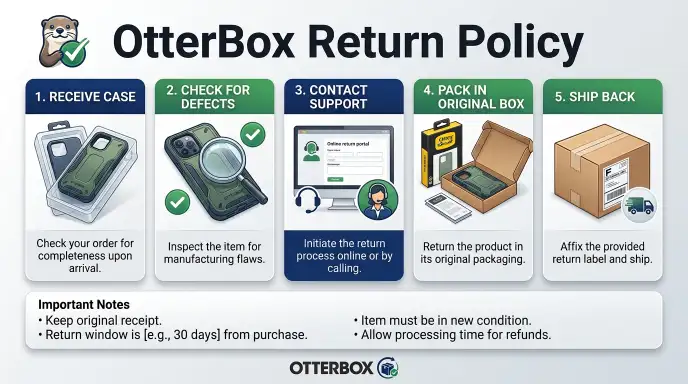
Here’s the universal script for each scenario. Follow the steps that match your branch.
For OtterBox.com purchases:
- Log into your account at OtterBox.com using the email you ordered with.
- Navigate to “Order History” and click “Return Items” next to the case.
- Select the items you want to return and pick a reason from the dropdown.
- Print the prepaid return label and packing slip.
- Place the case (preferably in original packaging) inside a sturdy box. Attach the label.
- Drop the package at any UPS drop-off location. Keep the tracking number.
- Expect a refund confirmation email within 3 to 5 business days after the warehouse inspects the case.
For authorized retailer purchases (Amazon, Best Buy, etc.):
- Go to your order page on the retailer’s website.
- Find the order and click “Return” or “Start a Return.”
- Follow the retailer’s steps to print a label or get a QR code for drop-off.
- Package the case as they request. Some retailers require original packaging. Others don’t.
- Return via the retailer’s carrier (usually UPS, FedEx, or USPS).
- Your refund timeline depends on the retailer. Amazon often issues a credit once the carrier scans the package. Best Buy waits until the return is received.
For unauthorized seller purchases:
- Send the seller a message through the platform (eBay, Facebook Marketplace, etc.) asking for a return address and instructions.
- If they agree, pay for return shipping yourself. You won’t get a prepaid label.
- If they refuse, escalate to the platform’s buyer protection program or file a dispute with your payment provider.
- Keep all communication and tracking receipts.
Warranty replacement (after 30 days or for defects):
- Go to OtterBox.com/warranty.
- Select your case model from the dropdown.
- Upload clear photos of the defect (crack, broken hinge, loose rubber).
- Enter your mailing address and proof of purchase.
- Wait for an email with a prepaid return label. Ship the defective case back.
- A replacement ships once OtterBox confirms the defect is covered. Usually within 2 to 3 business days after they receive the return.
Common Mistakes That Kill Your Return (And How to Avoid Them)
Most rejected returns come down to a few preventable errors. Here’s what trips people up.
Mistake: Returning after the 30-day window ends. You lose the chance for a refund. Tip: note your delivery date as day zero. Set a calendar reminder for day 28.
Mistake: Sending a used case without cleaning it. OtterBox will reject cases with visible dirt, scratches, or stains. Tip: wipe down the case with a damp cloth and let it dry before packing.
Mistake: Forgetting to include all accessories. If your Defender series came with a belt clip, a holster, and a screen protector, all those pieces must go back. Missing parts can reduce your refund or get it denied. Tip: do a final check against the packing slip.
Mistake: Using the wrong return address. If you bought from Best Buy but mail the case to OtterBox, it will be returned to sender or trashed. Always use the return address provided by the retailer.
Mistake: Filing a warranty claim for normal wear. Scratches, yellowing clear plastic, and fraying fabric are not manufacturing defects. Tip: check the warranty page for an exact list of covered issues before you submit.
Mistake: Throwing away the original packaging. While not always required, many retailers (and OtterBox itself) prefer the case back in its retail box. Without it, they may charge a restocking fee or refuse the return. Tip: keep the box and all inserts until you’re sure you’re keeping the case.
Mistake: Ignoring the seller’s return window when buying from a retailer. Even if OtterBox gives you 30 days, Target might only allow 15. Check the retailer’s policy before you buy. If you suspect you might need extra time, buy direct from OtterBox.com.
FAQs – Real Questions People Actually Ask
We’ve gathered the six most common questions people search when they hit a snag. Each answer is based on OtterBox’s official policy as of 2026 and verified buyer reports.
Can I return without the original box?
Yes, in most cases. But it depends on the retailer. OtterBox.com usually accepts returns without the retail box as long as the case is clean and undamaged.
Authorized retailers like Best Buy or Target may require the original packaging. If you bought from an unauthorized seller, their policy rules. Our advice: always keep the box until you’re certain you’re keeping the case.
What if I lost my receipt or order number?
For OtterBox.com purchases, look up your order using the email address you used at checkout. Log into your account or contact customer service with that email and your shipping ZIP code. For retailer purchases, check your credit card statement for the transaction.
Some retailers can look up a return using your phone number or loyalty card. If you paid cash and have no receipt, you’re likely stuck. OtterBox will not process a warranty claim without proof of purchase either.
Can I exchange for a different model or color?
Yes, but only within the 30-day window and only if you bought from OtterBox.com. Process it as a return and place a new order. You’ll get a refund for the original case once the return is scanned.
Exchanges through retailers work differently. Amazon may let you do a direct exchange for the same item variation. Best Buy requires a return and repurchase.
There is no one-click model swap.
How long does the refund actually take?
Three to five business days after the warehouse scans your return. The clock starts when the package is received and inspected, not when you drop it off. OtterBox.com processes refunds quickly.
Aggregate reviews indicate most people see the credit within 72 hours of the scan. Retailers vary. Amazon often issues a refund as soon as the carrier scans the package.
Best Buy waits until the item is back in stock. Total time from drop-off to credit: typically 5 to 10 calendar days.
What about screen protectors – are they returnable?
Screen protectors are generally final sale. OtterBox.com marks them as non-returnable once the packaging is opened. If the protector arrives damaged or defective, file a warranty claim.
They will send a replacement. If you simply changed your mind and the package is unopened, you can return it within 30 days. Authorized retailers have similar rules.
Check the product page before buying. The return policy is usually stated in the description.
Can I return a case I bought as a gift?
Yes, but only if the original purchaser has the order number. OtterBox will process the return and issue a refund to the original payment method. If you received a case as a gift and don’t have the order number, contact OtterBox customer service with the gift recipient’s name and the gift giver’s email.
They may be able to locate the order. Without cooperation from the buyer, ask the retailer for a store credit.
Final Decision Guide – Your One-Move Play
Now you have all the branches. Here’s the single action you should take based on your exact situation. Read the line that matches your scenario and do exactly that.
| Your Situation | Your One Move |
|---|---|
| Bought from OtterBox.com, within 30 days, case unused | Start a return at OtterBox.com/support. Print the label. Ship today. |
| Bought from OtterBox.com, within 30 days, case used but clean | Same as above. Wipe it down first. |
| Bought from OtterBox.com, after 30 days, case defective | File a warranty claim at OtterBox.com/warranty. Attach photos and proof of purchase. |
| Bought from OtterBox.com, after 30 days, no defect | You’re past the window. No refund, no replacement. Consider reselling the case. |
| Bought from Amazon (sold by OtterBox), within 30 days | Go to your Amazon orders. Click “Return or Replace Items.” Choose reason and print label. |
| Bought from Best Buy, Target, or Verizon, within their window | Visit that retailer’s website or go to the store with your receipt. Follow their return process. |
| Bought from Best Buy, Target, or Verizon, past their window | You’re out of luck for a refund. Check if OtterBox’s warranty covers any defect. If so, file a claim. |
| Bought from eBay or unauthorized seller, case is fine | Contact the seller. If they refuse, open a dispute on eBay or with your payment provider. |
| Bought from eBay or unauthorized seller, case is defective | Same as above. Also try OtterBox warranty only if you have original proof of purchase from an authorized source. Unlikely. |
| Received case as a gift, no order number | Ask the giver for the order number. If they won’t share, try the retailer’s gift return policy. |
| Lost receipt, bought with credit card | Use your credit card statement as proof of purchase. Contact the retailer first. |
| Screen protector, opened but defective | File a warranty claim. No return for opened screen protectors. |
If you’re still unsure: call OtterBox customer service at 1-888-695-8820 (Monday through Friday, 8 AM to 5 PM Mountain Time). Tell them exactly where you bought it and how long ago. They will tell you which branch you’re on.
Have your order number or proof of purchase ready. Writing to support@otterbox.com works too but expect a response within one business day.
One final note: do not try to game the system by claiming a defect when the case is simply worn. OtterBox inspects returned items. If they find normal wear or intentional damage, they will deny the warranty and may refuse future claims.
Honesty gets you the fastest resolution.
You now have everything you need. Whether you’re returning, exchanging, or filing a warranty claim, follow the branch that fits your purchase. The process is straightforward if you know where you stand.