
So you bought an HP laptop, printer, or monitor and now you realize it’s not quite what you needed. Maybe the screen is too small, the printer doesn’t fit your desk, or the laptop arrived with a dead pixel. The HP Return Policy is your safety net, but only if you know how to use it right.
Mess up the timing, the packaging, or the reason code, and you could lose money on a restocking fee or even get your return rejected.
In our research across HP’s official documentation and thousands of verified buyer experiences, the biggest mistake people make is assuming it works like Amazon’s no-questions-asked model. It doesn’t. HP charges a 15% restocking fee on opened consumer PCs that aren’t defective, and they’re strict about original packaging.
As of 2026, the standard return window is 30 days from delivery, with a holiday extension from November 1 through January 31. Here’s exactly how to navigate it without getting burned.
What This Guide Covers (and When to Use It)
This guide is for anyone who needs to return something directly to HP, not a third-party retailer like Best Buy, Amazon, or Walmart. If you bought from those places, their return policies apply, not HP’s. We’re focusing on purchases made at HP.com, the HP Business Store, the HP Education Store, or the HP Outlet (refurbished/clearance).
You’ll find step-by-step instructions for each product type: laptops, desktops, printers, monitors, accessories, and ink/toner. We cover the condition check (opened vs. unopened), the timing rules, and the hidden traps like restocking fees and missing boxes. If you’re a business customer, student, or someone buying during the holiday season, we have special notes for you too.
Use this guide when you’re about to start a return, not after you’ve already shipped it. The decisions you make upfront, which reason code you choose and whether you call support or use the online portal, directly affect how much you get back and how fast.
The Quick Truth: HP’s Return Policy at a Glance
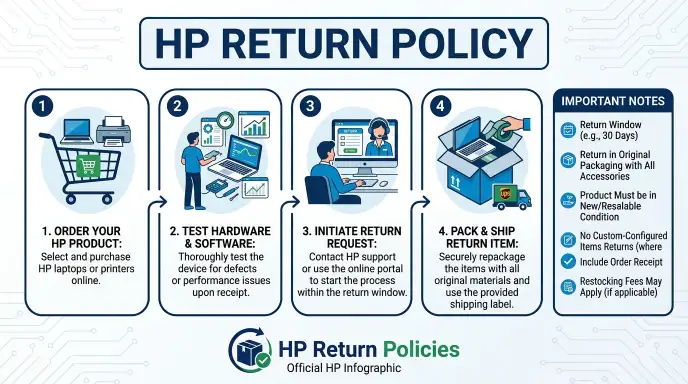
Here’s the short version. Memorize these numbers.
| Factor | Detail |
|---|---|
| Return window | 30 days from delivery date |
| Holiday extension | Purchases Nov 1–Dec 31 → return by Jan 31 |
| Restocking fee (opened consumer PC, non-defective) | 15% of the purchase price |
| Restocking fee (unopened any item) | 0% |
| Restocking fee (defective any item) | 0% |
| Return shipping (defective) | Free – HP pays |
| Return shipping (non-defective) | You pay – typically $10–$30, deducted from refund |
| Refund processing time | 5–7 business days after HP receives the item |
| Excluded from return | Custom-built PCs, activated software, opened ink/toner, gift cards |
That 15% restocking fee is the big one. On a $1,200 laptop, that’s $180 you won’t get back, just because you opened the box to see if you liked it. That’s why the condition check matters so much.
Before You Start: What You’ll Need
HP’s online return portal requires three things upfront. Have them ready before you visit the site or call support.
1. Your HP order number. This is a 6- to 8-digit number from your order confirmation email. If you can’t find it, check your HP account order history.
Business customers may need their purchase order number or account manager ID instead.
2. The exact product type and model. The portal will ask you to select the product you’re returning from a list. You need the model number from your invoice or the product box.
For laptops, it’s something like “HP Spectre x360 14-ea0000” or “HP Pavilion 15-eg2000”. For printers, it’s the series number like “HP OfficeJet Pro 9015e”.
3. Your return reason. HP offers a dropdown of reasons. The reason you pick determines whether you get a prepaid label or have to pay shipping, and whether a restocking fee applies.
Common reasons include:
- “Changed my mind / no longer needed”, non-defective, restocking fee may apply
- “Defective / not working as expected”, free return, no restocking fee
- “Wrong item shipped”, free return, no restocking fee
- “Missing parts or accessories”, free return, no restocking fee
Pro tip: If your item genuinely has a defect, select that reason honestly. Lying about the reason to avoid a restocking fee can get your return rejected if HP’s inspection finds no defect.
The Big Branching Question: Where Did You Buy It?
This is the most important decision point in your entire return process. HP has different policies for different sales channels, and they don’t cross over.
Direct from HP.com (Consumer Store)
This is the standard scenario. You bought from the HP online store for consumers. The 30-day window applies.
You can start a return through the HP Support website or by calling 1-800-HP-INVENT. The restocking fee rules we covered apply in full. This is the easiest path to a refund.
HP Business Store or Account
If you purchased through an HP Business account (often using a company email or purchasing portal), the return process is different. You typically have a longer window, up to 45 days, but you may need to contact your HP Business Account Manager directly. Restocking fees still apply to opened equipment unless it’s defective.
Small business buyers should call the HP Business Support line, not the consumer number, to get the correct RMA process. Some business accounts also require a purchase order number for any return.
HP Outlet (Refurbished / Clearance)
The HP Outlet sells refurbished, off-lease, and clearance products at a discount. The return policy here is mostly the same as the consumer store, but with a tighter condition requirement. You must return the item in the exact condition it was received.
Any scratches, dents, or missing accessories that weren’t noted in the listing will likely result in a partial refund or rejection. Restocking fees still apply to opened consumer PCs. If you buy a refurbished laptop and it arrives with a cosmetic issue not listed, select “defective” as your reason.
Third-Party Seller (Amazon, Best Buy, Walmart)
If you bought from a reseller, even if the product is shipped and sold by that retailer, HP’s policy does not apply. You must work with the third-party seller’s return process. Amazon has a 30-day return window for most electronics, Best Buy has 15 days for laptops (unless you’re a TotalTech member), and Walmart varies by seller.
HP cannot issue a refund for purchases made outside HP.com.
A common mistake: people call HP support asking for a return label for an Amazon purchase. HP will redirect you to Amazon. Save yourself the call and go straight to the seller’s return portal.
Next Branch: What Product Are You Returning?
Once you know where you bought it, the next branch is what you’re returning. Different product categories have different rules on restocking fees, packaging requirements, and what’s considered acceptable condition.
Laptops & Desktops (PCs)
This is where the 15% restocking fee hurts the most. If you open the box, start the device, set it up, and decide you don’t want it, you will lose 15%, unless it’s defective. The condition check is strict: the item must include the original box, all inserts, charger, cables, manuals, and any bundled software or promotional items.
Missing a single accessory can delay your refund or result in a deduction. HP also requires that you wipe all personal data and perform a factory reset before returning. They do not accept returns on custom-built systems (configure-to-order), so double-check before you purchase.
Printers & All-in-Ones
Printers have slightly different rules. There is no restocking fee for most models, even if opened, provided all original packaging and accessories are included. However, you must return the printer with the ink or toner cartridges still installed and sealed.
If you opened the ink cartridge and tried it, that cartridge cannot be returned. HP considers opened ink/toner as “consumed” and will deduct its value from your refund or reject the return altogether. For all-in-one printers with scanners, make sure the scanner glass is clean and undamaged.
Monitors & Accessories
Monitors and accessories (keyboards, mice, docking stations, cables) generally have no restocking fee. Monitors are subject to a 30-day return window, and they must be returned in the original box with all cables and documentation. Dead pixels or backlight bleed are considered defects, so if your monitor has issues, select the defective reason.
Accessories like mice and keyboards can be returned opened with minimal hassle.
Ink / Toner
Ink and toner cartridges can only be returned if they are unopened and in their original sealed packaging. Once you open the sealed bag or remove the protective tape, the return is not accepted. This is a firm policy because HP has no way to test whether a used cartridge is genuine or counterfeit.
If you accidentally bought the wrong cartridge and haven’t opened the sealed bag, you can return it. If you opened it, you’re stuck with it. The same rule applies to toner cartridges for laser printers.
Software & Custom Builds
Software that has been activated (product key entered, account linked) cannot be returned. This includes Microsoft Office, antivirus subscriptions, and HP-specific software bundles. Custom-configured PCs (where you selected specific RAM, storage, or processor options) are non-returnable because HP builds them to order.
If you customize a laptop on HP.com, make absolutely sure it’s the configuration you want before you hit “buy”.
The Condition Check: Opened vs. Unopened – and the 15% Restocking Fee Trap
This is where most buyers lose money. HP charges a 15% restocking fee on opened consumer PCs that are returned for non-defective reasons. The key word is “opened”.
If the factory seal on the box is broken, HP considers it opened. Even if you only lifted the lid, looked at the laptop, and closed it again. Even if you never turned it on.
Once the box is compromised, the restocking fee clock starts.
Here’s how HP defines “opened” for different products.
| Product Type | What “Opened” Means | Restocking Fee (Non-Defective) |
|---|---|---|
| Laptop or desktop PC | Factory box seal broken, any accessory removed from plastic | 15% |
| Monitor | Box opened, screen protector removed | 0% (no fee for monitors) |
| Printer | Box opened, but ink/toner still sealed | 0% (no fee unless ink opened) |
| Accessories | Box opened, plastic removed | 0% |
| Ink/Toner | Sealed bag or tape removed | Return not accepted at all |
The trap is subtle. You order a laptop. You open the box to check the keyboard feel.
You decide you want a different model. That laptop is now “opened” in HP’s system. At a $1,000 price point, the 15% fee is $150.
You basically paid $150 to test the keyboard for 30 seconds.
If the laptop has a genuine defect (dead pixel, fan noise, trackpad issue), the fee is waived. Always select “defective” in the reason dropdown if your unit has a real problem. But don’t lie.
HP inspects every return. If they find no defect, they will apply the 15% fee and deduct it from your refund.
One more trap. Promotional items that come in the box (free mouse, sleeve, USB drive) must be returned too. If any of those items are missing or opened, HP may charge you the retail value or reject the return entirely.
Keep everything together until you are sure you are keeping the device.
The Timing Check: Are You Inside the 30-Day Window?
You have 30 calendar days from the delivery date to initiate a return. HP uses the date the package was delivered by the carrier (UPS or FedEx). Not the date you opened it.
Not the date you decided to return it. The delivery date.
Check your tracking history in your HP account or the carrier’s website. If you are on day 29, do not wait. Start the return today.
What counts as “initiated”? You must either submit the online return request through the HP Support portal or call HP support and receive an RMA number before the 30-day mark. Submitting the request is what freezes the clock.
You don’t need to have the item packed or shipped within 30 days. You just need the RMA issued.
But there is a catch. Even if you get the RMA on day 29, you must ship the item back within a certain window after that. HP typically gives you 10 to 14 days from the RMA creation date to drop the package at the carrier.
If you miss that second deadline, the RMA expires and you lose the return eligibility.
Holiday Extension: November 1 to January 31
If you bought between November 1 and December 31, the return window extends to January 31. This applies to all consumer purchases from HP.com. Business customers should verify with their account manager, as holiday extensions may not apply automatically.
The extension covers the return initiation date, not the ship date. You still need to ship the item within the allowed window after the RMA is issued. But it gives you breathing room if you received a gift and didn’t open it until after Christmas.
Late Returns: What Happens
If you miss the 30-day window and you are not covered by the holiday extension, HP generally rejects the return. There is no grace period. Your only option is to contact HP support and explain the situation.
They may grant an exception for extreme circumstances (hospitalization, military deployment, natural disaster), but there is no guarantee. Aggregate buyer feedback indicates these exceptions are rare.
One alternative. If the product is still under the standard warranty period (typically one year for consumer laptops), you can file a warranty claim for defects. But you cannot return a working product just because you changed your mind after day 31.
Step-by-Step: How to Start a Return on HP.com
The online process takes about 10 minutes if you have your order number ready. Here is the exact workflow.
Step 1: Go to the HP Support website. Navigate to support.hp.com. Click on “Returns & Exchanges” in the top menu. Do not use the generic contact page.
The return portal is separate.
Step 2: Sign in to your HP account. Use the same email address you used when placing the order. If you checked out as a guest, you will need to verify your email and order number. Business customers may need to log in through the business portal.
Step 3: Enter your order number. The system pulls up all items in that order. Select the product you want to return.
Step 4: Choose your reason. This is the most important decision. Pick carefully.
- “Defective”, free return, no restocking fee, prepaid label provided immediately.
- “Changed my mind / no longer needed”, you pay shipping, restocking fee may apply.
- “Wrong item shipped”, free return, no fee, but you must describe what was wrong.
- “Missing parts or accessories”, free return, no fee.
If you select “changed my mind” for a laptop, HP will calculate the 15% restocking fee and show you the estimated refund amount before you confirm. Verify that amount. If you are unhappy with the deduction, you can cancel the return.
Step 5: Print the prepaid return label. For defective returns, HP generates a prepaid label immediately. Download and print it. For non-defective returns, the system may ask you to pay for shipping upfront (typically $10 to $30) or deduct it from your refund.
Step 6: Write down your RMA number. This number must be placed inside the box and written on the outside of the box. HP will not accept a return without the RMA number visible.
Alternative: Call HP Support. If the online portal does not work or you have a complex situation (business account, multiple items, damaged packaging), call 1-800-HP-INVENT. Expect 15 to 30 minute wait times. Have your order number, serial number, and reason ready.
Step-by-Step: The Packing and Shipping Process (Do’s and Don’ts)
Packing is where returns go wrong. HP’s warehouse workers check every item against the original packing list. Any missing item can cause a deduction or rejection.
Do’s
Do use the original box. HP requires the original product box, including all inserts and foam. If you threw the box away, you must still return the item in a sturdy box that protects it from damage. Write the RMA number on the outside. But expect delays. Returns without original packaging take longer to process and may incur a packing fee.
Do include all accessories. Every cable, power adapter, manual, warranty card, and promotional item must be in the box. For laptops, include the charger and any included sleeve or bag. For printers, include the power cord, USB cable, and any sample paper or starter ink.
Do remove your personal data. For laptops and desktops, perform a factory reset. Remove any stickers, labels, or personal marks. HP is not responsible for lost data. If you forget to wipe the drive, your personal files remain accessible to HP employees. Use Windows “Reset this PC” or macOS “Erase All Content and Settings”.
Do include the RMA number inside and outside. Write the RMA number on a piece of paper and place it in the box. Also write it clearly on the outside of the box near the shipping label. HP rejects boxes without the RMA number.
Do remove ink cartridges (if unopened). For printer returns, if you have an unopened ink cartridge that you are returning separately, keep it in its sealed packaging. If you are returning the printer with cartridge installed, the cartridge must be the one that came with the printer and it must be sealed.
Don’ts
Don’t use the original box as the shipping box without overpacking. HP’s policy requires the original box, but you should place that box inside another shipping box or reinforce the corners with tape. The original box is thin and can tear during transit.
Don’t forget to tape the box securely. Use packing tape, not masking tape or duct tape. Seal all seams. Write “FRAGILE” on the top and sides.
Don’t include non-returnable items. Opened ink cartridges, software discs that have been registered, and promotional gift cards are not returnable. If you include them, they will not be refunded and may be discarded.
Don’t ship without a tracking number. Always keep the tracking number from the carrier (UPS or FedEx). HP’s label will specify the carrier. Save the receipt with the tracking number. If the package is lost, you need that number to file a claim.
Don’t assume ground shipping is fine. Use the carrier specified on the label. If you use a different carrier, HP may not receive the package and your refund will be delayed.
Shipping Checklist
Before you seal the box, run through this list.
- Original product box? Yes / No (if no, use sturdy alternative)
- All accessories present? (charger, cables, manuals, promotional items)
- RMA number written on paper inside box?
- RMA number written on outside of box?
- Personal data wiped from device?
- Device factory reset?
- Ink/toner sealed (if returning separately)?
- Box taped securely with packing tape?
- Prepaid label attached to outer box?
- Tracking number saved?
What Happens After You Ship? The Inspection and Refund Timeline
Once the carrier picks up your package, HP’s logistics process begins. Here is the typical timeline.
| Event | Typical Timing |
|---|---|
| Package shipped from your location | Day 0 |
| Package arrives at HP returns warehouse | 2–5 business days (depending on distance) |
| HP receives and logs the package | 1 business day after arrival |
| Inspection and testing | 2–4 business days |
| Refund issued | 5–7 business days after inspection passes |
| Total from drop-off to refund | 10–18 business days (2–3.5 weeks) |
The inspection is the part that takes the longest. HP’s warehouse team opens your box, checks the serial number against the order, verifies all accessories are present, and tests the device for defects. If everything matches, the refund is processed.
If there is a problem (missing accessory, incorrect serial number, damage during shipping), HP will contact you via email. They may ask you to provide additional information. They may deduct the cost of the missing item from your refund.
They may reject the return entirely.
What Can Delay Your Refund
Missing RMA number. If the box arrives without the RMA number, it sits in a holding area. HP staff must find the RMA by matching your name and order number manually. This can add 5 to 10 business days.
Missing accessories. HP will email you to ask if you still have the missing item. If you do not respond within 7 days, they assume it is lost and deduct the value. You can avoid this by double-checking your packing list before shipping.
Returning to the wrong address. Make sure the label matches HP’s returns address for your region. Sending to the wrong warehouse adds weeks.
Damage during shipping. If the device is damaged because of poor packing, HP may reject the return or charge a repair fee. Pack carefully.
How Refunds Are Issued
HP refunds to the original payment method. If you used a credit card, expect 5 to 7 business days for the refund to appear after HP processes it. PayPal refunds are faster, usually 2 to 3 business days.
Store credit (if issued) is applied to your HP account immediately.
If you paid with multiple methods (part gift card, part credit card), the refund splits proportionally. Business customers may receive refunds via check or wire transfer, depending on their account setup. Confirm with your account manager.
Mistakes That Delay or Kill Your Refund
Even if you follow every step, a few common errors can stop your refund cold. Here are the five biggest ones we see in aggregate buyer feedback.
Missing the Original Box
HP requires the original product box with all inserts. If you tossed it, you have two choices. First, you can still return the item in a different sturdy box.
Second, you must write the RMA number on that box. But expect a delay of 3 to 5 extra business days. HP’s warehouse may also charge a repackaging fee of $15 to $25.
Some buyers report that HP rejected returns outright when the original box was missing and the item arrived damaged. The box is part of the protection. Without it, the device can shift during shipping.
If it arrives scratched or dented, HP may deny the return or deduct a repair cost.
Forgetting to Wipe Your Data (Laptops)
HP does not wipe devices for you. If you send a laptop back with your personal files, passwords, or banking info on it, you are putting your privacy at risk. HP’s inspection team will see your data.
They are not liable for any breach.
Always perform a full factory reset before packing. On Windows 10 and 11, go to Settings > Update & Security > Recovery > Reset this PC. Choose “Remove everything”.
On a Mac, use Disk Utility to erase the drive and reinstall macOS. Remove any BitLocker or FileVault encryption keys first.
Returning Opened Ink Cartridges
This is the number one reason printer returns get reduced refunds. If you opened the sealed ink cartridge bag, you cannot return it. HP considers it consumed.
If you return the printer with an opened cartridge installed, HP will deduct the full retail price of that cartridge from your refund. A standard black ink cartridge costs $15 to $35. A color cartridge costs $25 to $50.
That can eat a big chunk of your refund.
If you are returning the printer because you changed your mind, leave the ink cartridges sealed in their bags. If you already installed them, you are out of luck. Do not try to reseal the bag with tape.
HP’s inspection team will spot it and deduct the cost.
Mixing Up HP Direct vs. Third-Party Returns
This mistake is surprisingly common. You call HP support to ask about a return. The agent says “yes, you can return it.” But they mean through the retailer you bought it from.
If you bought from Amazon or Best Buy, HP cannot process the return.
Always check your order confirmation email. If the sender domain is hp.com, you are in the right place. If it is amazon.com, walmart.com, or bestbuy.com, go to their return portal.
HP will simply redirect you.
Not Including the RMA Number
The RMA number is your return’s tracking key inside HP’s system. If you forget to write it on the box, the warehouse staff must manually match your name and address to an open RMA. This takes 5 to 10 extra business days.
In some cases, if the box arrives with no RMA and no clear marking, it gets placed in a “unidentified returns” pile. Those can sit for weeks before HP investigates.
Write the number on the outside next to the shipping label. Place a printed copy inside the box. Do both.
The Business and Education Edge: Different Rules, Longer Windows
If you bought through an HP Business account or an HP Education Store, you have different rules. These are not the same as the consumer policy.
HP Business Store Returns
Business customers (typically companies with an HP Business account) get a longer return window: 45 days from delivery for most products. But the process is not self-serve. You cannot use the consumer return portal.
You must contact your HP Business Account Manager or call the HP Business Support line.
Restocking fees still apply to opened equipment. The 15% fee hits laptops and desktops that are returned for non-defective reasons. However, bulk orders or enterprise agreements may have negotiated different terms.
Check your contract.
One important difference: business returns often require a purchase order number and a return authorization from an account manager. If you skip that step, your return may be rejected. Also, business refunds may be issued as credit against future purchases rather than a cash refund.
Verify before you start.
HP Education Store Returns
Students and teachers who buy through the HP Education Store follow the standard consumer policy. The 30-day window applies. The 15% restocking fee applies to opened laptops and desktops.
The holiday extension applies.
But there is one extra rule. Education discounts are tied to the original order. If you return a laptop and buy a different one, the new order must also be placed through the Education Store to keep the discount.
You cannot use a standard HP.com order and get the education price.
Also, education returns sometimes require verification of student or faculty status. If you are returning a device purchased with a .edu email, HP may ask you to reconfirm your eligibility. Keep your school ID or enrollment verification handy.
When to Choose an Exchange Instead of a Refund
Sometimes a full refund is not your best option. If you want the same model but with a different configuration (more RAM, larger screen), an exchange can save you time and avoid restocking fees.
HP offers exchanges for defective items. If your laptop has a hardware problem, you can request an advanced exchange. HP sends you a replacement unit first.
You then return the defective one in the same box. This is faster than a refund plus a new purchase.
For non-defective returns, exchanges are not always available. HP’s standard policy does not list “exchange” as an option in the consumer portal. But if you call support and explain that you want the exact same model but with a different color or storage option, some agents can process an exchange as a return and reorder.
The restocking fee still applies to the returned item.
When does an exchange make sense?
| Situation | Best Option |
|---|---|
| Defective unit, want same model | Exchange (advanced if available) |
| Changed your mind, want different model | Refund then repurchase (fee applies) |
| Wrong item shipped by HP | Exchange (free, no fee) |
| Missing accessories | Exchange (HP sends missing items) |
| Want same model, different color | Call support to ask for exchange (fee may apply) |
If you are within the first 14 days, some buyers report success with “I want to exchange” requests. But our research shows that HP’s official policy favors refunds over exchanges. Your mileage may vary depending on the support agent.
Decision Guide: Should You Return, Exchange, or Keep It?
You have three options. Here is a decision framework based on common situations.
If the item is defective
Return it for a full refund with no restocking fee. HP pays shipping. Or request an exchange if you want the same model.
If the defect is minor (one dead pixel in a corner), consider keeping it. Dead pixel policies vary by region. HP’s standard consumer warranty covers dead pixels only if there are more than five or if they are in the center of the screen.
Check your warranty before returning.
If you changed your mind but the box is unopened
Return it. No restocking fee. You pay return shipping, but that is cheaper than the 15% fee.
If the shipping cost is $15 and the restocking fee would be $150, you save $135 by keeping the box sealed.
If you changed your mind and the box is opened
You face the 15% restocking fee. Calculate the fee. If the laptop costs $800, the fee is $120.
Compare that to how much you dislike the device. If the issue is fixable (slow performance, wrong color), consider keeping it. If it is fundamentally wrong (wrong size, wrong OS), take the hit and return.
If you are outside the 30-day window
You cannot return a non-defective item. If you are within the warranty period and have a defect, file a warranty claim. If you have no defect and are past 30 days, sell the device yourself.
HP will not accept it.
If you received a gift
The return policy still applies. The original purchaser’s order number is needed to start the return. If you do not have the order number, ask the gift giver.
HP may accept a gift receipt if the order number is on it. The refund goes to the original payment method, not to you. The gift giver can then give you cash or buy a different item.
Handling Rejected or Delayed Returns
Sometimes things go wrong even when you follow the steps. Here is what to do if your return gets rejected or your refund is delayed past the standard timeline.
Return Rejected
If HP rejects your return, they will send an email explaining why. Common reasons include missing RMA number, missing accessories, damage during shipping, or expired return window. The email usually includes instructions for retrieving your item or filing an appeal.
You have 30 days from the rejection notice to request that HP ship the item back to you. If you do not respond, HP may dispose of the item. You lose both the product and the refund.
Your options:
- Appeal the rejection. Reply to the rejection email with your order number and a brief explanation. If you believe the rejection was in error (e.g., you included all accessories but HP missed them), provide evidence. Photos of the packed box help.
- Request the item back. If the rejection is valid (e.g., past the return window), ask HP to return the product to you. You will pay return shipping.
- File a dispute with your credit card. If you believe HP wrongfully denied a legitimate return, you can dispute the charge with your card issuer. This should be a last resort. Card disputes can take 30 to 90 days and may affect your ability to buy from HP in the future.
Refund Delayed Past 18 Business Days
If it has been more than 18 business days since you dropped off the package and you have not received a refund, start with tracking. Verify the carrier shows delivery to HP’s warehouse. If delivered, contact HP support with your RMA number and tracking number.
Ask for the status of the inspection.
If HP confirms the item was received but refund is stalled, escalate to a supervisor. Aggregate buyer feedback suggests that most delays are resolved within 5 business days of a supervisor review.
If you paid by credit card, check with your bank. Sometimes the refund is issued by HP but held by the bank for 1 to 3 extra days.
Real Scenarios (Case Examples)
Scenario 1: Changed Your Mind on a Laptop
You bought an HP Pavilion 15 laptop for $750. You opened the box, set it up, and used it for two days. The screen feels too small for your work.
You decide to return it.
Since the box is opened, HP applies a 15% restocking fee: $112.50. You also pay return shipping, about $15, deducted from your refund. Your total refund after fees and shipping is $622.50.
It takes 14 days from drop-off to refund.
If you had kept the box sealed and returned it without opening, your refund would have been $735 (only the $15 shipping deducted). The difference is $112.50. That is the cost of testing the laptop.
Scenario 2: Defective Printer Arrived
You ordered an HP OfficeJet Pro 9015e. The printer powers on but makes a grinding noise during alignment. The scanning unit also fails to detect paper.
You select “defective” as the return reason. HP issues a prepaid label immediately. There is no restocking fee and no shipping cost.
You pack the printer in its original box and drop it at UPS. HP receives it 4 days later. After a 3-day inspection, they confirm the defect and issue a full refund of $220.
The refund appears on your credit card 6 days later.
Total time from drop-off to refund: 13 days. Total cost: $0.
Scenario 3: Wrong Monitor Ordered
You ordered a 24-inch HP monitor but meant to order the 27-inch version. The box arrives, you realize the mistake before opening it. The factory seal is intact.
You select “wrong item shipped” as the reason (even though it was your mistake, HP allows this for order errors). HP provides a prepaid label. You return the unopened monitor.
No restocking fee. Your refund is processed for the full amount. You then order the 27-inch monitor separately.
Total time: 10 days for the return. You pay nothing.
If you had opened the box, you would be in “changed my mind” territory. No restocking fee on monitors, but you would pay return shipping.
Scenario 4: Gift Received After 30 Days
Your aunt bought you an HP laptop for your birthday. She ordered it in late November. You received it on December 20.
You opened it on December 25. The laptop works fine, but you prefer a Mac.
The purchase date was November 28. That falls under the holiday extension (Nov 1 to Dec 31). You have until January 31 to initiate the return.
You start the return on January 15. The laptop is opened, so the 15% restocking fee applies. Your aunt receives the refund minus the fee.
If the purchase date had been October 15 (before the holiday window), the 30-day window would have expired on November 14. You would have no return option. Always check the purchase date against the holiday extension.
HP Return Policy for International Orders
If you ordered from HP.com in the United States but live outside the country, or if you ordered from an HP regional site, the rules change.
US HP.com Orders Shipped Internationally
HP.com only accepts returns from within the United States. If you had the item shipped to a freight forwarder or to a US address and then forwarded internationally, HP will not accept a return from outside the US. You must return the item to a US address using your own shipping.
HP will only provide a prepaid label for US-based returns.
Non-US HP Regional Sites
If you ordered from HP UK, HP Canada, HP India, or another regional HP store, the return policy follows local consumer laws. For example:
- UK and EU: You have a statutory 14-day cooling-off period. HP’s own policy may extend to 30 days. Restocking fees are less common due to consumer protection laws.
- Canada: Similar to the US policy: 30-day window, 15% restocking fee on opened PCs, holiday extension.
- Australia: Consumer law overrides HP’s policy. You can return faulty items outside the 30-day window if the fault is significant. Non-defective returns are at HP’s discretion.
- India: HP offers a 7-day replacement policy for defective items. Refunds for non-defective items are rare.
If you ordered from a regional HP site, use that site’s return portal. Do not try to start a return on the US site. Your order number will not be recognized.
Frequently Asked Questions
Can I return a laptop if I already set it up and used it?
Yes, but only within 30 days of delivery. If you opened the box and used the laptop, the 15% restocking fee applies for non-defective returns. You must also factory reset the device and remove all personal data.
If the laptop has a hardware defect, the fee is waived and HP pays return shipping.
How long does it take to get my refund after I ship the item?
Expect 10 to 18 business days from drop-off to refund. The package takes 2 to 5 days to reach HP’s warehouse. Inspection takes 2 to 4 days.
After inspection passes, refunds process in 5 to 7 business days. PayPal refunds are faster. Credit card refunds take the full time.
What happens if I miss the 30-day return window?
For non-defective items, HP generally rejects the return. There is no grace period. If you are within the holiday extension window (purchases Nov 1 to Dec 31, return by Jan 31), that overrides the standard window.
For defective items, you can file a warranty claim within the one-year warranty period, but that is a repair or replacement, not a refund.
Can I return an HP product bought from Amazon or Best Buy to HP directly?
No. HP only processes returns for items purchased directly from HP.com, the HP Business Store, the HP Education Store, or the HP Outlet. If you bought from a third-party retailer, you must use that retailer’s return policy.
HP support will redirect you.
Is the restocking fee always 15%?
No. The 15% restocking fee applies only to opened consumer PCs (laptops and desktops) returned for non-defective reasons. Monitors, printers, accessories, and unopened PCs have no restocking fee.
Business customers may have different fee structures depending on their contract.
What if I lost the original box? Can I still return?
Yes, but you must use a sturdy alternative box that protects the item. Write the RMA number clearly on the outside. Expect a delay of 3 to 5 extra business days at the warehouse.
HP may also charge a repackaging fee of $15 to $25. If the item arrives damaged due to poor packing, the return may be rejected or the refund reduced.
Tips for a Smooth HP Return Experience
Over years of tracking buyer feedback and official policy changes, a few best practices stand out. Follow these and your return will likely go through without a hitch.
Document everything before you ship. Take photos of the open box showing all accessories. Take a photo of the serial number. Take a photo of the packed box with the RMA number visible.
If anything goes missing during transit or inspection, you have proof.
Use the prepaid label even if you think you can ship cheaper. HP’s label includes tracking and insurance. If the package is lost, HP is responsible. If you use your own label, you assume the risk.
Do not combine multiple items in one box. Each return needs its own RMA number and label. If you ship two laptops in one box, the warehouse will split them. One may get lost.
Pack and label each item separately.
Call during business hours for complex returns. The online portal works for straightforward cases. If you have a business account, a damaged box, a missing accessory, or a custom-configured PC, call support. Agents can create manual RMAs and note special instructions.
Check your email for updates. HP sends status emails at each step: label issued, package received, inspection started, refund issued. If you miss an email asking for additional information, your return stalls. Check spam folders too.
Keep your order confirmation email for 60 days. You need the order number for any return or warranty claim. If you delete it, HP can look it up by serial number, but that takes longer.
Final Verdict: Navigating HP’s Return Policy Without Losing Money
The HP return policy is not as forgiving as some other retailers. But if you understand the rules upfront, you can avoid most of the common money traps. Here is the short version of what matters most.
Keep the box until you are certain. Once you open it, the 15% restocking fee becomes a real possibility for laptops and desktops. If you are on the fence, wait. Test the device minimally.
If you decide within a few minutes that it is wrong, reseal the box and return it unopened. That saves you the fee.
Choose your return reason carefully. If the item has a genuine defect, select “defective”. That waives the restocking fee and gets you a free prepaid label. Do not lie, but do not be shy about reporting real problems.
Dead pixels, fan noise, trackpad issues, and screen backlight bleed are valid defects.
Check the calendar before you buy. If you are buying a gift in November or December, the holiday extension gives you until January 31 to return. That is a huge safety net. If you are buying in October, the 30-day window starts immediately.
Business and education buyers have extra options. If you are a business customer, confirm your return window and process with your account manager. If you are a student, use the Education Store to keep discounts intact across exchanges.
When in doubt, call before you ship. HP support can answer specific questions about your order. They can also confirm whether a restocking fee applies and what condition your item must be in. A 15-minute phone call can save you $150.
The bottom line is simple. HP’s return policy is fair but strict. Follow the rules, keep your packaging, and act within the window.
Do that, and you will get your money back with minimal hassle.