
So you bought a Keychron keyboard. Maybe the switches feel off. Maybe the layout does not fit your desk.
Maybe you hit “order” too fast. Whatever the reason, you need to know how Keychron handles returns before you waste time or money.
The policy is straightforward on paper. But the details matter more than you think. As of 2026, Keychron applies the same basic rules to all direct orders: a 14-day return window, strict condition requirements, and potential restocking fees.
Most people lose their refund because they miss one small detail. Let us walk through exactly what you need to know.
Quick Answer: Can You Return It?
Keychron’s return policy gives you 14 days from delivery. The keyboard must be unopened for a full refund. Defective units get free return shipping and no restocking fee.
Opened boxes may mean a fee up to 20 percent. Contact customer support first for an RMA number.
If you bought from Amazon, different rules apply. Amazon’s own return policy replaces Keychron’s. That usually means 30 days instead of 14.
Check your order source before you do anything else.
The Three Things That Decide Your Outcome
Every Keychron return comes down to three variables. Get these right and you get a full refund. Get one wrong and you could lose money or get stuck with a keyboard you do not want.
Where You Bought It
This is the most important factor.
If you ordered from Keychron’s official store (keychron.com), their 14-day policy applies. The details below cover this path.
If you ordered from Amazon, Amazon’s return policy overrides Keychron’s. Amazon typically gives you 30 days from delivery. Print a return label from your account.
No need to contact Keychron support. The refund usually hits within a week of the carrier scan.
If you ordered from another authorized retailer like Drop or a local distributor, their policy applies. Check that retailer’s return page. Keychron cannot process returns for third-party purchases.
If you ordered from eBay or a resale platform, you are buying from a third-party seller. Keychron’s return policy does not apply. Your only recourse is the seller’s return policy or eBay’s buyer protection.
What Condition It’s In
Keychron splits returns into two categories: unopened and opened.
Unopened means the factory seal on the outer box is intact. The keyboard has never been removed from its packaging. You get a full refund with no restocking fee.
You still pay return shipping unless the item is defective.
Opened means you broke the seal or used the keyboard. Keychron cannot sell it as new. They inspect and refurbish it before reselling.
You pay a restocking fee of 10 to 20 percent depending on condition and region.
Used with signs of wear includes scratches, missing keycaps, damaged packaging, or any physical damage. Keychron may reject the return entirely.
Why You’re Returning It
If you changed your mind, you fall under the standard return policy. That means the 14-day window, a restocking fee if opened, and you pay return shipping.
If the keyboard is defective or dead on arrival, you fall under warranty. Keychron covers return shipping. There is no restocking fee.
Choose between a replacement or a refund. The warranty period is one year from purchase.
If you received the wrong item, Keychron fixes it at no cost. Contact support with photos. They send a return label and ship the correct product.
Standard Return (Changed Your Mind)
This is the most common situation. You opened the box, tested the keyboard, and decided it is not for you. Here is exactly how that works.
The 14-Day Countdown Is Real
The return window starts on the delivery date. Not the day you opened the box. Not the day you decided to return it.
The day the package arrived at your door.
If the tracking shows delivered on March 1, your last day to request a return is March 15. Keychron uses the timestamp from when you submit the request, not when you ship the package. Do not wait until day 13.
Submit your request as soon as you know you want to return it.
Amazon orders have a 30-day window. If you are close to the deadline, check which policy applies to your purchase.
Unopened vs. Opened – The Financial Difference
| Condition | Restocking Fee | Refund on $200 Keyboard |
|---|---|---|
| Unopened, in original packaging | 0% | $200 minus return shipping |
| Opened, like-new condition | 10% | $180 minus return shipping |
| Opened, light use | 15-20% | $160-170 minus return shipping |
| Signs of damage or wear | Return may be rejected | $0 |
If you have not opened the box and you know you want to return it, do not open it. Send it back unopened and keep the full purchase price.
If you already opened it, the restocking fee is not ideal. But it is cheaper than keeping a keyboard you will never use.
What “Original Packaging” Actually Means
Original packaging means the exact box the keyboard came in. That includes the inner cardboard tray, foam inserts, plastic wrap, USB cable, keycap puller, switch puller on hot-swappable models, extra keycaps, quick start guide, Keychron sticker, and everything else.
If you threw away the plastic wrap or lost the keycap puller, find them. Missing items can reduce your refund or trigger a rejection.
Pack the keyboard carefully. Use the original foam and cardboard tray. Tape the box securely.
Do not write on the product box. Use a shipping box or padded mailer on the outside. Keychron inspects the packaging when it arrives.
Defective or Dead on Arrival
A defective keyboard is frustrating but the return process is simpler. Keychron treats defects differently than change-of-mind returns.
DOA vs. Developed a Defect
Dead on arrival means the keyboard does not work at all out of the box. No lights, no keystrokes, no connection. This is uncommon.
A developed defect means the keyboard worked for a day or a week and then something failed. A key stops registering. Bluetooth drops repeatedly.
RGB lighting dies on one side. The USB port becomes loose.
Both are covered under warranty.
For DOA cases, contact support within 30 days of delivery. They issue a return label immediately. You get a replacement or a full refund with no shipping costs and no restocking fee.
Most DOA claims process within 48 hours of the item arriving at the warehouse.
For developed defects, contact support within the one-year warranty period. You may need to provide evidence. A video of the issue helps.
Keychron asks you to try basic troubleshooting first. A different cable, a different port, resetting the keyboard. If the issue persists, they issue an RMA.
Free Shipping, Faster Timeline
Defect returns are the only scenario where Keychron covers return shipping. They provide a prepaid label. You print it, pack the keyboard, and drop it off.
No cost to you.
The timeline is faster too. Change-of-mind returns go through a standard inspection queue. Defect returns are prioritized.
Most defect replacements ship within 5 business days of the warehouse receiving the returned unit. Refunds for defect returns typically post within 10 business days.
Replacement vs. Refund
You choose. If you want the same model, a replacement is the fastest path. If you want a different model or your money back, choose a refund.
If you choose a replacement and the model is out of stock, Keychron offers a comparable alternative or a refund. You are not required to accept a substitute.
The Costs Nobody Talks About
Here is where most people get surprised.
Return Shipping
For change-of-mind returns, you pay return shipping. The cost depends on your location.
If you are in the mainland United States, shipping a keyboard back to Keychron’s US warehouse costs $10 to $20 with USPS or UPS Ground. Use tracking and insurance. A lost package without tracking means no refund.
If you are outside the US, the cost jumps. Shipping from Europe, Australia, or Asia back to Keychron’s Hong Kong warehouse costs $30 to $60 depending on weight and speed. Customs forms are required.
Mark the package as “returned goods” to avoid import duties on the way back.
Keychron does not reimburse return shipping for non-defective items.
Restocking Fees
The restocking fee applies to opened but non-defective returns. The amount varies by region.
For most regions, the fee is 10 percent of the purchase price. For some markets, particularly in Europe, the fee can reach 20 percent. Check the return policy page for your specific region before you initiate the return.
On a $200 keyboard with a 15 percent restocking fee and $15 return shipping, you get back $155. That is a $45 loss for changing your mind. Better than keeping a keyboard you will not use, but worth knowing upfront.
The restocking fee does not apply to defective returns or unopened returns. Only to products removed from their packaging and returned for non-quality reasons.
International Returns
If you ordered from Keychron’s global store and live outside their regional warehouse zones, the process is more complicated.
You pay shipping both ways in some cases. You handle customs paperwork. You may owe import duties on the return if customs does not recognize the “returned goods” exemption.
Keychron’s policy states they are not responsible for customs charges on returns.
International buyers should expect a 4 to 6 week timeline for the full return process. Plan accordingly.
Common Mistakes That Cost You Money
Here are the errors that hurt the most.
Missing the Window by a Day or Two
The 14-day window is firm. Keychron does not grant extensions.
Count 14 calendar days from delivery. Not business days. Not the day you opened it.
The 14th day is your deadline to submit the return request.
If you wait until day 15, the system rejects it. Customer support cannot override the window for change-of-mind returns. Set a calendar reminder the day your package arrives.
The “I Just Wanted to Test It” Trap
You open the box. You plug it in for five minutes. You decide it is not for you.
That keyboard is now opened. The restocking fee applies.
If you are unsure about a keyboard, order a switch tester first. Keychron sells one for under $20. It comes with a dozen different switch types.
You can feel the difference between red, blue, brown, and banana switches without unboxing a full keyboard.
If you already own the tester and still want to try the real thing, know the cost. That five-minute test will cost you $20 to $40 depending on the restocking fee.
Forgetting Accessories or Box Inserts
Returns are delayed because of missing parts.
Most Keychron keyboards include a USB-C cable, keycap puller, switch puller on hot-swappable models, extra keycaps, quick start guide, sticker, foam inserts, and cardboard tray.
Check the box against the included items list. If anything is missing, find it. Keychron’s inspection team checks every return against the original packing list.
Assuming You Have More Time on Amazon Orders
If you bought from Amazon, check your order page. Amazon’s return window is typically 30 days. But some Keychron models sold through Amazon are fulfilled by third-party sellers.
Those sellers may set a shorter window.
Always verify on the Amazon order page before you delay.
Step-by-Step: How to Start a Return
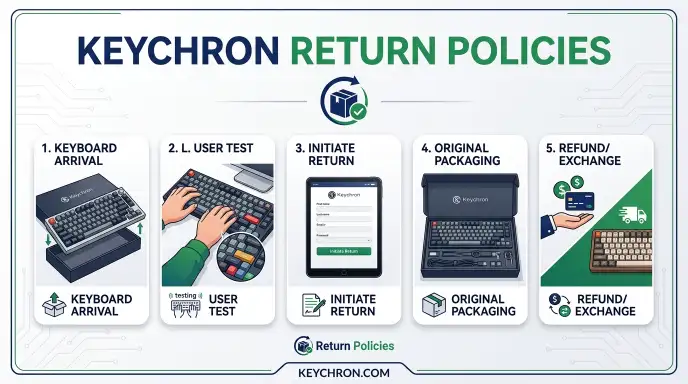
The process has seven steps. Follow them in order.
Step 1: Check Your Eligibility
Confirm three things. Your purchase source. Only direct Keychron.com orders use this process.
You are within the 14-day window. The keyboard and packaging meet the condition requirements.
If you bought from Amazon, skip this section. Go to your Amazon account and start the return there.
Step 2: Gather Your Order Information
You need your order number and the email address used for the purchase. The order number is in your confirmation email.
If you cannot find the email, log into your Keychron account. Order history is available under “My Orders.”
Step 3: Contact Keychron Customer Support
Go to the Keychron website. Find the support page or contact form. Use the “Return Request” option if available.
Write a clear message. Include your order number. State the reason for the return.
Say whether you want a refund or a replacement if the keyboard is defective.
Response time is usually one business day.
Step 4: Receive Your RMA Number
When support approves your return, they issue an RMA number. You must include this number with your package. Write it on the outside of the box and include it inside on a piece of paper.
Do not ship anything without an RMA number. Unauthorized returns are refused and sent back to you.
Step 5: Pack the Keyboard Properly
Place the keyboard back into its plastic sleeve or wrap. Seat it in the foam tray. Add all accessories in their original positions.
Close the box and tape it shut.
Put the product box inside a shipping box or padded mailer. Fill gaps with bubble wrap or packing paper. Write the RMA number on the outside.
Include a printed copy inside.
Step 6: Ship the Package
Use a carrier with tracking. USPS, UPS, FedEx, or DHL all work. Pay for insurance if the keyboard is expensive.
A lost package without tracking means no refund.
Ship to the address provided by Keychron support. Keep the tracking number and receipt until the refund posts.
Step 7: Wait for Processing
Once the package arrives, Keychron inspects it. This takes one to three business days for standard returns. Defective returns move faster.
If everything checks out, the refund processes within five to 15 business days. The money returns to your original payment method.
Direct from Keychron vs. Amazon
The two purchase channels behave very differently for returns.
Keychron Direct (keychron.com)
- Return window: 14 days from delivery
- Return shipping: You pay unless defective
- Restocking fee: Up to 20 percent on opened items
- Process: Requires RMA, contact support, ship to warehouse
- Timeline: 2 to 3 weeks total from request to refund
This is the slower path. You have less time. You pay more if you change your mind.
But you get direct access to Keychron’s warranty team.
Amazon
- Return window: Typically 30 days
- Return shipping: Often free or deducted from refund
- Restocking fee: Rare on Amazon for change-of-mind returns
- Process: Print label from Amazon account. Drop off at carrier.
- Timeline: Refund often starts within days of carrier scan
This is the faster, cheaper, more forgiving path. Amazon’s return policy is more consumer-friendly in almost every way.
Which Should You Choose?
If you are unsure about a keyboard, buy from Amazon. The longer window and easier return process give you room to decide.
If you want the full Keychron warranty experience and faster support for defects, buy direct. Just know that change-of-mind returns cost more.
If you are an international buyer, check shipping costs from both. Amazon may have a local warehouse. Keychron direct may ship from Hong Kong at a higher return cost.
The Open-Box Problem
You opened the box. You tested the keyboard. Now you want to return it.
Your Options Are Limited
Once the box is open, you cannot reverse the condition. The restocking fee applies. You pay return shipping.
| Keyboard Price | Restocking Fee (15%) | Return Shipping | Estimated Refund | Money Lost |
|---|---|---|---|---|
| $150 | $22.50 | $15 | $112.50 | $37.50 |
| $200 | $30 | $15 | $155 | $45 |
| $350 (Q-series) | $52.50 | $20 | $277.50 | $72.50 |
For a $350 keyboard, you lose over $70 to return it. At that point, consider keeping it.
The “Lightly Used” Loophole
Some buyers try to claim the keyboard is defective when it is not. Do not do this. Keychron inspects every return.
If they find no defect, they reject the warranty claim and apply the restocking fee. You also lose the return label and now pay full shipping.
Be honest about your reason. It saves time and money.
When Keeping Makes More Sense
If the restocking fee plus shipping equals more than the keyboard is worth on the resale market, sell it instead.
A used Keychron keyboard with original packaging sells for 60 to 80 percent of retail on the secondary market. After fees, you might net $120 on a $200 keyboard. That is better than a $155 refund after return costs.
Check sold listings to estimate your net. If the return costs eat too much, sell it.
When Returning Isn’t Worth It
Sometimes the best move is not to return the keyboard at all.
Sell It on the Secondary Market
Mechanical keyboards hold value better than most electronics. The enthusiast community buys and sells constantly.
Take clear photos. List all included accessories. Mention the switch type, layout, and any modifications.
Price it 15 to 25 percent below retail. It will sell within a week in most cases.
You avoid restocking fees and return shipping. You only pay the platform fee and shipping to the buyer.
Keep It as a Spare or Gift
A good mechanical keyboard lasts years. If you upgrade later, the old one becomes a backup. Or give it to a friend or family member.
Many people discover they like a keyboard more after a week of use. The switches break in. Your muscle memory adapts.
The sound grows on you.
Modify It Instead
If the problem is the switches, hot-swappable Keychron models let you change them. Buy a set of switches you prefer for $20 to $40. Pop the old ones out.
Pop the new ones in.
If the problem is the keycaps, a $30 set of PBT keycaps changes the texture and sound. If the problem is the stabilizers, a $10 lube kit fixes rattling.
Modifying a keyboard costs less than returning it and buying a different one.
Still Waiting? What to Expect on Timing
The waiting period is stressful. Here is what the timeline looks like.
| Step | Timeframe |
|---|---|
| Ship your return | 2 to 7 days depending on carrier and distance |
| Warehouse intake and inspection | 1 to 3 business days |
| Refund processing | 5 to 15 business days |
| Total from when you ship | 8 to 25 calendar days |
The refund goes back to your original payment method. Credit card refunds usually post faster than PayPal or bank transfers.
If it has been more than 20 business days since the carrier confirmed delivery, contact Keychron support. Provide your RMA number and tracking number.
International Returns Take Longer
If you shipped from outside Keychron’s regional warehouse zones, add two to three weeks to every step. Customs clearance adds time. The tracking may not update until the package clears.
Do not panic if tracking shows no movement for a week. That is normal for international shipments to Hong Kong.
Frequently Asked Questions
Can I return a Keychron keyboard after 14 days?
No, not for a change of mind. The 14-day window is firm for standard returns. If the keyboard is defective, the one-year warranty applies.
Contact support within the warranty period for defect issues.
Do I have to pay return shipping for a defective keyboard?
No. Keychron provides a prepaid return label for confirmed defect returns. You do not pay shipping and you do not pay a restocking fee.
Make sure support confirms the defect before you ship.
Is the restocking fee waived if I buy a replacement?
No. The restocking fee applies regardless of whether you choose a refund or a replacement. The only exception is defective units.
What if I lost the original box?
Without the original box, your return may be rejected. Keychron requires the full original packaging for returns. If you lost it, your best option is to sell the keyboard on the secondary market.
Can I return a keyboard that I modified?
No. Once you modify the keyboard by changing switches, keycaps, or stabilizers, it is no longer in original condition. Returns are not accepted for modified products.
Resell it instead.
What if I used a discount code on my order?
Your refund reflects the amount you actually paid. If you used a 10 percent discount code, you get 10 percent less back. Discount codes do not affect return eligibility.
Your Decision Guide: Return, Keep, or Sell?
Start at the top and follow the path that matches your situation.
Did you buy from Amazon? Return through Amazon. Longer window. Easier process.
No restocking fee in most cases. That is your best path.
Is the keyboard unopened? Return it directly to Keychron. No restocking fee. You only pay return shipping.
Do it now before the 14-day window closes.
Is the keyboard defective? File a warranty claim. Free return shipping. No restocking fee.
Choose replacement or refund.
Have you used the keyboard for more than a few minutes? The restocking fee applies. Calculate your net refund. Compare it to what you could get by selling.
Is your refund after fees worth more than 70 percent of what you paid? Return it. If not, sell it on the secondary market.
Do you genuinely dislike the keyboard, or are you just unsure? If unsure, give it a week. Use it as your daily driver. Many keyboards feel wrong for the first few days.
If you genuinely dislike it, return or sell.
The Bottom Line
There is no single right answer. Your decision depends on how much you paid, how much you dislike the keyboard, and how much hassle you want to accept.
For most people, the best order of preference is this: Amazon return if applicable, unopened return to Keychron, warranty claim for defects, secondary market sale, opened return with restocking fee, keep and modify, or keep as-is.
If you are on the fence and still within the 14-day window, start the return process now. You can always cancel it. You cannot extend the window.
Submit the RMA request and decide later.