
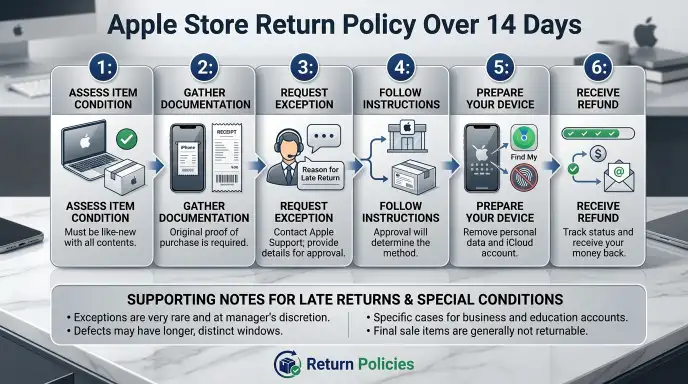
You missed the 14-day return window. That sinking feeling when you realize the Apple Store won’t just take it back. Maybe you bought the wrong model.
Maybe the gift recipient didn’t want it. Maybe you just changed your mind. Whatever the reason, the Apple Store return policy over 14 days feels like a dead end.
But it’s not always the end of the road.
Apple’s official policy is clear: 14 calendar days from delivery or purchase. That’s exactly 336 hours. No automatic grace period, no hidden extension for most situations.
However, as of 2026, the real world of returns is messier than that single sentence suggests. Your actual options depend on a handful of specific conditions. Let’s walk through them step by step.
Quick Answer
Apple’s return policy is 14 days. After that, you cannot return a device for a refund. Exceptions are rare.
A manager may approve a return for a proven defect. Buyers remorse is not a valid reason past 14 days. Your best alternative is Apple Trade In.
You can also check your credit card benefits. Consumer laws in some regions may help.
Why This Matters More Than You Think
This isn’t just about a lost refund. It’s about a device that could cost you hundreds or thousands of dollars. If you’re stuck with a phone you don’t want, that’s money you can’t use for something else.
And if the device has a defect, you’re facing a repair bill instead of a simple swap.
The stakes are higher than most people realize. Many buyers assume Apple will make an exception if they ask nicely. That’s not how it works.
The 14-day policy is enforced by the point-of-sale system. The register literally won’t process a return after the window closes. A manager override is possible, but it’s not guaranteed.
The real risk is losing the full value of the device. You can’t sell it as new. You can’t return it to the store.
You’re left with a used device that loses value the moment you open the box. That’s why you need to know your options before the clock runs out.
The Hard Truth: What 14 Days Actually Means (And What It Doesn’t)
Let’s get specific about the timeline. The 14-day window starts on the day you receive the device. If you bought it in a store, it starts the day of purchase.
If you ordered online, it starts the day it’s delivered. That’s a hard rule for most purchases.
What counts as a return? The device must be in original condition. No scratches, no dents, no damage.
Original packaging and all accessories must be included. Activation lock must be disabled. Find My must be turned off.
The device passcode must be removed. If any of those are missing, the return is rejected even within the 14-day window.
What the policy does not cover: buyer’s remorse after 14 days. Accidental damage after 14 days. Software issues that could be fixed.
Loss of original packaging. Carrier contract complications. The policy is strict for a reason, but it’s not a trap.
It’s a clear timeline.
What about price adjustments?
Price adjustments also follow the 14-day rule. If the price drops after you buy, Apple will refund the difference within 14 days. After that, the adjustment is denied.
This catches a lot of people off guard, especially during sales events like Black Friday.
What about gift returns?
If you received a device as a gift, the return window is the same. The gift giver’s purchase date matters. If they bought it 20 days ago, you’re out of luck.
The recipient cannot return it past the original 14-day window. Apple does not offer a separate gift return policy.
Is Your Situation Normal, Defective, or Damaged? (The Three Paths)
Your path forward depends entirely on which category you fall into. Let’s break it down.
| Situation | What It Means | Your Options After 14 Days |
|---|---|---|
| Normal (buyer’s remorse) | You changed your mind. No defect, no damage. | Trade In, sell privately, consumer law if applicable |
| Defective | Hardware or software issue that prevents normal use. | Manager override possible, AppleCare+ replacement, consumer law |
| Accidental damage | Screen cracked, water damage, physical impact. | No return. AppleCare+ repair, out-of-pocket repair, Trade In |
Path 1: You Just Changed Your Mind (Buyer’s Remorse)
This is the most common situation. You bought the wrong model. You don’t like the color.
You found a better deal. None of those are valid reasons for a return after 14 days.
Your best bet is Apple Trade In. You’ll get a fraction of the value back, but it’s better than nothing. You can also sell the device privately on a marketplace.
The resale value of a used Apple device is still high, especially if it’s in good condition.
Path 2: The Device Has a Real Defect (Hardware or Software Issue)
This is where you have the strongest case. A true defect, like a screen that stops working or a battery that swells, is covered by Apple’s standard warranty. The warranty lasts one year from the date of purchase.
This is separate from the return policy.
If you have a defect, bring the device to an Apple Store. The Genius Bar will inspect it. If the issue is a manufacturing defect, they will repair or replace it under warranty.
This is not a return, but it solves the problem. You get a working device or a replacement.
If the defect appeared after 14 days but within the first year, you’re still covered by warranty. You don’t need to return the device. You need a repair.
The Genius Bar handles this.
Path 3: There’s Accidental Damage or a Broken Screen
Accidental damage is not covered by the standard warranty. If you drop the phone and crack the screen, you cannot return it. You cannot exchange it for a new one.
The return policy does not apply to damaged devices.
Your options are limited. If you have AppleCare+, the repair cost is low. You can pay the service fee and get the screen fixed.
If you don’t have AppleCare+, the repair cost is high. You can pay out of pocket or trade in the device for a lower value.
The Manager Override: When It Works, When It Doesn’t
The manager override is the most misunderstood part of Apple’s return policy. Many people believe a store manager can simply approve any return. That’s not true.
The override is a tool for specific situations, not a general exception.
A manager can override the system for a proven defect. If the device has a hardware issue that was not present at purchase, the manager may approve a return or exchange. This is rare.
It requires a Genius Bar inspection and a documented issue.
A manager will not override for buyer’s remorse. If you simply changed your mind after 14 days, the manager will say no. The policy is enforced by the system, and the manager has no authority to override it for a “change of mind.”
The best way to request a manager override is to be polite and prepared. Bring the device, the original packaging, and proof of purchase. Explain the issue clearly.
If the device is defective, show the evidence. If the manager says no, accept it gracefully. Arguing will not change the policy.
What if the manager says no?
You have a few options. You can escalate to a senior advisor by calling Apple Support. They have more authority than a store manager.
You can also try a different Apple Store, but this is a long shot. The policy is consistent across locations.
Your best bet is to move on to the alternatives. Trade In, credit card protection, or consumer law. Fighting the policy for buyer’s remorse is a waste of time.
Your Best Escape Hatch: Apple Trade In
Apple Trade In is your best option for getting value out of a device you can’t return. It’s not a refund, but it’s real money. The process is straightforward.
You bring the device to an Apple Store or ship it through the Apple Trade In website. Apple evaluates the device and gives you a quote. If you accept, you get a gift card or credit toward a new purchase.
The value depends on the model, age, condition, and storage capacity.
For a recent iPhone in good condition, you can expect to get 50% to 70% of the original value. For an older device, the value drops significantly. The trade in value is lower than what you would get from a private sale, but it’s fast and easy.
The key advantage of Trade In is that it works even after the 14-day return window. The device does not need to be in original packaging. It does not need to be unopened.
Any condition is accepted, though damage reduces the value.
Trade In vs private sale
| Option | Time | Value | Effort |
|---|---|---|---|
| Apple Trade In | 1–2 days | 50–70% of original | Low |
| Private sale (marketplace) | 1–4 weeks | 75–90% of original | High |
| Carrier trade in | 1–2 days | 40–60% of original | Low |
If you need the money fast, Apple Trade In is the best option. If you want the highest value, a private sale is better. But remember, a private sale takes time and effort.
You have to list the device, negotiate with buyers, and meet in person.
Carrier Purchases: A Completely Different Set of Rules
If you bought your device through a carrier like AT&T, Verizon, or T-Mobile, the return policy is different. Apple’s 14-day policy does not apply. You are subject to the carrier’s return policy.
Most carriers offer a 14-day return window as well. Some offer 30 days for certain devices. The clock starts the day you receive the device.
The device must be in original condition, just like Apple’s policy.
The key difference is that carrier returns often involve a restocking fee. AT&T charges a $55 restocking fee for smartphones. Verizon charges a $50 fee.
T-Mobile charges a $70 fee. These fees apply even if you return within the window.
After the carrier’s return window closes, you are stuck. The carrier will not accept a return. You cannot exchange the device.
You are responsible for the full cost of the device under your contract or installment plan.
What if you bought through a carrier but want to return to Apple?
You cannot return a carrier-purchased device to Apple. Apple will direct you to the carrier. The carrier’s policy is the only policy that matters.
This catches many people off guard.
Your best option is to contact the carrier directly. Explain your situation. Some carriers offer a one-time exception for loyal customers.
It’s not guaranteed, but it’s worth a try.
What About AppleCare+? Does That Help You Return It?
AppleCare+ is a warranty and service plan, not a return policy. It does not extend the 14-day return window. It does not give you a refund after 14 days.
It covers repairs and replacements for defects and accidental damage.
If you have AppleCare+ and your device has a defect, you can get it repaired or replaced under the plan. This is a service, not a return. You pay a service fee, and Apple fixes the device.
The device is still yours.
If you have AppleCare+ and you simply want to return the device, AppleCare+ does not help. You cannot use AppleCare+ to bypass the return policy.
Can you cancel AppleCare+ after 14 days?
Yes, you can cancel AppleCare+ at any time. If you cancel within 30 days, you get a full refund. If you cancel after 30 days, you get a pro-rated refund minus the value of any service already used.
This is useful if you’re stuck with a device and want to save money on the warranty.
The Holiday Exception: Yes, There Is an Extended Window
Apple offers an extended return window for purchases made during the holiday season. This is a real exception, and it’s written into the policy.
The holiday window typically runs from November 1 to January 8. Any device purchased during this period can be returned through January 8, regardless of when you bought it. This gives you more than 30 days in most cases.
The holiday exception applies to most products. It does not apply to gift cards, personalized items, or digital content. Those are still non-returnable.
The holiday window is a goodwill gesture. Apple does not advertise it heavily. You need to check the specific dates each year as they may vary slightly.
How to use the holiday exception
If you purchased a device between November 1 and December 24, you can return it through January 8. This is a great option for gift recipients who don’t want the device. The original recipient can return it even if they didn’t buy it.
The same rules apply: original condition, original packaging, activation lock disabled. The extended window does not change the condition requirements.
The EU, UK, and Australia: Better Protections You Should Know
Consumer protection laws in some regions give you more rights than Apple’s 14-day policy. If you live in or purchased a device in the European Union, the United Kingdom, or Australia, you have better options.
| Region | Key Protection | What It Means |
|---|---|---|
| European Union | 14-day cooling-off period under EU Consumer Rights Directive | You can return any online purchase within 14 days for any reason. No defect required. |
| United Kingdom | 30-day right to reject under the Consumer Rights Act 2015 | You can reject a defective product within 30 days for a full refund. |
| Australia | Major failure provision under Australian Consumer Law | If a product has a major failure, you can get a refund, replacement, or repair at your choice. |
The EU cooling-off period applies to online purchases only. If you bought in a store, the 14-day period may not apply. The regulation is designed for distance selling, not in-store purchases.
The UK’s 30-day right to reject only applies to defective products. It does not apply to buyer’s remorse. If the device is not defective, you are subject to the seller’s standard return policy.
Australia’s consumer law is the strongest. A major failure is defined as a problem that would stop a reasonable consumer from buying the product. This includes defects that make the device unusable.
If you have a major failure, you can demand a refund regardless of the seller’s policy.
What if you bought in a different region?
If you purchased a device in the US but now live in the EU, the US policy applies. The consumer protection laws are based on where you bought the device, not where you live. If you bought in the EU, EU law applies.
Mistakes That Kill Your Chances (Even If You’re Right)
Even if you have a legitimate case, certain mistakes can ruin your chances of a return or exchange. Avoid these at all costs.
Activating the device
If you activate the device, you cannot return it as new. The activation ties the device to your Apple ID. Even if you erase it, the system knows it was activated.
This reduces the resale value and complicates the return process.
Removing the original packaging
The original packaging is required for returns. If you throw away the box, the return is rejected. Keep the box and all accessories until you are sure you want to keep the device.
Damaging the device
Any damage, even a small scratch, voids the return policy. The device must be in original condition. Damage is not covered by the return policy.
It’s a repair issue.
Filing a credit card dispute without evidence
A credit card dispute is a last resort. If you file a dispute without evidence, the card issuer will deny it. You need proof that you tried to return the device and that Apple refused.
Without that, the dispute is worthless.
Calling Apple Support without preparation
When you call Apple Support, you need to be prepared. Have your order number, the device serial number, and proof of purchase ready. Explain your situation clearly.
If you are vague or unprepared, the support agent will deny your request.
Your Last Resort Options: Credit Cards and Consumer Law
If all else fails, you have two last resort options. Neither is guaranteed, but they are worth trying.
Credit card purchase protection
Many credit cards offer purchase protection or extended return benefits. These benefits allow you to return a product even after the seller’s return window closes. The benefit is typically limited to a certain amount, like $500 or $1,000 per claim.
To use this benefit, you need to contact your credit card issuer. Provide proof of purchase, proof that the seller refused the return, and a description of the issue. The issuer will review the claim and may refund the purchase price.
The catch is that purchase protection often excludes buyer’s remorse. It’s designed for theft, damage, or loss. Some cards offer return protection that covers change of mind.
Check your card’s benefits guide.
Consumer law complaints
If you live in a region with strong consumer protection laws, you can file a complaint with the relevant authority. In the EU, you can file a complaint with the national consumer protection agency. In the UK, you can file with the Financial Ombudsman Service.
In Australia, you can file with the Australian Competition and Consumer Commission.
These complaints are taken seriously. If the authority finds that the seller violated consumer law, they can force the seller to accept the return. This is a long process, but it can work.
The Step-by-Step Plan to Try Right Now
If you’re reading this and you’re past the 14-day window, here’s a plan. Follow these steps in order.
Step 1: Check your purchase date
Log into your Apple account. Go to your order history. Find the device and note the purchase date.
Add 14 days. If you’re past that date, move to step 2.
Step 2: Determine your situation
Is the device defective? Is there accidental damage? Did you just change your mind?
Be honest with yourself. Your situation determines your options.
Step 3: If defective, go to the Genius Bar
Book an appointment at the Apple Store. Bring the device. Explain the issue.
The Genius Bar will inspect the device. If it’s a manufacturing defect, they will repair or replace it under warranty. This is not a return, but it solves the problem.
Step 4: If buyer’s remorse, consider Trade In
If you just changed your mind, Trade In is your best option. Get a quote from Apple. Compare it to the private sale value.
Decide which option is better for you.
Step 5: Check your credit card benefits
Log into your credit card account. Look for purchase protection or return protection. If your card offers it, file a claim.
Provide the required documentation.
Step 6: Check your region’s consumer laws
If you live in the EU, UK, or Australia, research your consumer rights. You may have a legal right to a refund. File a complaint with the relevant authority if needed.
Step 7: Accept the loss if necessary
Sometimes you have to take the loss. If none of the above options work, accept it. The device is yours.
Use it or sell it. The lesson is to be more careful next time.
When to Walk Away and Take the Loss
This is the hardest part. Knowing when to stop fighting and accept the loss.
If the device is not defective, and you don’t have a credit card benefit, and you live in a region without strong consumer protections, you’re out of options. The device is yours. You can try to sell it, but you’ll take a hit.
The loss is not the end of the world. A used Apple device still has value. You can sell it for 60% to 80% of the original price.
The loss is the difference between that and the full price. It’s a lesson learned.
The key is to act quickly. The longer you wait, the more the device depreciates. Sell it now, take the loss, and move on.
Final Decision Guide: What to Do Based on Your Situation
Here’s a quick decision guide to help you choose the right path.
| Situation | Best Action | Second Best |
|---|---|---|
| Device defective, within 1 year | Genius Bar appointment | AppleCare+ replacement |
| Device defective, past 1 year | AppleCare+ replacement (if active) | Out-of-pocket repair |
| Buyer’s remorse, within 14 days | Return to Apple for full refund | n/a |
| Buyer’s remorse, past 14 days | Apple Trade In | Private sale |
| Accidental damage, with AppleCare+ | AppleCare+ repair | Trade In |
| Accidental damage, no AppleCare+ | Out-of-pocket repair | Trade In |
| Carrier purchase, within window | Return to carrier | n/a |
| Carrier purchase, past window | Pay off device and sell | Trade In |
Frequently Asked Questions
Can I return an Apple product after 14 days if it’s unopened?
No. The 14-day return policy applies to all products, including unopened ones. The packaging does not extend the return window.
You need to return it within 14 days of purchase or delivery.
Does Apple ever make exceptions for loyal customers?
Rarely. Apple’s policy is consistent across all customers. Being a loyal customer does not give you special treatment.
The only exceptions are for proven defects or the holiday window.
What happens if I return a device after 14 days by accident?
The return will be rejected. Apple’s system will flag the return as past the window. The device will be returned to you.
You cannot force a return after the window closes.
Can I return a device to Apple if I bought it from a third party?
No. Apple only accepts returns for devices purchased directly from Apple. If you bought from a third party, you must return to that seller.
Apple’s policy does not apply.
How do I check my AppleCare+ coverage?
Log into your Apple account. Go to the AppleCare+ section. You can see the coverage status and expiration date.
You can also check on the device itself under Settings > General > About.
What is the best way to sell a used Apple device?
The best way is a private sale on a marketplace like Facebook Marketplace or Craigslist. You get the highest value, but it takes time. Apple Trade In is faster but gives you less money.
Choose based on your priorities.
Carrier Purchases: A Completely Different Set of Rules
If you bought your device through a carrier like AT&T, Verizon, or T-Mobile, Apple’s 14-day policy doesn’t apply. Your return is governed by the carrier’s terms. That’s a critical distinction most people miss.
Carrier return windows are similar but not identical. AT&T offers 14 days for most devices. Verizon offers 30 days for smartphones purchased online or by phone.
T-Mobile offers 14 days for devices bought from T-Mobile directly. Each carrier has its own clock and its own conditions.
Restocking fees are the norm. AT&T charges $55. Verizon charges $50.
T-Mobile charges $70. These fees come out of your refund. Apple does not charge a restocking fee on its own sales.
That’s a big difference.
The carrier also has stricter condition requirements. A scratch that Apple might overlook can trigger a rejection at AT&T. The device must be in “like new” condition with the original box and all accessories.
Missing the box often means no return at all.
Can you return a carrier device to an Apple Store?
No. Apple will not accept a return for a device purchased from a carrier. You must go back to the carrier where you bought it.
Apple’s system won’t process the return because the original sale was not in Apple’s system.
If you try, the store staff will direct you to the carrier. This is a common point of frustration. Many people assume Apple will handle it because the device is an Apple product.
That assumption costs time and stress.
What if you’re past the carrier’s return window?
You’re in a tougher spot. Carrier contracts and installment plans tie you to monthly payments. You can’t just stop paying.
You have a few options.
You can pay off the device early and unlock it. Then you own it free and clear. You can sell it privately or trade it in.
The trade in value from the carrier might be lower than Apple’s, but it’s an option.
You can also try a carrier loyalty exception. Some carriers have a one-time goodwill return for long-time customers. Call customer service.
Be polite. Explain that you missed the window by a few days. It works sometimes, but not often.
What About AppleCare+? Does That Help You Return It?
AppleCare+ is a service plan. It is not a return policy extension. It covers repairs and replacements for defects and accidental damage.
It does not give you a refund after 14 days.
If you have AppleCare+ and your device develops a defect, you get a replacement. That’s a repair service, not a return. The device is still yours.
You still own it. You just get a working unit.
If you have AppleCare+ and you want to return the device because you changed your mind, it offers no help. AppleCare+ does not override the 14-day return policy. You cannot use it to force a refund.
Can you cancel AppleCare+ and get money back after 14 days?
Yes. You can cancel AppleCare+ at any time. If you cancel within 30 days of purchase, you get a full refund.
After 30 days, you get a prorated refund minus the value of any service already used.
That refund is not a device return. It’s money back for the warranty you bought. It can help offset the loss if you’re stuck with the device.
But it won’t get you out of the device itself.
Does AppleCare+ help with trade-in value?
Indirectly. A device with active AppleCare+ has higher resale value. Buyers will pay more for a device that’s still covered.
The same applies to trade in values. Apple’s trade in calculator doesn’t ask about AppleCare+, but private buyers do.
The Holiday Exception: Yes, There Is an Extended Window
Apple extends the return window during the holiday shopping season. This is a real exception. It’s not a rumor or a loophole.
It’s written into Apple’s official policy.
The holiday window typically runs from November 1 to January 8. Any product purchased between those dates can be returned through January 8. That gives you well over 14 days for most purchases.
The extended window covers most hardware products. It does not cover gift cards, personalized items, or digital content. Those remain non-returnable regardless of the date.
How do you use the holiday exception?
Check the specific dates each year. Apple announces them in late October. If you bought between the start date and December 25, your return deadline is January 8.
The same condition rules apply. Original box, all accessories, activation lock disabled. No damage.
The only difference is the calendar.
Does the holiday exception apply to carrier purchases?
No. The holiday exception is for Apple Store purchases only. If you bought from a carrier, you follow the carrier’s holiday policy.
Many carriers offer their own extended windows. Check with your carrier.
What about gift recipients?
This is a common scenario. Someone receives an Apple device as a gift after the 14-day window has passed. The holiday exception solves that.
If the device was purchased during the holiday window, the recipient can return it through January 8. They just need the gift receipt or the original purchase email.
The EU, UK, and Australia: Better Protections You Should Know
Consumer protection laws in some regions give you stronger rights than Apple’s standard policy. These laws apply regardless of what Apple’s terms say.
European Union
The EU Consumer Rights Directive gives you a 14-day cooling-off period for online purchases. This applies to any online order within the EU, including from Apple. You can cancel for any reason within 14 days of receiving the product.
No defect required. No restocking fee.
The directive does not apply to in-store purchases. If you bought in a physical Apple Store in the EU, you are subject to Apple’s 14-day policy. But online purchases get the statutory cooling-off period.
United Kingdom
The Consumer Rights Act 2015 gives you a 30-day right to reject for defective products. If the device develops a fault within 30 days, you can claim a full refund. This is stronger than Apple’s policy.
It covers manufacturing defects, not buyer’s remorse.
After 30 days, you still have rights. You can request a repair or replacement within six months. The burden of proof is on the seller to show the defect didn’t exist at purchase.
Australia
The Australian Consumer Law is the strongest. If a product has a major failure, you can demand a refund, replacement, or repair. A major failure is a problem that would stop a reasonable person from buying the product.
Examples include a phone that won’t turn on or a laptop with a dead screen.
For minor failures, you can request a repair or replacement. The law applies for a reasonable period after purchase. That period can extend well beyond 14 days.
How to use these laws
Don’t rely on Apple’s policy if you live in these regions. Cite the law. Contact Apple Support and reference the relevant consumer rights act.
If Apple refuses, file a complaint with the national consumer authority.
In the EU, that’s your country’s consumer protection agency. In the UK, it’s the Financial Ombudsman Service or the Competition and Markets Authority. In Australia, it’s the ACCC.
Mistakes That Kill Your Chances (Even If You’re Right)
Even with a strong case, you can ruin your chances with a simple mistake. These are the most common errors we see.
Activating the device
Once you activate an iPhone or iPad, it’s tied to your Apple ID. Even after you erase it, the activation history remains. Apple’s system flags activated devices as used.
That can kill a return even within the window. If you’re past the window, activation makes a manager override far less likely.
Removing the original packaging
The original box and all accessories are required for returns. If you threw away the box, you’re in trouble. Apple will reject the return.
You can’t substitute a generic box. Keep everything until you’re sure you’re keeping the device.
Damaging the device
A scratch or dent voids the return policy. The device must be in original condition. If you dropped it and cracked the screen, you cannot return it.
Period. The only option is repair.
Filing a credit card dispute without evidence
A chargeback is a last resort. If you file one without proof that you tried to return the device, the bank will deny it. You need documentation: emails, call logs, refusal letters.
Without that, you lose the dispute and waste time.
Calling Apple Support without preparation
When you call, have your order number, serial number, and proof of purchase ready. Explain your situation concisely. If you’re vague or emotional, the agent will follow the script.
They have no incentive to bend the rules for a disorganized caller.
Waiting too long
Even if you have a legitimate issue, waiting weeks or months to act weakens your case. Apple may argue that you accepted the device by keeping it so long. Act quickly.
The sooner you raise the issue, the more leverage you have.
Your Last Resort Options: Credit Cards and Consumer Law
When every other path is blocked, you still have two final options. Neither is guaranteed. Both require effort and documentation.
But they can work when the system says no.
Credit card purchase protection and return protection
Many Visa, Mastercard, American Express, and Discover cards offer benefits that go beyond the merchant’s policy. Purchase protection covers theft or damage within a set period. Return protection covers situations where the merchant refuses a return.
Return protection is the relevant one here. It typically covers up to $300 to $500 per claim. Some premium cards cover up to $1,000.
The benefit reimburses you for the purchase price if the merchant won’t accept the return.
The catch is that return protection usually has a time limit. Most cards require you to file within 90 days of purchase. Some cards exclude electronics.
Others exclude items over a certain value. You need to check your card’s specific terms.
How to file a claim
Call the number on the back of your card. Ask about return protection or purchase protection. The agent will tell you what documents you need.
You will need the original receipt. You will need proof that Apple refused the return. That could be a screenshot of the return denial in your Apple account or an email from Apple Support.
You will need the device serial number and the date of purchase.
The claim process takes one to two weeks. If approved, the credit issuer refunds the purchase price to your card. You keep the device.
You don’t have to ship it anywhere.
Consumer law complaints in the US
The US does not have a federal cooling-off law for most retail purchases. The FTC’s Cooling-Off Rule only applies to sales made at your home, workplace, or a temporary location. It does not apply to Apple Store purchases, whether online or in person.
However, state consumer protection laws can help. Some states have laws against unfair or deceptive practices. If you can show that Apple misled you about the return policy, you may have a claim.
This is hard to prove. Apple’s policy is clearly stated on its website and at the point of sale.
The Magnuson-Moss Warranty Act can help if the device has a defect. This federal law covers product warranties. If Apple refuses to honor a warranty, you can file a claim.
This applies to defects, not buyer’s remorse.
Consumer law complaints outside the US
If you live in the EU, UK, or Australia, your options are stronger. File a complaint with the relevant authority.
In the EU, contact your national consumer protection agency. In the UK, contact the Financial Ombudsman Service or the Competition and Markets Authority. In Australia, contact the ACCC.
These agencies take complaints seriously. If they find that Apple violated consumer law, they can force Apple to accept the return. The process takes several weeks.
But it has a high success rate for valid claims.
Small claims court
For high-value devices, small claims court is an option. The filing fee is low. You don’t need a lawyer.
You present your case to a judge.
The threshold varies by state. In most states, small claims handles cases up to $5,000 to $10,000. That covers most Apple devices.
If you win, the court orders Apple to accept the return or pay damages.
This is a genuine last resort. It requires time and preparation. But it works for people who have a clear case and the patience to see it through.
The Step-by-Step Plan to Try Right Now
If you are past the 14-day window and want to maximize your chances, follow this order. Do not skip steps. Do not jump ahead.
Step 1: Verify your exact purchase date
Log into your Apple account at apple.com. Go to Order History. Find the device.
Note the purchase date and the delivery date. Write them down.
Add 14 calendar days to the delivery date. That is your return deadline. If you are past it, move to step 2.
Step 2: Assess your situation honestly
Is the device defective? Does it have a hardware or software issue that prevents normal use? Is there any accidental damage?
Or did you just change your mind?
Be honest. A manager can spot a weak case immediately. If you are asking for a return because you found a better price elsewhere, you will be denied.
Accept that and move to the alternatives.
Step 3: If defective, book a Genius Bar appointment
Go to apple.com or use the Apple Store app. Book a Genius Bar appointment at your nearest Apple Store. Bring the device, the original packaging, and proof of purchase.
Explain the issue clearly. Show the defect. Let the technician inspect the device.
If the defect is confirmed, you will get a repair or replacement under warranty. That solves the problem even if you can’t return the device.
Step 4: If not defective, call Apple Support
Call 1-800-MY-APPLE. Ask for a senior advisor. Explain your situation.
Be polite. Be concise. Do not demand a return.
Ask if there are any options available.
The senior advisor has more authority than a store employee. They can offer a store credit or a one-time exception in rare cases. This is not common, but it has happened.
It depends on your history with Apple and the specifics of your case.
Step 5: Check your credit card benefits
Log into your credit card account. Look for the benefits guide. Search for “return protection” or “purchase protection.”
If your card offers it, file a claim online or by phone. Have your receipt ready. Have the denial from Apple ready.
The claim takes one to two weeks.
Step 6: Consider Apple Trade In
If none of the above work, Trade In is your best option. Go to apple.com/trade-in. Answer the questions about your device.
Get a quote.
Compare the quote to the private sale value. If the difference is small, use Trade In for convenience. If the difference is large, sell the device on a marketplace.
Step 7: If applicable, file a consumer law complaint
If you live in the EU, UK, or Australia, file a complaint with the relevant authority. Provide all documentation. Be patient.
The process takes time but can force a resolution.
Step 8: Accept the outcome
Sometimes you cannot win. If you have exhausted every option, accept the loss. Sell the device.
Use the proceeds for your next purchase. Take it as a lesson learned.
When to Walk Away and Take the Loss
Knowing when to stop is a skill. Many people waste weeks chasing a return that will never happen. Here is how to know when it is time to move on.
You have no defect to point to
If the device works perfectly and you just changed your mind, you have no leverage. Apple’s policy is clear. No manager override will happen.
No credit card benefit will cover buyer’s remorse. The device is yours.
You have already escalated as far as you can
If a senior advisor said no and your credit card claim was denied, the fight is over. Pursuing small claims court for a $1,000 phone is not worth the time and stress. Take the loss.
The device has been damaged
If you dropped the phone or cracked the screen, the return path is dead. Accidental damage is not covered. Your only options are repair or trade in.
Fighting for a return will not change that.
More than 30 days have passed
The longer you wait, the weaker your case. After 30 days, Apple assumes you accepted the device. Even if you have a legitimate issue, the delay works against you.
Move to alternatives.
What taking the loss actually means
You keep the device. You use it or sell it. You take whatever value you can recover.
Then you move on.
The financial hit is real. But it is not the end of the world. A used Apple device in good condition sells for 60 to 80 percent of its original price.
You lose 20 to 40 percent. That is a hard lesson. But it is cheaper than fighting a losing battle for weeks.
Final Decision Guide: What to Do Based on Your Situation
This table summarizes the best action for each situation. Find your scenario and follow the recommendation.
| Situation | Best First Action | Backup Plan | Timeframe |
|---|---|---|---|
| Device defective, within 1 year | Genius Bar appointment | AppleCare+ replacement | 1 week |
| Device defective, past 1 year | AppleCare+ replacement (if active) | Out-of-pocket repair | 1 week |
| Buyer’s remorse, within 14 days | Return to Apple for full refund | N/A | 1 day |
| Buyer’s remorse, past 14 days | Apple Trade In | Private sale | 1 week |
| Accidental damage, with AppleCare+ | AppleCare+ repair | Trade In | 1 week |
| Accidental damage, no AppleCare+ | Out-of-pocket repair | Trade In | 2 weeks |
| Carrier purchase, within window | Return to carrier | N/A | 1 day |
| Carrier purchase, past window | Pay off device and sell | Trade In | 1 month |
| EU purchase, within 14 days | Return under cooling-off period | N/A | 1 day |
| UK purchase, defective within 30 days | Claim under Consumer Rights Act | N/A | 1 week |
| Australia purchase, major failure | Demand refund under ACL | ACCC complaint | 1 month |
Frequently Asked Questions
Can I return an Apple product after 14 days if it is unopened?
No. The 14-day policy applies to all products regardless of condition. Even an unopened box cannot be returned after the window closes.
The only exception is the holiday extension window.
Does Apple ever make exceptions for loyal customers?
Rarely. Apple treats all customers equally. There is no loyalty override for the return policy.
A senior advisor may offer a store credit in rare situations, but it is not common.
What happens if I return a device after 14 days by accident?
The system rejects the return. The device is sent back to you or held at the store. You will receive a notification explaining that the return was denied.
You do not lose the device; you just cannot return it.
Can I return a device to Apple if I bought it from a third party?
No. Apple only accepts returns for products purchased directly from Apple. If you bought from a carrier, retailer, or reseller, you must return to that seller.
How do I check my AppleCare+ coverage status?
Go to Settings on your device. Tap General. Tap About.
Look for AppleCare+ coverage. You can also log into your Apple account and check the coverage section.
What is the best way to sell a used Apple device?
A private sale on a marketplace like Facebook Marketplace or Craigslist gives the highest return. You get 70 to 90 percent of the original value. The trade off is time and effort.
Apple Trade In is faster but returns 50 to 70 percent.