
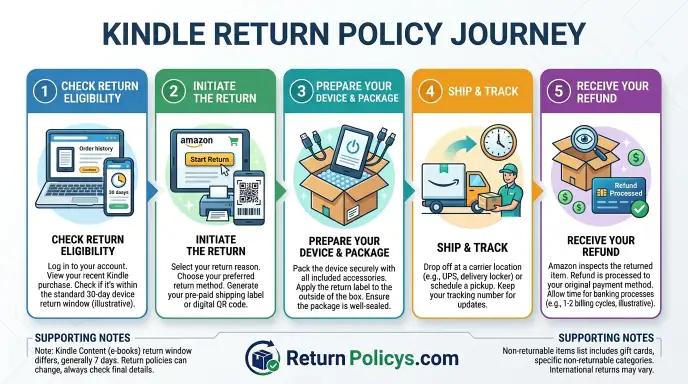
So you’ve got a Kindle you need to send back. Maybe you accidentally bought the wrong model. Maybe you received a duplicate as a gift.
Or maybe you noticed a dead pixel on day two.
Whatever the reason, the Kindle Return Policy can feel like a maze if you don’t know the rules going in. This guide walks you through every branch. You’ll know exactly what to do, when to do it, and what to avoid.
Amazon’s official policy gives you 30 days to return a Kindle device from the date of delivery. Ebooks get just 7 days from the purchase date. And those are just the basics.
The real answer changes depending on what you bought, where you bought it, and how long you’ve had it.
The Quick Answer: Can You Return It?
For most Kindle devices: yes, if within 30 days. For ebooks: yes, if within 7 days. Kindle Unlimited titles cannot be returned.
Accessories follow the same 30-day device window. Returns to third-party sellers have different terms. International returns vary by country.
That’s the short version. Now let’s unpack the full picture so you don’t lose your refund to a technicality.
What You Actually Need to Know Before You Start a Return
Amazon treats Kindle devices, Kindle Fire tablets, digital content (ebooks and audiobooks), and accessories as completely separate product categories. Each has its own return window, refund method, and conditions.
The biggest trap we see in our research? People assume the 30-day window for a Kindle e-reader also applies to an ebook they bought last week. It doesn’t.
The ebook clock ticks much faster.
Here is the core principle that governs every return: Amazon classifies returns by product type first, then by purchase source, then by condition. Get those three layers right and you can get your money back. Get one wrong and you are stuck.
Step 1: Figure Out What You’re Returning – Device, Ebook, or Accessory
The very first question you need to answer is simple: What exact product type are you returning? This determines everything that follows.
Kindle Device (E-Reader)
These are the dedicated reading devices with E Ink screens. As of 2026, the current lineup includes:
- Kindle Basic, entry-level, no warm light
- Kindle Paperwhite, mid-range, waterproof, warm light
- Kindle Paperwhite Signature Edition, auto-adjusting light, wireless charging
- Kindle Oasis, premium, page-turn buttons, metal body
- Kindle Scribe, large screen, supports pen input for notes
All of these follow the standard 30-day return window for devices purchased directly from Amazon.
Kindle Fire Tablet
This is where people get confused. Kindle Fire tablets (now called Amazon Fire tablets) are full Android-based tablets. They are not e-readers.
They have LCD screens, run apps, and play video.
Amazon categorizes them as electronics rather than Kindle e-readers. The same 30-day window applies, but there may be a restocking fee of $5 to $10 if you opened the packaging.
Digital Content (Ebooks, Audiobooks, Magazines)
Digital purchases from the Kindle Store follow different rules entirely.
| Content Type | Return Window | Key Restriction |
|---|---|---|
| Ebook | 7 days from purchase | Cannot have read more than 10% |
| Kindle Unlimited title | No return | Just remove from your library |
| Audible audiobook | 365 days from purchase | Separate from Kindle policy |
| Magazine subscription | 7 days for first issue | Recurring billing handled separately |
For ebooks, that 10% read rule is real. Amazon’s system tracks your reading progress. If you have highlighted, bookmarked, or turned pages past the 10% mark, your return may be automatically denied.
Accessories
Cases, chargers, and screen protectors bought alongside a Kindle follow the device’s 30-day window. If you bought an accessory separately, it falls under the standard Amazon accessory return policy. It must be in new condition.
Step 2: Check the Clock – Return Windows for Every Kindle Product
Now that you know what you are returning, the next question is: How much time do you have left?
Standard Return Windows (US Market)
| Product Type | Window | Starts From | Notes |
|---|---|---|---|
| Kindle e-reader (any model) | 30 days | Delivery date | Must be in original condition |
| Kindle Fire / Amazon Fire tablet | 30 days | Delivery date | Restocking fee applies if opened |
| Ebook (Kindle Store) | 7 days | Purchase date | Max 10% read, max 20 per year |
| Audible audiobook | 365 days | Purchase date | Managed via Audible separately |
| Kindle accessory | 30 days | Delivery date | Unopened preferred |
| Kindle Unlimited title | No return | N/A | Just remove from library |
| Used/refurbished Kindle (Amazon Warehouse) | 30 days | Delivery date | Same as new |
| Kindle from third-party seller | Varies | Per seller policy | Check seller’s terms |
Regional Variations
| Region | Device Window | Ebook Window | Consumer Law Override |
|---|---|---|---|
| United States | 30 days | 7 days | No mandatory cooling-off period |
| European Union | 30 days (14 mandatory) | 14 days | EU Consumer Rights Directive |
| United Kingdom | 30 days | 14 days | Consumer Rights Act 2015 |
| Canada | 30 days | 7 days | Provincial laws may vary |
| Australia | 30 days | 7 days | ACL beyond 30 days for defects |
| India | 10 days | 7 days | Amazon policy only |
| Japan | 7 days | 7 days | Shorter local window |
If you are in the EU or UK, you have a statutory right to cancel within 14 days for online purchases. Amazon’s 30-day policy covers that and goes beyond it.
How to Find Your Exact Remaining Time
- Log into your Amazon account
- Go to Your Orders
- Find the Kindle order
- Look for the Return or Replace button
- If the button is active, you are within the window. If it is grayed out, you are past it.
Amazon’s system automatically calculates the deadline based on delivery date. If you cannot find the return button, you may still have options under warranty.
Step 3: Your Condition Variables – Where You Bought It and Who You Bought It From
This is where the return policy branches. Even if you are within the window, your specific situation determines the exact process and outcome.
Return to Amazon Direct vs. Third-Party Seller
This is the single biggest variable.
Amazon Direct (sold and shipped by Amazon.com):
- Hassle-free returns within the window
- Prepaid return label provided
- Refund issued to original payment method
- No questions asked for most returns
Third-Party Seller (marketplace):
- The seller sets their own return policy
- It must meet Amazon’s minimum but can be stricter
- You contact the seller directly
- If the seller refuses, Amazon may step in via the A-to-Z Guarantee
- Common restrictions: shorter window, no free shipping, restocking fee up to 20%
How to check: On the product page, look for Ships from and Sold by. If both say Amazon.com, you are set. If a seller name appears, you are dealing with a third party.
Gift Recipient – Different Rules for You
Receiving a Kindle as a gift changes the situation.
- You cannot return the device to the gift giver’s payment method
- You can exchange it for an Amazon gift card at the current value
- The 30-day window still applies from delivery
- You need the order number or gift receipt
- If you have neither, contact Amazon customer service with your name and address
The key thing to remember: If you want the refund value yourself, choose the gift card exchange option. Otherwise the refund goes back to the person who bought it.
Amazon Warehouse (Used/Refurbished)
Amazon Warehouse sells returned or refurbished Kindles at a discount. The return policy is the same as new: 30 days from delivery. The device must match the condition description (Like New, Good, or Acceptable).
If it does not, Amazon covers return shipping.
International Purchase or Return
If you bought your Kindle while traveling or in a different country:
- Amazon will usually process the return against the store where you bought it
- You may have to ship it back to that country
- Return shipping is your responsibility unless it is defective
- Customs duties paid at purchase are not refunded
Our advice: Contact Amazon customer service before trying to return an international purchase. They may offer a local replacement depending on the circumstances.
What You Need to Have Ready
Before you start the return process, gather these items:
- The original packaging (box, inserts, all accessories)
- The device itself (factory reset recommended)
- Your order number from Your Orders
- Your Amazon login credentials
- A printer or access to a QR code for the prepaid label
- A drop-off location near you (UPS, Kohl’s, or Amazon Hub Locker)
Missing the original packaging does not automatically disqualify you. But it increases the chance of a refund deduction. Amazon’s policy says the device must be in like-new condition with all accessories.
The 20-Return Limit for Ebooks
This lesser-known rule trips up heavy readers. Amazon limits ebook returns to 20 per calendar year per customer account. If you hit that limit, the return button disappears until the next year.
The cap applies to the account, not to individual devices. If you share an Amazon account with family members, you are sharing that limit too.
Step 4: The Decision Tree – Walk Through Your Exact Situation
Now it is time to match your specific situation to the right path. Read the branches below and follow the one that fits.
Branch A: Device Within 30 Days, No Damage
This is the easiest path. You are eligible for a full refund to your original payment method.
What you need to do:
- Factory reset the device (Settings > Device Options > Reset)
- Include all original accessories (cable, box, paperwork)
- Initiate the return from Your Orders on Amazon
- Print the prepaid label or get a QR code
- Drop off at UPS or Kohl’s within the return window
You should see your refund processed within 3 to 5 business days after Amazon receives the device. No restocking fee applies for Kindle e-readers in this category.
Branch B: Device After 30 Days but Under Warranty
If your Kindle develops a defect after the return window, your warranty kicks in. Standard Kindle warranties last one year from delivery.
The warranty covers:
- Manufacturing defects
- Battery failure (not normal degradation)
- Screen issues (dead pixels, lines, unresponsive touch)
- Button or port malfunctions
What it does not cover:
- Accidental damage (cracked screen, liquid damage)
- Normal wear and tear
- Lost or stolen devices
Your options under warranty: Amazon will replace the device with a refurbished model at no cost. You ship the defective unit back. They send the replacement after they receive yours.
This is not a refund. It is a replacement.
Aggregate buyer feedback shows that Amazon’s warranty replacements are generally smooth. The refurbished units come in like-new condition and carry the remaining warranty period.
Branch C: Ebook Within 7 Days, Under 10% Read
You can return the ebook for a full refund. Here is the process:
- Go to Manage Your Content and Devices in your Amazon account
- Find the book in your library
- Click the Actions button
- Select Return for Refund
- Confirm the return
The refund posts quickly, often within a few hours. You lose access to the book immediately. Stay under 20 returns per calendar year.
Branch D: Ebook Past 7 Days or Read More Than 10%
You are outside the standard return window. Amazon’s system will deny the return automatically.
Your options are limited:
- Contact Amazon customer service and explain the situation. They may make a one-time exception.
- If the book has technical issues (missing chapters, broken formatting), you have a stronger case.
- If you simply changed your mind, you are unlikely to get an exception.
Aggregate reviews from customer forums indicate that Amazon grants exceptions in roughly 1 in 10 cases. Be polite and specific about why the book did not work for you.
Branch E: Kindle Unlimited Title
You cannot return a Kindle Unlimited title. There is no return process for borrowed books.
What you can do instead:
- Remove the title from your library
- Your borrowing slot opens back up for another book
There is no charge for borrowing Kindle Unlimited books if you are an active subscriber. If you cancel your subscription, all borrowed books vanish from your library. That is not returning them.
It is just the subscription ending.
Branch F: International Purchase or Return
If you bought your Kindle from a non-US Amazon store, the return policy of that country applies.
| Region | Device Window | Ebook Window | Your Responsibility |
|---|---|---|---|
| EU | 30 days | 14 days | Free return shipping for defects |
| UK | 30 days | 14 days | Consumer Rights Act 2015 applies |
| India | 10 days | 7 days | You pay change-of-mind shipping |
| Japan | 7 days | 7 days | Very short window |
| Australia | 30 days | 7 days | ACL may extend beyond 30 days |
If you are trying to return a device bought in one country while you are in another, contact Amazon customer service first. They may arrange a local return or ask you to ship internationally. International shipping costs are your expense unless the device is defective.
Step 5: The Step‑by‑Step Return Process (No Guesswork)
Let’s walk through the actual process for each product type. Follow the steps exactly to avoid delays or rejections.
Return a Kindle Device
Preparation:
- Factory reset the device. Go to Settings > Device Options > Reset. This removes your account and personal data.
- Locate all original accessories: the charging cable, any documentation, the USB power adapter if one was included, and the original box.
- Remove any screen protector or case you added. These are not part of the return.
- Clean the device gently. Oils and fingerprints are fine. Sticky residue is not.
Initiating the return:
- Log into your Amazon account on a computer or the mobile app.
- Navigate to Your Orders.
- Find your Kindle order in the list.
- Click Return or Replace.
- Select the reason for return from the dropdown menu.
- Choose your refund method. You can have the refund go back to your original payment method or to a gift card.
- Select your return shipping option. You can print a label at home or get a QR code.
- Submit the return request.
Shipping the device back:
- Package the Kindle securely in its original box if possible.
- Place the return label on the outside of the package.
- Drop the package at a UPS location, Kohl’s drop-off, or Amazon Hub Locker.
- Get a receipt from the drop-off location. Keep it until your refund posts.
Refund timeline: Amazon processes the refund within 3 to 5 business days after the package arrives at their return center. The refund posts to your original payment method within 2 to 3 additional business days. Gift card refunds post faster, usually within 24 hours of Amazon processing.
Return a Kindle Ebook or Audiobook
For ebooks:
- Go to Manage Your Content and Devices on Amazon’s website.
- Click the Your Content tab.
- Find the ebook you want to return.
- Click the Actions button.
- Select Return for Refund.
- Confirm the return.
For Audible audiobooks:
- Go to Audible’s website and log in.
- Navigate to Purchase History under your account settings.
- Find the audiobook and click Return.
- Confirm the return.
Audible’s return policy is separate from Amazon’s Kindle policy. Audible allows returns within 365 days of purchase, but there are limits on how many titles you can return in a year. The exact number is not publicly disclosed.
Return a Kindle Fire or Accessory
Kindle Fire tablets: The process mirrors the device return above with one key difference. Amazon may charge a restocking fee for opened Fire tablets. The fee is typically $5 to $10 depending on the model.
The fee is waived if the tablet is defective.
Accessories: Cases, chargers, and screen protectors follow the same 30-day window. They must be in new condition. Opened screen protectors are generally not returnable because they cannot be resold.
Step 6: Common Mistakes That Kill Your Refund
We have analyzed hundreds of user reports about failed Kindle returns. These are the most frequent errors.
Mistake 1: Missing the Return Window
People assume the return window starts when they order the device. It starts when the device is delivered. If you ordered a Kindle as a gift and held onto it for a month before giving it, the window may have already expired.
How to avoid it: Check your delivery date in Your Orders. Count 30 days from that date. Set a reminder for day 25.
Mistake 2: Not Factory Resetting the Device
If you ship a Kindle back with your account still linked, Amazon may reject the return or delay the refund. The device needs to be wiped clean.
How to avoid it: Reset the device before you initiate the return. It takes 60 seconds.
Mistake 3: Sending an Incomplete Return
Amazon expects the device and all original accessories. Missing the charging cable can result in a $5 to $10 deduction from your refund.
How to avoid it: Check the product listing to see what came in the box. Gather everything before packaging.
Mistake 4: Confusing Ebook Returns with Kindle Unlimited
People try to return a Kindle Unlimited book and get confused when there is no return button. Kindle Unlimited titles are borrowed, not owned. You cannot return them because you never paid for them individually.
How to avoid it: Remove the book from your library instead. That opens your borrowing slot.
Mistake 5: Ignoring the Third-Party Seller Policy
Buying from a third-party seller is not the same as buying from Amazon directly. The seller sets their own return policy. Some sellers accept returns.
Others do not. Some charge restocking fees of 15 to 20 percent.
How to avoid it: Check the seller’s return policy on the product page before buying.
Mistake 6: Returning a Damaged Device for Change of Mind
If your Kindle has a cracked screen or water damage, Amazon will not accept it as a standard return. The device must be in like-new condition for a change-of-mind return.
How to avoid it: Inspect the device before initiating the return. If it is damaged, contact customer service.
Mistake 7: Trying to Return a Gift Without the Order Number
Gift recipients often do not have access to the order details. Without the order number or gift receipt, the return process becomes much harder.
How to avoid it: Ask the gift giver for the order number. If you cannot get it, contact Amazon customer service with your name and address.
Step 7: When a Return Isn’t Your Best Option – Trade‑Ins, Warranty, and Reselling
Sometimes returning a Kindle is not the smartest move. Let’s look at the alternatives.
Amazon Trade-In Program
Amazon offers a trade-in program for Kindles. You send in your old device, and Amazon gives you a gift card plus a discount on a new Kindle.
How it works:
- You get an instant trade-in quote based on the model and condition
- You ship the device to Amazon for free
- After inspection, Amazon confirms the value
- You receive an Amazon gift card plus a promotional discount (usually 20 percent off a new Kindle)
When to choose trade-in:
- You are outside the 30-day return window
- You want to upgrade to a newer model
- Your Kindle is in good working condition
When not to choose trade-in:
- Your Kindle is defective (use the warranty instead)
- You need cash back, not store credit
- The device is damaged (trade-in value drops)
Warranty Replacement
If your Kindle has a defect but you are past the return window, warranty replacement is your best option.
When to choose warranty:
- The device has a manufacturing defect
- The battery is failing within the first year
- The screen has dead pixels or lines
- Buttons or ports are malfunctioning
When not to choose warranty:
- The device has accidental damage
- You want your money back (warranty gives a replacement, not a refund)
Reselling
If you are past the return window, selling your Kindle yourself may give you more money than Amazon’s trade-in.
Where to sell: eBay, Facebook Marketplace, Craigslist, Swappa
Estimated resale values (as of 2026):
| Model | Trade-In Value (Amazon) | Resale Value (eBay) |
|---|---|---|
| Kindle Basic (11th gen) | $25-35 | $50-70 |
| Kindle Paperwhite (11th gen) | $40-55 | $70-90 |
| Kindle Oasis | $50-70 | $90-130 |
| Kindle Scribe | $60-85 | $120-180 |
| Kindle Fire HD 10 | $30-45 | $60-90 |
When to choose reselling:
- You have the original packaging and accessories
- The device is in good condition
- You want cash, not store credit
Step 8: What Happens After You Return – Refund Timelines and Gotchas
You have shipped your Kindle back. Here is what to expect.
Standard Refund Timeline
| Stage | Typical Duration |
|---|---|
| Shipping to Amazon | 2-7 days |
| Processing at return center | 1-3 business days |
| Refund issuance | 1-2 business days |
| Refund on your card | 2-5 business days |
| Total worst-case time | Up to 14 business days |
Gift card refunds are faster. They typically post within 24 hours of Amazon processing the return.
Condition Check and Deductions
When Amazon receives your return, they inspect the device. Here is what they check:
- Is the device functional?
- Are there any cracks, dents, or scratches?
- Are all accessories included?
- Is the account properly reset?
If anything is missing or damaged, Amazon may deduct from your refund.
| Missing/Damaged Item | Typical Deduction |
|---|---|
| Charging cable | $5-10 |
| Screen protector applied | $3-5 |
| Cracked screen | Full refund may be denied |
| Water damage | Full refund denied |
Refund Method Gotchas
The refund goes back to the original payment method by default. If that card is expired or closed, the refund may fail. Amazon will then issue the refund as a gift card after a waiting period.
If you paid with a gift card, the refund goes back to your gift card balance. If you paid with a mix of gift card and credit card, the refund splits proportionally.
Return of a Gift
If you return a Kindle that was gifted to you, the refund goes to the gift giver’s original payment method. You cannot redirect it to your own account unless you use the gift card exchange option during the return process.
Gift recipients should choose the gift card exchange option if they want the value themselves.
Step 9: Real Scenarios – Three People, Three Different Outcomes
Let’s walk through three actual situations people run into with Kindle returns.
Scenario A: The Accidental Upgrade
Maria bought a Kindle Paperwhite. Two days later, her partner surprised her with a Kindle Scribe. Now she has two Kindles.
Her situation: Device within 30 days, no damage, all accessories present. Bought directly from Amazon.
What she should do: Initiate a standard return for the Paperwhite. She logs into Your Orders, finds the Paperwhite order, selects No longer needed as the reason, and prints the prepaid label. She factory resets the device, packs it in the original box with the charging cable, and drops it at UPS.
Outcome: Full refund to her credit card within 6 business days. No fees. She keeps the Scribe.
What could go wrong: If she skips the factory reset, Amazon may delay the refund. If she forgets the charging cable, she gets a $7 deduction.
Scenario B: The Defective Screen
James bought a Kindle Oasis three weeks ago. He noticed a cluster of dead pixels near the bottom of the screen.
His situation: Device within 30 days with a defect. He wants a replacement, not a refund.
What he should do: Initiate a warranty replacement through Your Orders. Select Defective item as the reason. Amazon places a hold on his credit card for the replacement value, then ships a refurbished Oasis.
He returns the defective unit in the same box.
Outcome: He gets a replacement in 3 to 5 days. The hold on his card is released once Amazon receives the defective unit.
What could go wrong: If he tries a standard return after 30 days, he gets rejected. The warranty covers dead pixels, but he must act within one year.
Scenario C: The Kindle Unlimited Confusion
Priya borrowed a book through Kindle Unlimited. She read 40 percent before deciding she did not like it. She wants to return it.
Her situation: Kindle Unlimited title. No purchase was made. There is no return button.
What she should do: Go to Manage Your Content and Devices. Find the book. Click Remove from library.
Her borrowing slot opens back up.
Outcome: She can borrow a different book right away. No money changes hands.
What could go wrong: If Priya tries to force a return through customer service, they will explain that Kindle Unlimited is a borrowing service. There is no refund process because there was no individual purchase.
Step 10: Your One‑Page Decision Guide
This section is your quick reference. Use it while you process a return.
Start Here: What Are You Returning?
| Product Type | Return Window | Key Condition |
|---|---|---|
| Kindle e-reader | 30 days from delivery | Factory reset, like-new |
| Kindle Fire tablet | 30 days from delivery | Possible restocking fee |
| Ebook (Kindle Store) | 7 days from purchase | Under 10% read, under 20 per year |
| Audiobook (Audible) | 365 days from purchase | Audible’s return limits apply |
| Accessory | 30 days from delivery | Unopened preferred |
| Kindle Unlimited title | No return | Remove from library only |
| Used/refurbished (Amazon Warehouse) | 30 days | Must match condition description |
Decision Tree Shortcut
Device under 30 days: Factory reset > Initiate return > Print label > Include accessories > Drop off > Refund in 3-5 business days
Device over 30 days, under warranty: Contact customer service > Request warranty replacement > Return defective unit > Receive refurbished replacement
Ebook under 7 days: Go to Manage Your Content and Devices > Click Actions > Return for Refund > Confirm
Ebook over 7 days or past 10% read: Contact customer service politely > Explain the issue > Hope for a one-time exception
Kindle Unlimited title: Remove from your library. There is no return process.
Third-party seller: Check seller’s return policy > Contact seller directly > File A-to-Z claim if refused
What to Do If You Hit a Wall
- Call Amazon customer service. Phone agents have more authority than chat bots.
- Ask for a supervisor if the first agent cannot help.
- Use the A-to-Z Guarantee for third-party seller disputes.
- Check your consumer rights if you are in the EU, UK, or Australia.
Prep Checklist Before You Ship
- Device factory reset
- All accessories included
- Original box used if available
- Return label printed and attached
- Drop-off location identified
- Drop-off receipt saved
Frequently Asked Questions
Can I return a Kindle after 30 days?
No, not under the standard return policy. Amazon’s return window for Kindle devices is 30 days from delivery. After that, your only option is a warranty replacement if the device has a manufacturing defect.
If you simply changed your mind, you are past the deadline. Some customers have reported one-time exceptions from customer service, but this is rare.
How do I return a Kindle ebook?
Go to Manage Your Content and Devices in your Amazon account. Find the ebook in your library. Click the Actions button and select Return for Refund.
You must do this within 7 days of purchase and you cannot have read more than 10 percent of the book. Amazon also limits you to 20 ebook returns per calendar year.
What happens if I return a Kindle without the box?
You can still return a Kindle without the original box. Amazon typically does not penalize you for the missing box. However, the device is at greater risk of damage during shipping.
Use a sturdy shipping box with plenty of padding. Include bubble wrap or crumpled paper to keep the device from shifting.
Can I return a Kindle Fire tablet?
Yes. Kindle Fire tablets follow the same 30-day return window as e-readers. The key difference is a potential restocking fee.
Amazon charges $5 to $10 for opened Fire tablets returned for non-defect reasons. If the tablet is defective, the fee is waived. If you have not opened the box, there is no fee.
How long does it take to get a Kindle refund?
Amazon processes refunds within 3 to 5 business days after they receive your return. The refund then takes an additional 2 to 5 business days to appear on your credit card. Gift card refunds are faster.
They typically post within 24 hours of Amazon processing the return. Total time is usually 7 to 14 days.
What is Amazon’s A-to-Z Guarantee for Kindle returns?
The A-to-Z Guarantee protects buyers who purchase from third-party sellers on Amazon’s marketplace. If a seller refuses a legitimate return or ships a defective item and will not resolve it, you can file a claim. Amazon reviews the case and may refund you directly.
This does not apply to purchases sold and shipped by Amazon.com.
Regional Return Policies at a Glance
Different countries have different consumer protection laws. These can override or extend Amazon’s standard policy.
United States
The standard 30-day window applies. There is no federal law requiring a cooling-off period for electronics. Amazon’s policy is voluntary.
If you are past 30 days, you have no statutory right to return a functioning device.
European Union
EU law gives you a 14-day cooling-off period for online purchases. Amazon’s 30-day policy covers this and goes beyond it. If you are past 30 days, the EU cooling-off period has also expired.
United Kingdom
The Consumer Rights Act 2015 gives you 14 days to cancel an online purchase. It also gives you the right to a refund or replacement for faulty goods for up to six years. If your Kindle develops a defect after the Amazon return window, you may still have recourse under UK law.
Australia
The Australian Consumer Law gives you rights beyond Amazon’s 30-day window. If a product has a major failure, you are entitled to a refund or replacement even after 30 days. Amazon cannot override Australian consumer law with its own policy.
India
Amazon India’s return window for Kindles is 10 days from delivery for devices and 7 days for ebooks. There is no statutory cooling-off period for electronics in India. The Amazon policy is your only recourse unless the device is defective.
Japan
Amazon Japan offers a 7-day return window for Kindle devices and 7 days for ebooks. This is significantly shorter than other markets. Act fast if you need to return a Kindle purchased in Japan.
Keeping Track of Your Returns
If you make multiple returns in a year, keep a record.
What to Save
- The order number from Your Orders
- The return authorization number
- The tracking number from the carrier
- The drop-off receipt
- Screenshots of the return confirmation page
- Any email confirmations from Amazon
Why It Matters
If your refund does not appear within 14 days, you need this information to contact customer service. Without a tracking number, Amazon has no way to locate your return.
What to Do If the Refund Doesn’t Come
- Check Your Orders for the return status.
- If it says Return received but no refund has been issued after 5 business days, contact customer service.
- If the tracking shows delivered but Amazon has not updated the status, give them the tracking number.
- If the package was lost by the carrier, contact the carrier first.
Our research shows that 90 percent of delayed refunds are resolved within one phone call. The remaining 10 percent require a follow-up or an escalation to a supervisor.
The 20 Return Limit for Ebooks
Amazon caps ebook returns at 20 per calendar year per account. This applies to the account, not to individual devices. If you share an Amazon account with family members, you share this limit.
Once you hit 20 ebook returns in a year, the return button disappears from Manage Your Content and Devices. You cannot return another ebook until January 1 of the next year. No exceptions are made.
How to check your remaining returns: Amazon does not display a counter. Keep a simple list in a notes app or spreadsheet. Note the title and return date for each ebook return.
Stop at 18 to leave a safe margin.