
Figuring out the Alienware Return Policy is one of those things that feels straightforward until you hit the first snag. You unbox your new gaming laptop, change your mind, and suddenly you’re staring at a 15% restocking fee. The rules change based on where you bought it, what condition it’s in, and how much time has passed.
As of 2026, the standard window is 30 days from delivery. That’s the good news. The bad news?
A restocking fee of 15% applies to opened laptops, desktops, and monitors unless you’re returning a defective unit. Understanding the difference between a defect and a change of heart is where most people get tripped up.
Quick Answer
You have 30 days from delivery. Return it unopened for a full refund. Opened items incur a 15% restocking fee.
Defective items are free to return. Where you bought it changes the rules.
Problem / Pain Point
Why Returning an Alienware Isn’t as Simple as Clicking “Undo”
Most people assume returning a laptop works like returning a sweater. You box it up, print a label, and get your money back. With Alienware, that’s not always the case.
The problem is that Alienware is a premium gaming brand under Dell. Their return policy is designed to protect against abuse, not just make things easy for you. That means there are traps hidden in the fine print.
The biggest one? The restocking fee. If you open the box and decide you don’t want it, you’re paying 15% just for the privilege of handing it back.
On a $2,000 laptop, that’s $300 gone.
The Restocking Fee Trap — Who Pays and When
The restocking fee is the single most frustrating part of the Alienware Return Policy. It’s not applied equally. Understanding when it triggers is the key to avoiding it.
Here’s the breakdown:
- Unopened items: No restocking fee. You get a full refund, including any taxes and shipping charges.
- Opened laptops, desktops, and monitors: 15% restocking fee applies. This includes the box being opened, seals broken, or the device powered on.
- Opened accessories and peripherals: Usually no restocking fee, but you must return all packaging and accessories.
- Defective items: No restocking fee. You also get free return shipping.
The trap is that “defective” is narrowly defined. A dead pixel on a 4K screen might not qualify. A fan that’s louder than you expected is not a defect.
Dell’s inspection team makes the final call.
Core Explanation / How It Works
Condition Variables: Defective vs. “I Just Changed My Mind”
The entire Alienware Return Policy hinges on one question: why are you returning it? The answer determines everything from fees to shipping costs to how long the refund takes.
There are two broad categories:
- Defective or damaged on arrival: You get free return shipping, no restocking fee, and a faster refund. Dell covers the cost because it’s their problem.
- Change of mind or “it’s not for me”: You pay the return shipping and a 15% restocking fee if the item was opened. This is your problem, not theirs.
The distinction matters more than you think. If you report a defect but the inspection team disagrees, you’ll be charged the restocking fee anyway. That’s why it’s worth documenting everything when you first unbox it.
Deck of Cards — Your Eligibility Depends on These Three Things
Your ability to return an Alienware product comes down to three variables. Think of them as a deck of cards. If any one card is missing, the return falls apart.
| Variable | What It Means | What Can Go Wrong |
|---|---|---|
| Order source | Where you bought it — Dell direct, Best Buy, Amazon, Dell Outlet | Each retailer has its own policy that overrides Dell’s |
| Item condition | Unopened, opened, damaged, or defective | The restocking fee depends on this single factor |
| Time since delivery | Inside or outside the 30-day window | Past 30 days and you’re stuck with it unless it’s under warranty |
Let’s break each one down.
Order source: This is the biggest trap. If you bought from Best Buy, you’re subject to Best Buy’s return policy, not Dell’s. Same for Amazon, Micro Center, or any other retailer.
Dell’s policy only applies when you buy directly from Dell or its official outlet.
Item condition: Unopened items are the safest bet. Once you open that box, the restocking fee kicks in unless you can prove it’s defective. Physical damage, missing accessories, or a damaged box can also result in a rejected return.
Time since delivery: The clock starts ticking the day the package lands on your doorstep. Not the day you ordered it. Not the day you unboxed it.
The 30-day window is strict, and extensions are rare.
Decision Tree
Branch 1: If You Bought Directly from Dell
If you ordered from Dell’s website or the Alienware section of Dell’s store, this is the branch you’re on. The good news is that you have a straightforward process. The bad news is that the restocking fee still applies.
Your Exact Steps for Defective Items (Fee-Free, Free Shipping)
If your device arrived damaged, won’t power on, or has a clear hardware defect, follow these steps:
- Log into your Dell account and go to your order history.
- Click “Start a return” next to the Alienware product you want to return.
- Select “Defective” as the reason. Be specific about the problem. “Won’t charge” is better than “doesn’t work.”
- Upload photos or videos of the defect if possible. This speeds up the process.
- Print the return label Dell provides. It’s prepaid, you don’t pay anything.
- Pack the item securely in the original box with all accessories.
- Drop it off at the carrier specified on the label (usually FedEx or UPS).
- Track the return using the label number. Refund typically arrives 5 to 10 business days after Dell receives it.
Dell’s official return policy page confirms that defective items are eligible for free return shipping and no restocking fee. Make sure you have your order number handy when you start the process.
Your Exact Steps for Change-of-Mind (Yes, That 15% Fee)
If you simply changed your mind, the process is similar but with one painful difference: the restocking fee.
- Log into your Dell account and go to your order history.
- Click “Start a return” and select “Change of mind” or “No longer needed.”
- Wait for the RMA number. Dell will email you a return authorization.
- Print the return label. This time, it’s not prepaid. You’ll need to pay for shipping.
- Pack the item carefully. Original box, all accessories, foam inserts, cables, manuals. Missing anything could delay the refund.
- Ship it back and keep the tracking number.
- Wait for inspection. Dell inspects every returned item. If they find damage or missing parts, they can deduct from the refund.
- Expect a 15% deduction from the purchase price. The refund is issued to your original payment method.
Important: If you opened the box, the restocking fee is almost certain. The only way to avoid it is to return the item unopened with the seals intact.
Branch 2: If You Bought from a Third-Party Retailer (Best Buy, Amazon, Micro Center)
This is where things get messy. Dell’s Alienware Return Policy does not apply when you buy from a third-party retailer. You are bound by that retailer’s policy instead.
Best Buy: You have 15 days for most products, 30 days if you’re a paid My Best Buy Total member. Restocking fees may apply on opened gaming PCs. Best Buy’s policy is more generous with defective items, but returns must be made in-store or through their online portal.
Amazon: You have 30 days from delivery. Alienware products sold by Amazon or fulfilled by Amazon are eligible for free return shipping on defective items. Change-of-mind returns are subject to a restocking fee of up to 15% if the item is opened.
Amazon’s policy is generally easier to navigate, but you still need to follow their process.
Micro Center: You have 15 days for laptops and desktops. Restocking fees of 15% apply on opened items. Micro Center is known for being strict about packaging and accessories.
Missing a cable can result in a deduction.
The key takeaway: check the retailer’s policy before you buy. Don’t assume Dell’s 30-day window applies everywhere.
Branch 3: If You Bought Refurbished or Open-Box from Dell Outlet
Dell Outlet is a different beast. You’re buying refurbished or open-box items at a discount, and the return policy reflects that.
- Return window: 14 days from delivery, not 30.
- Restocking fee: 15% on opened items, same as new.
- Defective items: Free return shipping, no restocking fee. But the inspection is stricter.
- Final sale items: Some Dell Outlet products are marked as final sale. No returns, no exchanges, no exceptions.
If you bought from Dell Outlet, check your order confirmation for the return policy. It’s usually printed at the bottom. If it says “final sale,” you’re stuck with it.
Mistakes to Avoid / Common Errors
Throwing Away the Box — Why It’s a Dealbreaker
The original box is not optional. It’s part of the return requirement. If you toss it, you’re in trouble.
Dell’s inspection team checks for the original packaging. If you ship the laptop back in a generic box without the foam inserts, they can reject the return or charge you a restocking fee anyway. The box is part of the product’s condition assessment.
Your best bet? Keep the box for the full 30 days. If you’re sure you’re keeping it, recycle it.
But wait until the window closes.
Leaving Personal Data on the Drive (Yes, They Check)
This is a security issue and a return killer. If your Alienware laptop arrives at Dell’s inspection center with personal data still on the drive, they can refuse the return.
Dell’s policy requires you to remove all personal data before returning the device. They will not return it to you for data recovery. Once it’s gone, it’s gone.
Before you ship it back, do this:
- Back up any files you want.
- Factory reset the laptop.
- Remove any accounts tied to the device (Microsoft, Steam, etc.).
- Wipe the drive using the built-in Windows reset tool.
It takes 10 minutes and saves you from a nightmare.
Using the Wrong Return Address or Label Type
The return label Dell emails you is tied to a specific RMA number. If you use the wrong label, the return gets lost. It’s that simple.
Make sure you:
- Use the label that comes with your RMA confirmation.
- Check the address matches the one in your order.
- Don’t reuse a label from a previous return.
If you print the wrong label, call Dell support immediately. They can reissue the correct one.
Calling Support Without Your Order Number Handy
Dell’s customer service team will ask for your order number. If you don’t have it, the call is a waste of time.
Your order number is in your confirmation email and in your Dell account under “Order History.” Write it down before you call. It saves 10 minutes of back-and-forth.
Also, have the serial number of the device ready. It’s on the box and on the bottom of the laptop. This speeds up the process, especially if you’re reporting a defect.
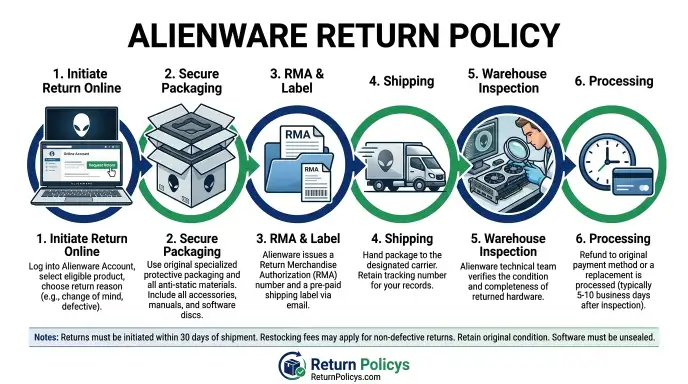
Step-by-Step Process / How to Start Your Return
Follow this process for any return, regardless of the reason. The steps are the same, but the fees and shipping label differ.
Step 1: Check Your Eligibility
Before you start, confirm these three things:
- You’re within the return window (30 days for new items direct from Dell, 14 for Dell Outlet, varies for third-party retailers).
- The item is in returnable condition (no physical damage, all accessories present).
- You have the original packaging.
If any of these are missing, your return may be denied.
Step 2: Initiate the Return Online
Go to the Dell support site and log in. Click “Returns” under your order. Select the item you want to return.
Choose your reason from the dropdown.
Be honest. If you select “defective” but it’s actually a change of mind, the inspection team will reclassify it and charge the restocking fee anyway.
Step 3: Print Your RMA and Label
Dell will issue a Return Merchandise Authorization (RMA) number and a printable label. For defective items, the label is prepaid. For change-of-mind returns, you pay shipping.
Print both the RMA form and the label. Put the RMA form inside the box with the laptop.
Step 4: Pack Everything
Use the original box and foam inserts. Place the laptop in a static-free bag if you have one. Include all accessories, cables, manuals, and any promotional items that came in the box.
Seal the box with strong packing tape. Do not write on the box except the shipping label.
Step 5: Ship It
Drop the package at the carrier location listed on the label. Get a receipt with a tracking number. Keep the tracking number until the refund appears.
Step 6: Track and Wait
Dell typically takes 1-3 business days to inspect the return after delivery. Then another 5-10 business days for the refund to hit your account. Total time: about two weeks from drop-off.
If you haven’t seen a refund after 15 business days, call Dell support with your RMA number.
Costs / Pricing / Data
Here’s the real picture of what you’ll pay or save.
| Scenario | Restocking Fee | Shipping Cost | Refund Timeline |
|---|---|---|---|
| Unopened change of mind | 0% | You pay (varies by weight) | 5-10 business days |
| Opened change of mind | 15% | You pay | 5-10 business days |
| Defective item | 0% | Free (prepaid label) | 5-10 business days |
| Dell Outlet open box | 15% | You pay | 5-10 business days |
| Best Buy opened (within 15 days) | Up to 15% | Free (store drop-off) | Instant for in-store |
Shipping costs for a typical laptop run $20-$40 with insurance. The 15% restocking fee on a $1,500 laptop is $225. That’s real money.
Pro tip: If you’re within the evaluation period and unsure, keep the box sealed until you’re certain.
Expert Tips / Pro Advice
How to Get the Restocking Fee Waived
It’s possible, but not guaranteed. If you catch a legitimate defect after opening, you can push for a fee waiver. Document the problem thoroughly.
Take clear photos and a short video of the issue. When you call support, explain that you opened the box to check for defects, and that’s when you found the problem.
If the agent refuses, ask to speak to a supervisor. Supervisors have more authority to waive fees, especially for first-time returns.
When to Escalate — Supervisor Call Tactic That Actually Works
If your return is denied or you’re charged a fee you disagree with, don’t accept the first answer. Politely ask, “Can you escalate this to a returns specialist?” Most agents will transfer you.
When you get the specialist, state the facts clearly: order number, date of delivery, what went wrong, and what resolution you want. Avoid being emotional. Stick to the details.
How to Double-Check Your Warranty Status Before You Return
Before you start a return for a defect, check if the item is still under warranty. If it’s past the return window but within the warranty period, you can file a warranty claim instead of a return. Warranty claims are free and cover repairs or replacements.
To check, go to Dell’s warranty lookup page and enter your service tag. The service tag is on the bottom of the laptop or on the box.
Safety / Legal / Compliance / Warnings
US vs. EU/UK Rules — Your Legal Rights Might Override Dell’s Policy
If you’re in the European Union or the United Kingdom, you have a 14-day cooling-off period under consumer law. This means you can return any online purchase for any reason within 14 days, no restocking fee. That overrides Dell’s 30-day policy with the 15% fee.
In the US, only California has specific laws about restocking fees. California law requires that restocking fees be clearly disclosed at the time of purchase. If Dell didn’t disclose it, you may be able to challenge the fee.
Data Privacy — Why You Must Wipe Your Device First
We mentioned this earlier, but it’s worth repeating. Dell’s return policy explicitly states that they are not responsible for data left on returned devices. If your data is on the drive and the device is lost or processed, it’s gone.
Before you ship any computer back, perform a full factory reset. On Windows, go to Settings > Update & Security > Recovery > Reset this PC. Choose “Remove everything.” This ensures your data is gone.
California Restocking Fee Law — You May Be Exempt
California Civil Code Section 1799.3 requires that restocking fees be clearly posted at the point of sale. If you bought your Alienware in California or had it shipped to a California address, and you weren’t told about the 15% fee, you may be able to dispute it.
Contact Dell support and reference the California law. Some agents will waive the fee to avoid a legal headache.
Frequently Asked Questions
Can I return an Alienware after 30 days?
No, not under the standard return policy. After 30 days, your only option is a warranty claim if the device is defective and within the warranty period. Dell’s standard warranty is one year for hardware defects.
Can I exchange instead of returning?
Yes, but only for the same model. Dell offers an exchange process for defective items within the return window. You can request an exchange instead of a refund.
The replacement ships after Dell receives the original unit.
What if they deny my return?
First, check the reason. Common denials include physical damage, missing accessories, or expiration of the return window. If you disagree, call support and ask for a supervisor.
Provide your documentation (photos, order number). In some cases, they can make an exception.
Do I need the original box?
Yes. The original box and foam inserts are required. Without them, Dell may reject the return or charge a fee for packaging.
If you lost the box, contact support to see if they can provide a replacement box for a fee.
How long does the refund take?
After Dell receives your return and inspects it, refunds are processed in 5 to 10 business days. Credit card refunds are usually faster than PayPal or debit cards. The total time from when you drop off the package is typically 10 to 15 business days.
Final Recommendation / Decision Guide
Your best move depends on your situation. Use this guide.
Quick Flowchart: “Should I Return It or Keep It?”
- Is it defective? If yes, start a return. You’ll pay nothing.
- Is it still unopened and within 30 days? Return it for a full refund.
- Is it opened but you just don’t like it? You’ll pay 15%. Decide if that’s worth it. On a $1,000 laptop, $150 is a steep “rental fee.”
- Is it past 30 days? Check the warranty. If covered, file a claim. If not, you’re keeping it.
- Did you buy from a third-party retailer? Use their policy. Don’t call Dell.
Your Best Move Based on Your Specific Situation
| Situation | Best Action |
|---|---|
| Opened, not defective, within 30 days | Return, but accept the 15% fee. Alternatively, sell it privately to avoid the fee. |
| Opened, defective, within 30 days | Return for free. Document the defect. |
| Unopened, within 30 days | Return for free. No downside. |
| Past 30 days, defective | File a warranty claim. |
| Past 30 days, not defective | Keep it or sell it secondhand. |
| Dell Outlet opened, within 14 days | Return, but expect 15% fee unless defective. |
One last thing: always read the return policy on your receipt or order confirmation. Policies change, and your specific transaction may have different terms. If you’re uncertain, call Dell support before you ship anything.
The Alienware Return Policy isn’t designed to trick you. It’s designed to cover Dell’s costs for opened items. As long as you know the rules before you buy, you can avoid surprises.
Unbox carefully, test quickly, and decide within the first week. That gives you plenty of time if you need to send it back.