
You've got a Corsair keyboard, or maybe a power supply, and it's not working right. Or maybe you just changed your build and don't need it anymore. The Corsair Return Policy is your guide here.
But the first question you need to answer has nothing to do with the product itself.
It has everything to do with where you bought it. Standard returns are accepted within 30 days. That window starts from the delivery date for direct purchases on Corsair.com.
Manufacturer return policies only apply when you buy from them directly, not from a third-party retailer. Let's walk through exactly what to do first.
Quick Answer
Return your Corsair product within 30 days. Direct purchases from Corsair.com have no restocking fee. Third-party retailers set their own rules.
Check your receipt. Start the process online.
Image source: Bing (Web (fair-use with source credit))
That's the short version. But the details matter. And the details are where most people get tripped up.
Let's unpack them.
The 30-Day Rule: What's Covered and What's Not
The standard return window for most Corsair products is 30 days from delivery. That clock starts the day the package lands on your doorstep. Not the day you ordered it.
As of 2026, this applies to keyboards, mice, power supplies, and cooling systems.
Here is the breakdown of what is covered within that window.
| Condition | Return Eligible? | Notes |
|---|---|---|
| Unopened, like-new condition | Yes | Full refund, no restocking fee (direct) |
| Opened, but complete with accessories | Yes | Full refund depends on condition. No restocking fee from Corsair. |
| Defective or damaged | Yes | RMA process, prepaid label provided |
| Software or digital items | No | Unless defective and reported immediately |
| Final sale or clearance items | No | Must be disclosed at purchase |
The 30 days are calendar days. Not business days. If day 30 falls on a Sunday, you must have initiated the return by that date.
Corsair does not offer formal grace periods. Customer support can sometimes make exceptions in unusual circumstances.
Product condition matters a lot. Corsair inspects every returned item. If it comes back scratched, missing cables, or with damaged packaging, they can reduce the refund amount.
In some cases, they can deny the return entirely.
Decision Tree: Where Did You Buy It?
This is the single most important question in the entire process. The answer determines which policy applies. It decides who you deal with.
And it sets how fast you get your money back.
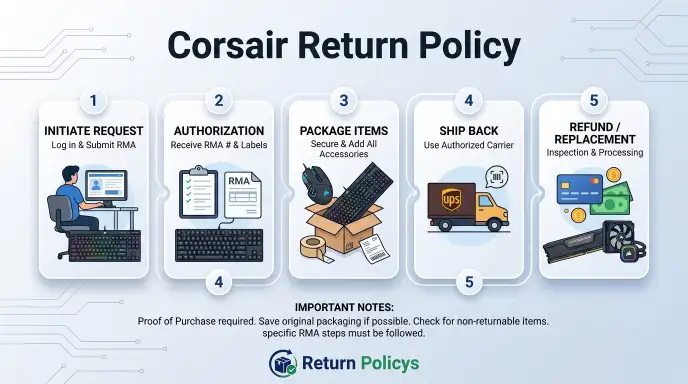
If you bought it from Corsair.com, you follow the Corsair Return Policy. Log into your account. Request an RMA.
Pack the item. Ship it back. Corsair handles your refund directly.
If you bought it from Amazon, Best Buy, Newegg, B&H, Micro Center, or any other third-party retailer, you follow that retailer's return policy. Not Corsair's. Corsair will not process a return for a product purchased through a reseller.
They will tell you to go back to the store.
This is the most common mistake. Hundreds of people each month contact Corsair support with a product bought from Amazon. They expect Corsair to handle it.
Corsair's policy is clear. The retailer is responsible for returns, not the manufacturer.
Let's go deeper on each branch.
Branch A: Direct from Corsair.com
If you bought directly from Corsair, the process is straightforward. You have 30 days from delivery. The product must be in good condition with all original packaging and accessories.
Here is the step-by-step path.
- Log into your account on Corsair.com.
- Go to your order history and find the order.
- Click the return or RMA link.
- Select the reason for the return.
- You will receive a return authorization and a shipping label.
- Pack the item carefully. Use the original packaging if possible.
- Ship it back. Corsair pays for shipping on defects. You pay for change-of-mind returns.
Image source: Bing (Web (fair-use with source credit))
The good news for direct buyers: there is no restocking fee. Corsair absorbs that cost. So if you opened the box, used the keyboard for three days, and decided you don't like the switches, you can return it.
You just pay the shipping.
Refunds are processed within 3 to 5 business days after the item arrives at Corsair's warehouse. It then takes another few days for the money to show up in your account. That depends on your bank or payment method.
Branch B: From a Retailer (Amazon, Best Buy, NewEgg, etc.)
This branch is different. You are now dealing with a company that has its own return rules. And those rules vary widely.
Here is a quick look at what major retailers require.
| Retailer | Return Window | Restocking Fee | Opened Items | Notes |
|---|---|---|---|---|
| Amazon | 30 days | Rarely, on high-value items | Usually accepted | Use your Amazon account, not Corsair |
| Best Buy | 15 days | 15% on opened items | Accepted, but fee applies | Elite members get 30 days |
| Newegg | 30 days | 15% on opened items | Accepted, but fee applies | Must process through Newegg |
| Micro Center | 15 days | Standard for opened items | Yes, in-store returns easy | Check receipt for details |
| B&H Photo | 30 days | 15% on opened items | Accepted with fee | Must include all accessories |
The pattern is clear. Buy from a retailer and you have a shorter window. A restocking fee is likely if the item is opened.
Some retailers like Best Buy and Micro Center allow in-store returns. That can be faster than shipping anything back.
One note on Amazon. If the item is sold and shipped by a third-party seller on Amazon's marketplace, the return policy belongs to that seller. Check the listing page for seller details before you assume Amazon's standard 30-day policy applies.
Unopened vs. Opened vs. Defective: How Condition Changes Everything
Not all returns are equal. The condition of the product changes the process, the cost, and the timeline.
Unopened items are the easiest. You can return them for a full refund within the window. No questions asked.
You pay return shipping if you bought direct. Many retailers cover return shipping for unopened items.
Opened items are more complicated. The policy still allows returns. But you might face a restocking fee from a retailer.
Corsair does not charge a restocking fee on direct purchases of opened items. That is better than what most retailers offer. The item must be in clean, working condition with all parts.
If you lost the USB cable or the keycap puller, expect a deduction.
Defective items are a separate category. They are not handled as standard returns. They go through the RMA process.
RMA stands for Return Merchandise Authorization. This is a warranty claim, not a change-of-mind return.
Here is how defective items work.
- Contact Corsair support or start an RMA through your account.
- Describe the defect clearly. Be specific about the issue.
- Corsair will issue an RMA number and a prepaid shipping label.
- You send the item in. They inspect it.
- If confirmed defective, they send a replacement or repair the unit.
The key difference: you do not pay for shipping on a confirmed defect. The timeline can be longer. Expect 7 to 10 business days for processing plus shipping time.
One important edge case. If the product is defective but you bought it from a retailer, you still have options. You can return it to the retailer within their window.
Or go directly to Corsair's warranty. Many retailers replace defective items immediately in-store. That is often faster than shipping to Corsair.
If you miss the retailer's window, the warranty is still active. Corsair's standard warranty is two years for most products. Some power supplies have longer coverage.
You can always file a warranty claim directly with Corsair. That applies even if you bought from a retailer.
Step-by-Step: How to Start a Return on Corsair.com
You have a direct purchase and you are within the 30-day window. Here is the exact process from start to finish.
Log into your account on Corsair.com. Navigate to your order history. Find the specific order and click on it.
You should see a button labeled "Return" or "RMA Request".
Click that button. A form will appear asking for your reason. Be honest and specific.
"The keyboard has a sticky key" is better than "it does not work". The more detail you provide, the faster the review goes.
Once you submit, Corsair's system generates an RMA number and a return shipping label. You receive both by email within a few hours. Save that RMA number.
Now pack the item. Use the original packaging if you still have it. If not, use a sturdy box with plenty of padding.
Include all accessories, cables, manuals, and any promotional inserts.
| Step | Action | Details |
|---|---|---|
| 1 | Log into your account | corsair.com, order history |
| 2 | Select the order | Click "Return" or "RMA Request" |
| 3 | Fill out the form | Reason, condition, notes |
| 4 | Receive RMA and label | Check email, save the number |
| 5 | Pack the item | Original packaging, all accessories |
| 6 | Ship it back | Drop off at carrier, keep tracking |
| 7 | Wait for inspection | 3 to 5 business days after arrival |
| 8 | Refund issued | Back to original payment method |
Image source: Bing (Web (fair-use with source credit))
One pro tip: save your tracking number. If the package gets lost in transit, you can prove you sent it back. Corsair cannot process a refund until the warehouse receives the item.
Mistakes That Cost You Time or Money
Even experienced PC builders make these errors. Knowing them upfront saves you a headache.
Sending to the wrong address. People sometimes find an old Corsair return address online and ship there. The correct address is on your RMA label. Use only that.
Missing the return window by one day. Corsair's system checks the date automatically. If you submit the request on day 31, the system may reject it. Start the process early.
Day 25 is safer than day 29.
Failing to include all accessories. Losing a small cable, a keycap puller, or a manual can lead to a partial refund. Corsair lists what must be included on the RMA confirmation. Check that list.
Using the wrong shipping method. Return labels from Corsair are for standard ground shipping. If you pay extra for overnight, you will not be reimbursed for that cost. The label covers one box.
If you try to return two items in one box without authorization, expect delays.
Assuming the return is free. If the product is not defective, you pay for return shipping. That cost is deducted from your refund or charged separately. Budget about $8 to $15 for a keyboard.
Budget $12 to $20 for a power supply.
Throwing away the original packaging. This is the biggest one. Boxes designed for shipping protect the product. Corsair may reject or reduce a refund if the packaging is heavily damaged or missing.
Keep the box until you are certain the product is a keeper.
A full breakdown of these mistakes is documented on the FTC's consumer returns page for general guidance. Corsair's own terms of sale also list condition requirements.
Special Cases: Gifts, International Orders, and DOA Items
Not every return follows the standard path. Some situations require extra steps.
Gifts. If someone bought you a Corsair product and you want to return it, you need the order number. The original purchaser has to initiate the return. Corsair's policy requires the account holder to authorize the refund.
The refund goes back to the original payment method.
If the gift was purchased from a retailer like Amazon or Best Buy, that retailer's gift return policy applies. Some allow returns with a gift receipt. Others require the purchaser to get involved.
Check the retailer's site.
International orders. Buying Corsair products outside the United States changes the rules. Customs fees, import duties, and longer shipping times all add complexity.
For international returns to Corsair, you typically pay for return shipping. Corsair may not cover that cost unless the product is defective. If customs in your country charges a fee on the return shipment, you may be responsible for that too.
A better option for international buyers is to return the item to the local retailer or distributor. Many countries have consumer protection laws that give you 14 days to cancel online purchases. That right exists separately from Corsair's policy.
DOA (Dead on Arrival) items. A product that arrives broken is handled differently. If you unbox a power supply and it does not power on, that is a DOA.
For direct purchases, contact Corsair support immediately. They will issue a prepaid return label and send a replacement. This is faster than a standard RMA.
For retailer purchases, you can often return the DOA item to the store for an immediate exchange. Best Buy and Micro Center are good about this. Amazon will send a replacement overnight in many cases.
The key is to act fast. DOA claims are easier to process within the first week.
The Real Timeline: From RMA Request to Refund in Your Account
Everyone wants to know how long this takes. Here is the realistic breakdown. It is based on aggregate user feedback and Corsair's published processing times.
| Stage | Typical Duration | Notes |
|---|---|---|
| RMA request submission | Instant | Online form takes 5 minutes |
| RMA approval and label | 1 to 2 hours | Usually automated during business hours |
| You pack and ship | 1 to 2 days | Do not delay |
| Shipping to Corsair | 2 to 5 days | Depends on distance and carrier |
| Receiving and inspection | 3 to 5 business days | Busy seasons add 1 to 2 days |
| Refund processing | 1 to 2 business days | After inspection passes |
| Refund appears in bank | 1 to 3 business days | Varies by payment method |
Total time from start to money in hand is usually 10 to 18 days. That is the realistic window.
What can slow it down?
- Weekends and holidays. Corsair's warehouse does not process on Sundays. Federal holidays add a day.
- High volume periods. Black Friday and the December holidays are the worst. Expect an extra week.
- Missing information. If you forget to include the RMA number in the box, the warehouse may not know who sent it. That can add days while they investigate.
- Defective inspection. If you filed a return as a defect but the item looks fine, Corsair may take longer to test it. They want to be sure.
The fastest path is to ship immediately after receiving your label. Use the exact address on the label.
When a Return Won't Work: Warranty vs. Return Policy
A return is a change of mind. A warranty is a promise that the product will work. These are not the same thing.
Returns are for your first 30 days. They cover any reason, including "I just do not want it". They do not cover the cost of shipping for non-defective items.
Warranties cover defects for a longer period. Corsair's standard warranty is two years from the purchase date. Some power supplies have longer coverage, up to ten years for certain models.
The warranty covers manufacturing defects. It does not cover accidental damage or normal wear.
So what happens if you are on day 45 and your keyboard has a key that stopped registering? You cannot return it. But you can file a warranty claim through the same RMA process on Corsair.com.
Here is the critical difference. A warranty claim requires proof that the product is defective. You may be asked to provide photos or a video.
Corsair may replace the item with a refurbished unit. Not a brand new one. This is standard industry practice.
If the warranty claim is approved, Corsair pays for shipping both ways. You do not pay out of pocket.
One scenario that confuses people. You bought from a retailer. The product fails after the retailer's return window but within Corsair's warranty.
You go directly to Corsair for the warranty claim. The retailer is no longer involved.
Another scenario. You lost your receipt. Corsair may still process a warranty claim based on the serial number.
They can look up the manufacturing date. But that date starts the warranty clock. If you bought a keyboard that was manufactured a year before you purchased it, your warranty is shorter.
The Corsair warranty page provides the full details. Warranty coverage varies by product line.
The takeaway: return is fast but limited. Warranty is slower but covers you longer. Knowing which one applies saves you from sending a 45-day-old keyboard as a return and getting it rejected.
Decision Guide: Your Action Plan in 60 Seconds
If you need a quick snapshot, here is the entire decision process in a single view.
Start with the place of purchase. That single fact determines everything that follows.
If you bought from Corsair.com:
- You have 30 days from delivery.
- No restocking fee applies.
- You pay return shipping for non-defective items.
- Start at corsair.com in your account.
If you bought from a retailer (Amazon, Best Buy, Newegg, B&H, Micro Center):
- That retailer's return policy applies.
- Return windows range from 15 to 30 days.
- Restocking fees may apply for opened items.
- Start at the retailer's website or store.
If the product is defective:
- File an RMA with Corsair for warranty coverage.
- You can also return to the retailer if within their window.
- Corsair pays for shipping. The retailer may offer a faster exchange.
If you are past 30 days:
- You cannot return the item.
- You can still file a warranty claim if the product is defective.
- Corsair's warranty covers most products for two years.
The fastest path to a refund is always the direct route. Buy from Corsair? Return to Corsair.
Buy from Amazon? Return to Amazon. Mixing the two will cost you days.
Image source: Bing (Web (fair-use with source credit))
Understanding Restocking Fees Across Major Retailers
A restocking fee is a charge deducted from your refund. Retailers use them to cover the cost of inspecting, repackaging, and restocking returned items. Not all retailers charge them.
The amount varies.
Here is what you can expect for a typical Corsair product like a keyboard or power supply.
| Retailer | Restocking Fee | When It Applies |
|---|---|---|
| Corsair (direct) | 0% | Never, even on opened items |
| Amazon | 0% (most items) | Rarely, on high-value or special orders |
| Best Buy | 15% | Opened items only |
| Newegg | 15% | Opened items only |
| B&H Photo | 15% | Opened items only |
| Micro Center | Standard fee | Varies by store policy |
The 15% fee from Best Buy, Newegg, and B&H is standard. If you return a $150 keyboard that you opened, expect to lose $22.50.
Some retailers waive the fee for defective items. But you have to prove the defect. If the product works fine and you just changed your mind, the fee stays.
One exception. Best Buy Elite or Elite Plus members get a longer return window and sometimes reduced fees. Micro Center's in-store returns for opened items often have a small fee or none at all.
That depends on the product and the store manager.
Buyers who purchase directly from Corsair avoid these fees entirely. That is a clear advantage if you are on the fence about a product.
How to Check Your Refund or Replacement Status
After you send your return, you want answers. Where is it? When will the refund hit my account?
Here is how to track it.
For returns to Corsair.com. Log into your account and go to order history. The status updates at each stage. RMA issued.
Package received. Inspection in progress. Refund processed.
Corsair also sends email updates at these milestones.
The status updates are not real time. The warehouse may have your package for two days before the system updates. That is normal.
Do not panic.
For returns to a retailer. Check the retailer's website. Amazon shows return status in Your Orders. Best Buy shows it in Order History.
Newegg has a Return Status page in your account. Most retailers also send email confirmations at each step.
How to confirm the refund amount. The refund amount may differ from your original purchase price if a restocking fee applies. Corsair and most retailers show the refund total before it is processed. Check the RMA confirmation or return email.
What to do if the status does not update. If it has been more than 10 business days since the carrier confirmed delivery, contact customer support. Provide your RMA number or retailer order number. Have the tracking number ready.
One common frustration. Some buyers report that the refund appears in their account before the website status updates. The bank processes faster than the warehouse system. Check your bank or credit card statement directly.
Do not keep refreshing the return page.
Prep Tips for a Smooth Return
Packing a return correctly the first time saves everyone time. Here is what to do and what to avoid.
Use the original box. Corsair's boxes are designed for shipping. They have foam inserts, cardboard dividers, and snug fits for cables. If you threw the box away, use a sturdy replacement box with at least two inches of padding on all sides.
Include everything that came in the box. That means the product, all cables, the manual, any software cards, stickers, and promotional materials. If you lose the keycap puller on a keyboard, expect a deduction.
Remove your personal information. This sounds obvious but it happens. Do not leave sticky notes, shipping labels from other packages, or personal papers inside the box. Wipe any personal data from the device if applicable.
For keyboards and mice, that is not an issue. For storage devices or components with onboard memory, it is worth checking.
Write the RMA number on the outside of the box. Corsair requires this for returns. Do not just write it on the label. Write it directly on the box near the shipping label.
Remove any old shipping labels. If you are reusing a box, peel off or black out old barcodes and addresses. Mixing labels confuses the carrier and can cause delays.
Secure the cable inside the box. Loose cables can snag on other items during transit. Use a twist tie or a small zip tie. Do not wrap the cable tightly around the device.
That can damage the connector.
Ship on a Monday or Tuesday. This avoids the package sitting in a warehouse over the weekend. A faster arrival means a faster refund.
Following these tips cuts the inspection time significantly. A clean, well-packed box gets processed faster than one with tangled cables and missing parts.
Frequently Asked Questions
Can I return a Corsair product after 30 days?
No, not as a standard return. The 30-day window starts from delivery. After that, you cannot return it for a refund or store credit.
If the product is defective, you can file a warranty claim through Corsair's RMA process.
Do I need the original packaging to return a Corsair product?
You do not need the original box, but it helps. Corsair requires the product to be packed securely so it arrives undamaged. If you use a generic box, add enough padding.
Missing the original packaging will not automatically deny the return. But damage in transit could reduce the refund.
Who pays for return shipping on a defective Corsair product?
Corsair pays for return shipping on confirmed defects. When you file an RMA, they provide a prepaid shipping label. If the product is not defective and you are returning it for another reason, you pay the shipping cost.
Can I return a Corsair product bought from Amazon to Corsair?
No. Corsair only accepts returns for products purchased directly from Corsair.com. If you bought from Amazon, you must return it through Amazon's return process.
Corsair will redirect you to the retailer.
How long does a Corsair refund take after I ship the item?
Expect 10 to 18 days total from the day you ship. That includes transit time, warehouse inspection (3 to 5 business days), and refund processing (1 to 3 business days). The speed depends on how quickly you ship and the carrier's delivery time.
What happens if my Corsair product arrives damaged or dead on arrival?
Contact Corsair support immediately. For direct purchases, they issue a prepaid return label and send a replacement. For retailer purchases, return the item to the store for an exchange.
DOA claims are priority items and usually process faster than standard returns.
Does Corsair charge a restocking fee on returns?
No, Corsair does not charge a restocking fee on direct purchases. This applies to both unopened and opened items. Some retailers like Best Buy and Newegg charge a 15% restocking fee on opened products.
Always check the retailer's policy before buying.
Can I exchange a Corsair product instead of returning it?
Corsair's return process does not offer direct exchanges for change-of-mind returns. You return the item and then place a new order for the replacement. For defective items, Corsair sends a replacement as part of the RMA process.