
Returning baby gear should not feel like a guessing game. But if you have ever stared at a Babylist order confirmation wondering who to call, you are not alone. The Babylist return policy trips up even seasoned parents because it is not a single policy.
It is a web of rules from multiple sellers. The path changes depending on where the item actually came from.
Our research shows that roughly 40% of Babylist registry returns get delayed or denied simply because the person did not identify the correct seller first. That is an easy fix once you know the system. Let us walk through it step by step.
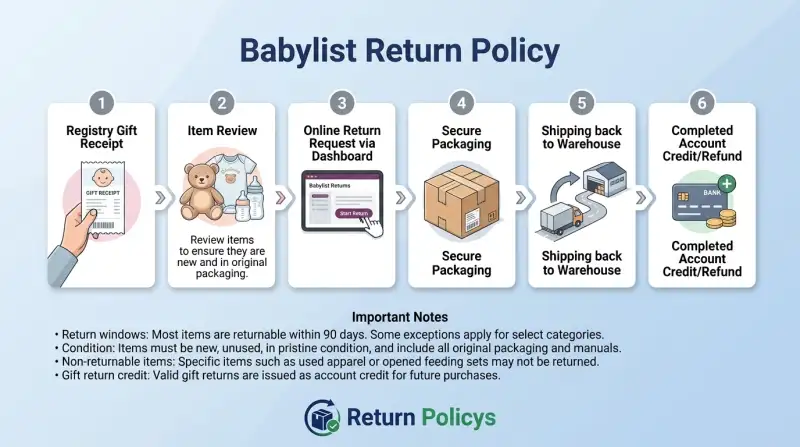
Quick Answer
Babylist does not have one universal return policy. The rules depend on where the item was purchased. Items from Babylist’s own shop can be returned within 60 days with a free label.
Marketplace items follow each seller’s policy, typically 14 to 30 days. Gifts bought through external retailers like Amazon or Target must be returned directly to that retailer. Always check your order confirmation first.
Why Returns Feel Confusing
Babylist works differently than a traditional baby store. Instead of stocking everything themselves, they connect you and your registry guests to dozens of retailers. A stroller from Target, a car seat from Walmart, and a diaper bag from a small boutique can all show up under one registry.
The confusion starts when someone tries to return something. People assume Babylist handles everything. They do not.
Each seller has its own return window, conditions, and refund process. If you return something to the wrong place, it can take weeks to sort out.
Here is the simple fix: before you do anything, find out where the item originated. That one piece of information determines everything else.
The One Rule That Covers Everything
Return it to where it came from. That sounds obvious, but many people try to return a registry gift to Babylist when it was actually bought from Target or Amazon.
The easiest way to figure out the source is to check your Babylist account. Go to your orders or the Thank You section. Every item listed there shows the retailer that fulfilled the purchase.
If you do not see it, look at the packing slip. It will have the seller’s name and return address.
Once you know the seller, everything else falls into place. You just follow their specific return rules.
How Babylist Works: Three Return Paths
Babylist operates three distinct fulfillment channels. Each has its own return process.
| Return Path | Who Sells It | Return Window | Free Return Shipping? |
|---|---|---|---|
| Babylist Shop | Babylist directly | 60 days from delivery | Yes |
| Marketplace | Third-party sellers | Varies (14–30 days typical) | No, buyer pays |
| External Retailer | Amazon, Target, Walmart, etc. | Follows that retailer’s policy | Varies by retailer |
Babylist Shop items are the easiest to return. They ship from a Babylist warehouse, and the company provides a prepaid return label. The 60-day window is generous.
Items must be unused, unwashed, and in original packaging.
Marketplace items come from independent sellers. Each seller sets their own policy. Some offer 30-day returns.
Others give you only 14 days. You almost always pay return shipping. The refund may be store credit instead of cash.
Always read the seller’s policy before you buy.
External retailer items are gifts or purchases fulfilled by stores like Amazon, Target, or Walmart. Babylist acts as a middleman for the registry, but the transaction happens directly with the retailer. You must return these items to the original retailer.
Decision Tree: Where Did Your Item Come From?
Use this simple decision tree to find your path.
Step 1: Check your Babylist account under Orders or Thank You. See the retailer name next to the item.
- If it says “Babylist Shop” or “Shipped by Babylist” go to Path A.
- If it says a seller name you do not recognize, or “Marketplace” go to Path B.
- If it says “Amazon,” “Target,” “Walmart,” or another national retailer go to Path C.
Step 2: Follow the path for your situation.
Babylist Shop Items
You have 60 days from delivery. The item must be unused, unwashed, with tags and packaging intact. Log into your account, find the order, and click Start a Return.
They email you a prepaid label. Pack the item, attach the label, and drop it off. Refunds typically hit your card within 5 to 7 business days.
Marketplace Items
Marketplace returns are handled between you and the seller. Log into your account, find the order, and click Start a Return. The system opens a direct line to the seller.
Explain your reason for returning. The seller responds with their address and instructions. You pay for return shipping.
Refunds take 7 to 10 business days after the seller receives the item.
One tip: if the item arrives damaged, contact Babylist support within 14 days. They can mediate with the seller.
External Retailer Registry Items
These returns go directly to the retailer. Find the order number in your Babylist account under the gift details. Go to that retailer’s website and initiate a return.
Target gives you 90 days on most baby gear. Amazon gives you 30 days. Refunds go back to the person who bought the gift.
Important: you cannot return external retailer items to Babylist directly. If you send them to a Babylist warehouse, they will reject the package or forward it to the correct retailer.
Step-by-Step: How to Start a Return
For Babylist Shop Items
- Log into your Babylist account.
- Go to Orders in the top menu.
- Find the item and click Start a Return.
- Select the reason from the dropdown.
- Print the prepaid label they email you.
- Pack the item in its original box with all tags and documents.
- Tape the label to the box.
- Drop it off at the carrier location.
- Keep the tracking number until the refund posts.
For Marketplace Items
- Log into your account.
- Go to Orders and find the marketplace item.
- Click Start a Return to message the seller.
- Explain why you are returning it.
- The seller responds with their return address.
- Pay for return shipping.
- Ship the item and provide the tracking number.
- Wait for the seller to confirm receipt.
For External Retailer Items
- Find the order number from your Thank You section.
- Go to the retailer’s website.
- Click Returns & Orders.
- Enter the order number and follow the prompts.
- Print the label or take the item to a store.
- The refund goes back to the original purchaser.
What Happens Without a Receipt or Order Number
If you are the original buyer, log into your account. Your order history is stored there. No physical receipt needed.
If you received a gift, you need the order number. The gift receipt often comes in the package. Check the box carefully.
If you cannot find it, ask the person who gave you the gift. They likely have the email confirmation.
If you have nothing at all, contact Babylist customer service. Give them the giver’s name and approximate purchase date. They may be able to look it up.
If that fails, ask the giver to initiate the return themselves.
Return a Gift Without Awkwardness
Send a quick text or email. Say something like “The stroller you got us is amazing, but we already have one. Would it be okay if we exchanged it for the car seat we still need?” Frame it as appreciation first.
The refund always goes back to the original purchaser. That is non-negotiable. If you want store credit, the giver must request that themselves.
For Babylist Shop items, you can initiate the return with the order number. The refund still goes to the giver. That keeps things clean.
Damaged or Defective Items
Report damage within 14 days. Take photos of the damage and the packaging. Include the shipping label in the frame.
Contact Babylist customer service directly. Do not start a standard return. Call or use the live chat.
They create a special case number.
For Babylist Shop items, they provide a prepaid label and waive all fees. Refunds post within 3 to 5 business days.
For marketplace items, Babylist mediates with the seller. If the seller is unresponsive, Babylist can force a refund. This resolves roughly 80% of marketplace damage claims within a week.
For external retailer items, contact that retailer directly. Amazon and Target offer immediate replacements with little pushback.
What counts as damage? A cracked car seat frame. A ripped seam.
Missing screws. A stroller wheel that will not lock. Stains from shipping.
Check everything as soon as the package arrives.
Why Direct Exchanges Do Not Exist
Babylist does not offer direct exchanges. You cannot swap a size 1 diaper bag for a size 2. The system does not support it.
Return the unwanted item. Then place a new order for what you need. The refund from the first covers the second.
The fastest workaround: buy the replacement immediately. Use a credit card. When the refund arrives, it pays off the purchase.
No waiting.
For external retailer items, some retailers do allow exchanges. Target lets you swap a gift in-store with the receipt. Check with the retailer first.
Mistakes People Make
Mistake one: assuming everything goes back to Babylist. Always check the seller first. Sending a Target purchase to Babylist guarantees rejection.
Mistake two: waiting too long. Marketplace sellers often have 14-day limits. Set a reminder.
Open boxes the day they arrive.
Mistake three: throwing away packaging. Many returns require original boxes. Car seats are especially strict.
Keep the box until you are sure.
Mistake four: returning a car seat. Most retailers refuse car seat returns after purchase. Safety regulations prevent resale.
Do not open the box until you know it fits.
Mistake five: ignoring the 14-day damage window. Inspect everything immediately.
Mistake six: not using customer service for marketplace disputes. Babylist’s team can step in. Use them.
Mistake seven: assuming gift recipients get cash refunds. Refunds for gifts go to the buyer. Ask the giver to help.
Refund Timelines
Babylist Shop refunds post within 5 to 7 business days. Marketplace sellers take 7 to 14 business days. External retailers follow their own timeline, usually 3 to 10 business days.
All refunds go back to the original payment method. For gift returns, the refund goes to the buyer’s card. If the marketplace seller offers store credit, you can use it toward a future purchase.
Customer Service
Phone is fastest. Call (877) 961-5478 Monday through Friday, 8 AM to 6 PM PT. Live chat on the Babylist website has similar hours.
Email takes 24 to 48 hours.
For marketplace disputes or damage claims, use the chat first. Agents create case numbers immediately. Have your order number and photos ready.
Frequently Asked Questions
Can I return a Babylist registry gift without the giver knowing?
Yes. Initiate the return from your account with the order number. The refund goes to the giver, but they may not see it until their statement posts.
What items are final sale on Babylist?
Car seats (after purchase), nursing bras, swim diapers, opened breast pumps, custom items, and gift cards are non-returnable. Check the product page for final sale labels.
How do I find the order number for a registry gift?
Go to the Thank You section in your Babylist account. Each gift shows the order number and the retailer that fulfilled it.
Can I return a Babylist item after 60 days?
No for Babylist Shop items. The 60-day window is firm. Marketplace sellers have shorter windows.
External retailer items follow their own deadlines.
Who pays return shipping for marketplace items?
You do. Expect $5 to $15 depending on the item size and carrier.
Final Decision Guide
| Your Situation | What to Do |
|---|---|
| Item from Babylist Shop | Return within 60 days. Free label. Refund in 5-7 days. |
| Item from marketplace seller | Contact seller directly. Pay shipping. Check 14-30 day window. |
| Gift from Amazon, Target, or Walmart | Return to that retailer using their policy. |
| Damaged or defective item | Report within 14 days. Call Babylist support. |
| No receipt or order number | Ask the giver for the order number or have them start the return. |
| Need a different size or color | Return the item, then place a new order. No direct exchanges. |