
Returning clothes you bought online should be straightforward. But the Revolve Return Policy has details that can trip you up. Final sale items, the $7.95 return fee, and store credit rules all matter.
This guide covers everything you need to know so you don’t lose money or miss a deadline.
You have 30 calendar days from delivery to start a return. Most refunds come back as store credit, not to your card. That rule surprises more shoppers than any other.
Here is what you need to know before you send anything back.
Your Quick Guide to Revolve Returns
| Policy Detail | What You Need to Know |
|---|---|
| Standard Return Window | 30 calendar days from delivery |
| Refund Processing Time | 5–7 business days after warehouse receives your return |
| Receipt Requirement | Order number or email confirmation required. No receipt means store credit only |
| Online Return Availability | Yes. Returns start through your Revolve account |
| In-Store Return Availability | No physical stores. Returns are online only |
| Exchange Options | No direct exchanges. Return the item and place a new order |
| Customer Support Availability | Email and live chat. No phone line listed |
The most important number is 30. Your return clock starts ticking the moment your package is delivered. Not when you open it.
Not when you try it on. The delivery date is day one.
The 30-Day Rule: When Your Clock Starts Ticking
Thirty days sounds like plenty of time. But with Revolve, the window is fixed and firm.
Your return period begins on the date your order was delivered. That is the date the carrier records, not the day you pick it up from your mailbox or front desk. If you live in an apartment building or use a package locker, the clock starts when the carrier scans it as delivered.
What happens if you miss the 30-day window?
Revolve’s system automatically rejects return requests made after the 30-day mark. There is no grace period. Aggregate buyer feedback confirms this is the most common reason returns get denied.
Exceptions to the 30-day rule
There are exactly two exceptions.
- Defective or damaged items. You have the same 30-day window, but the process is different. Contact customer support directly instead of using the standard portal.
- Final sale items. These cannot be returned at all. The 30-day rule does not apply because there is no return window.
How to calculate your exact deadline
Find the “delivered” date on your tracking number. Add 30 calendar days. That is your last day to start a return through your Revolve account.
If that date falls on a weekend or holiday, the system still counts it. You must start the return by then.
If you ordered multiple items and they arrived in separate packages, each package has its own 30-day clock. You cannot return everything under one original order date.
Holiday return policy
Revolve does not advertise extended holiday return windows. As of , the standard 30-day policy applies year-round. If you order gifts in November, plan for a return window that expires before New Year’s.
Final Sale Items: What You Absolutely Cannot Return
Final sale items at Revolve are non-returnable. No exceptions. Not even if they don’t fit.
Not even if you change your mind.
How to spot a final sale item before you buy
Look for these signs on the product page:
- The words “Final Sale” in red or bold near the price
- A banner on the product image
- A note in your shopping bag before checkout
If you are unsure, scroll to the shipping and returns section on the product page. It will say “final sale” if applicable. Not all markdown items are final sale.
Check every time.
What happens if you try to return a final sale item
Your return request will be rejected automatically. If you ship it back anyway, Revolve will refuse the package or return it to you at your own expense. In some cases, they keep the item and do not issue a refund.
Can you exchange a final sale item for a different size?
No. Final sale items cannot be exchanged either. The only scenario where a final sale item can be returned is if it arrives damaged or defective.
Even then, the 30-day window applies, and you must contact customer support rather than using the standard return portal.
Why does Revolve have final sale items?
This is common for online fashion retailers. It usually applies to deeply discounted items, limited-run collections, or specific brands. It reduces inventory risk and allows Revolve to offer lower prices.
Our advice. Before you click “buy” on any discounted item, check the returns section on the product page. It takes ten seconds and could save you from being stuck with something you cannot wear.
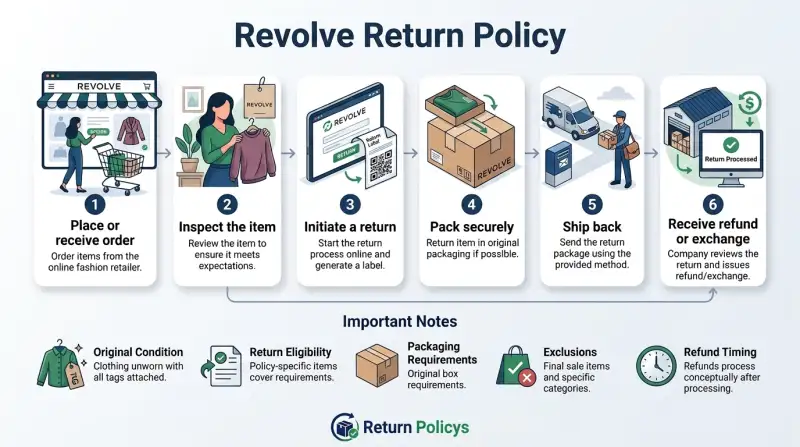
How to Return: Step-by-Step Process
Step 1: Log into your Revolve account
Go to Revolve.com and sign in. Click “My Account” then “My Orders.” Find the order with the items you want to return. Click “Return Items.”
Step 2: Select the items and choose a reason
Check the box next to each item you are returning. A dropdown menu asks for a reason. Pick the option that best applies.
Your reason does not affect the outcome. This data helps Revolve with inventory and quality.
Step 3: Choose your refund method
Revolve shows you your options. For most shoppers, the default is store credit. If you are a first-time returner or have Diamond status, you may see an option to refund to your original payment method.
Step 4: Print your return label
Revolve generates a prepaid return label. Print it at home or choose the QR code option. With the QR code, show it at the UPS or USPS drop-off location.
No printer needed.
Step 5: Pack your items
Use the original packaging if you have it. A sturdy box or poly mailer works too. Include all items with tags attached.
Do not mix multiple orders in one box. Each return needs its own label.
Step 6: Drop off the package
Take your package to the carrier listed on the label. The prepaid label typically uses UPS. The QR code option shows the drop-off location on the label sheet.
Step 7: Save your tracking number
Save the tracking number from the label after drop-off. Track the return in your Revolve account. The refund process begins after the warehouse scans your package.
What about defective items?
If an item arrives damaged or defective, do not use the standard return portal. Contact Revolve customer support through chat or email. They will provide a prepaid return label or offer a returnless resolution.
With a returnless resolution, you keep the item and they refund you. This is common for small defects where return shipping costs more than the product.
Online Return Process (Including the Prepaid Label Fee)
The online process is the only return method available. Revolve has no physical stores. This section covers the steps inside your account and the fee structure.
Starting a return online
Access the return portal from any device. Log in. Each order has a “Return Items” button.
The button is only clickable if the order is within the 30-day window.
The prepaid label fee: $7.95
The prepaid return label is free to generate. But if you use it, Revolve deducts $7.95 from your refund. This fee applies to every return that uses the prepaid label, regardless of how many items are in the box.
When does the $7.95 fee NOT apply?
- If the item is defective or damaged. Customer support provides a fee-free label.
- If Revolve made a mistake with your order, like the wrong size or color.
- If you are a Diamond status member. Diamond members get free returns always.
Alternatives to the prepaid label
You can pay for return shipping yourself using a carrier of your choice. The $7.95 fee does not apply. But the carrier will charge more than $7.95.
Using Revolve’s label is almost always cheaper for US customers.
Returning multiple orders together
Each order must have its own return label. You cannot combine items from two different orders into one box. If you do, the warehouse will not process the return correctly.
You may not get refunded for all items.
International online returns
If you are outside the United States, Revolve does not provide a prepaid label. You must arrange and pay for return shipping yourself. Mark the package correctly to avoid customs issues.
Contact customer support before shipping any international return.
How long does the online return take to process?
After you drop off the package, it takes 2 to 3 business days for the warehouse to receive and scan it. Then the refund processing begins. Store credit refunds are faster than card refunds because there is no bank processing time.
In-Store Return: Does Revolve Allow It?
No. Revolve is an online-only retailer. They do not operate physical stores anywhere in the United States or internationally.
Every return must go through the online portal. You cannot walk into a shop, hand over your items, and walk out with a refund.
Why this matters for your return strategy
Since there is no in-store option, you need to plan for shipping time. Your return package must reach Revolve’s warehouse within the processing window. If you wait until day 28 of your 30-day window to start the return, you are fine.
The return label is generated when you start the return. Shipping time does not count against your window.
But there is a catch. If you initiate the return on day 30 and then delay dropping off the package, the label itself expires. Return labels are typically valid for 7 to 14 days.
If it expires, you need to request a new label. If your 30-day window has passed, the system will reject the new request.
What about Revolve pop-up shops or events?
Revolve occasionally hosts pop-up events or trunk shows. These are not return drop-off locations. Staff at those events will not process returns.
You still need to send the item back through the standard online process.
Return Without a Receipt: What Are Your Options?
Can you return a Revolve item if you lost the receipt or order confirmation? It depends on your situation.
If you have a Revolve account
You do not need a paper receipt. Revolve keeps a digital record of every order placed through your account. Log in, go to “My Orders,” and you will see every purchase.
Your order history is your proof.
If you checked out as a guest
You still have options. Revolve sent a confirmation email with your order number. Search your email for “Revolve order confirmation.” Use that order number to look up the order on the Revolve website.
From there, you can request a return.
If you lost the email and the order number
This is difficult. Without an account or an order number, Revolve cannot verify your purchase. Contact customer support with your name, shipping address, and the approximate purchase date.
They may be able to locate the order. If they cannot find it, you cannot return the item.
Gift returns
If you received a Revolve item as a gift, you need the order number from the gift receipt or the original purchaser’s account. Revolve’s gift return process issues the refund as store credit to the recipient, not back to the buyer’s card.
Store credit for gift returns
If you return a gift without the order number, you will likely receive store credit. The credit is tied to the original order. Contact customer support to have the store credit transferred to your account.
Refund Policy: Store Credit vs. Original Payment Method
The default is store credit.
When you return an item through Revolve’s online portal, the standard refund method is store credit. That is the default. You receive a Revolve credit for future purchases.
The credit never expires.
When do you get a refund to your original payment method?
There are two scenarios.
- First-time return. If this is your very first return on your Revolve account, you can choose a refund to your original payment method. This is a one-time perk.
- Diamond status. Revolve’s top loyalty tier qualifies for automatic refunds to the original payment method on every return. Diamond status is earned by spending a significant amount on the site annually.
What if you are not a first-time returner and not Diamond?
You get store credit. There are no exceptions in the standard return process. Some customer reviews suggest that contacting support with a valid reason can occasionally result in a card refund.
That is at Revolve’s discretion and not guaranteed.
Can you convert store credit to cash?
No. Revolve store credit is non-transferable and cannot be converted back to cash. You can only use it on the Revolve website.
It works for Revolve USA only. It cannot be used on Revolve Europe or other regional sites.
Refunds for defective items
If you contact customer support for a defective or damaged item, the refund is typically issued to your original payment method. This applies even if you are not a first-time returner or Diamond member. The same applies if Revolve made an error with your order.
Refunds for gift returns
Gift returns are refunded as store credit to the recipient. The original buyer does not get a refund. Keep this in mind if you plan to buy a gift.
How Long Does a Refund Take? (Timeline Breakdown)
Once you drop off your return package, here is exactly what happens and how long each step takes.
| Step | Timeframe | Notes |
|---|---|---|
| Package reaches Revolve warehouse | 2–5 business days after drop-off | Depends on carrier and distance |
| Warehouse processing | 2–3 business days | Returns are scanned and inspected |
| Store credit issued | Instant after processing | You can use it right away |
| Card refund issued | 5–7 business days after processing | Depends on your bank or card issuer |
| PayPal refund | 1–3 business days after processing | Usually faster than credit cards |
Total time from drop-off to refund
For store credit, expect 5 to 7 business days total.
For card refund, expect 10 to 14 business days total.
What can delay your refund?
Several factors can slow things down.
- Holiday seasons. Black Friday and December holidays increase warehouse volume. Processing can take a week or longer.
- Incomplete or incorrect returns. Missing items or missing tags put the return on hold. This can add days or weeks.
- International returns. International shipping can take 2 to 4 weeks each way. Add warehouse processing time on top of that.
- Return label expiration. If you generated a label and did not use it within the validity period, you will need to start over. That resets the clock.
Can you check the status of your refund?
Yes. Log into your Revolve account and go to “My Returns.” You will see each return’s status: “In Transit,” “Received,” or “Refunded.” If it shows “Received” but no refund has been issued after 5 business days, contact customer support.
Refunds for orders paid with Afterpay or Klarna
If you used a buy now, pay later service, Revolve processes the refund to the original payment method. The provider adjusts your payment plan. Check with Afterpay or Klarna directly if the refund does not appear within 10 business days.
Exchange Policy: Does Revolve Do Direct Swaps?
No. Revolve does not offer direct exchanges. If you need a different size, color, or style, you must return the original item and place a new order.
Why Revolve does not do exchanges
Direct exchanges require inventory management that many retailers find inefficient. By returning and reordering, you get the exact item you want. You are not waiting for the exchange to process before getting the new item.
How to handle a size issue
If you ordered a dress in size small and it does not fit, follow these steps.
- Start a return for the small through your account.
- Place a new order for the medium immediately.
- Return the small using the prepaid label.
This way, you are not stuck without the dress while waiting for a refund. You will have two transactions on your card temporarily. The cost of the small will be refunded when the return is processed.
The exception: defective or damaged items
If the item you received is defective, Revolve may offer a replacement instead of a refund. Contact customer support. They will evaluate the situation and determine if a replacement is available.
If it is, they ship it at no cost. You do not need to place a new order.
Color swaps
Color changes are treated the same as size changes. Return the original item. Order the new color.
No direct exchange.
The cost of exchanges
Since exchanges are not available, you will incur the same return costs as a standard return. If you use the prepaid label, the $7.95 fee applies unless you are Diamond or the item is defective. You also pay for the new order.
Once the original item is returned, the refund issues as store credit or card, depending on your status.
Our advice on exchanges
If you frequently need different sizes, order multiple sizes of the same item at once. Return the ones that do not fit in a single box. This saves you from multiple return fees and speeds up the process.
Items That May Not Be Returnable (Beyond Final Sale)
Final sale items are the obvious non-returnable category. But several other items can also get your return rejected.
Swimwear and lingerie with a hygiene seal
Items like swimsuits, bodysuits, and underwear often come with a removable hygiene seal. If you remove that seal or the adhesive strip is broken, the item is no longer returnable. Revolve enforces this strictly.
Even trying the item on with the seal intact can damage it. Be careful.
Worn or used items
Your return must be in unworn condition. No makeup stains, deodorant marks, or signs of wear beyond simply trying it on. If the warehouse inspector finds evidence of wear, the return will be rejected.
The item may be sent back to you at your own expense.
Items with missing tags
Revolve attaches hang tags and sometimes plastic security tags. If the hang tag is removed or the security tag is missing, the item cannot be returned. Keep all tags attached until you are certain you want to keep the item.
Customized or personalized items
Any item that was customized for you, such as monogrammed clothing or engraved accessories, is non-returnable. This applies even if you ordered the wrong size.
Items purchased through third-party marketplaces
If you bought a Revolve product from a different retailer, you must return it to that retailer. Revolve will not accept returns for items purchased elsewhere.
Items from limited-release collaborations
Some limited-edition collections or brand collaborations are marked as non-returnable at purchase. Always check the product page.
Gift cards
Gift cards are non-returnable and non-refundable by law in most states.
Common Return Problems and How to Solve Them
Even when you follow every rule, problems can happen. Here are the most common issues and what to do about them.
Problem: Refund not received
Check your Revolve account. Go to “My Returns.” If the status says “Refunded,” the credit or card refund has been issued. Check your store credit balance or your card statement.
If the status still says “Received” and it has been more than 5 business days, contact customer support. Have your return tracking number ready.
Problem: Return request rejected
The most common reason is the 30-day window. Check the delivery date on your tracking. If you are past 30 days, the system rejects the request automatically.
Another reason could be a final sale item. Check the original product page. If you believe the rejection was an error, contact customer support with your order number and a screenshot of the rejection message.
Problem: Item arrived damaged, but you missed the return window
Contact customer support immediately. Even if the 30-day window has passed, you may still have recourse if the damage was not visible until after the window closed. Provide photos of the damage and your order number.
Revolve handles these cases individually. There is no guarantee, but it is worth trying.
Problem: Account flagged for excessive returns
Revolve monitors return activity. If you return a high percentage of your orders, your account may be flagged. You might lose the ability to return items or be required to pay return shipping on every return.
Keep your return rate reasonable. If your account is flagged, contact customer support to ask about reinstatement. There is no published threshold, but aggregate buyer feedback suggests returning more than 30% of orders regularly can trigger flags.
Problem: Defective item process confusion
If you used the standard return portal for a defective item, you may have been charged the $7.95 fee. Contact customer support to request a fee waiver. Also, if the item is defective, you might qualify for a returnless resolution.
Do not throw the item away until customer support confirms what to do.
Problem: International return shipping costs more than the item
If you are outside the US, shipping a return could cost more than the price of the item. It may be cheaper to keep or donate the item. Contact customer support to ask if they can offer a partial refund or store credit without returning the item.
Some buyers report that Revolve provides a discount or credit in these situations.
Customer Support: How to Get Help When Stuck
When the standard return process does not work, you need to talk to a real person. Here is how to reach Revolve’s customer support team.
Available contact methods
Revolve offers two ways to get help.
- Email. Reach customer support through the contact form on the Revolve website. There is no publicly listed email address. You fill out a form, and they reply by email.
- Live chat. Available on the Revolve website during business hours. The chat window pops up in the bottom corner. You can type your question and get a real-time response.
What is not available
Revolve does not have a phone number listed for customer support. Some older online sources may show a phone number, but as of , the official Revolve website only lists email and chat. Do not call any number you find on third-party sites.
It could be a scam.
What to have ready before contacting support
Gather these details before you reach out.
- Your order number. It starts with an “R” followed by numbers.
- The email address used for the purchase.
- The item name and SKU if possible.
- A brief description of the problem.
- Photos if the issue is damage or a defect.
- The return tracking number if you already shipped the item.
Having these ready cuts down on back-and-forth. Support can usually resolve your issue faster.
When to escalate
If you do not get a satisfactory response within 48 hours, follow up on the same email thread. If the issue remains unresolved, ask to speak to a supervisor or file a complaint through the Revolve website. For unresolved billing or refund issues, you can file a dispute with your credit card company.
Important Tips Before You Return Anything
A little preparation goes a long way. Use this checklist to avoid common mistakes.
Check your return deadline first
Log into your account and confirm the 30-day window. Do this before you pack anything. If you are past the deadline, do not waste time on a return that will be rejected.
Keep all tags and accessories
Include every tag that came with the item. If the item came with a dust bag, belt, or extra hardware, include those too. Missing items can delay or cancel your refund.
Take photos of the item before packing
Photograph the item from all angles, including close-ups of any stains or defects. Also photograph the packaging. If the item is damaged during transit and the carrier gets involved, these photos are your proof.
Use a sturdy box or poly mailer
Flimsy packaging can cause damage during shipping. If the item arrives back at Revolve damaged because of poor packaging, you may receive a reduced refund or no refund at all.
Include the packing slip
Revolve provides a packing slip with the return label. Fill it out and include it inside the box. This helps the warehouse process your return faster.
Ship with tracking and insurance
Revolve’s prepaid label includes tracking. If you pay for your own shipping, always pay for tracking. For high-value items, consider adding insurance.
If the package gets lost, you will need the tracking number to file a claim.
Do not write on the product tags
Never write your name or return code directly on the hang tag or the item. This can make the item unsellable. Your return may be rejected.
Know your account status
If you are a first-time returner or a Diamond member, you can get a card refund. If you are not, expect store credit. This is not the time for surprises.
Frequently Asked Questions
Can I return Revolve items after the 30-day window?
No. The system automatically rejects return requests after 30 calendar days from delivery. There is no grace period.
If you miss the window, contact customer support, but do not expect an exception.
How long does Revolve take to refund?
Once the warehouse receives your return, store credit is issued instantly. Card refunds take 5 to 7 business days after processing. Total time from drop-off is typically 10 to 14 business days.
Can I return opened products?
It depends on the product. Clothing and accessories must be unworn with tags attached. Swimwear and lingerie require an intact hygiene seal.
Opened cosmetics or beauty products may not be returnable. Check the product page for specific rules.
Can online orders be returned in stores?
No. Revolve does not have physical stores. All returns must go through the online portal and be shipped back to their warehouse.
Does Revolve offer free returns?
Returns are free if you use Revolve’s prepaid label, but the $7.95 fee is deducted from your refund. Diamond members get free returns with no fee. Defective items also get free returns.
Can I exchange instead of refund?
No direct exchanges. You must return the item and place a new order. The only exception is for defective or damaged items, where customer support may offer a replacement.
What if I lost my return label?
Go to your Revolve account and “My Returns.” You can reprint the label from there. If the label has expired, start a new return request. If the 30-day window has passed, you may not be able to generate a new label.
Can I return a gift without the order number?
It is difficult. You need the order number from the gift receipt or the original purchaser’s account. Without it, customer support may still locate the order using your name and shipping address.
The refund will be issued as store credit.
How do I know if an item is final sale before buying?
Check the product page for a “Final Sale” label near the price or in the shipping and returns section. Always look before you click “buy.” Discounted items are not automatically final sale.
What is a returnless resolution?
If an item is defective or damaged and the cost of return shipping is not worth it, Revolve may refund you without requiring you to send the item back. You keep the item. This is decided case by case through customer support.
Does Revolve have a loyalty program that affects returns?
Yes. Diamond status members get automatic refunds to their original payment method on all returns. They also get free return shipping with no $7.95 fee.
Lower tiers, Insiders and Insiders Plus, still get store credit as standard.
Can I use Revolve store credit on sale items?
Yes. Store credit works like a gift card. You can use it on any item on the Revolve website, including sale and clearance items.
It never expires, so you can wait for a sale if you want to stretch the value.
Final Thoughts: Make the Return Process Work for You
The 30-day window, the store credit default, the $7.95 fee, the no-exchange rule. These are the key points that determine whether your return goes smoothly or turns into a headache.
Know your deadlines. The 30-day clock starts at delivery. Mark it on your calendar. Start the return online before the deadline, even if you drop off the package later.
The label generation locks in your window.
Expect store credit unless you qualify for a card refund. First-time returners and Diamond members get the card refund option. Everyone else gets store credit. That credit never expires.
But it is not cash. Plan accordingly.
Watch out for final sale. Always check the product page before you buy. If you see “Final Sale,” you are committed. No returns, no exchanges, no exceptions unless the item arrives damaged.
Pack carefully. Include all tags, accessories, and the packing slip. Use sturdy packaging. Take photos before you seal the box.
A small mistake here can cost you the refund.
Use the prepaid label for domestic returns. It costs $7.95, but arranging your own shipping will likely cost more. For international returns, the math is different. Sometimes it is cheaper to keep the item.
Contact support when you hit a wall. If your return is rejected, your refund is late, or an item arrives damaged, reach out through the Revolve website chat or email. Have your order number and details ready.
Remember the bigger picture. Revolve’s return policy is standard for online fashion retailers. The 30-day window, return fees, and store credit default are common. The main frustration is the no-exchange rule.
But if you order multiple sizes when needed, you can work around it.
Verify the official policy. Store policies can change. Before you start a return, check the current rules on the Revolve website. Our guide reflects the policy as of .
Confirm the deadline, the refund method, and any special exceptions for your situation.
You have the tools to navigate this system. Use them, and you will save time, money, and hassle.
ReturnPolicys.com independently researches publicly available policy information to help consumers understand return, refund, and exchange processes. We are not affiliated with the companies mentioned unless clearly stated. Always confirm the current policy on the official Revolve website before initiating a return.